

ovstage Overview#
ovstage holds the world state used by simulation, rendering, animation, and other application components. Producers write attribute values across scene objects; consumers query and read those values through a C API or Python bindings. You can populate the runtime stage from composed USD content or write data directly.
Applications coordinate changes using ordinals, which label updates, and watermarks, which mark the ordinal through which updates are immutable and available to read. This page introduces that data model and explains what consumers can read.
USD Stage and Runtime Stage#
A USD stage is the composed scene: USD loads layers from disk and resolves references, overrides, and other composition rules to present one scene. The runtime stage holds the values that application components read and update while the simulation runs. It is separate from the USD stage.
Population transfers selected, composed USD data into the runtime stage. It reads resolved values at a chosen USD time and writes them at an application-supplied ordinal. It does not copy the layers or their composition rules. Runtime writes do not automatically edit the source USD layers; exporting runtime values to USD is a separate operation.
The flow below shows how a USD scene becomes runtime data. After population, producers can write further changes directly to the runtime stage.
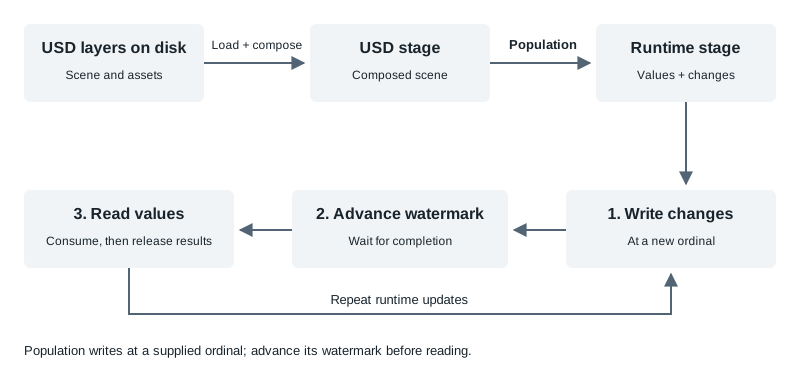
Population supplies initial runtime values. Subsequent writes and reads use the same ordinal and watermark model described below.#
The runtime stage is a columnar, time-series database: it groups attribute values across prims and tracks changes by ordinal. Here, “time-series” means an ordered record of changes, not a complete history of values. The current implementation retains the latest values and a limited record of changes; it does not provide arbitrary historical snapshots. Ordinals have no built-in time unit.
See Population (USD → ovstage) for selecting and loading USD content, and Exporting ovstage to USD for exporting runtime values.
Prims, Attributes, and Value Columns#
A prim is an addressable entity identified by a path, such as
/World/BodyA. An attribute is a named, typed data slot on a prim, such as
its mass. A value column carries values for one attribute across selected prims.
For example, this USDA layer defines two prims with the same two attributes:
#usda 1.0

def "World"
{
    def "BodyA"
    {
        custom float mass = 2.0
        custom vector3f[] velocities = [(1, 0, 0)]
    }
    def "BodyB"
    {
        custom float mass = 3.0
        custom vector3f[] velocities = [(0, 1, 0)]
    }
}
Assume population selects both attributes on both prims and writes their values at ordinal 1. The diagram shows those values after the watermark advances to 1. Each horizontal row is an attribute column; entries within it belong to different prims. This is a logical layout, not a promise of one contiguous memory allocation.
![At ordinal 1, the mass column contains BodyA 2.0 and BodyB 3.0. The velocities column contains BodyA [(1, 0, 0)] and BodyB [(0, 1, 0)]. Both columns are red after the watermark reaches 1.](../_images/runtime-layout.svg)
USD groups attributes under each prim. The runtime view groups values by attribute across prims. Red marks changes at or below the watermark.#
Prims need not have the same attributes; an absent value is different from zero.
An attribute value can be a scalar, a fixed-size vector or matrix, or an array. Array lengths can differ between prims. The data type, array kind, and semantic information describe how to interpret a value.
A query selects prims. Reads and writes combine that selection with attribute names. Values cross the API as tensors: typed arrays described using DLPack. The instance’s path dictionary maps names and prim paths to reusable identifiers. Use that dictionary so your application and ovstage use compatible identifiers.
A change is a write or deletion applied to an attribute on a prim at a particular ordinal. One operation can make changes to many prims or attributes. A record of a change identifies what changed and when; it does not guarantee that the value written by that change is still stored.
A watermark marks the ordinal through which writes are finished for the attributes it covers. Once it reaches ordinal N, writes at N or any earlier ordinal are rejected; further changes must use ordinals greater than N. Values written at or below the watermark can be read if they are still available. Values written beyond it cannot yet be read. Advancing the watermark does not preserve earlier values or restore values replaced by later writes.
The diagram below shows changes to two attributes on one prim. Each row is an attribute; each rectangle is a change at the ordinal above it. The vertical line marks the watermark. Red marks changes at or below it; green marks changes beyond it. The tinted row backgrounds show the same boundary, including ordinals where no change is shown.
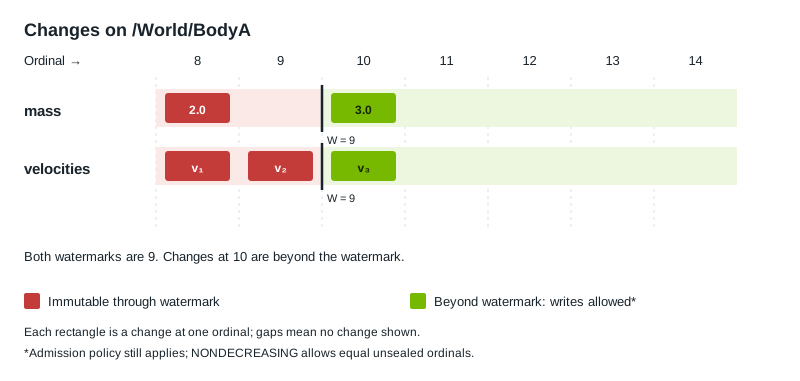
Red means no further writes are accepted at those ordinals. Green means the watermark does not yet prohibit writes there; other write constraints still apply. This timeline shows changes, not a guarantee that their historical values remain available.#
Ordinals and Simulation Time#
An ordinal is an application-defined sequence number that labels changes. ovstage represents it as an unsigned 64-bit integer with no built-in time unit: it is up to the application to decide how time maps to ordinals (if at all).
An application can use several ordinals within one simulation step—for example, one for input changes and another for the resulting physics updates. The application defines what each ordinal represents and which ordinals each consuming library, such as ovphysx or ovrtx, reads.
Library Clocks and Stage Updates#
ovphysx and ovrtx each track simulation time internally:
ovphysx:
PhysX.step(dt)advances its clock bydtseconds. With an ovstage attached,update_from_ovstage(from_ordinal, to_ordinal)first applies input changes from that inclusive ordinal range. Complete the watermark advance before requesting the update, then step physics. See the ovphysx API.ovrtx:
Renderer.step(..., delta_time=dt, ordinal=N)updates from the attached ovstage through at least N, then advances its sensor simulation clock bydtseconds. It may observe newer stage values; N does not select a historical snapshot. In C, callovrtx_update_from_stage()followed byovrtx_step_with_stage(). See the ovrtx integration guide.
Calling physx.step(dt) advances physics time. Calling
renderer.step(..., delta_time=dt, ordinal=N) advances renderer time and consumes
ovstage updates through at least ordinal N. These are separate actions: writing
data at ordinal N or advancing the watermark does not advance either clock.
The application decides which simulation time the values written at N represent.
Writes, Watermarks, and Reads#
A watermark sets the boundary for further writes to the attributes it covers. Once the watermark reaches ordinal N, no further writes at N or any earlier ordinal are accepted. Advancing it to N declares that all writes through N are finished. Later updates must use ordinals greater than N. This does not guarantee that earlier values remain available to read.
Note
API naming: the current API uses write_floor for a watermark.
For example, ovstage.Stage.advance_write_floor() advances a watermark.
This documentation preserves existing API identifiers.
The simplest update cycle is:
Submit writes at a new ordinal, wait for completion, and check errors.
Advance the watermark to that ordinal for the required attributes.
Observe successful completion of the watermark advance.
Read and consume the results.
Release the results before submitting overlapping updates.
The snippets below write three temperature values at ordinal 1, advance the
watermark, and read the values back. query selects /World/A, /World/B,
and /World/C; attr identifies temperature in the path dictionary.
The Python example imports NumPy as np and OrdinalRange from ovstage.
See Application Flow for creating the stage and query.
# Write one value per prim, then advance the watermark before reading.
# wait() reports asynchronous failures; the context manager and finally
# block release the read and its result even if consuming the data fails.
stage.write_attribute(
    query, attr, ordinal=1, tensors=np.array([1.0, 2.0, 3.0], np.float32), is_array=False
).wait()
stage.advance_write_floor(ordinal=1).wait()

with stage.read_attributes(query, [attr], OrdinalRange.latest(1)) as read:
    read.wait()
    group = read.fetch_next()
    if group is None:
        raise SystemExit("read returned no group at ordinal 1")
    try:
        # group.array(i) is a zero-copy numpy view of tensor i (CPU).
        print("read back ordinal", group.ordinal, group.array(0))  # -> [1. 2. 3.]
    finally:
        stage.release_group(group)
This example calls the C API from C++. attrArg wraps the attribute
token for the write call. The example’s waitOp() helper checks enqueue
status, waits for completion, and releases operation tracking; check()
handles status errors.
// Write one float per prim into the "temperature" column (UPSERT creates
// the prims on first write), advance the watermark to ordinal 1,
// then read the column back.
// Describe three contiguous CPU floats, one per prim in query order.
// The tensor references this array; keep it alive until the write completes.
float values[] = { 1.0f, 2.0f, 3.0f };
int64_t shape[] = { 3 };
int64_t strides[] = { 1 };
DLTensor tensor{};
tensor.data = values;
tensor.device = { kDLCPU, 0 };
tensor.ndim = 1;
tensor.dtype = { kDLFloat, 32, 1 }; // {code, bits, lanes}
tensor.shape = shape;
tensor.strides = strides;

// This is one scalar per prim, rather than a variable-length array per prim.
ovstage_write_data_t write{};
write.tensors = &tensor;
write.tensor_count = 1;
write.is_array = false;

// Submit the values at ordinal 1. UPSERT creates missing prims/attributes.
// waitOp checks both acceptance and completion before we proceed.
ovstage_enqueue_result_t enq =
    ovstage_write_attribute(stage, query, attrArg, /*ordinal*/ 1, write, OVSTAGE_PRIM_MODE_UPSERT);
waitOp(stage, enq, "write_attribute");

// Finish writes through ordinal 1 for all attributes. Once this completes,
// the values can be read and further writes at ordinals <= 1 are rejected.
ovstage_write_floor_desc_t writeFloor{};
writeFloor.ordinal = 1;
writeFloor.scope = OVSTAGE_SCOPE_ALL;
enq = ovstage_advance_write_floor(stage, &writeFloor);
waitOp(stage, enq, "advance_write_floor");

// Read the values at ordinal 1 (a snapshot: no start ordinal). A later change
// to this attribute would make this read fail with OUT_OF_RANGE; use
// UINT64_MAX as the end to read current values.
ovstage_ordinal_range_t range{};
range.end_ordinal = 1;
range.has_start_ordinal = false;
ovstage_read_handle_t read = OVSTAGE_INVALID_READ_HANDLE;
enq = ovstage_read_attributes(stage, query, &attr, 1, range, &read);
waitOp(stage, enq, "read_attributes");

// Fetch the result data after the read completes. This uniform example
// returns one group; general readers fetch until END_OF_ITERATION.
ovstage_read_group_t group{};
status = ovstage_fetch_read_next(stage, read, OVSTAGE_TIMEOUT_INFINITE, &group);
check(stage, status, "fetch_read_next");
if (group.data.tensor_count != 1 || !group.data.tensors[0].data)
{
    std::fprintf(stderr, "unexpected read layout\n");
    return EXIT_FAILURE;
}
// Borrow the returned floats while the group is alive. Releasing the group
// invalidates this pointer; copy the values first if they must live longer.
const float* out = static_cast<const float*>(group.data.tensors[0].data);
std::printf("read back ordinal %llu: %.1f %.1f %.1f\n", (unsigned long long)group.ordinal, out[0], out[1], out[2]);
ovstage_release_group(stage, &group); // the tensor data is only valid until the group is released
The example also releases the read handle during cleanup:
// Release the read handle after releasing its returned data.
enq = ovstage_release_read(stage, read);
waitOp(stage, enq, "release_read");
This small, uniform column returns one group of results. General consumers must fetch all groups, as described in Reading Attributes.
The initial watermark is 0, so an ordinary first write uses ordinal 1 or higher. Watermarks never move backwards; a lower advance has no effect.
The two panels below show the same changes before and after a watermark advance. The rectangles at ordinal 10 turn from green to red when the watermark reaches 10. Assume these are the latest changes and no further writes occur between the panels.
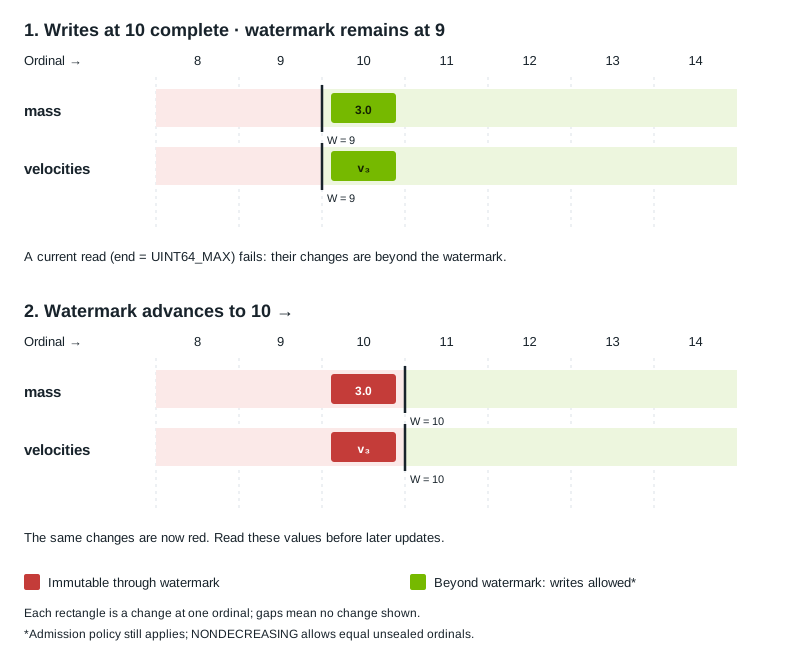
Observe the watermark advance before issuing dependent reads. Release the results before updating the same values again.#
An accepted enqueue does not mean that an operation has completed. Work can execute before you wait; waiting observes completion and reports execution errors.
Writes at the same ordinal execute in submission order. Different ordinals do not
establish a general execution order. Use explicit coordination when one update
depends on another. The default NONDECREASING admission policy allows equal
unsealed ordinals but rejects older retained changes on the same cells;
STRICTLY_INCREASING also rejects equal ordinals. See
Ordinal Admission Policies. Sharing an ordinal does
not make a batch transactional. See Writing Attributes
for write admission and partial-failure behavior.
A watermark advance is ordered after preceding writes, deletes, and map commits at or below its target ordinal in the affected scope. Work at higher ordinals remains independent. Reads do not automatically wait for unrelated writes or watermark advances: observe successful completion of the advance before issuing dependent reads.
Per-Attribute Watermarks#
Different producers can finish different attributes at different times. You can advance a watermark for all attributes, only named attributes, or all known attributes except named exclusions.
For an attribute with watermark W:
New writes at ordinals less than or equal to W are rejected.
Writes at ordinals greater than W remain subject to normal write validation.
Reads of stored attribute values require the watermark to have reached the ordinals of the selected changes.
For example, consider a stage with two known attributes:
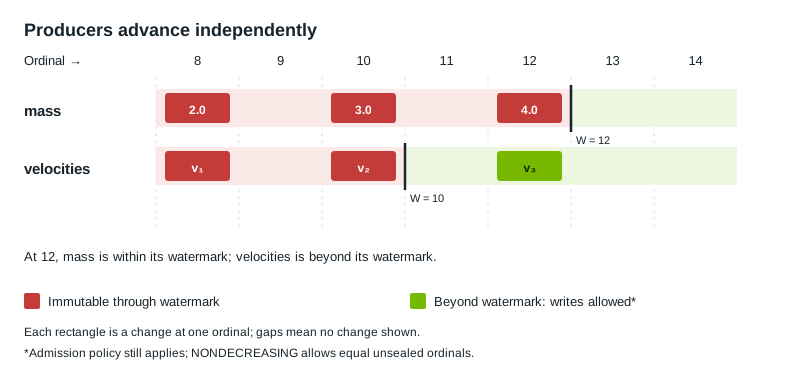
The mass producer has finished writes through 12; the velocities producer has finished writes through 10. The minimum watermark across these attributes is 10.#
Query an attribute’s watermark with ovstage.Stage.get_attribute_write_floor().
Passing None queries the minimum across known attributes, called the
global write floor in the API. It does not report the most advanced producer.
An attribute need not change at every step. Its current value may have been written at an ordinal below the watermark.
What Reads Return#
The current implementation retains the latest values, together with a limited record of which attributes changed on which prims. It does not provide arbitrary historical snapshots.
There are two read forms:
Read form |
Meaning in the current implementation |
|---|---|
Snapshot ( |
Checks every queried path for each requested attribute. A recorded change
after |
Inclusive change range |
Selects attributes on prims that changed within the interval. Returns their latest values or deletion markers only when that fixed interval can still be served. |
The diagram below follows mass on /World/BodyA through two writes.
At each step, compare a current read (end UINT64_MAX) with a read
restricted to [10, 10].
That range includes only ordinal 10. Each panel shows new reads after the stated
operation completes; previous results have been released. In step 1, no change
exists at or below watermark 9. The current read fails because the only change is
at 10, beyond the watermark, not because the earlier interval is empty. Both change records
remain retained throughout the example.
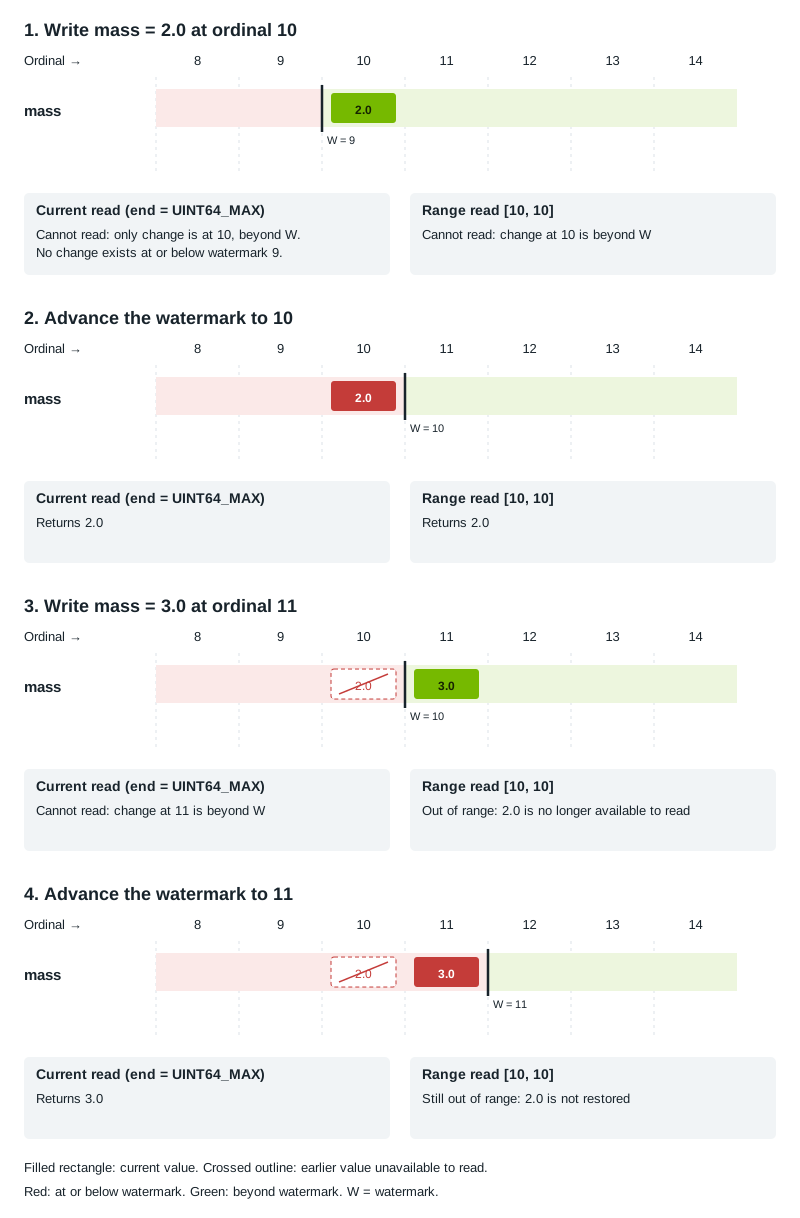
Advancing the watermark lets the current read return 3.0. It cannot restore 2.0 for the fixed range. The crossed outline marks the earlier change whose value is no longer available to read.#
A watermark violation is reported as
ErrorCode.WRITE_FLOOR_VIOLATION. The check applies to the selected recorded
changes at or before the requested end, rather than comparing the end itself
with the watermark. Lowering a snapshot’s end below a recorded change instead
makes it OUT_OF_RANGE; it does not recover an earlier value. In steps 1 and
3, a snapshot ending at the watermark therefore has a different error from the
current read shown. See Error Handling and Diagnostics for how enqueue, wait, and fetch
expose these errors.
A snapshot or change-range read fails with ErrorCode.OUT_OF_RANGE when a selected
attribute on a prim has a retained change after the requested end. Snapshots select
every queried path; change ranges select only pairs changed within the interval. Advancing the watermark cannot restore
that interval. Choose a newer interval or read current state, according to the
consumer’s needs.
Records of older changes can also be discarded. See Retained Change Records before relying on an old interval.
Queries resolve against current scene state. They do not reconstruct
which prims existed at an earlier ordinal. Derived metadata such as usd-path, usd-parent,
and usd-children also reflects current structure. These derived attributes are
not gated by the watermark and have no per-write change stream; change-range reads
return no results for them. See Reading Attributes for details.
Consuming Results Safely#
Keep read results alive while using their values, and release them before updating the same data. Copy values that must outlive the results. See Reading Attributes for fetching and releasing results.
For a coherent step across several attributes, coordinate the producers, advance the watermark for the required scope, consume the results, and release them before those values are overwritten. A watermark alone does not retain that step for a consumer that falls behind.
Further Reading#
Application Flow — a complete create, write, advance-watermark, and read example.
Asynchronous Operations — operation ordering, waits, and timeouts.
Queries, Writing Attributes, and Reading Attributes — selection and data access.
DLPack Tensor Exchange — layouts, CPU/CUDA support, and buffer lifetimes.
Population (USD → ovstage) and Exporting ovstage to USD — moving data between USD and the runtime stage.
Glossary#
- USD stage#
The composed scene obtained by resolving USD layers and composition rules.
- Runtime stage#
The data store that holds attribute values and tracks changes by ordinal for application components to read and update.
- Population#
Transferring selected, composed USD data into the runtime stage at a supplied ordinal.
- Prim#
An addressable entity identified by a prim path, such as
/World/BodyA.- Attribute#
A named, typed data slot on a prim, such as its mass.
- Change#
A write or deletion applied to an attribute on a prim at a particular ordinal. One operation can make many changes.
- Ordinal#
An application-defined sequence number that labels changes. It has no built-in time unit. “Values written at ordinal N” refers to the data; “ordinal N” refers to the number.
- Watermark#
A boundary for further writes to the attributes it covers. Once it reaches N, no further writes at N or any earlier ordinal are accepted. Earlier values are not guaranteed to remain available to read.
- Operation ID#
An identifier in
Operation.op_idused to track an asynchronous operation and wait for its completion. C enqueue results call this fieldop_index. It is separate from the ordinal attached to a change.- Token#
An identifier returned by the path dictionary for a string, such as an attribute name. Reuse it to refer to the same name without passing the string again.
- Tensor#
A typed array used to exchange attribute values. Its DLPack description gives the buffer’s element type, shape, memory device, and strides (the distances between elements).