

Getting Started in C#
ovrtx runtime validation requires an NVIDIA RTX-capable GPU, a supported NVIDIA driver, internet access, and execution outside sandboxed environments. The minimal example downloads scene assets from S3. Supported driver versions are listed in Hardware & Driver Requirements.
The C/C++ examples require CMake 3.16 or newer, a C++17 compiler, and a development environment. Building the whole example set through the top-level examples/c/CMakeLists.txt needs CMake 3.18. Install the prerequisites for your platform:
Install Visual Studio 2022 17.8 or newer (which provides CMake and a C++ toolchain). ovrtx binaries require the Microsoft VC runtime 14.38 or newer; VS 2022 17.8 is the oldest release that ships it. Older toolchains work only if you separately install a VC redistributable of 14.38 or newer.
sudo apt-get install build-essential cmake
Next, clone the repository:
git clone https://github.com/NVIDIA-Omniverse/ovrtx.git
cd ovrtx/examples/c/minimal
Finally, configure, build, and run the minimal example for your platform:
cmake -B build
cmake --build build --config Release
.\build\static\Release\minimal.exe
cmake -B build -DCMAKE_BUILD_TYPE=Release
cmake --build build
./build/static/minimal
The minimal example shows how to create the renderer, load an OpenUSD scene, and render a single image. The results are copied back to the CPU for writing out as a PNG.
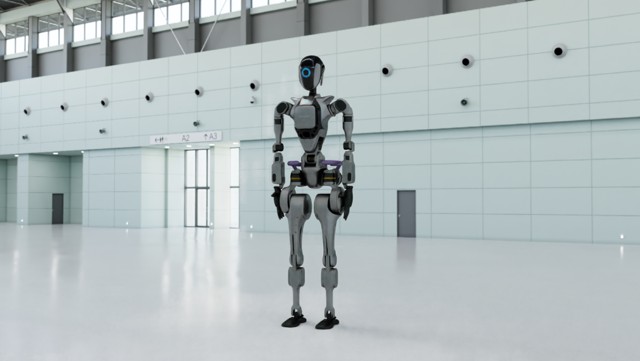
A successful run writes ./out.png. The output should match the reference image above.
The first step from a newly built application will block for 1-2 minutes while shaders are compiled and cached.
Installation#
CMake#
ovrtx requires CMake 3.16 or newer; find_package(ovrtx) fails on older versions. ovrtx binary distributions can be found on the GitHub Releases page, and contain a CMake config.
The simplest way to add ovrtx as a dependency to your project is using CMake FetchContent:
# Capture this file's directory at parse time (before macro expansion)
# CMAKE_CURRENT_LIST_DIR inside a macro would refer to the caller's directory
set(_OVRTX_CMAKE_DIR "${CMAKE_CURRENT_LIST_DIR}")

# Fetch ovrtx package
macro(ovrtx_fetch)
    find_package(ovrtx QUIET)

    if (ovrtx_FOUND)
        message(STATUS "found ovrtx at: ${ovrtx_DIR}")
    else()
        set(FETCHCONTENT_QUIET FALSE)

        # Override FetchContent's base directory to share large deps among examples.
        # Uses the directory where ovrtx.cmake lives, ensuring all examples share the same _deps.
        # If copying this project to your own workspace, delete this line or override it.
        if(NOT DEFINED CACHE{FETCHCONTENT_BASE_DIR})
            set(FETCHCONTENT_BASE_DIR "${_OVRTX_CMAKE_DIR}/_deps" CACHE PATH "Shared FetchContent directory")
        endif()

        # Platform-specific package selection
        if(CMAKE_SYSTEM_NAME STREQUAL "Windows")
            set(OVRTX_PACKAGE_SYSTEM "windows-x86_64")
            set(OVRTX_HASH "96de03fdcbee3a398f059f1ffb15a3d8f30bb8bcc6ae5d84a08e8875769ce296")
        elseif(CMAKE_SYSTEM_NAME STREQUAL "Linux")
            if (CMAKE_SYSTEM_PROCESSOR STREQUAL "aarch64")
                set(OVRTX_PACKAGE_SYSTEM "manylinux_2_35_aarch64")
                set(OVRTX_HASH "c91048d75743a06cf887031721d37508564c853e321a92ec3bfb6ec7a74bc568")
            elseif(CMAKE_SYSTEM_PROCESSOR STREQUAL "x86_64")
                set(OVRTX_PACKAGE_SYSTEM "manylinux_2_35_x86_64")
                set(OVRTX_HASH "63639c3eabaf31553dbf883ac2376d8b6e361806dee4e17bafaa0962ce23dd51")
            else()
                message(FATAL_ERROR "Unsupported system: ${CMAKE_SYSTEM_NAME} ${CMAKE_SYSTEM_PROCESSOR}")
            endif()
        else()
            message(FATAL_ERROR "Unsupported system: ${CMAKE_SYSTEM_NAME} ${CMAKE_SYSTEM_PROCESSOR}")
        endif()

        include(FetchContent)

        # test override: consume a local package
        if(NOT OVRTX_LOCAL_PACKAGE AND DEFINED ENV{OVRTX_LOCAL_PACKAGE})
            set(OVRTX_LOCAL_PACKAGE "$ENV{OVRTX_LOCAL_PACKAGE}")
        endif()
        if(OVRTX_LOCAL_PACKAGE)
            message(STATUS "ovrtx: using local package ${OVRTX_LOCAL_PACKAGE}")
            FetchContent_Declare(
                ovrtx
                DOWNLOAD_EXTRACT_TIMESTAMP TRUE
                URL "${OVRTX_LOCAL_PACKAGE}"
            )
        else()
        FetchContent_Declare(
            ovrtx
            DOWNLOAD_EXTRACT_TIMESTAMP TRUE
            URL "https://github.com/NVIDIA-Omniverse/ovrtx/releases/download/v0.6.0/ovrtx@0.6.0.1791947691.c6d71501.${OVRTX_PACKAGE_SYSTEM}.zip"
            URL_HASH SHA256=${OVRTX_HASH}
        )

        endif()

        FetchContent_MakeAvailable(ovrtx)

        # Make ovrtx findable by find_package
        list(APPEND CMAKE_PREFIX_PATH ${ovrtx_SOURCE_DIR})

        find_package(ovrtx REQUIRED)

    endif()
endmacro()
Note that the macro above is provided for convenience in ovrtx.cmake in the examples/c/cmake directory in the repository.
Alternatively, download the appropriate package for your system from the Releases page, point
CMAKE_PREFIX_PATH at the directory where you extracted the archive, and use find_package(ovrtx)
from your CMakeLists.txt. The macro above already takes this path when it can: it tries
find_package(ovrtx QUIET) first and only downloads the package if that fails.
For a complete example CMakeLists.txt that includes package fetching, both
loader models, the Windows release-CRT setting, and runtime setup, see
examples/c/minimal/CMakeLists.txt. The example builds both models from the
same source:
add_executable(minimal main.cpp)
# Static-loader model for BOTH packages: link the static ovrtx and ovstage
# loaders. main.cpp / *_setup_runtime hand each loader its own package root at
# runtime (a side-by-side `ovrtx/` and `ovstage/` link beside the exe) instead of
# replicating either package next to the exe.
target_link_libraries(minimal PRIVATE ovrtx::ovrtx_static ovstage::ovstage_static)
target_compile_definitions(minimal PRIVATE OVRTX_EXAMPLE_STATIC_LOADERS=1)

# Shared-loader model for BOTH packages. The operating system resolves only the
# loader libraries; each runtime is opened by its first initialization call.
add_executable(minimal-dynamic main.cpp)
target_link_libraries(minimal-dynamic PRIVATE ovrtx::ovrtx ovstage::ovstage)

# Keep each loader model's runtime deployment isolated. In particular, the
# shared-loader DLLs copied beside minimal-dynamic must not affect minimal's
# static-loader package-root test.
set_target_properties(minimal PROPERTIES
    RUNTIME_OUTPUT_DIRECTORY "${CMAKE_CURRENT_BINARY_DIR}/static")
set_target_properties(minimal-dynamic PROPERTIES
    RUNTIME_OUTPUT_DIRECTORY "${CMAKE_CURRENT_BINARY_DIR}/shared")

# The ovrtx/ovstage packages ship release-only static loaders (compiled /MD).
# Force the release CRT so the Debug config links cleanly.
if(MSVC)
    set_target_properties(minimal PROPERTIES MSVC_RUNTIME_LIBRARY "MultiThreadedDLL")
    set_target_properties(minimal-dynamic PROPERTIES MSVC_RUNTIME_LIBRARY "MultiThreadedDLL")
endif()

# Setup runtime dependencies (DLL copying, junctions, rpath)
ovrtx_setup_runtime(minimal)
ovstage_setup_runtime(minimal)
ovrtx_setup_runtime(minimal-dynamic)
ovstage_setup_runtime(minimal-dynamic)
Model #1 links the static forwarding loaders (ovrtx::ovrtx_static and
ovstage::ovstage_static). Model #2 links the shared forwarding loaders
(ovrtx::ovrtx and ovstage::ovstage). In both models, the runtime and
OpenUSD remain unloaded until the first initialization call. If ovstage may be
initialized first, call ovrtx_register_schema_paths() before that call.
Calling ovrtx_setup_runtime() is required, not optional: linking succeeds without it, but the
application will fail at runtime because it cannot locate the bin/ payload described in
Runtime Packaging and Deployment. The helper reads OVRTX_BINARY_DIR, which
find_package(ovrtx) sets to the package bin/ directory, so you can also use that variable
directly if you prefer to stage the runtime yourself.
The setup above covers ovrtx alone. From ovrtx 0.4 onward an application normally also links ovstage and attaches a stage to the renderer; see ovstage Integration for that combined setup.
For other build systems, download the appropriate package for your system from the Releases page. The headers are in the
include directory and libraries are in lib and bin, in either static or dynamic flavors.
Runtime Packaging and Deployment#
ovrtx requires several libraries and other runtime dependencies to be present and discoverable at runtime. These are all included in the ovrtx binary distribution under the bin directory:
bin/
├── libovrtx-dynamic.so / ovrtx-dynamic.dll
├── cache/
├── library/
├── libs/
├── mdl/
├── plugins/
├── rendering-data/
└── usd_plugins/
The ovrtx shared loader automatically opens the runtime and its dependencies from this layout. If you need to deploy your application with a different layout, you can point ovrtx to the correct paths using the ovrtx_config_entry_binary_package_root_path() helper function when configuring the renderer. When the package bin/ directory lives next to your executable, use OVX_CONFIG_EXECUTABLE_DIR_TOKEN ("${executable_dir}") instead of resolving the executable directory in client code:
ovrtx_config_entry_t config_entries[] = {
    ovrtx_config_entry_binary_package_root_path(
        literal_to_ovx_string(OVX_CONFIG_EXECUTABLE_DIR_TOKEN))
};

ovrtx_config_t config;
config.entries = config_entries;
config.entry_count = sizeof(config_entries) / sizeof(config_entries[0]);

ovrtx_renderer_t* renderer;
ovrtx_result_t result = ovrtx_create_renderer(&config, &renderer);
Note that when static linking ovrtx, you must provide the binary package root path or ovrtx will not be able to find the required dependencies at runtime.
Minimal Example#
#include <ovrtx/ovrtx_config.h>
#include <ovrtx/ovrtx_types.h>
#include <ovrtx/ovrtx.h>
#include <ovstage/ovstage.h>

#include <cstring>
#include <iostream>
#include <string>
#include <string_view>

#define STB_IMAGE_WRITE_IMPLEMENTATION
#include "stb_image_write.h"

template <typename ResultT>
static bool check_and_print_error(ResultT const& result,
                                  std::string_view operation) {
    if (result.status == OVRTX_API_ERROR) {
        ovx_string_t error = ovrtx_get_last_error();
        if (error.ptr && error.length > 0) {
            std::cerr << "ovrtx " << operation << " failed: "
                      << std::string_view(error.ptr, error.length) << std::endl;
        } else {
            std::cerr << "ovrtx " << operation << " failed" << std::endl;
        }
        return true;
    }
    return false;
}

// Find the handle of the given output in the given set of outputs
static ovrtx_render_var_output_handle_t
find_output(ovrtx_render_product_set_outputs_t const& outputs, char const* output_to_find);

static bool print_ovstage_error(ovstage_instance_t* stage,
                                ovstage_api_status_t status,
                                std::string_view operation) {
    ovx_string_t error = ovstage_population_get_last_error();
    if ((!error.ptr || error.length == 0) && stage) {
        error = ovstage_get_last_error();
    }

    std::cerr << "ovstage " << operation << " failed (" << static_cast<int>(status) << ")";
    if (error.ptr && error.length > 0) {
        std::cerr << ": " << std::string_view(error.ptr, error.length);
    }
    std::cerr << std::endl;
    return true;
}

static bool wait_population_op(ovstage_instance_t* stage,
                               ovstage_population_enqueue_result_t const& enqueue,
                               std::string_view operation) {
    if (enqueue.status != OVSTAGE_OK) {
        return print_ovstage_error(stage, enqueue.status, operation);
    }

    ovstage_population_op_wait_result_t wait_result {};
    ovstage_api_status_t status = ovstage_population_wait_op(
        stage, enqueue.op_index, OVSTAGE_TIMEOUT_INFINITE, &wait_result);
    if (status != OVSTAGE_OK) {
        return print_ovstage_error(stage, status, operation);
    }
    for (size_t i = 0; i < wait_result.error_op_id_count; ++i) {
        ovstage_population_op_id_t op_id = wait_result.error_op_ids[i];
        ovx_string_t error = ovstage_population_get_last_op_error(op_id);
        std::cerr << "ovstage " << operation << ": op " << op_id << " failed";
        if (error.ptr && error.length > 0) {
            std::cerr << ": " << std::string_view(error.ptr, error.length);
        }
        std::cerr << std::endl;
    }
    return wait_result.error_op_id_count != 0;
}

static bool wait_ovstage_op(ovstage_instance_t* stage,
                            ovstage_enqueue_result_t const& enqueue,
                            std::string_view operation) {
    if (enqueue.status != OVSTAGE_OK) {
        return print_ovstage_error(stage, enqueue.status, operation);
    }

    ovstage_op_wait_result_t wait_result {};
    ovstage_api_status_t status =
        ovstage_wait_op(stage, enqueue.op_index, OVSTAGE_TIMEOUT_INFINITE, &wait_result);
    ovstage_release_op(stage, enqueue.op_index);
    if (status != OVSTAGE_OK) {
        return print_ovstage_error(stage, status, operation);
    }
    for (size_t i = 0; i < wait_result.error_op_id_count; ++i) {
        ovstage_op_id_t op_id = wait_result.error_op_ids[i];
        ovx_string_t error = ovstage_get_last_op_error(stage, op_id);
        std::cerr << "ovstage " << operation << ": op " << op_id << " failed";
        if (error.ptr && error.length > 0) {
            std::cerr << ": " << std::string_view(error.ptr, error.length);
        }
        std::cerr << std::endl;
    }
    return wait_result.error_op_id_count != 0;
}

static bool commit_ovstage_ordinal(ovstage_instance_t* stage, ovstage_ordinal_t ordinal) {
    ovstage_write_floor_desc_t write_floor {};
    write_floor.ordinal = ordinal;
    write_floor.scope = OVSTAGE_SCOPE_ALL;
    return wait_ovstage_op(stage, ovstage_advance_write_floor(stage, &write_floor),
                           "advance_write_floor");
}

int main() {
    ovrtx_renderer_t* renderer = nullptr;
    ovstage_instance_t* stage = nullptr;
    bool stage_attached = false;
    ovstage_ordinal_t stage_ordinal = 1;
    ovrtx_result_t result;

    // Create the renderer, providing configuration settings.
    //
    ovrtx_config_t config {};
#ifdef OVRTX_EXAMPLE_STATIC_LOADERS
    // The static loader needs the package root linked beside the executable.
    ovx_string_t ovrtx_package_root = {
        OVX_CONFIG_EXECUTABLE_DIR_TOKEN "/ovrtx",
        sizeof(OVX_CONFIG_EXECUTABLE_DIR_TOKEN "/ovrtx") - 1};
    ovrtx_config_entry_t config_entries[] = {
        ovrtx_config_entry_binary_package_root_path(ovrtx_package_root),
    };
    config.entries = config_entries;
    config.entry_count = sizeof(config_entries) / sizeof(config_entries[0]);
#endif

    // Publish ovrtx's schema paths before either runtime can initialize OpenUSD.
    result = ovrtx_register_schema_paths(&config);
    if (check_and_print_error(result, "register_schema_paths")) {
        return 1;
    }

    std::cerr << "Creating renderer. The first run of the application will take some time as shaders are compiled and cached..." << std::endl;
    result = ovrtx_create_renderer(&config, &renderer);
    if (check_and_print_error(result, "create_renderer")) {
        return 1;
    }
    std::cerr << "Renderer created." << std::endl;

    auto cleanup = [&](int exit_code) {
        int result_code = exit_code;
        if (stage_attached) {
            result = ovrtx_detach_ovstage(renderer);
            if (check_and_print_error(result, "detach_ovstage")) {
                result_code = 1;
            }
        }
        // After a detach failure, only renderer destruction is supported.
        if (renderer) {
            result = ovrtx_destroy_renderer(renderer);
            if (check_and_print_error(result, "destroy_renderer")) {
                result_code = 1;
            }
        }
        if (stage) {
            ovstage_api_status_t stage_result = ovstage_destroy_instance(stage);
            if (stage_result != OVSTAGE_OK) {
                print_ovstage_error(stage, stage_result, "destroy_instance");
                result_code = 1;
            }
        }
        // Release ovstage process state. Safe even if initialization failed.
        ovstage_shutdown();
        return result_code;
    };

    // Populate an ovstage instance from USD, then attach it to the renderer.
    //
    // As well as just passing a URI to an existing layer, we could pass a USDA
    // string in order to compose a Stage at runtime. This can be very useful
    // for dynamically creating the RenderProducts etc. that define the render
    // output rather than editing the original layer to add them.
    //
    // A real application might want to load the USD layer and traverse it to
    // find either existing RenderProducts, and/or Cameras and allow the user to
    // select which one to render, and which RenderVars to output.
    char const* usd_url = "https://omniverse-content-production.s3.us-west-2.amazonaws.com/Samples/Robot-OVRTX/robot-ovrtx.usda";

    ovstage_config_t stage_config {};
#ifdef OVRTX_EXAMPLE_STATIC_LOADERS
    // The static loader needs the package root linked beside the executable.
    ovx_string_t ovstage_package_root = {
        OVX_CONFIG_EXECUTABLE_DIR_TOKEN "/ovstage",
        sizeof(OVX_CONFIG_EXECUTABLE_DIR_TOKEN "/ovstage") - 1};
    ovstage_config_entry_t stage_config_entries[] = {
        ovstage_config_entry_binary_package_root_path(ovstage_package_root),
    };
    stage_config.entries = stage_config_entries;
    stage_config.entry_count = sizeof(stage_config_entries) / sizeof(stage_config_entries[0]);
#endif
    ovstage_api_status_t stage_init_status = ovstage_initialize(&stage_config);
    if (stage_init_status != OVSTAGE_OK) {
        print_ovstage_error(nullptr, stage_init_status, "initialize");
        return cleanup(1);
    }

    ovstage_instance_desc_t stage_desc {};
    stage_desc.name = "minimal";
    ovstage_api_status_t stage_result = ovstage_create_instance(&stage_desc, &stage);
    if (stage_result != OVSTAGE_OK) {
        print_ovstage_error(stage, stage_result, "create_instance");
        return cleanup(1);
    }

    result = ovrtx_attach_ovstage(renderer, stage);
    if (check_and_print_error(result, "attach_ovstage")) {
        return cleanup(1);
    }
    stage_attached = true;

    std::cerr << "Adding " << usd_url << " at root..." << std::endl;
    ovstage_population_enqueue_result_t populate_result =
        ovstage_population_open_usd_from_file(stage,
                                              {usd_url, strlen(usd_url)},
                                              stage_ordinal,
                                              /* time = */ 0.0,
                                              OVSTAGE_POPULATION_DOMAIN_RENDERING);
    if (wait_population_op(stage, populate_result, "population_open_usd_from_file") ||
        commit_ovstage_ordinal(stage, stage_ordinal)) {
        return cleanup(1);
    }
    std::cerr << "USD loaded." << std::endl;

    // We render a frame by stepping the renderer.
    //
    // Any sensors whose exposures end during this step will generate a frame
    // that will be available in the step result. Since the camera in the loaded
    // USD layer is instantaneous (does not specify motion blur or rolling
    // shutter), it will generate a frame every time the render is stepped.
    //
    // To step the renderer we need to tell ovrtx which RenderProducts we're
    // interested in, which in this case is the RenderProduct we defined in the
    // loading layer.
    ovrtx_render_product_set_t render_products = {};
    ovx_string_t render_product_str = {"/Render/Camera", strlen("/Render/Camera")};
    render_products.render_products = &render_product_str;
    render_products.num_render_products = 1;

    std::cerr << "Stepping renderer..." << std::endl;
    ovrtx_step_result_handle_t step_result_handle = 0;
    ovrtx_enqueue_result_t enqueue_result =
        ovrtx_step_with_stage(renderer, render_products, 1.0 / 60.0, stage_ordinal, &step_result_handle);
    if (check_and_print_error(enqueue_result, "step")) {
        return cleanup(1);
    }

    // Wait for the render to complete. Here we'll just block until it's done.
    ovrtx_op_wait_result_t wait_result;
    result = ovrtx_wait_op(renderer,
                           enqueue_result.op_index,
                           ovrtx_timeout_infinite,
                           &wait_result);
    if (check_and_print_error(result, "wait_op")) {
        ovrtx_destroy_results(renderer, step_result_handle);
        return cleanup(1);
    }
    std::cerr << "Stepped renderer." << std::endl;

    std::cerr << "Fetching results..." << std::endl;
    ovrtx_render_product_set_outputs_t outputs = {};
    result = ovrtx_fetch_results(
        renderer, step_result_handle, ovrtx_timeout_infinite, &outputs);
    if (check_and_print_error(result, "fetch_results")) {
        ovrtx_destroy_results(renderer, step_result_handle);
        return cleanup(1);
    }

    // Find LdrColor by its authored RenderVar prim path.
    ovrtx_render_var_output_handle_t ldrcolor_output_handle =
        find_output(outputs, "/Render/Camera/LdrColor");
    if (ldrcolor_output_handle == OVRTX_INVALID_HANDLE) {
        std::cerr << "LdrColor output not found" << std::endl;
        ovrtx_destroy_results(renderer, step_result_handle);
        return cleanup(1);
    }
    std::cerr << "Fetched results." << std::endl;

    // Map rendered output so that it can be accessed on the CPU
    ovrtx_map_output_description_t map_desc = {};
    map_desc.device_type = OVRTX_MAP_DEVICE_TYPE_CPU;
    ovrtx_render_var_output_t rendered_output = {};
    result = ovrtx_map_render_var_output(renderer,
                                       ldrcolor_output_handle,
                                       &map_desc,
                                       ovrtx_timeout_infinite,
                                       &rendered_output);
    if (check_and_print_error(result, "map_render_var_output")) {
        ovrtx_destroy_results(renderer, step_result_handle);
        return cleanup(1);
    }

    // LdrColor is a single-tensor render variable; read tensors[0].
    // Image outputs follow shape [H, W, C] with dtype.lanes == 1.
    if (rendered_output.num_tensors != 1) {
        std::cerr << "Unexpected LdrColor render variable: expected 1 tensor, got " << rendered_output.num_tensors << "." << std::endl;
        ovrtx_cuda_sync_t no_sync = {};
        ovrtx_unmap_render_var_output(renderer, rendered_output.map_handle, no_sync);
        ovrtx_destroy_results(renderer, step_result_handle);
        return cleanup(1);
    }
    DLTensor const& tensor = *rendered_output.tensors[0].dl;
    if (tensor.ndim != 3 || !tensor.shape || tensor.shape[2] != 4 || tensor.dtype.lanes != 1) {
        std::cerr << "Unexpected LdrColor tensor layout. Expected [H, W, 4] and dtype.lanes == 1." << std::endl;
        ovrtx_cuda_sync_t no_sync = {};
        ovrtx_unmap_render_var_output(renderer, rendered_output.map_handle, no_sync);
        ovrtx_destroy_results(renderer, step_result_handle);
        return cleanup(1);
    }
    int width = static_cast<int>(tensor.shape[1]);
    int height = static_cast<int>(tensor.shape[0]);
    stbi_write_png("out.png",
                   width,
                   height,
                   /* components = */ 4,
                   tensor.data,
                   /* row stride in bytes = */ 4 * width);

    // Unmap output
    ovrtx_cuda_sync_t no_sync = {};
    result = ovrtx_unmap_render_var_output(
        renderer, rendered_output.map_handle, no_sync);
    if (check_and_print_error(result, "unmap_render_var_output")) {
        ovrtx_destroy_results(renderer, step_result_handle);
        return cleanup(1);
    }

    // Clean up resources (ovrtx will warn if results are leaked)
    result = ovrtx_destroy_results(renderer, step_result_handle);
    if (check_and_print_error(result, "destroy_results")) {
        return cleanup(1);
    }

    return cleanup(0);
}

static ovrtx_render_var_output_handle_t
find_output(ovrtx_render_product_set_outputs_t const& outputs,
            char const* output_to_find) {
    for (size_t i = 0; i < outputs.output_count; ++i) {
        ovrtx_render_product_output_t const& product_output =
            outputs.outputs[i];
        for (size_t f = 0; f < product_output.output_frame_count; ++f) {
            ovrtx_render_product_frame_output_t const& frame =
                product_output.output_frames[f];
            for (size_t v = 0; v < frame.render_var_count; ++v) {
                ovrtx_render_product_render_var_output_t const& var =
                    frame.output_render_vars[v];
                if (var.render_var_path.ptr &&
                    std::string_view(var.render_var_path.ptr, var.render_var_path.length) ==
                        std::string_view(output_to_find)) {
                    return var.output_handle;
                }
            }
        }
    }
    return OVRTX_INVALID_HANDLE;
}
Next Steps#
Explore more Examples including the Vulkan Interop example with real-time GPU rendering, click picking, marquee selection, and styled selection outlines with translucent fill.
Refer to the C API Reference for the full C API reference.