

Getting Started in Python#
ovrtx and ovstage are distributed on PyPI. Use uv to install both packages for the current attached-stage workflow:
uv add ovrtx ovstage
pip also works:
pip install ovrtx ovstage
ovstage is optional when maintaining standalone compatibility code. The renderer-owned scene APIs used by that mode have been deprecated since ovrtx 0.4, and scene ownership will move entirely to ovstage in a future release.
All the examples in the repository contain pyproject.toml files that are tested with uv. Python 3.10-3.13 are supported; on Windows, use Python 3.11 or newer.
If installation fails, first verify that you are using a supported Python version and that your environment can reach PyPI. If you need a specific release artifact, GitHub Releases also contain Python wheels that can be installed explicitly.
ovrtx runtime validation requires an NVIDIA RTX-capable GPU, a supported NVIDIA driver, internet access, and execution outside sandboxed environments. The minimal example downloads scene assets from S3. Supported driver versions are listed in Hardware & Driver Requirements.
To get started, first clone the repository and run the first example with uv:
git clone https://github.com/NVIDIA-Omniverse/ovrtx.git
cd ovrtx/examples/python/minimal
uv run main.py --png
The minimal example shows how to create the renderer, load an OpenUSD scene, and render a single image, copying the results back to the CPU for display.
A successful run writes _output/render.png. The output should match the reference image below.
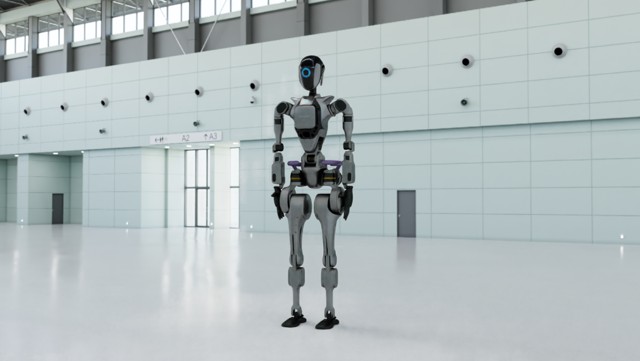
The first step from a newly built application will block for 1-2 minutes while shaders are compiled and cached.
ovrtx and ovstage Load Order#
Importing ovrtx and ovstage does not load either OpenUSD-dependent
runtime. The minimal example creates ovrtx.Renderer first; renderer creation
registers ovrtx’s schema paths and loads the ovrtx runtime/OpenUSD, after which
ovstage.Stage loads the ovstage runtime against the same initialized OpenUSD.
If an application must create ovstage.Stage first, call
ovrtx.register_schema_paths() before stage construction. That call loads only
the ovrtx shared loader and publishes discovery paths; it does not initialize the
renderer or OpenUSD. Creating the stage may then load the ovstage runtime/OpenUSD,
and a later ovrtx.Renderer uses the paths that were already registered.
ovstage.library_version() also creates a temporary native instance, so make
the schema call before that probe in a stage-first process.
Minimal Example#
import argparse
import sys
from pathlib import Path

import numpy as np
import ovrtx
import ovstage
from PIL import Image

USD_URL = "https://omniverse-content-production.s3.us-west-2.amazonaws.com/Samples/Robot-OVRTX/robot-ovrtx.usda"


def main():
    parser = argparse.ArgumentParser(description="Minimal ovrtx Python example")
    parser.add_argument("--png", action="store_true", help="Save render to _output/render.png instead of displaying")
    args = parser.parse_args()

    # Create the Renderer and attach the stage that owns scene data.
    print("Creating renderer. The first run of the application will take some time as shaders are compiled and cached...", file=sys.stderr)
    renderer = ovrtx.Renderer()
    stage = ovstage.Stage("ovrtx.example.minimal")
    renderer.attach_ovstage(stage)
    print("Renderer created.", file=sys.stderr)

    print(f"Opening {USD_URL}...", file=sys.stderr)
    ordinal = 1
    ovstage.population.open_usd(stage, USD_URL, ordinal=ordinal)
    stage.advance_write_floor(ordinal, ovstage.Scope.ALL).wait()
    print("USD loaded.", file=sys.stderr)

    # Step the renderer to simulate the Camera at 60Hz
    print("Stepping renderer...", file=sys.stderr)
    products = renderer.step(
        render_products={"/Render/Camera"},
        delta_time=1.0 / 60,
        ordinal=ordinal,
    )
    print("Stepped renderer.", file=sys.stderr)

    # Get the Camera output for the step as a numpy array and display it
    print("Fetching results...", file=sys.stderr)
    for _product_name, product in products.items():
        for frame in product.frames:
            var = frame.render_vars["/Render/Camera/LdrColor"].map(device=ovrtx.Device.CPU)
            view = np.from_dlpack(var)
            pixels = view.copy()
            del view
            var.unmap()
            del var
            img = Image.fromarray(pixels)
            if args.png:
                output_dir = Path("_output")
                output_dir.mkdir(exist_ok=True)
                img.save(output_dir / "render.png")
                print(f"Saved to {output_dir / 'render.png'}", file=sys.stderr)
            else:
                img.show()
    print("Fetched results.", file=sys.stderr)

    del frame, product, products
    renderer.detach_ovstage()
    stage.destroy()
    renderer.destroy()


if __name__ == "__main__":
    main()
The example above is provided as a Python project in the examples/python/minimal directory in the repository.
Reading Simulation Time#
The products returned by step() expose the
renderer’s simulation clock in seconds. Use
simulation_end_time to timestamp
external logs or a HUD after a completed step. You do not need to accumulate
delta_time in a separate Python clock.
For example, log the simulation time from the results produced above:
import logging

logging.basicConfig(level=logging.INFO)
logging.info("Simulation time: %.6f s", products.simulation_end_time)
simulation_start_time and
simulation_end_time describe the whole
step window. Each FrameOutput has its own
start_time and
end_time for the sensor’s capture window.
Use those frame timestamps when synchronizing individual sensor outputs.
With step_async(), read the same timestamps from
the results returned by .wait().fetch(). They belong to that step even
if later steps have already completed. Calling
reset() with time=T sets the next step’s
simulation start time to T.
Next Steps#
Explore more Examples including the Planet System demo with GPU-accelerated animation.
Refer to the Python API Reference for the full Python API.