

C: Material Editor#
An interactive Qt desktop application that demonstrates how to use the ovrtx C API to build a material editing workflow. The application loads a USD scene, renders it with ovrtx, and provides a GUI for browsing materials, inspecting shader graphs, and editing shader parameters with live-rendered feedback.
This example uses deprecated standalone renderer population and attribute-write APIs for its live material-editing workflow. Use the 0.3-to-0.4 migration skill when moving scene management and edits to ovstage.
This example supports MaterialX materials only. The OpenUSD installation used to build the example must be built with MaterialX support enabled so MaterialX shader definitions are available through Sdr.
“Create a C++ Qt desktop application that combines live ovrtx rendering with read-only USD material introspection, showing materials, a rendered viewport, a shader graph, and editable shader properties, while keeping runtime material edits and rendering resets separate from introspection.”
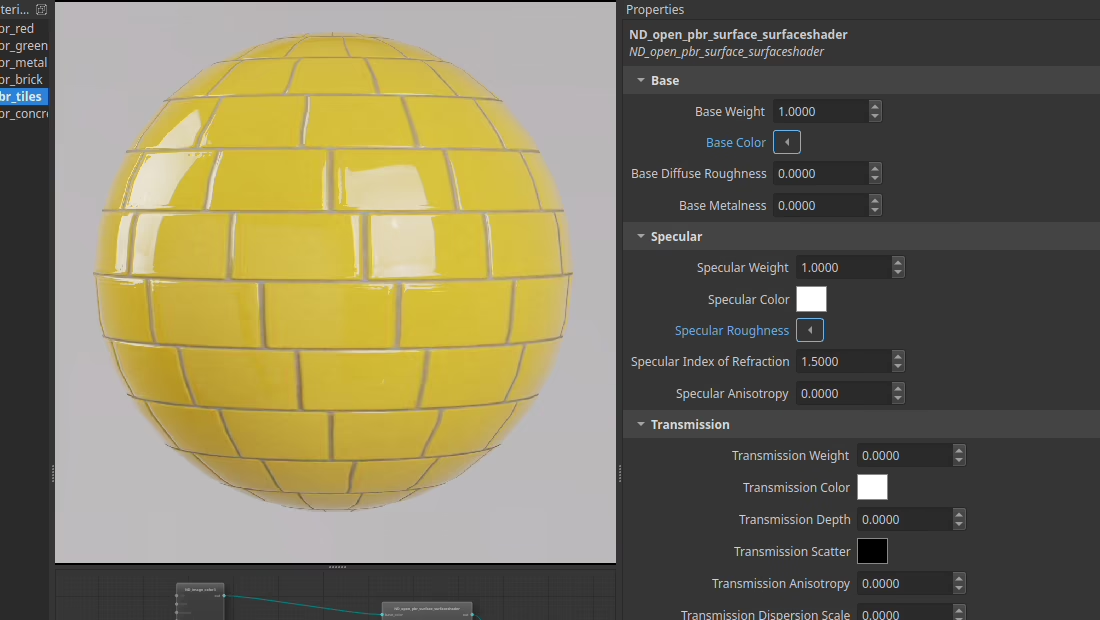
Build and Run#
Prerequisites
sudo apt install build-essential cmake qt6-base-devOpenUSD 25.11 headers and shared libraries, built with MaterialX support enabled
NVIDIA GPU with driver 535+
Building
cmake -B build -DCMAKE_BUILD_TYPE=Release \
  -DCMAKE_PREFIX_PATH="/path/to/Qt/6.x/gcc_64;/path/to/OpenUSD-25.11"
cmake --build build
Running
./build/material-editor path/to/materialx-scene.usd
Prerequisites
Qt6 MSVC 2019 64-bit component
OpenUSD 25.11 built with the matching MSVC toolchain and MaterialX support enabled
Building
cmake -B build -DCMAKE_PREFIX_PATH="C:/Qt/6.5.1/msvc2019_64;C:/path/to/OpenUSD-25.11"
cmake --build build --config Release
Running
build\Release\material-editor.exe path\to\materialx-scene.usd
Run from an environment where Qt and OpenUSD runtime libraries are discoverable through the normal platform library search path.
If no path is provided, the app loads data/material-editor-ball.usda.
UI Panels#
Material list - select which material is bound to the scene geometry.
Viewport - live path-traced render from ovrtx.
Node graph - read-only visualization of the selected material’s UsdShade shader graph.
Property panel - shader inputs from the USD Sdr registry, grouped into collapsible sections.
USD Scene Requirements#
At least one
Meshprim with aMaterialBindingAPIschema applied.One or more MaterialX
Materialprims under aLooksscope, each containingShaderchild prims.A
CameraandRenderProductdefining the render output.The target mesh prim path is currently hardcoded to
/World/Sphere.