

Sensor Configuration#
To get rendered output from a sensor in ovrtx, the USD stage must describe what to render and which outputs to produce. This is done through two USD prim types from the UsdRender schema:
RenderProduct – represents a single sensor output configuration (resolution, which sensor to use, which variables to output).
RenderVar – declares a named output variable (for example,
LdrColor,HdrColor) that the renderer produces for a RenderProduct.
These prims can either exist in the USD file being loaded or be injected at runtime using ovrtx’s USD composition API.
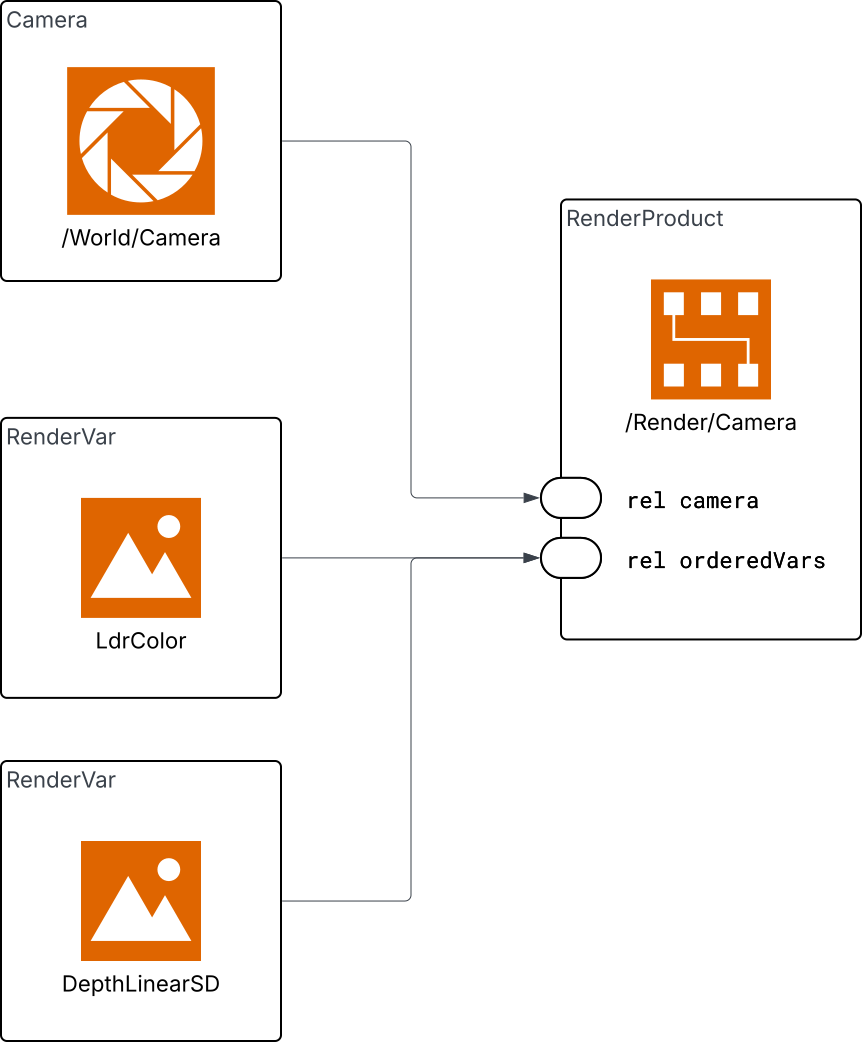
RenderProduct#
Each sensor that you want output from needs a corresponding RenderProduct prim in the stage. The RenderProduct ties together:
A sensor (camera, lidar, etc.) through the
rel camerarelationship.One or more output variables through the
rel orderedVarsrelationship, which points toRenderVarprims.Settings controlling the rendering of the sensor, such as the output image resolution for a camera, or the render mode used to render it. For camera render modes and settings, refer to Render Modes.
Here is a minimal RenderProduct in USDA that renders LdrColor from a camera at /World/Camera:
def "Render" {
    def RenderProduct "Camera" {
        int2 resolution = (1920, 1080)
        rel camera = </World/Camera>
        rel orderedVars = [<LdrColor>]

        def RenderVar "LdrColor" {
            string sourceName = "LdrColor"
        }
    }
}
render_scope = stage.DefinePrim("/Render")
camera_product = UsdRender.Product.Define(stage, "/Render/Camera")
camera_product.GetResolutionAttr().Set(Gf.Vec2i(1920, 1080))
camera_product.GetCameraRel().SetTargets(["/World/Camera"])

ldr_var = UsdRender.Var.Define(stage, "/Render/Camera/LdrColor")
ldr_var.GetSourceNameAttr().Set("LdrColor")

camera_product.GetOrderedVarsRel().SetTargets(["/Render/Camera/LdrColor"])
The rel camera Relationship#
rel camera must point to the USD prim path of the sensor whose output you want. For camera sensors, this is typically a UsdGeomCamera prim.
rel camera = </World/Camera>
It is also possible to specify multiple sensors in a single RenderProduct:
rel camera = [</World/Environment1/Camera>, </World/Environment2/Camera>]
When a RenderProduct targets multiple sensors, RTX splits the output frame into tiles, one tile per sensor. Use this pattern when the sensors share the same output variables and resolution and the application wants one tiled output for throughput. For a complete camera example, refer to Python: Tiled Rendering.
For more information about OpenUSD Relationships, refer to the Learn OpenUSD page on Relationships.
The rel orderedVars Relationship#
rel orderedVars lists the RenderVar prims that this RenderProduct should output. Each entry is a path to a RenderVar prim. You can request multiple outputs from the same sensor:
rel orderedVars = [<LdrColor>, <HdrColor>]
The RenderVar prims can be defined as children of the RenderProduct (as shown above), or in a shared Vars scope elsewhere in the stage.
For more information about OpenUSD Relationships, refer to the Learn OpenUSD page on Relationships.
RenderVar#
A RenderVar prim declares a named output. Its USD prim path identifies the output in ovrtx step results; the sourceName attribute specifies which renderer output to bind:
def RenderVar "LdrColor" {
    string sourceName = "LdrColor"
}
The available source names depend on the sensor type. Refer to Outputs for camera sensor outputs, Lidar Sensors for lidar point-cloud channels, and Radar Sensors for radar point-cloud channels.
After stepping, Python frame.render_vars keys and C render_var_path values are full RenderVar prim paths such as /Render/Camera/LdrColor or /Render/Vars/LdrColor. Use sourceName values such as LdrColor only when authoring the RenderVar or describing the semantic output type.
For sensors that produce multi-tensor outputs – lidar and radar point clouds, for example – the RenderVar prim also carries a channels attribute that selects which tensors the output should include. Only listed channels are produced (the sensor model auto-enables a small set like Counts and Flags regardless):
    def "Render"
    {
        def "Products"
        {
            def RenderProduct "LidarProduct"
            {
                rel camera = </World/Lidar>
                rel orderedVars = [<../../Vars/PointCloud>]
            }
        }

        def "Vars"
        {
            def RenderVar "PointCloud"
            {
                uniform string sourceName = "PointCloud"
                token[] channels = [
                    "Coordinates",
                    "Intensity",
                    "Counts",
                    "TimeOffsetNs"
                ]
            }
        }
    }
A RenderVar produces an ovrtx render variable at runtime; a render variable carries one or more named tensors and zero or more named params. See Sensor Outputs for what a render variable output looks like and how to map it in C and Python, and Reading Sensor PointClouds for lidar/radar PointCloud readback.
Independent RenderProducts#
Create one RenderProduct per sensor when each sensor needs independent output variables, resolution, stepping, device pinning, or result handling:
def "Render" {
    def RenderProduct "FrontCamera" {
        rel camera = </World/FrontCamera>
        rel orderedVars = [<../Vars/LdrColor>]
    }

    def RenderProduct "RearCamera" {
        rel camera = </World/RearCamera>
        rel orderedVars = [<../Vars/LdrColor>]
    }

    def "Vars" {
        def RenderVar "LdrColor" {
            string sourceName = "LdrColor"
        }
    }
}
render_scope = stage.DefinePrim("/Render")

front_product = UsdRender.Product.Define(stage, "/Render/FrontCamera")
front_product.GetCameraRel().SetTargets(["/World/FrontCamera"])
front_product.GetOrderedVarsRel().SetTargets(["/Render/Vars/LdrColor"])

rear_product = UsdRender.Product.Define(stage, "/Render/RearCamera")
rear_product.GetCameraRel().SetTargets(["/World/RearCamera"])
rear_product.GetOrderedVarsRel().SetTargets(["/Render/Vars/LdrColor"])

vars_scope = stage.DefinePrim("/Render/Vars")
ldr_var = UsdRender.Var.Define(stage, "/Render/Vars/LdrColor")
ldr_var.GetSourceNameAttr().Set("LdrColor")
When stepping the renderer, pass every active RenderProduct path, including sensors that have no completed output this step. See Multi-rate Sensor Simulation for different sensor rates and partial outputs. The following example steps two independent products:
(
    subLayers = [
        @../../data/ovrtx-test-base.usda@
    ]
)

def Camera "DocsCamera" (
    prepend apiSchemas = ["OmniSensorGenericCameraCoreAPI"]
)
{
}

def "Render"
{
    def RenderProduct "DocsCamera"
    {
        rel camera = </DocsCamera>
        rel orderedVars = [<LdrColor>]

        def RenderVar "LdrColor"
        {
            string sourceName = "LdrColor"
        }
    }
}
products = renderer.step(
    render_products={"/Render/FrontCamera", "/Render/RearCamera"},
    delta_time=1.0 / 60,
    ordinal=ordinal,
)
ovx_string_t rp_paths[] = {
    {"/Render/FrontCamera", strlen("/Render/FrontCamera")},
    {"/Render/RearCamera",  strlen("/Render/RearCamera")},
};
ovrtx_render_product_set_t render_products = {};
render_products.render_products = rp_paths;
render_products.num_render_products = 2;

ovrtx_step_result_handle_t step_handle = 0;
ovrtx_enqueue_result_t enqueue_result = ovrtx_step_with_stage(
    renderer_, render_products, 1.0 / 60.0, ordinal, &step_handle);
Adding RenderProducts at Runtime#
If the USD file you are loading does not already contain the RenderProduct and RenderVar prims, you can compose them into an inline root layer without editing the original scene.
Create an inline USDA string that uses subLayers to include the original scene and authors the RenderProducts in the same root layer. Populate that string with ovstage.population.open_usd_from_string (Python) or ovrtx_open_usd_from_string (C compatibility):
ovstage.population.open_usd_from_string(stage, f'''
#usda 1.0
(
    subLayers = [
        @{scene_path}@
    ]
)

def "Render" {{
    def RenderProduct "Camera" {{
        int2 resolution = (1920, 1080)
        rel camera = </Camera0>
        rel orderedVars = [<LdrColor>, <HdrColor>]

        def RenderVar "LdrColor" {{
            string sourceName = "LdrColor"
        }}

        def RenderVar "HdrColor" {{
            string sourceName = "HdrColor"
        }}
    }}
}}
''', ordinal=ordinal)
stage.advance_write_floor(ordinal, ovstage.Scope.ALL).wait()

products = renderer.step(
    render_products={"/Render/Camera"},
    delta_time=1.0 / 60,
    ordinal=ordinal,
)
    // Compose a docs-owned render-config layer on top of a scene layer via
    // USD sublayers. The composed root gets populated into the attached
    // ovstage in one call.
    std::string scene_path = get_test_data_dir() + "/simple_camera.usda";
    std::string usda = make_sublayer_usda(scene_path, R"usda(
def "Render" {
    def RenderProduct "Camera" {
        int2 resolution = (640, 480)
        rel camera = </Camera0>
        rel orderedVars = [<LdrColor>, <HdrColor>]

        def RenderVar "LdrColor" {
            string sourceName = "LdrColor"
        }

        def RenderVar "HdrColor" {
            string sourceName = "HdrColor"
        }
    }
}
)usda");
    ovstage_population_enqueue_result_t pr = ovstage_population_open_usd_from_string(
        stage_,
        {usda.c_str(), usda.size()},
        /*ordinal=*/1,
        /*time=*/NAN,
        OVSTAGE_POPULATION_DOMAIN_RENDERING);
    ASSERT_EQ(pr.status, OVSTAGE_OK) << format_ovstage_population_last_error();
    docs_wait_ovstage_population_no_errors(stage_, pr.op_index);
    docs_ovstage_advance_write_floor(stage_, 1);
Tip
Use the ovstage population reference functions only when you need removable referenced content after a root stage is already open. For one composed root stage, prefer the inline subLayers pattern shown above.
Advanced RenderProduct Controls#
The sections below describe controls authored on the RenderProduct after the basic sensor/output wiring is in place: renderer settings, warm-up behavior, and per-product GPU device allow-lists. They are collected here because they affect how a RenderProduct produces output. For camera-mode-specific settings and examples, refer to Render Modes.
Render Settings#
Render settings control how the renderer produces output – for example, the maximum number of path tracing bounces, denoiser configuration, or post-processing parameters. In ovrtx, render settings are written as attributes on the RenderProduct prim using the standard attribute write API.
Setting names use the omni:rtx: namespace prefix. For example, omni:rtx:rtpt:maxBounces controls the maximum number of bounces in the real-time path tracer.
After changing a render setting, call reset() (Python) or ovrtx_reset() (C) and run warm-up frames to allow the renderer to reconverge with the new setting.
Write the setting through an ovstage query at a new ordinal:
stage.write_attribute(
    query,
    attribute,
    ordinal=ordinal,
    tensors=np.array([max_bounces], dtype=np.uint32),
    is_array=False,
).wait()
stage.advance_write_floor(ordinal, ovstage.Scope.ALL).wait()
Use ovrtx_write_attribute() with a DLTensor containing the setting value:
// Author a render setting on the RenderProduct prim by writing the
// attribute through ovstage. omni:rtx:rtpt:maxBounces is a uint32
// scalar.
path_dictionary_instance_t* pd = ovstage_get_path_dictionary(stage_);
ovx_string_t prim_path = ovx_str("/Render/Camera");
ovx_primpath_list_t path_list{};
ASSERT_EQ(
    path_dictionary_create_path_list_from_strings(pd, &prim_path, 1, &path_list).status,
    OVX_API_SUCCESS);
ovstage_query_handle_t query_handle = OVSTAGE_INVALID_QUERY_HANDLE;
ASSERT_EQ(ovstage_query_from_path_list(stage_, path_list, &query_handle), OVSTAGE_OK);

ovx_string_t attr_str = ovx_str("omni:rtx:rtpt:maxBounces");
ovx_token_t attr_token{};
ASSERT_EQ(path_dictionary_create_tokens_from_strings(pd, &attr_str, 1, &attr_token).status,
          OVX_API_SUCCESS);

uint32_t value = static_cast<uint32_t>(max_bounces);
int64_t write_shape[1] = {1};
DLTensor write_tensor{};
write_tensor.data = &value;
write_tensor.device = {kDLCPU, 0};
write_tensor.ndim = 1;
write_tensor.dtype = {kDLUInt, 32, 1};
write_tensor.shape = write_shape;

ovstage_write_data_t write_data{};
write_data.tensors = &write_tensor;
write_data.tensor_count = 1;
write_data.is_array = false;

ovx_string_or_token_t attr_ref{};
attr_ref.token = attr_token;

ovstage_enqueue_result_t wq = ovstage_write_attribute(
    stage_, query_handle, attr_ref, ordinal, write_data, OVSTAGE_PRIM_MODE_UPSERT);
ASSERT_EQ(wq.status, OVSTAGE_OK) << format_ovstage_last_error();
docs_wait_ovstage_no_errors(stage_, wq.op_index);
docs_ovstage_advance_write_floor(stage_, ordinal);

ovstage_release_query(stage_, query_handle);
path_dictionary_release_path_list_reference(pd, path_list);
Warming Up the Renderer#
After loading a scene or changing render settings, the first few rendered frames will not be production quality. There are two independent reasons:
Texture streaming – ovrtx streams textures on demand. Initial frames use low-resolution mip levels while higher-resolution data loads in the background.
Path tracing convergence – The path tracer accumulates samples over successive frames. Early frames are noisy; quality improves as more samples are gathered.
Texture streaming is asynchronous by default. Select disabled, synchronous, or
asynchronous behavior when creating the renderer with
RendererConfig.texture_streaming_mode or
ovrtx_config_entry_texture_streaming_mode(). Synchronous mode controls
texture-feedback processing; it does not make all texture loading operations
synchronous. See Renderer Configuration.
To get a good quality image, run warm-up frames before capturing output. A conservative default of 40 frames handles both texture streaming and convergence for typical scenes.
You should warm up after any of the following:
Populating a scene or adding an ovstage USD reference (new textures need to stream in).
Calling
reset()(accumulated path tracing samples are discarded).Changing render settings that invalidate the accumulation buffer (for example, bounce counts).
WARMUP_FRAMES = 40
for _ in range(WARMUP_FRAMES):
    renderer.step(render_products={"/Render/Camera"}, delta_time=1.0 / 60, ordinal=2)
// Warm up — step enough frames for texture streaming to finish loading
// high-res mips and for path tracing to converge to a good quality image.
ovx_string_t rp_path = ovx_str("/Render/Camera");
ovrtx_render_product_set_t render_products{};
render_products.render_products = &rp_path;
render_products.num_render_products = 1;

ovrtx_step_result_handle_t step_handle = 0;
int const WARMUP_FRAMES = 40;
for (int i = 0; i < WARMUP_FRAMES; ++i) {
    ovrtx_enqueue_result_t eq = ovrtx_step_with_stage(
        renderer_, render_products, 1.0 / 60.0, /*ordinal=*/2, &step_handle);
    ASSERT_API_SUCCESS(eq.status);
    docs_wait_no_errors(renderer_, eq.op_index);
    ovrtx_destroy_results(renderer_, step_handle);
}
Note
Warm-up frames still produce results. In Python you can ignore them (they are garbage-collected). In C you must call ovrtx_destroy_results() for each step to avoid resource leaks.
RenderProduct Device Pinning#
ovrtx can restrict a RenderProduct to a list of CUDA-visible device indices.
Author the uint[] deviceIds attribute directly on the RenderProduct before
loading the stage.
deviceIds is an allow-list of indices after CUDA_VISIBLE_DEVICES has
filtered and remapped the process-visible GPUs. A singleton list such as
[0] constrains the RenderProduct to CUDA-visible GPU 0. A list such as
[0, 1] allows ovrtx to choose either visible device.
    def RenderProduct "Camera"
    {
        rel camera = </World/Camera>
        uint[] deviceIds = [0]
        int2 resolution = (640, 320)
        rel orderedVars = <LdrColor>

        def RenderVar "LdrColor"
        {
            string sourceName = "LdrColor"
        }
    }
Use RenderProduct device pinning when:
A test or application must run a specific RenderProduct on a deterministic CUDA-visible device.
Renderer-level
active_cuda_gpusis broader than the device set allowed for one product.Viewport picking is required. In the current ovrtx version, picking works only for RenderProducts running on CUDA-visible GPU 0, so picking products should author
deviceIds = [0].