

Minimal#
Minimal mode uses lightweight shading for high-throughput rendering. Use it for segmentation masks, bounding-box visualization, or reinforcement learning loops that do not need full path-traced lighting.
token omni:rtx:rendermode = "MinimalRendering"
Lighting Behavior#
Minimal mode only respects the first DistantLight found in the scene, and shadows from that light are hard shadows. This restriction keeps Minimal mode fast and stable for speed-of-light rendering workloads.
Other light types, such as DomeLight, are not used for Minimal mode lighting. If the scene has no DistantLight, Minimal mode falls back to a single camera light.
For improved visibility without adding scene lights, use ambient lighting through the omni:rtx:sceneDb:ambientLightColor and omni:rtx:sceneDb:ambientLightIntensity attributes listed below, or disable shadows with omni:rtx:minimal:castShadows.
Settings#
USD declaration |
Description |
|---|---|
|
Selects the shading mode. 0: No Rendering – no path tracing is performed and LdrColor is black; use when only data outputs such as depth and albedo are required.
1: Constant Diffuse – uses a single constant color for all surfaces.
2: Texture Diffuse – uses diffuse texture colors.
3: Diffuse/Glossy/Emission – full material evaluation with diffuse, glossy, and emission.
|
|
The color to use in Constant Diffuse shading mode. |
|
Global toggle to cast hard shadows from the first |
|
Color of the global ambient environment lighting. |
|
Brightness of the global ambient environment lighting. A value of 0 disables ambient lighting. |
Anti-Aliasing and DLSS#
Anti-aliasing reduces jagged edges and shimmer in rendered images. Minimal mode
supports DLSS Super Resolution (DLSS-SR) for image upscaling and anti-aliasing,
and DLSS Ray Reconstruction (DLSS-RR) for upscaling, anti-aliasing, and denoising.
DLSS is optional and disabled when omni:rtx:minimal:dlss:mode is unset or zero.
Use DLSS-SR for textured geometry when you want smoother edges or a larger output
image from a lower internal render resolution. Use DLSS-RR when the image also
needs denoising, particularly for Gaussian splats. Rendering Gaussian splats in
Minimal mode requires omni:rtx:minimal:mode = 3 for full material evaluation;
DLSS-SR does not provide their denoising.
Both controls belong to OmniRtxSettingsMinimalAPI_1. Configure them on the
RenderProduct that produces the image. These are Minimal-specific controls;
omni:rtx:post:dlss:execMode and the
Path-Tracing pixel filter do not select Minimal’s DLSS behavior.
USD declaration |
Description |
|---|---|
|
Selects the image reconstruction method: |
|
Selects how the internal render resolution is chosen when DLSS is enabled. The output resolution remains the RenderProduct’s |
Choose one of the following execution modes:
Token |
Behavior |
|---|---|
|
Selects a preset based on the output resolution. |
|
Uses a lower internal resolution to favor rendering throughput. |
|
Balances internal resolution and image quality. |
|
Uses a higher internal resolution than Balanced or Performance. |
|
Selects DLAA: anti-aliasing at native output resolution, without upscaling. Keep DLSS enabled with mode |
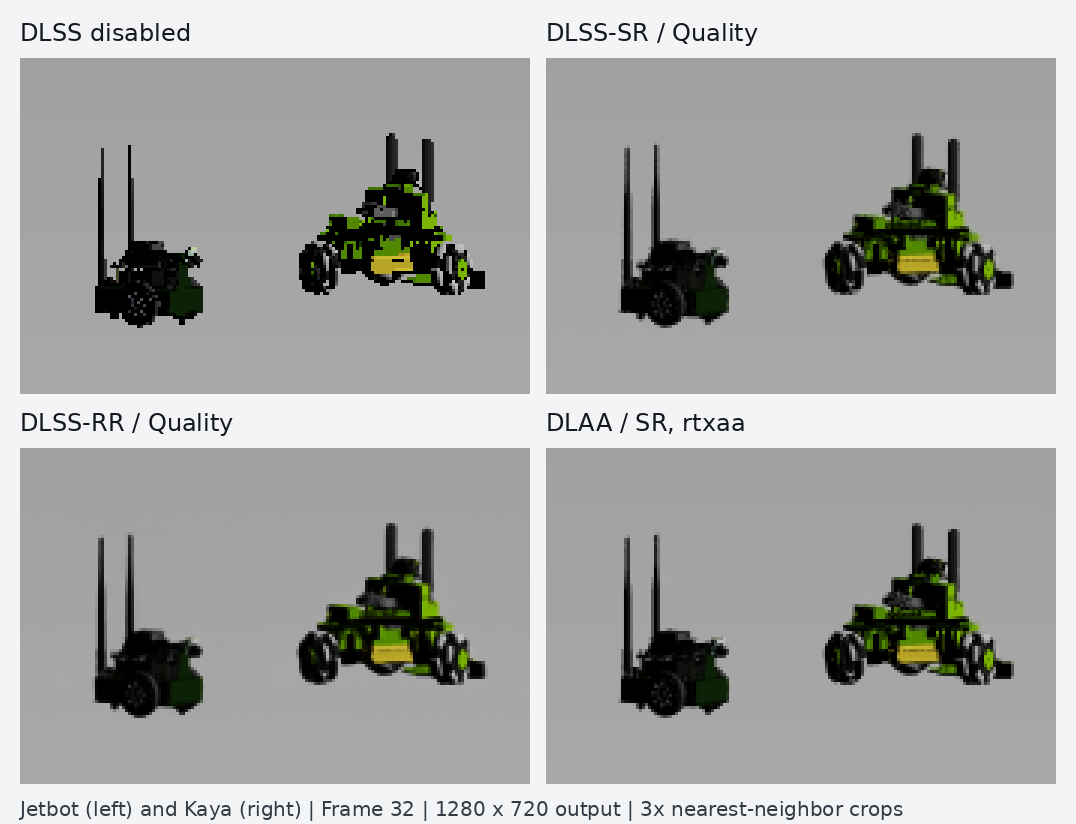
Matching 170 × 112 crops of Jetbot (left) and Kaya (right) from ovrtx-robot-lineup.usda, captured at frame 32 with 1280 × 720 output. DLSS smooths the robot silhouettes and reconstructs fine details. The camera, Texture Diffuse shading, and disabled shadows stay the same across modes. Crops are enlarged 3× without additional filtering.#
The following equivalent USDA and OpenUSD Python snippets configure a 1280 × 720 RenderProduct with DLSS-SR and the Quality preset. Both controls are authored before loading the scene into the renderer; the same USD configuration works with the ovrtx Python and C APIs.
def Scope "Render"
{
    def RenderProduct "Camera" (
        prepend apiSchemas = ["OmniRtxSettingsMinimalAPI_1"]
    )
    {
        rel camera = </World/Camera>
        int2 resolution = (1280, 720)
        rel orderedVars = [<LdrColor>]
        token omni:rtx:rendermode = "MinimalRendering"
        int omni:rtx:minimal:mode = 2

        # Enable super resolution; use 2 for ray reconstruction or 0 to disable DLSS.
        int omni:rtx:minimal:dlss:mode = 1
        # Use "rtxaa" for native-resolution DLAA instead of upscaling.
        token omni:rtx:minimal:dlss:execMode = "quality"

        # Keep small robots visible inside the warehouse.
        bool omni:rtx:minimal:castShadows = false

        def RenderVar "LdrColor"
        {
            string sourceName = "LdrColor"
        }
    }
}
stage.DefinePrim("/Render", "Scope")
product = UsdRender.Product.Define(stage, "/Render/Camera")
prim = product.GetPrim()
prim.AddAppliedSchema("OmniRtxSettingsMinimalAPI_1")
product.CreateCameraRel().SetTargets(["/World/Camera"])
product.CreateResolutionAttr(Gf.Vec2i(1280, 720))
product.CreateOrderedVarsRel().SetTargets(["/Render/Camera/LdrColor"])
prim.CreateAttribute("omni:rtx:rendermode", Sdf.ValueTypeNames.Token, custom=False).Set("MinimalRendering")
prim.CreateAttribute("omni:rtx:minimal:mode", Sdf.ValueTypeNames.Int, custom=False).Set(2)

# DLSS selection is an integer; the resolution preset is a token.
prim.CreateAttribute("omni:rtx:minimal:dlss:mode", Sdf.ValueTypeNames.Int, custom=False).Set(1)
prim.CreateAttribute("omni:rtx:minimal:dlss:execMode", Sdf.ValueTypeNames.Token, custom=False).Set("quality")
# Keep small robots visible inside the warehouse.
prim.CreateAttribute("omni:rtx:minimal:castShadows", Sdf.ValueTypeNames.Bool, custom=False).Set(False)

render_var = UsdRender.Var.Define(stage, "/Render/Camera/LdrColor")
render_var.CreateSourceNameAttr("LdrColor")
DLSS uses information from earlier frames. Keep the renderer alive and render several frames before capturing a comparison image. Compare the same scene, camera, output resolution, and shading mode so that changes in LdrColor show the effect of DLSS. Denoising and reconstruction add processing work; a lower internal resolution does not guarantee a speedup for every scene or output size.
See the Minimal DLSS example for a runnable scene, image capture, and Rerun output. The C example loads the same scene.