

C: Decals#
Loads the same local decal scene as the Python example through an attached runtime stage, renders it, and saves the color output.
“Create a minimal C API example that loads USD-authored decals through a runtime stage, renders them, and saves the color output.”
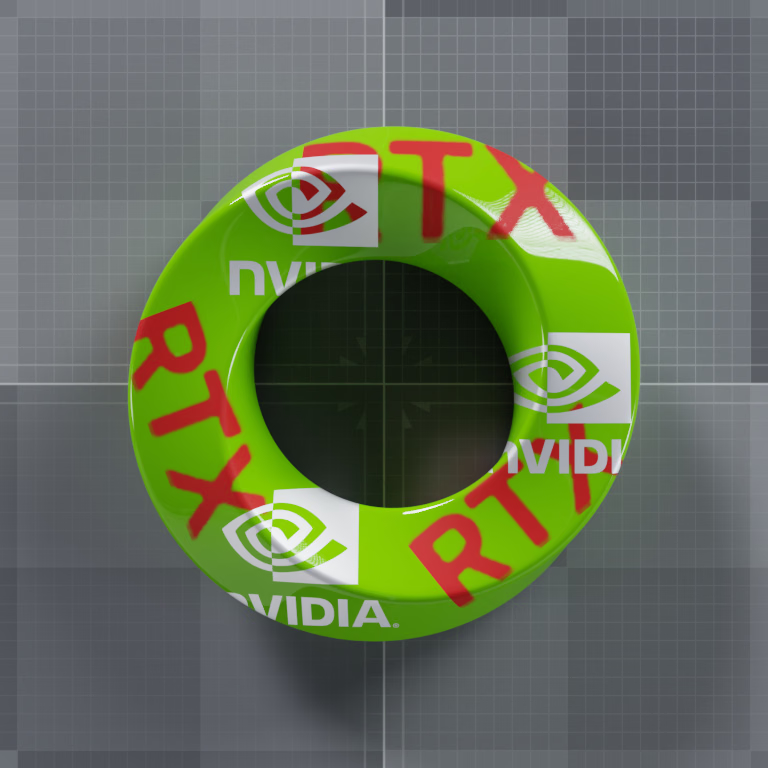
Enlarged silver NVIDIA logos (priority 10) overlap red RTX lettering (priority 0). Cutouts reveal the lower decal or the green receiver.#
Both examples consume the same USD authoring. For decal sizing, masks, and the priority comparison with equivalent USDA and usd-core Python snippets, see Overlapping Decals and Python: Decals.
The example populates the stage, advances its write floor, and renders the scene:
constexpr ovstage_ordinal_t ordinal = 1;
std::filesystem::path executable_dir =
    std::filesystem::absolute(argc > 0 ? argv[0] : "decals").parent_path();
std::string scene_path = (executable_dir / "ovrtx-test-decals.usda").string();
auto populate = ovstage_population_open_usd_from_file(
    stage,
    {scene_path.c_str(), scene_path.size()},
    ordinal,
    0.0,
    OVSTAGE_POPULATION_DOMAIN_RENDERING);
ovstage_write_floor_desc_t floor {ordinal, OVSTAGE_SCOPE_ALL};
if (wait_population(stage, populate) ||
    wait_stage(stage, ovstage_advance_write_floor(stage, &floor))) {
    std::cerr << "Could not populate the decal scene." << std::endl;
    return cleanup(1);
}

ovx_string_t product_path = {"/Render/Camera", strlen("/Render/Camera")};
ovrtx_render_product_set_t render_products {&product_path, 1};
ovrtx_step_result_handle_t final_handle = OVRTX_INVALID_HANDLE;
for (int frame = 0; frame <= 40; ++frame) {
    ovrtx_step_result_handle_t step_handle = OVRTX_INVALID_HANDLE;
    auto enqueue = ovrtx_step_with_stage(
        renderer, render_products, 1.0 / 60.0, ordinal, &step_handle);
    ovrtx_op_wait_result_t wait_result {};
    if (failed(enqueue, "step") ||
        failed(ovrtx_wait_op(renderer,
                             enqueue.op_index,
                             ovrtx_timeout_infinite,
                             &wait_result),
               "wait_op") ||
        report_wait_errors(wait_result)) {
        return cleanup(1);
    }
    if (frame < 40) {
        ovrtx_destroy_results(renderer, step_handle);
    } else {
        final_handle = step_handle;
    }
}
It maps LdrColor to CPU memory and writes a PNG:
ovrtx_render_product_set_outputs_t outputs {};
if (failed(ovrtx_fetch_results(
               renderer, final_handle, ovrtx_timeout_infinite, &outputs),
           "fetch_results")) {
    return cleanup(1);
}
auto output_handle = find_ldr_color(outputs);
ovrtx_map_output_description_t map_desc {};
map_desc.device_type = OVRTX_MAP_DEVICE_TYPE_CPU;
ovrtx_render_var_output_t output {};
if (output_handle == OVRTX_INVALID_HANDLE ||
    failed(ovrtx_map_render_var_output(renderer,
                                       output_handle,
                                       &map_desc,
                                       ovrtx_timeout_infinite,
                                       &output),
           "map_render_var_output") ||
    output.num_tensors != 1) {
    return cleanup(1);
}
DLTensor const& pixels = *output.tensors[0].dl;
int width = static_cast<int>(pixels.shape[1]);
int height = static_cast<int>(pixels.shape[0]);
std::filesystem::path output_path = executable_dir / "decals.png";
bool wrote_output =
    stbi_write_png(output_path.string().c_str(), width, height, 4, pixels.data, 4 * width) != 0;
ovrtx_cuda_sync_t no_sync {};
ovrtx_unmap_render_var_output(renderer, output.map_handle, no_sync);
ovrtx_destroy_results(renderer, final_handle);
if (!wrote_output) {
    std::cerr << "Could not write " << output_path << std::endl;
    return cleanup(1);
}
std::cout << "Saved " << output_path << std::endl;
Prerequisites#
CMake 3.16 or newer and a C++17 compiler
An NVIDIA RTX-capable GPU and a supported driver
Building and Running#
cd examples/c/decals
cmake -B build -DCMAKE_BUILD_TYPE=Release
cmake --build build --config Release
Run decals-dynamic from build/shared for a single-configuration
generator or build/shared/Release for a multi-configuration generator. A
successful run writes decals.png beside the executable.