

Rect Light#
A RectLight emits from one side of a rectangle along its local -Z axis.
Use it for panel lights, windows, and softboxes. It also uses the
common light attributes.
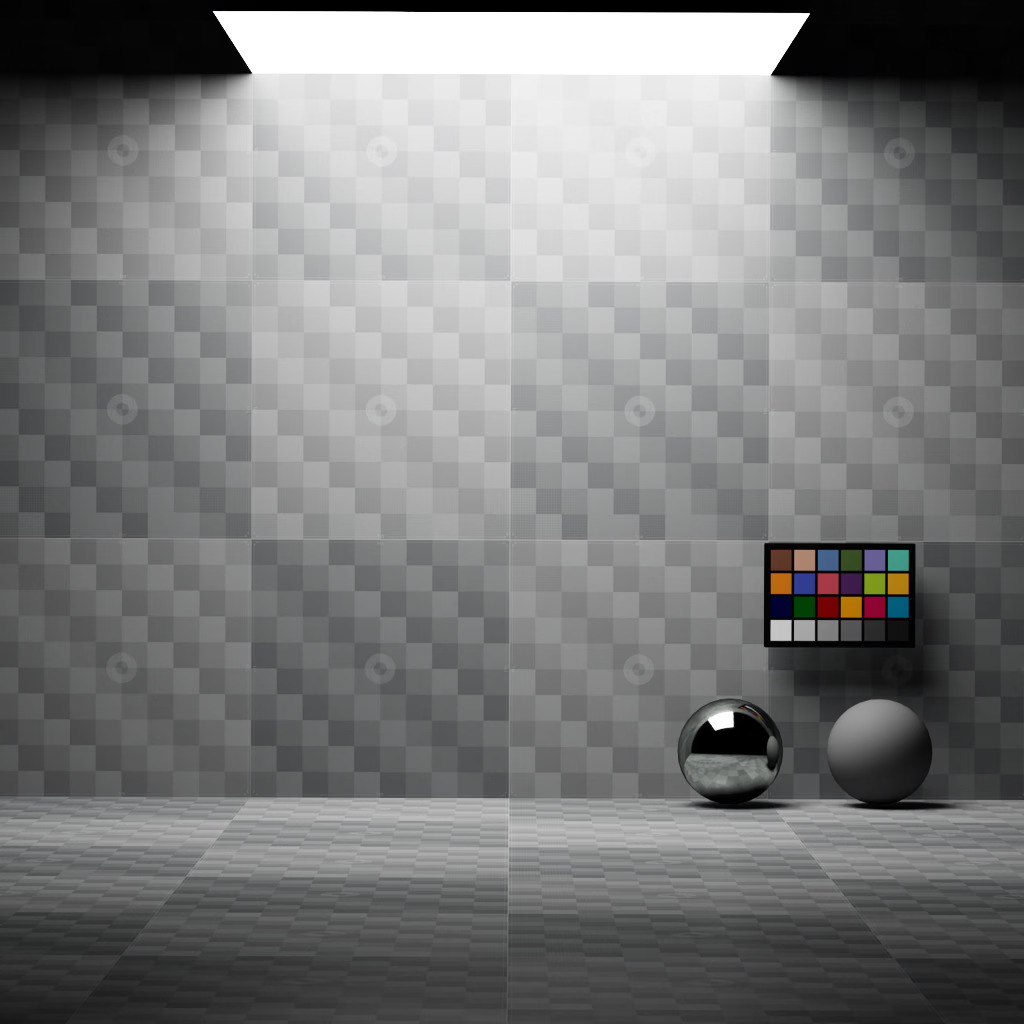
A rect light produces illumination from a rectangular emitting surface.#
USD declaration |
Description |
|---|---|
|
Rectangle width along the local X axis, in scene units. |
|
Rectangle height along the local Y axis, in scene units. |
|
Optional color texture that modulates emission across the rectangle. |
The following examples create a 1.2-by-0.6 scene-unit panel light:
def RectLight "Panel"
{
    float inputs:height = 0.6
    float inputs:width = 1.2
}
light = UsdLux.RectLight.Define(stage, "/World/Panel")
light.GetHeightAttr().Set(0.6)
light.GetWidthAttr().Set(1.2)
Projector Lights#
A projector light turns a RectLight into a pinhole emitter. Instead of
emitting from the rectangular surface, it projects inputs:texture:file
through the light center. Use this for slide projectors, patterned spotlights,
and calibrated projection systems.
USD declaration |
Description |
|---|---|
|
Enables pinhole projector behavior. This control is supported only on |
|
Color image to project. Without a texture, the projector emits its light color. |
|
Optional float lookup texture that maps outgoing directions to UV coordinates in the projected color image. Use it to reshape or calibrate the projection. |
The rect light’s width and height define the default pinhole projection. Both panels below use the same transform, dimensions, and texture. The area-light intensity is increased to compensate for its much lower output at this small size since its energy is emitted uniformly over all directions rather than being focused:
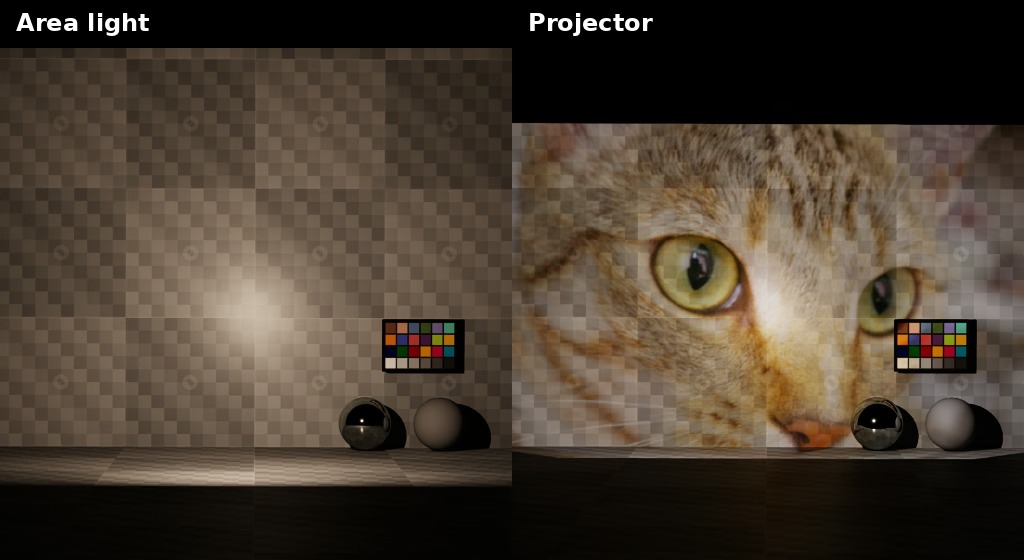
Projector mode emits the image from a pinhole instead of illuminating the scene as an area light. The area-light intensity is increased for visibility. Projected image: Chelsea the cat, photographed by Stefan van der Walt and dedicated to the public domain under CC0 1.0 Universal.#
Projection Direction Texture#
Without projector:directionTexture:file, the projector uses a rectangular
pinhole mapping based on inputs:width and inputs:height. A direction
texture replaces that mapping.
The direction texture is not a color image or a field of XYZ directions. It is
a floating-point lookup indexed by octahedrally encoded outgoing direction.
Its red and green channels store the UV coordinates used to sample
inputs:texture:file. Only values strictly between 0 and 1 emit light;
boundary values and values outside that range mask emission.
The following comparison uses the same Chelsea color texture. The second panel uses a direction texture generated from an example OpenCV pinhole calibration:
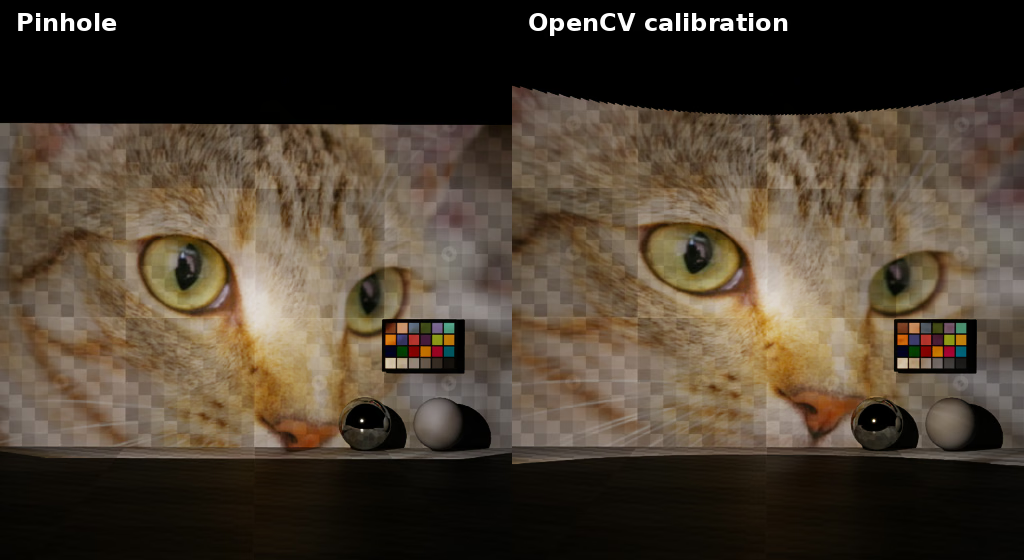
The example-generated direction texture applies the OpenCV calibration without changing the projected color image.#
Generating A Direction Texture From OpenCV Calibration#
Start with the calibrated image resolution, camera matrix, and distortion coefficients. The matrix uses pixel units. The distortion vector follows OpenCV’s ordering for radial, tangential, thin-prism, and sensor-tilt terms:
IMAGE_SIZE = (3840, 2160)
CAMERA_MATRIX = np.array(
    [
        [2400.0, 0.0, 1900.0],
        [0.0, 2421.0, 1200.0],
        [0.0, 0.0, 1.0],
    ],
    dtype=np.float64,
)
# OpenCV order: k1, k2, p1, p2, k3, k4, k5, k6,
# s1, s2, s3, s4, tau_x, tau_y.
DISTORTION = np.array(
    [
        -0.32734,
        0.07468,
        -0.00046,
        0.00106,
        0.0,
        0.0,
        0.0,
        0.0,
        -0.0008216463,
        0.0,
        -0.01727441,
        0.0,
        -0.03459962,
        0.001508283,
    ],
    dtype=np.float64,
)
The direction texture is indexed by an octahedral encoding of outgoing directions. Generate one normalized direction at each texel center:
texel_centers = (np.arange(texture_size, dtype=np.float64) + 0.5) / texture_size
oct_x, oct_y = np.meshgrid(
    texel_centers * 2.0 - 1.0,
    texel_centers * 2.0 - 1.0,
)
direction_z = 1.0 - np.abs(oct_x) - np.abs(oct_y)

folded_x = (1.0 - np.abs(oct_y)) * np.where(oct_x >= 0.0, 1.0, -1.0)
folded_y = (1.0 - np.abs(oct_x)) * np.where(oct_y >= 0.0, 1.0, -1.0)
direction_x = np.where(direction_z <= 0.0, folded_x, oct_x)
direction_y = np.where(direction_z <= 0.0, folded_y, oct_y)

directions = np.stack((direction_x, direction_y, direction_z), axis=-1)
directions /= np.linalg.norm(directions, axis=-1, keepdims=True)
Project the front-facing directions with cv2.projectPoints() and normalize
the resulting pixel coordinates to UV space. Store -1 for directions that
OpenCV projects outside the image so the projector masks them:
flat_directions = directions.reshape(-1, 3)
uv = np.full((flat_directions.shape[0], 2), -1.0, dtype=np.float32)

# The renderer flips local -Z before indexing the lookup, so valid decoded
# directions face +Z in the coordinate system passed to OpenCV.
front_facing = flat_directions[:, 2] > 1.0e-8
image_points, _ = cv2.projectPoints(
    flat_directions[front_facing],
    np.zeros(3),
    np.zeros(3),
    camera_matrix,
    distortion,
)
projected_uv = image_points[:, 0, :] / np.asarray(image_size)

# Projector lights emit only for UVs strictly inside (0, 1). Mark every
# direction that projects outside the calibrated image with -1.
inside_image = np.all((projected_uv > 0.0) & (projected_uv < 1.0), axis=1)
front_indices = np.flatnonzero(front_facing)
uv[front_indices[inside_image]] = projected_uv[inside_image]
uv = uv.reshape(directions.shape[:2] + (2,))
Finally, write the UV coordinates as float32 R and G channels in a square OpenEXR image:
height, width, channels = uv.shape
if width != height or channels != 2:
    raise ValueError("direction textures must be square float RG images")

path.parent.mkdir(parents=True, exist_ok=True)
float_channel = Imath.Channel(Imath.PixelType(Imath.PixelType.FLOAT))
header = OpenEXR.Header(width, height)
header["channels"] = {"R": float_channel, "G": float_channel}
header["compression"] = Imath.Compression(Imath.Compression.ZIP_COMPRESSION)

output = OpenEXR.OutputFile(str(path), header)
output.writePixels(
    {
        "R": np.ascontiguousarray(uv[:, :, 0], dtype=np.float32).tobytes(),
        "G": np.ascontiguousarray(uv[:, :, 1], dtype=np.float32).tobytes(),
    }
)
output.close()
Note
The renderer samples the lookup with linear filtering. Values can blend
across the boundary between valid UVs and the -1 mask. Use enough lookup
resolution for a smooth edge, and add an invalid guard band when you need a
hard calibrated aperture boundary.
See Python: Projector Light Calibration for the complete runnable example.