

Overview#
Sensor Processing Graphs (SPG) enables running custom GPU code as post-processing passes on RTX render outputs (Arbitrary Output Variables, or AOVs). You write a CUDA kernel or a Slang shader, describe its launch configuration in a Lua script, declare its interface in USD, and wire it into a RenderProduct. All computation stays on the GPU; there is no CPU-side data transfer in the processing pipeline.
This guide assumes proficiency with CUDA kernel programming or Slang Shader programming and basic familiarity with USD (Universal Scene Description).
How SPG Works#
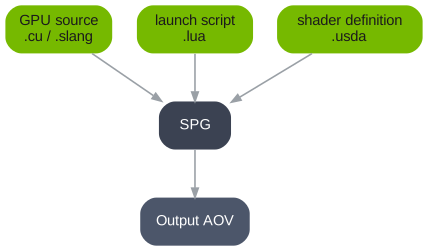
Every SPG node is defined by three files:
File |
Role |
|---|---|
|
GPU source. The transform you write, in CUDA or in Slang. |
|
Lua launch script. Named after the GPU source. Tells SPG how to validate the inputs, what the outputs have to be, and how to launch the GPU code. |
|
USD shader definition. Declares the SPG node with its inputs and outputs in USD and references the GPU source. Wired into the render graph. |
Finding Your Way#
The pages after this one come in four kinds:
Section |
Purpose |
|---|---|
Walkthrough. Builds one node from nothing, in order, once. |
|
One page per task. Find the one you need. Not written to be read in sequence. |
|
Lookup. Every Lua function and every USD attribute you can author. |
|
Symptoms. Starts from what you observed rather than from what you meant to do. |