

Scene Partitions#
Overview#
Scene partitions let different cameras render isolated environments from one stage. You can use them to simulate independent robot environments while keeping shared, unpartitioned content visible to every camera.
ovrtx enables scene partitioning when it creates the renderer.
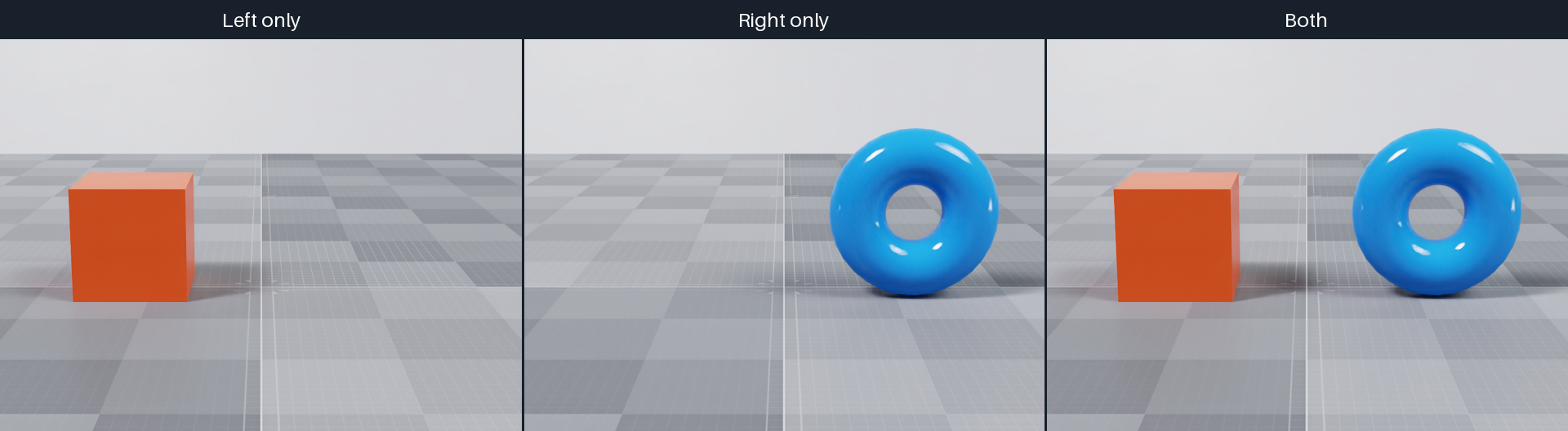
The cameras render the left orange cube, the right blue torus, and both objects from the same viewpoint. The ground and studio environment remain visible in all three views.#
Creating Scene Partitions#
Select a camera’s partition with omni:scenePartition. Assign geometry with
the primvars:omni:scenePartition token primvar. Primvars are inherited, so
you can assign an entire environment on its top-level Xform.
USD declaration |
Description |
|---|---|
|
Author on a Camera to select the named partition that it renders. |
|
Author on geometry or an ancestor Xform to assign that content to a named partition. |
These are custom Omni attributes. They do not currently have generated schema accessors, so author them with their exact names and token types.
A camera sees geometry assigned to its selected partition.
A camera does not see geometry assigned to another partition.
Unpartitioned geometry remains visible to every camera.
This excerpt from the example assigns the two objects to separate partitions and selects them with the left and right cameras. The third camera has no partition selector.
Both tabs author the same scene objects. Asset paths are relative to the
example directory; the Python snippet assumes an existing USD stage.
def Xform "World"
{
    def Xform "Left" (
        prepend references = @../../../tests/docs/data/cube.usd@
    )
    {
        token primvars:omni:scenePartition = "left" (interpolation = "constant")
        double3 xformOp:translate = (-115, 0, 0)
        uniform token[] xformOpOrder = ["xformOp:translate"]
        over "Cube"
        {
            color3f[] primvars:displayColor = [(0.9, 0.12, 0.025)]
        }
    }

    def Xform "Right" (
        prepend references = @../../../tests/docs/data/torus.usd@
    )
    {
        token primvars:omni:scenePartition = "right" (interpolation = "constant")
        double3 xformOp:translate = (115, 75, 0)
        float3 xformOp:rotateXYZ = (90, 0, 0)
        uniform token[] xformOpOrder = ["xformOp:translate", "xformOp:rotateXYZ"]
        over "Torus"
        {
            color3f[] primvars:displayColor = [(0.025, 0.3, 0.85)]
        }
    }

    def Xform "Ground" (
        prepend references = @../../../tests/docs/data/ground.usd@
    )
    {
        double3 xformOp:scale = (20, 1, 20)
        uniform token[] xformOpOrder = ["xformOp:scale"]
    }

    def DomeLight "Environment"
    {
        float inputs:intensity = 1000
        asset inputs:texture:file = @../../../tests/docs/data/studio.exr@
        token inputs:texture:format = "latlong"
    }

    def Camera "LeftCamera"
    {
        custom token omni:scenePartition = "left"
        float focalLength = 38
        float2 clippingRange = (1, 100000)
        double3 xformOp:translate = (0, 230, 850)
        float3 xformOp:rotateXYZ = (-12, 0, 0)
        uniform token[] xformOpOrder = ["xformOp:translate", "xformOp:rotateXYZ"]
    }

    def Camera "RightCamera"
    {
        custom token omni:scenePartition = "right"
        float focalLength = 38
        float2 clippingRange = (1, 100000)
        double3 xformOp:translate = (0, 230, 850)
        float3 xformOp:rotateXYZ = (-12, 0, 0)
        uniform token[] xformOpOrder = ["xformOp:translate", "xformOp:rotateXYZ"]
    }

    def Camera "BothCamera"
    {
        float focalLength = 38
        float2 clippingRange = (1, 100000)
        double3 xformOp:translate = (0, 230, 850)
        float3 xformOp:rotateXYZ = (-12, 0, 0)
        uniform token[] xformOpOrder = ["xformOp:translate", "xformOp:rotateXYZ"]
    }
}
UsdGeom.Xform.Define(stage, "/World")

left = UsdGeom.Xform.Define(stage, "/World/Left")
left.GetPrim().GetReferences().AddReference("../../../tests/docs/data/cube.usd")
UsdGeom.PrimvarsAPI(left).CreatePrimvar(
    "omni:scenePartition", Sdf.ValueTypeNames.Token, UsdGeom.Tokens.constant
).Set("left")
left.AddTranslateOp().Set(Gf.Vec3d(-115, 0, 0))
UsdGeom.Mesh(stage.GetPrimAtPath("/World/Left/Cube")).CreateDisplayColorAttr(
    [(0.9, 0.12, 0.025)]
)

right = UsdGeom.Xform.Define(stage, "/World/Right")
right.GetPrim().GetReferences().AddReference("../../../tests/docs/data/torus.usd")
UsdGeom.PrimvarsAPI(right).CreatePrimvar(
    "omni:scenePartition", Sdf.ValueTypeNames.Token, UsdGeom.Tokens.constant
).Set("right")
right.AddTranslateOp().Set(Gf.Vec3d(115, 75, 0))
right.AddRotateXYZOp().Set(Gf.Vec3f(90, 0, 0))
UsdGeom.Mesh(stage.GetPrimAtPath("/World/Right/Torus")).CreateDisplayColorAttr(
    [(0.025, 0.3, 0.85)]
)

ground = UsdGeom.Xform.Define(stage, "/World/Ground")
ground.GetPrim().GetReferences().AddReference("../../../tests/docs/data/ground.usd")
ground.AddScaleOp(UsdGeom.XformOp.PrecisionDouble).Set(Gf.Vec3d(20, 1, 20))

environment = UsdLux.DomeLight.Define(stage, "/World/Environment")
environment.CreateIntensityAttr(1000)
environment.CreateTextureFileAttr("../../../tests/docs/data/studio.exr")
environment.CreateTextureFormatAttr("latlong")

for name, partition in (("Left", "left"), ("Right", "right"), ("Both", None)):
    camera = UsdGeom.Camera.Define(stage, f"/World/{name}Camera")
    if partition is not None:
        camera.GetPrim().CreateAttribute(
            "omni:scenePartition", Sdf.ValueTypeNames.Token, custom=True
        ).Set(partition)
    camera.CreateFocalLengthAttr(38)
    camera.CreateClippingRangeAttr(Gf.Vec2f(1, 100000))
    camera.AddTranslateOp().Set(Gf.Vec3d(0, 230, 850))
    camera.AddRotateXYZOp().Set(Gf.Vec3f(-12, 0, 0))
To let the third camera see both objects, the example sets
omni:rtx:scenePartitioning:showAllPartitionsByDefault to true on
/Render/OmniverseGlobalRenderSettings. It also sets
omni:rtx:scenePartitioning:excludeBackgroundDomeLightInPartition to
false on each RenderProduct to retain shared dome lighting.
Supported Object Types#
Meshes, curves, points, OpenVDB volumes, and ray-traced Gaussian splats support
scene partitioning through primvars:omni:scenePartition. Geometry instances
also carry their own partition assignment.
The following limitations apply:
Neural-reconstruction volumes (NuRec/NRE): their separate compositing paths do not filter volumes by the camera’s scene partition. Assigning a partition does not isolate these volumes.
Warning
Deforming geometry may be clipped to its undeformed bounds.
Example#
See Python: Camera Scene Partitions for a runnable example.