

C: Spectral Rendering#
Render the rect-light scene with white, blackbody3200, daylight, sodium, or mercury illumination and rgb or spectral transport.
The diamond rests on a pavilion facet with its crown facing 65 degrees
camera-left. Rendering uses 32 maximum bounces, denoising, and glossy, diffuse,
and emissive firefly thresholds of 10,000.
The scene, camera, and 6400-lumen light power remain fixed. Run each transport
in a separate process because the material backend is initialized at startup.
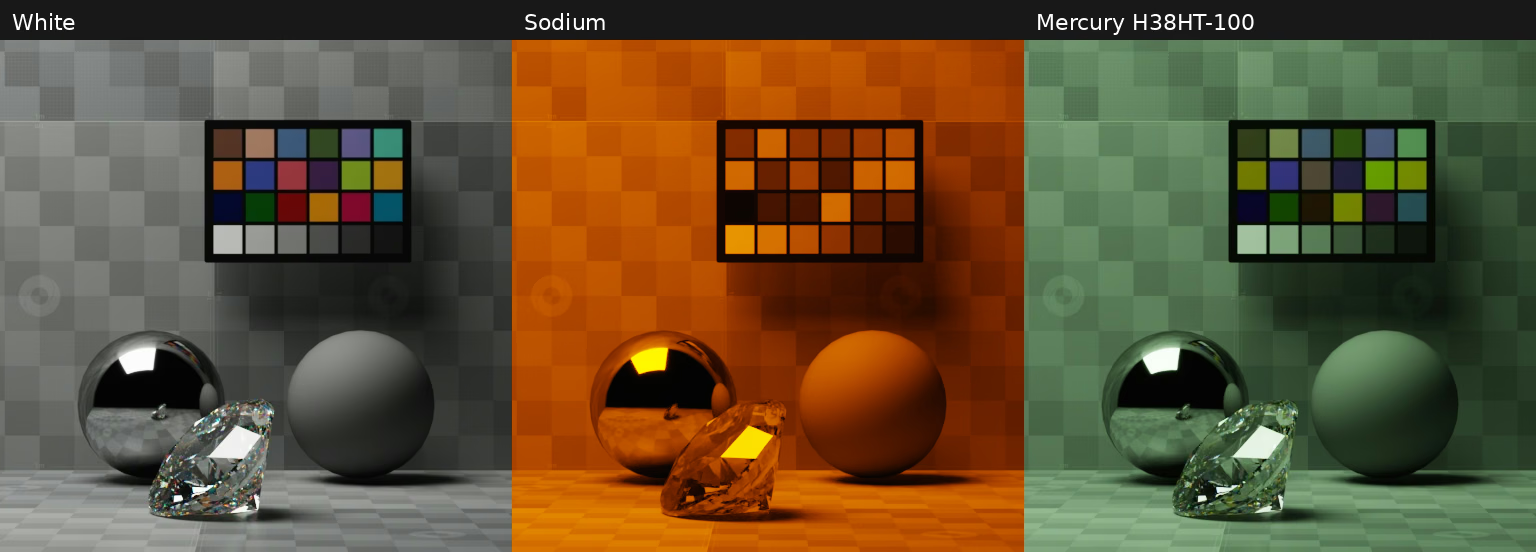
Spectral PathTracing under white (left), sodium (center), and mercury (right).#
Build and run from the example directory:
# Enter the spectral rendering example directory.
cd examples/c/spectral-rendering
# Configure a Release build and resolve the SDK dependencies.
cmake -B build -DCMAKE_BUILD_TYPE=Release
# Build the executable and stage its scene assets.
cmake --build build --config Release
# Render low-pressure sodium with RGB transport and save a PNG.
./build/spectral-rendering sodium rgb 4096 sodium-rgb.png
# Render low-pressure sodium with spectral PathTracing and save a PNG.
./build/spectral-rendering sodium spectral 4096 sodium-spectral.png
# Render mercury light with RGB transport and save a PNG.
./build/spectral-rendering mercury rgb 4096 mercury-rgb.png
# Render mercury light with spectral PathTracing and save a PNG.
./build/spectral-rendering mercury spectral 4096 mercury-spectral.png
On Windows, use build\Release\spectral-rendering.exe. The arguments are
illuminant, transport, sample count, and output PNG. Output resolution is
512 × 512. CMake stages the shared USD layer and its local assets beside the
executable. The example uses the C API from C++ and the shared ovrtx/ovstage loaders.
The following snippet sets the startup configuration.
// Select the process-wide material backend before creating any renderer.
ovrtx_config_entry_t entries[] = {
    ovrtx_config_entry_enable_spectral_rendering(transport == "spectral"),
};
ovrtx_config_t renderer_config{entries, 1};

ovrtx_result_t result = ovrtx_register_schema_paths(&renderer_config);
if (failed(result, "register_schema_paths") ||
    failed(ovrtx_create_renderer(&renderer_config, &renderer),
           "create_renderer")) {
    return 1;
}
The following snippet selects the shared scene variants and renders one converged PathTracing frame.
// Camera prims share geometry/exposure; only their spectral response differs.
const char* camera_path = camera == "canon5d" ? "/World/Canon5D" :
                          camera == "sony_a7iv" ? "/World/SonyA7IV" : "/World/Camera";
// Apply the API only when requested; default curves supply CIE 1931 responsivity.
std::string white_point_layer;
if (argc == 7) {
    const std::string camera_name = std::string(camera_path).substr(7);
    white_point_layer = "over \"" + camera_name +
        "\" (prepend apiSchemas = [\"PhysicalCameraResponsivityAPI\"]) {\n"
        "float physical:responsivity:colorTemperature = " + std::to_string(white_point) + "\n}\n";
}
constexpr ovstage_ordinal_t ordinal = 1;
std::filesystem::path executable_dir =
    std::filesystem::absolute(argv[0]).parent_path();
std::string scene_path =
    (executable_dir / "spectral.usda").generic_string();
std::string layer =
    "#usda 1.0\n(subLayers = [@" + scene_path +
    "@])\n"
    "over \"World\" {\n" + white_point_layer + " over \"RectLight\" (variants = { string illuminant = "
    "\"" +
    illuminant +
    "\" }) {}\n }\n"
    "over \"Render\" {\n over \"Camera\" (variants = { string transport = "
    "\"" +
    transport +
    "\" }) {\n rel camera = <" + camera_path +
    ">\n uint omni:rtx:pt:samplesPerPixel = " + std::to_string(spp) +
    "\n }\n }\n";
auto populate = ovstage_population_open_usd_from_string(
    stage,
    {layer.c_str(), layer.size()},
    ordinal,
    0.0,
    OVSTAGE_POPULATION_DOMAIN_RENDERING);
ovstage_write_floor_desc_t floor{ordinal, OVSTAGE_SCOPE_ALL};
if (wait_population(stage, populate) ||
    wait_stage(stage, ovstage_advance_write_floor(stage, &floor))) {
    std::cerr << "Could not populate the spectral scene." << std::endl;
    return cleanup(1);
}

ovx_string_t product_path = {"/Render/Camera", strlen("/Render/Camera")};
ovrtx_render_product_set_t render_products{&product_path, 1};
// PathTracing completes its samples within a single step.
ovrtx_step_result_handle_t final_handle = OVRTX_INVALID_HANDLE;
auto enqueue = ovrtx_step_with_stage(
    renderer, render_products, 1.0 / 60.0, ordinal, &final_handle);
ovrtx_op_wait_result_t wait_result{};
if (failed(enqueue, "step") ||
    failed(ovrtx_wait_op(renderer,
                         enqueue.op_index,
                         ovrtx_timeout_infinite,
                         &wait_result),
           "wait_op") ||
    report_wait_errors(wait_result)) {
    return cleanup(1);
}
The following snippet copies the rendered color output to a PNG.
ovrtx_render_product_set_outputs_t outputs{};
if (failed(ovrtx_fetch_results(
               renderer, final_handle, ovrtx_timeout_infinite, &outputs),
           "fetch_results")) {
    return cleanup(1);
}
auto output_handle = find_ldr_color(outputs);
ovrtx_map_output_description_t map_desc{};
map_desc.device_type = OVRTX_MAP_DEVICE_TYPE_CPU;
ovrtx_render_var_output_t output{};
if (output_handle == OVRTX_INVALID_HANDLE ||
    failed(ovrtx_map_render_var_output(renderer,
                                       output_handle,
                                       &map_desc,
                                       ovrtx_timeout_infinite,
                                       &output),
           "map_render_var_output") ||
    output.num_tensors != 1) {
    return cleanup(1);
}
DLTensor const& pixels = *output.tensors[0].dl;
int width = static_cast<int>(pixels.shape[1]);
int height = static_cast<int>(pixels.shape[0]);
std::filesystem::path output_path = std::filesystem::absolute(argv[4]);
std::filesystem::create_directories(output_path.parent_path());
bool wrote_output = stbi_write_png(output_path.string().c_str(),
                                   width,
                                   height,
                                   4,
                                   pixels.data,
                                   4 * width) != 0;
ovrtx_cuda_sync_t no_sync{};
ovrtx_unmap_render_var_output(renderer, output.map_handle, no_sync);
ovrtx_destroy_results(renderer, final_handle);
if (!wrote_output) {
    std::cerr << "Could not write " << output_path << std::endl;
    return cleanup(1);
}
std::cout << "Saved " << output_path << std::endl;
See Spectral Rendering for the comparison images, settings, and limitations.
Camera Responsivity Example#
Compare Canon EOS 5D and Sony α7 IV sensitivity curves from rawtoaces with the default CIE 1931 observer. The following commands render all six combinations of camera response and illuminant:
# Repeat the comparison under D65 daylight and sodium illumination.
for light in daylight sodium; do
  # Compare the CIE 1931 observer, Canon EOS 5D, and Sony α7 IV.
  for camera in cie1931 canon5d sony_a7iv; do
    # Render this illuminant and camera response with spectral PathTracing; save the named outputs.
    ./build/spectral-rendering "$light" spectral 4096 "${light}-${camera}.png" "$camera"
  done # Finish this camera comparison.
done # Finish both illuminants.
The camera choice defaults to cie1931. Custom responsivities require spectral
transport.
White-Point Adaptation#
Select the camera white point independently of the light. These commands render eight images with CIE 1931 responsivity, 4096 samples, 32 bounces, denoising, and firefly thresholds of 10,000. The camera responsivity API is applied when a white point is supplied; its default channel curves retain the CIE observer.
# Compare tungsten-like blackbody illumination with D65 daylight.
for light in blackbody3200 daylight; do
  # Select the camera white point explicitly; no scene estimation is performed.
  for white in 3200 5000 5600 6504; do
    # Save a spectral image using CIE 1931 responsivity and sensor-channel white balance.
    ./build/spectral-rendering "$light" spectral 4096 "${light}-wb${white}.png" cie1931 "$white"
  done # Finish the four white points.
done # Finish both illuminants.
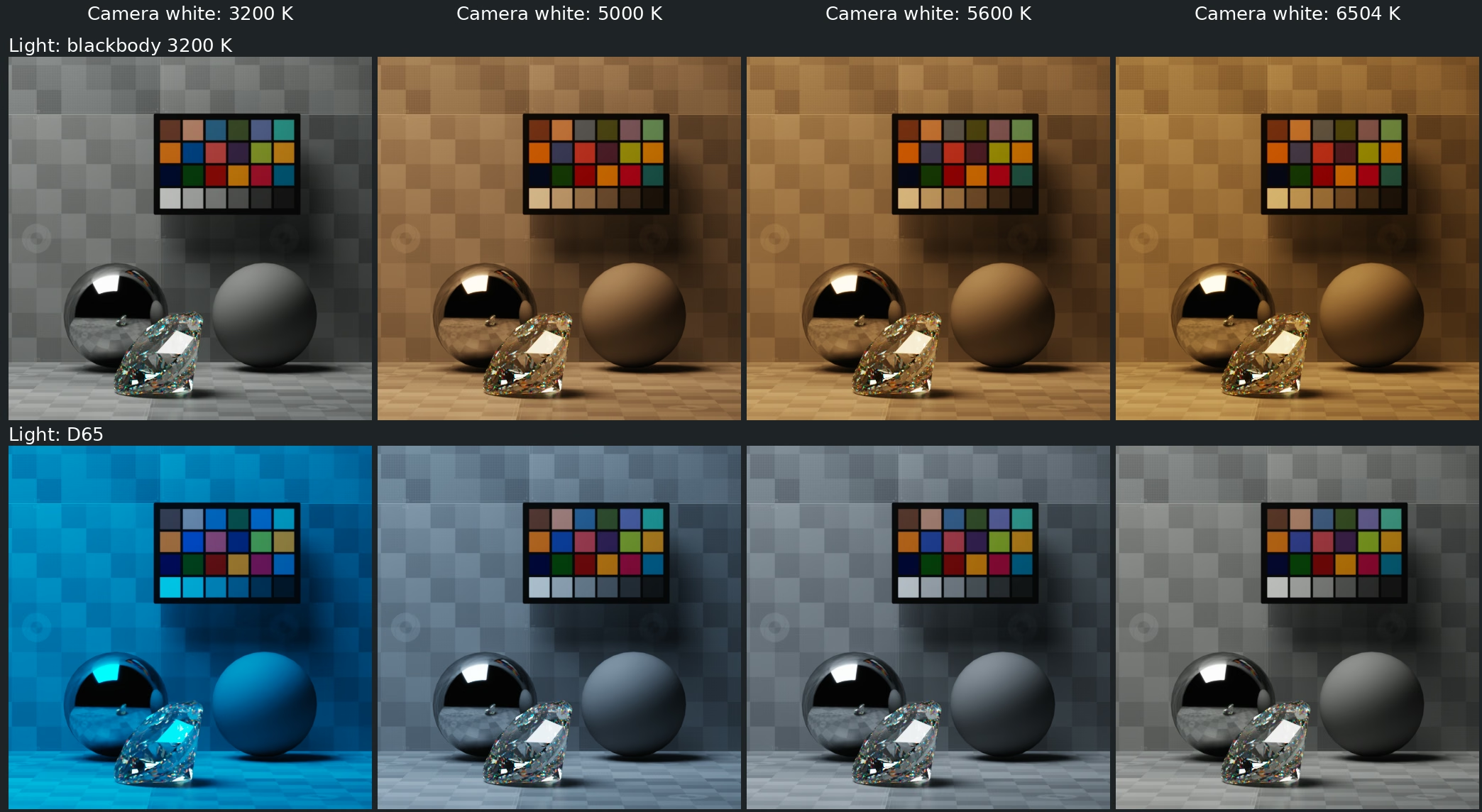
Top: blackbody 3200 K. Bottom: D65. Columns select 3200, 5000, 5600, and 6504 K camera white points.#