

Gaussian Splats#
Gaussian splats represent a scene with oriented, translucent ellipsoids. Each splat has a position, rotation, scale, opacity, and radiance. Use them to render captured appearance or procedurally authored particle fields.
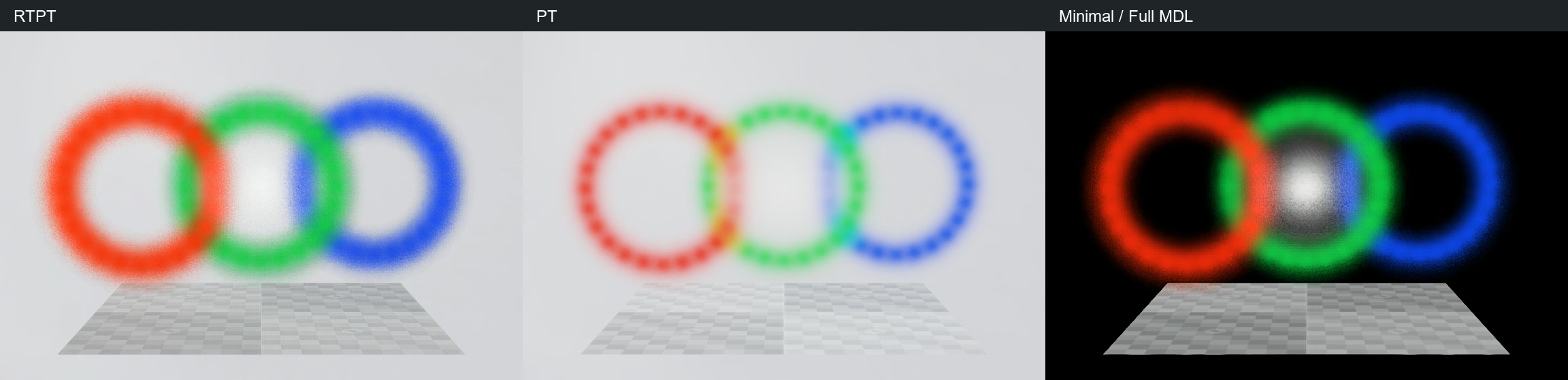
Left to right: RTPT, PT, and Minimal, with the same authored splats and camera. The modes differ in lighting, background, and image reconstruction.#
Note
Gaussian splats store captured lighting in their radiance. Scene lights affect them through shadows rather than direct illumination: changing a light’s intensity or color does not directly brighten or tint the splats, but scene objects can cast shadows onto them.
Without a bound material, ParticleField3DGaussianSplat uses
ParticleFieldEmissive. To adjust brightness on an explicitly bound instance
of this material, set inputs:emission_intensity on its shader. The default
is 1.0; lower values dim the splats and higher values brighten them.
Converting 3DGS PLY Files to USD#
Use NVIDIA’s usd-convert-gsplat to convert a 3D Gaussian
Splat (3DGS) .ply file to USD with a ParticleField3DGaussianSplat prim.
The input should contain 3DGS data, including scales, rotations, opacity, and
spherical harmonics, rather than only point positions or mesh geometry.
From your uv project directory, add the converter and OpenUSD Python bindings.
See Getting Started in Python for the Python setup:
uv add usd-convert-gsplat usd-core
Convert your splat file to a binary USD file, replacing the example paths with your own:
uv run python -m usd_convert_gsplat -i "scene.ply" -o "scene.usdc" --rotate-x 180
The optional --rotate-x 180 applies a 180-degree rotation around the X axis.
Adjust or omit it to match your source data’s orientation to your scene; this
rotation is not required for every dataset.
To render the converted asset, compose it with a camera and render-output configuration. See the Inline Composition section of Loading USD for a scene-wrapper example, and Sensor Configuration for the RenderProduct and RenderVar setup. See Python: Gaussian Splats for this example’s scene requirements and run commands.
Creating a Gaussian Splat Prim#
Author a ParticleField3DGaussianSplat prim. Its schema supplies the
particle-field APIs; you do not need to apply them individually. Each
per-particle array must describe the same number of splats.
The following equivalent examples create one orange splat. The quaternion is written with its real component first, and the scales are linear values in scene units. The example uses degree-zero spherical harmonics (SH0), so the color does not depend on viewing direction.
def ParticleField3DGaussianSplat "Splat" {
    point3f[] positions = [(0, 0, 0)]
    quatf[] orientations = [(1, 0, 0, 0)]
    float3[] scales = [(1, 0.5, 0.25)]
    float[] opacities = [0.9]
    uniform int radiance:sphericalHarmonicsDegree = 0
    # SH0 = (linear RGB - 0.5) / 0.2820947918; this is orange RGB (1, .3, 0).
    float3[] radiance:sphericalHarmonicsCoefficients = [(1.772454, -0.708982, -1.772454)]
}
splat = stage.DefinePrim("/Splat", "ParticleField3DGaussianSplat")
splat.CreateAttribute("positions", Sdf.ValueTypeNames.Point3fArray, custom=False).Set([(0, 0, 0)])
splat.CreateAttribute("orientations", Sdf.ValueTypeNames.QuatfArray, custom=False).Set([Gf.Quatf(1)])
splat.CreateAttribute("scales", Sdf.ValueTypeNames.Float3Array, custom=False).Set([(1, 0.5, 0.25)])
splat.CreateAttribute("opacities", Sdf.ValueTypeNames.FloatArray, custom=False).Set([0.9])
splat.CreateAttribute("radiance:sphericalHarmonicsDegree", Sdf.ValueTypeNames.Int,
                      custom=False, variability=Sdf.VariabilityUniform).Set(0)
splat.CreateAttribute("radiance:sphericalHarmonicsCoefficients", Sdf.ValueTypeNames.Float3Array,
                      custom=False).Set([(1.772454, -0.708982, -1.772454)])
USD declaration |
Meaning |
|---|---|
|
Particle centers in local scene units. |
|
Normalized particle rotations; identity is (1, 0, 0, 0). |
|
Positive linear scale along each particle’s local axis. |
|
Peak opacity for each particle; use values from 0 to 1. |
|
Schema default; author 0 for the single-coefficient example shown here. |
|
RGB spherical-harmonic coefficients, grouped by particle. Degree 0 uses one float3 per particle. |
For degree zero, convert linear RGB to a coefficient with
SH0 = (RGB - 0.5) / 0.2820947918. Do not put display-encoded RGB values
directly into the coefficient array. This example uses degree zero, with one
RGB coefficient per splat.
Render Modes#
Select the mode on the RenderProduct using omni:rtx:rendermode.
Mode |
Token |
Example behavior |
|---|---|---|
Real-Time Path Tracing |
|
Renders the particle field; accumulate frames for stochastic transparency. |
Path Tracing |
|
Renders the same field with path-tracing accumulation and reconstruction. |
Minimal |
|
Use Full MDL and DLSS Ray Reconstruction as configured below. Lighting and background differ from RTPT/PT. |
For Minimal, set both int omni:rtx:minimal:mode = 3 (Full MDL) and
int omni:rtx:minimal:dlss:mode = 2 (DLSS Ray Reconstruction). Full MDL
renders the splats; Ray Reconstruction denoises their stochastic transparency.
Author the DLSS attribute explicitly; it is not declared in the generated RTX
settings schema.
For accumulated Gaussian depth and albedo settings, see Real-Time Path-Tracing.
Limitations#
A single frame can be noisy because transparency is stochastic. Warm up and inspect the result at the resolution and frame count your application uses.