

DLSS 5 3D-Guided Neural Rendering#
Warning
This feature is experimental and currently supported only on Windows. It requires an NVIDIA Blackwell GPU and a driver that supports DLSS Neural Rendering. The current integration requires driver 615.64 or newer.
The required driver has not been validated for use with Omniverse. There may be unknown compatibility, rendering, or stability issues. This guidance will be updated once a suitable Production Branch driver has been validated.
DLSS 5 3D-Guided Neural Rendering (DLSS-NR) uses a neural model to enhance lighting and material appearance in a rendered image. It uses the image, depth, motion vectors, and temporal history to guide the result.
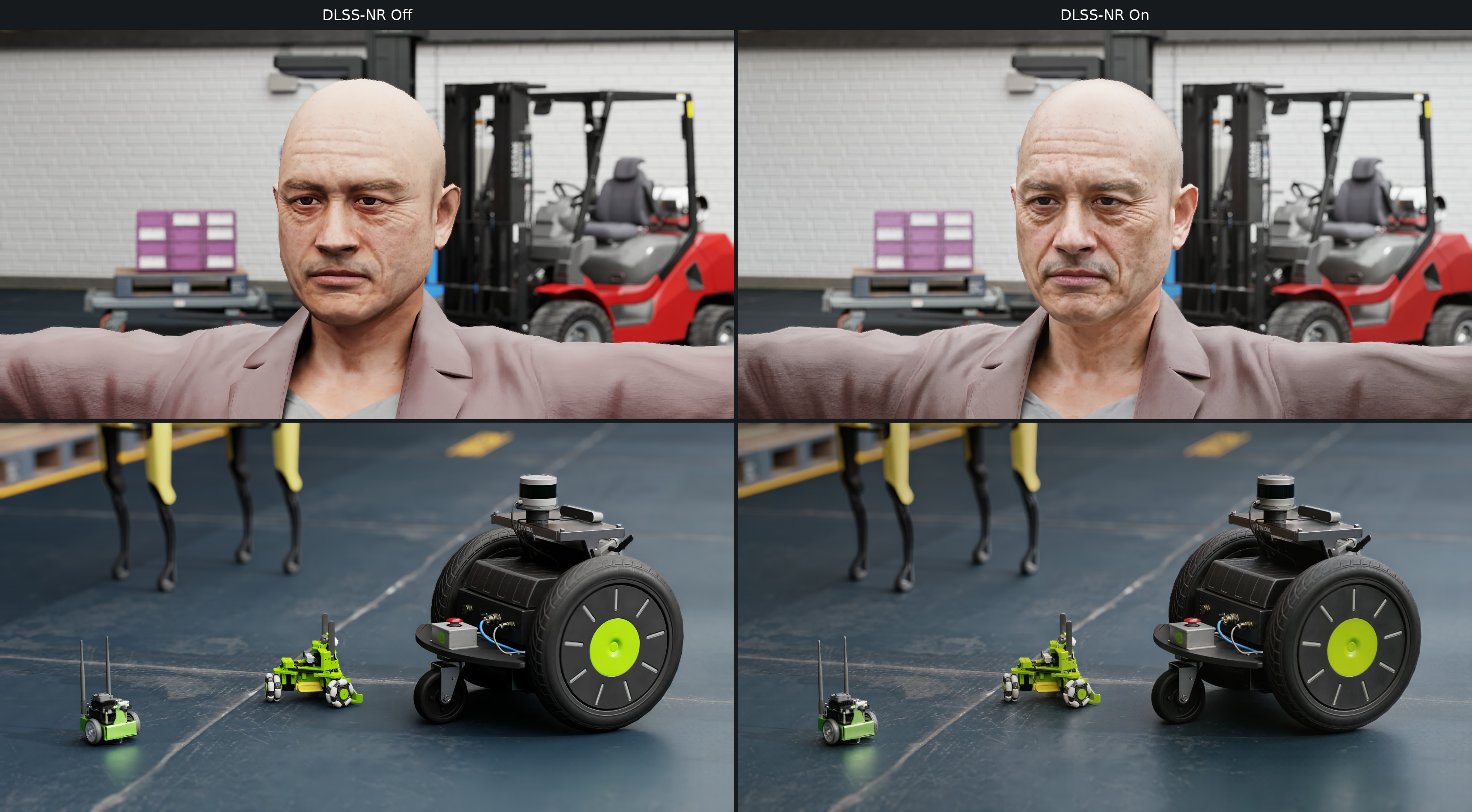
DLSS-NR Off (left) and On (right), shown on a portrait and a robot lineup.#
DLSS-NR generates appearance detail. Its output should not be treated as a physically accurate reference image. It is separate from DLSS Super Resolution (upscaling) and DLSS Ray Reconstruction (denoising).
Enable Neural Rendering#
DLSS-NR is off by default and is supported only in Real-Time Path-Tracing. It does not run in Path Tracing or Minimal.
Configure the camera’s RenderProduct as follows:
Select
RealTimePathTracingwithomni:rtx:rendermode.Request LdrColor in
orderedVars.Set
omni:rtx:dlssnr:enabledtotrue.
OmniRtxPostDlssNrAPI_1 is automatically applied to RenderProduct prims.
You can author its attributes directly on the RenderProduct. DLSS-NR runs
only when NGX reports support for the GPU and driver. Enabling the attribute
on an unsupported system leaves the image without the neural rendering effect.
The following snippets configure an existing scene camera for neural rendering.
The resolution sets the output size; the scene must provide /World/Camera.
def Scope "Render" {
    def RenderProduct "Camera" {
        int2 resolution = (1280, 720)
        rel camera = </World/Camera>
        rel orderedVars = [<LdrColor>]

        # Neural rendering requires real-time path tracing and an LDR output.
        token omni:rtx:rendermode = "RealTimePathTracing"
        bool omni:rtx:dlssnr:enabled = true

        def RenderVar "LdrColor" {
            string sourceName = "LdrColor"
        }
    }
}
from pxr import Gf, Sdf, UsdRender

stage.DefinePrim("/Render", "Scope")
product = UsdRender.Product.Define(stage, "/Render/Camera")
product.CreateResolutionAttr(Gf.Vec2i(1280, 720))
product.CreateCameraRel().SetTargets(["/World/Camera"])
product.CreateOrderedVarsRel().SetTargets(["/Render/Camera/LdrColor"])

# Neural rendering requires real-time path tracing and an LDR output.
prim = product.GetPrim()
prim.CreateAttribute("omni:rtx:rendermode", Sdf.ValueTypeNames.Token, custom=False).Set("RealTimePathTracing")
# OmniRtxPostDlssNrAPI_1 is automatically applied to RenderProducts.
prim.GetAttribute("omni:rtx:dlssnr:enabled").Set(True)

render_var = UsdRender.Var.Define(stage, "/Render/Camera/LdrColor")
render_var.CreateSourceNameAttr("LdrColor")
Controls#
These attributes belong to OmniRtxPostDlssNrAPI_1 on the RenderProduct.
The renderer clamps strength values to the range shown below.
USD declaration |
Behavior |
|---|---|
|
Enables neural rendering when the render mode, output, GPU, and driver support it. |
|
Overall effect strength, from 0 to 1. Zero preserves the original image; one applies the full effect. |
|
Whole-image tone adjustment strength, from 0 to 1. |
|
Spatially adaptive tone adjustment strength, from 0 to 1. |
|
Local detail and structure enhancement strength, from 0 to 1. |
|
Enables the model’s automatic influence mask. |
|
Skin-specific structure enhancement strength, from 0 to 1. |
|
Selects processing style 0, 1, or 2. |
|
Selects the NGX model preset: 0 uses the linked SDK default; 1 through 7 select presets A through G. Values are clamped to this range. Changing the preset recreates the feature and resets its history. |
|
Experimental number of chained evaluations, from 1 to 4. Each evaluation processes the preceding result with its own temporal history. Additional iterations increase processing and memory costs. |
Strength controls are read for each rendered frame. Changing the input, render, or output dimensions also recreates the feature and resets its history.
Note
Keep iterations at 1 when exploring the other controls. The chained
evaluations are experimental; more iterations do not guarantee a better image.
Outputs#
DLSS-NR affects LdrColor. If you request both LdrColor and HdrColor, the renderer applies the effect to the separately tone-mapped LDR image and keeps HDR unchanged. If you request only HdrColor, DLSS-NR is skipped.