

Rolling Shutter#
Overview#
A global shutter samples all photosites at the same time. A rolling shutter offsets sample time across the image, one row or column at a time. Moving straight edges can therefore appear curved or skewed.
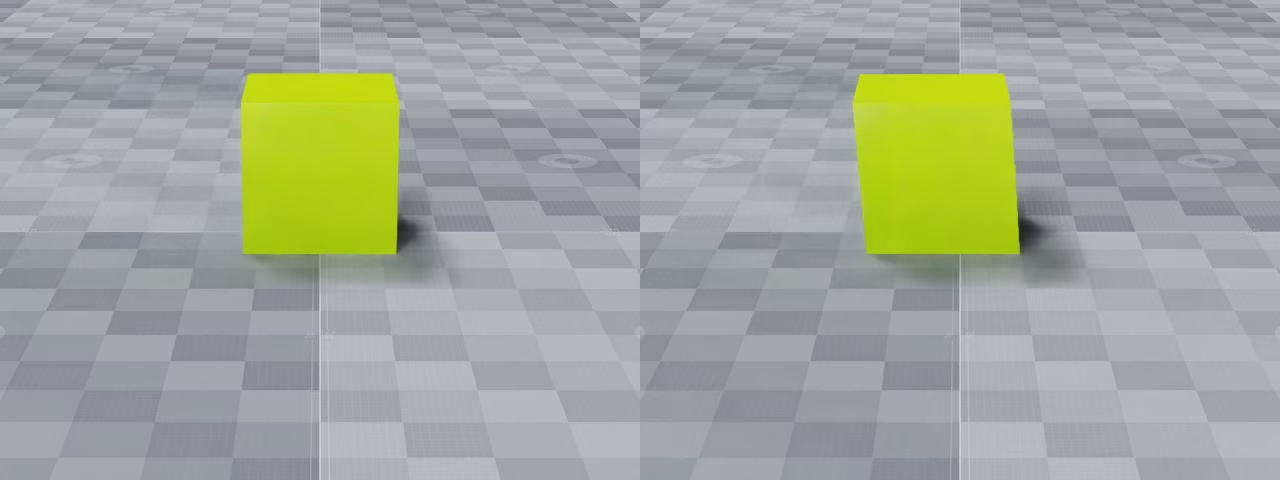
The global-shutter image on the left keeps the moving cube square. The top-to-bottom rolling shutter on the right skews it across the scan.#
Creating A Rolling-Shutter Camera#
Apply OmniRtxRollingShutterAPI to a camera and author its analytic timing
attributes. Times are rational seconds expressed as a (numerator,
denominator) pair.
USD declaration |
Description |
|---|---|
|
Selects the scan direction. |
|
Time from the start of one scan line to the next, expressed as rational seconds in |
|
Exposure duration for each scan line, expressed as rational seconds in |
scanOrder accepts these values:
Token |
Behavior |
|---|---|
|
Disables rolling shutter. |
|
Scans image rows from top to bottom. |
|
Scans image rows from bottom to top. |
|
Scans image columns from left to right. |
|
Scans image columns from right to left. |
The following example scans from top to bottom. Each line starts 40
microseconds after the previous line, and each line has a (1, 32) second
exposure (31.25 ms).
def Camera "Camera" (
    prepend apiSchemas = ["OmniRtxRollingShutterAPI"]
)
{
    double2 omni:rtx:rollingShutter:lineExposure = (1, 32)
    double2 omni:rtx:rollingShutter:lineOffset = (40, 1000000)
    token omni:rtx:rollingShutter:scanOrder = "topToBottom"
}
prim = UsdGeom.Camera.Define(stage, "/Camera").GetPrim()
prim.ApplyAPI("OmniRtxRollingShutterAPI")
prim.GetAttribute("omni:rtx:rollingShutter:scanOrder").Set("topToBottom")
prim.GetAttribute("omni:rtx:rollingShutter:lineOffset").Set(Gf.Vec2d(40, 1_000_000))
prim.GetAttribute("omni:rtx:rollingShutter:lineExposure").Set(Gf.Vec2d(1, 32))
Runtime Use#
Rolling shutter requires the motion BVH. Create the renderer with
ovrtx.RendererConfig.motion_bvh set to
ovrtx.MotionBvh.AUTO or ovrtx.MotionBvh.ENABLE. AUTO
activates the motion BVH when a rolling-shutter camera is rendered. In C, pass
OVRTX_MOTION_BVH_AUTO or OVRTX_MOTION_BVH_ENABLE to
ovrtx_config_entry_motion_bvh().
config = ovrtx.RendererConfig(motion_bvh=ovrtx.MotionBvh.AUTO)
renderer = ovrtx.Renderer(config)
ovrtx_config_entry_t entries[] = {
    ovrtx_config_entry_motion_bvh(OVRTX_MOTION_BVH_AUTO),
};
ovrtx_config_t config = {entries, 1};

ovrtx_renderer_t* rolling_shutter_renderer = nullptr;
ovrtx_result_t result = ovrtx_create_renderer(&config, &rolling_shutter_renderer);
ASSERT_API_SUCCESS(result.status);
For line index i, ovrtx samples at the end of this interval:
startTime + i * lineOffset to
startTime + i * lineOffset + lineExposure.
The total exposure span is (lineCount - 1) * lineOffset + lineExposure.
Top-to-bottom and bottom-to-top scans use the RenderProduct height as
lineCount. Horizontal scans use its width.
Exposure Across Steps#
If a step() window contains the entire exposure,
ovrtx returns one completed frame. If the exposure crosses step boundaries,
the scheduler divides it into ordered splits. isFullFrame becomes true only
for the final split.
With omni:sensor:Core:partialOutputs = true (the runtime default), each
split produces a FrameOutput. The renderer keeps one internal
canvas for the exposure, preserves scan lines written by earlier splits, and
adds the newly exposed lines on each later split. The RenderVars in the
camera output tables behave as follows:
RenderVars |
Intermediate-split behavior |
|---|---|
|
Return the last completed display image. The final split returns the newly completed image. |
|
Recomputed for every split from the current rolling-shutter GBuffer. Intermediate values describe the partially accumulated exposure, not a completed frame. |
|
Recomputed for every split. Per-pixel IDs follow the current synthetic-data and GBuffer state. |
|
Metadata rather than a scan-line image. It does not accumulate across scan lines and changes only when the scene’s semantic mapping changes. |
With omni:sensor:Core:partialOutputs = false, ovrtx suppresses intermediate
frame outputs and returns the frame only after the final split completes.
For setting this policy on cameras through ovstage, see
Multi-rate Sensor Simulation.
For a ticked camera, two exposure windows can overlap. Both are retained. A
single step() call can therefore return multiple
FrameOutput entries when it completes the older exposure and
also advances the newer one. With partial outputs enabled, this can be a full
frame for exposure A followed by an intermediate frame for exposure B whose
display-color outputs still display A.
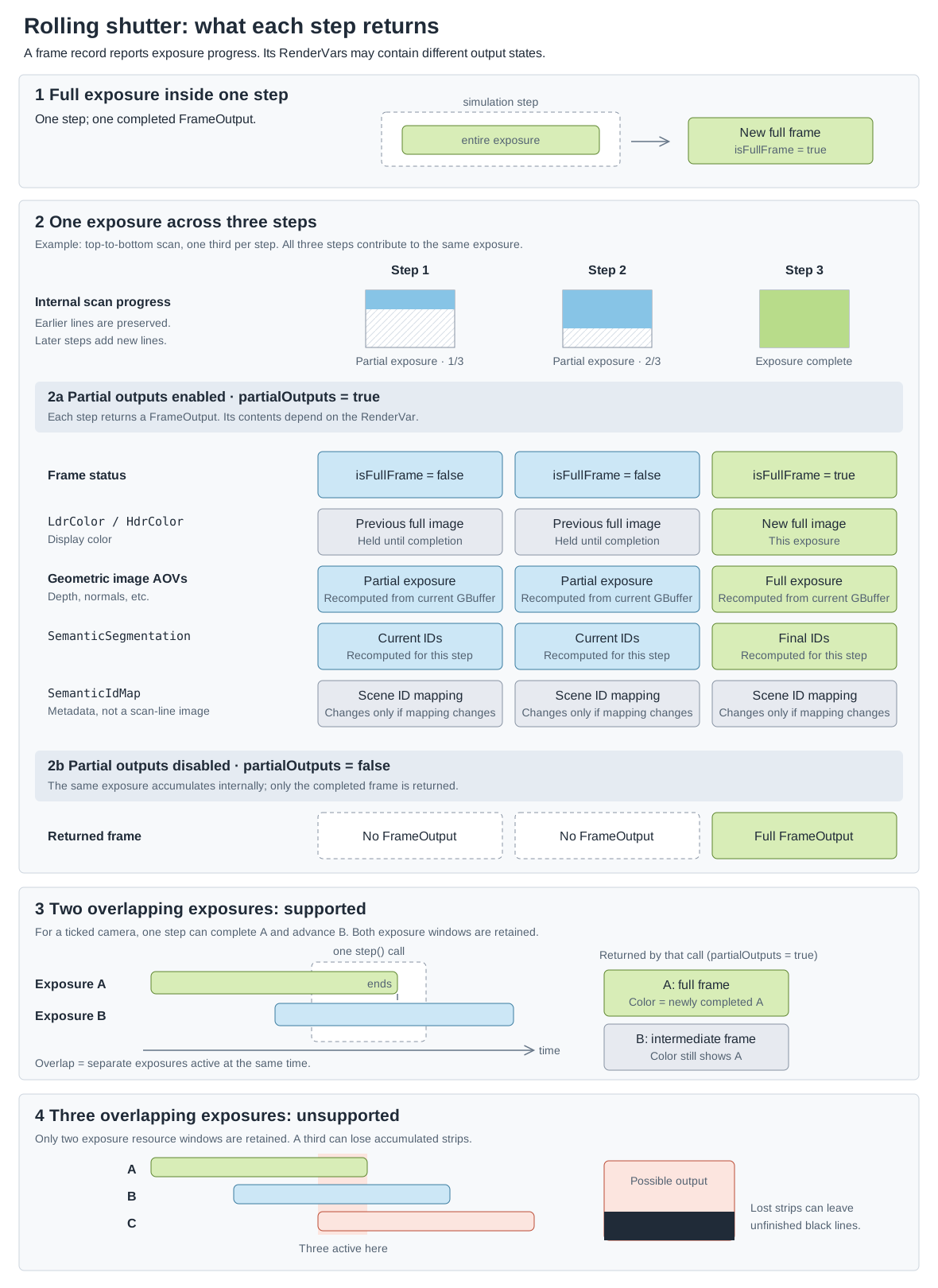
A normal exposure may complete in one step or accumulate across several steps. Partial-output mode controls whether intermediate frame records are returned. Two simultaneous ticked exposures are retained; a third exceeds the resource windows and can produce unfinished scan lines.#
Note
lineExposure shifts the sample time to the end of each line’s interval.
It does not yet integrate motion blur over that interval.
Warning
This limit is separate from one exposure accumulating normally across
several step() calls. For a camera with an
authored sensor frame rate, keep the total exposure span at or below two
sensor frame intervals. If the span is longer, three or more exposures can
overlap. ovrtx retains only two exposure resource windows, so accumulated
scan lines from the newer exposure can be discarded and appear black.
Reduce the resolution, lineOffset, lineExposure, or sensor frame
rate.
See Python: Camera Rolling Shutter for a runnable example.