

Decals#
Overview#
Decals project materials onto mesh geometry without changing the geometry, like stickers. An OmniDecal prim defines a bounded volume (the clipbox), a projector, and the material to overlay. Bound mesh surfaces receive the decal where they intersect that volume.
Use decals for labels, dirt, wear, and markings that should remain independent of the receiver’s geometry and UV layout. Overlapping decals are composited by priority; at most six contribute at one surface point.
Note
Decals differ from UV projectors. UV projectors provide texture coordinates to a primitive’s material. A decal overlays a separate material on bound geometry.
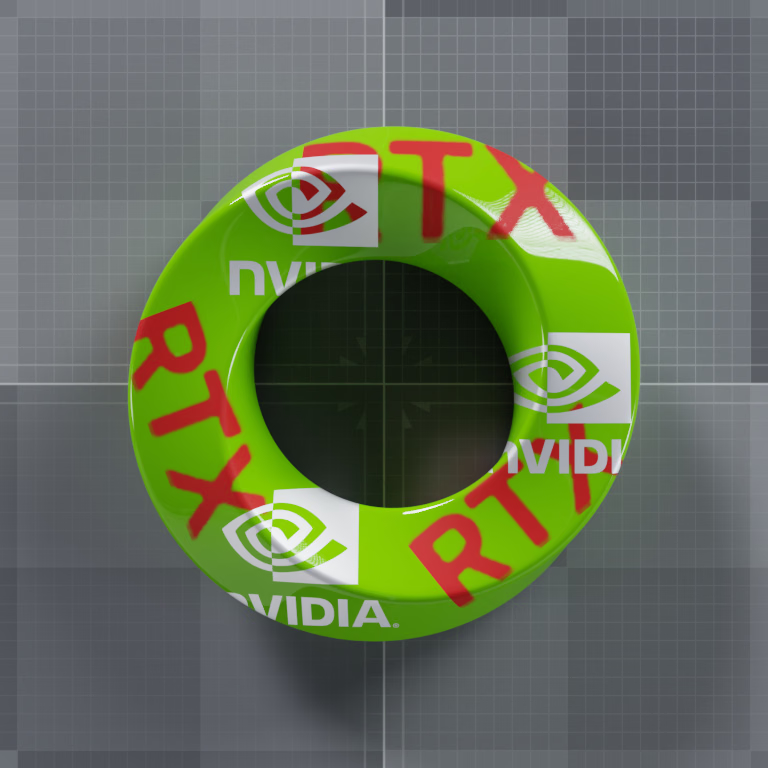
Silver NVIDIA logos overlap red RTX lettering on the curved receiver. Cutouts reveal lower-priority decals or the original green material.#
Creating a Decal#
Define an OmniDecal prim, set its local-space extent, and bind a material. OmniDecal and OmniCoordSysAPI do not have typed usd-core Python bindings, so Python authoring uses generic prim, attribute, metadata, and relationship APIs.
The following equivalent snippets create a planar decal and bind a placeholder material. Add an MDL shader network to that material for a visible result.
def Xform "World"
{
    def Scope "Looks"
    {
        def Material "DecalMaterial"
        {
        }
    }

    def OmniDecal "Decal" (
        prepend apiSchemas = ["MaterialBindingAPI"]
    )
    {
        float3[] extent = [(-1, -1, -1), (1, 1, 1)]
        rel material:binding = </World/Looks/DecalMaterial>
        bool omni:decal:enabled = true
        token omni:decal:faceMode = "front"
        int omni:decal:outputSpace = 0
        int omni:decal:priority = 0
        token omni:projector:space = "object"
        token omni:projector:type = "planar"
    }
}
    stage.DefinePrim("/World", "Xform")
    stage.DefinePrim("/World/Looks", "Scope")
    stage.DefinePrim("/World/Looks/DecalMaterial", "Material")

    decal = stage.DefinePrim("/World/Decal", "OmniDecal")
    decal.ApplyAPI("MaterialBindingAPI")
    decal.CreateAttribute("extent", Sdf.ValueTypeNames.Float3Array).Set(
        [Gf.Vec3f(-1), Gf.Vec3f(1)]
    )
    decal.CreateRelationship("material:binding").SetTargets(
        ["/World/Looks/DecalMaterial"]
    )
    decal.CreateAttribute("omni:decal:enabled", Sdf.ValueTypeNames.Bool).Set(True)
    decal.CreateAttribute("omni:decal:faceMode", Sdf.ValueTypeNames.Token).Set("front")
    decal.CreateAttribute("omni:decal:outputSpace", Sdf.ValueTypeNames.Int).Set(0)
    decal.CreateAttribute("omni:decal:priority", Sdf.ValueTypeNames.Int).Set(0)
    decal.CreateAttribute("omni:projector:space", Sdf.ValueTypeNames.Token).Set("object")
    decal.CreateAttribute("omni:projector:type", Sdf.ValueTypeNames.Token).Set("planar")
The decal’s transform and extent position and size the clipbox. The
OmniDecal schema automatically applies OmniProjectorAPI, whose
attributes control how the decal computes UV coordinates within that region.
Binding a Decal to a Prim#
Apply a named OmniCoordSysAPI instance to receiving geometry and target the decal through the matching coordSys:<instance>:binding relationship. The instance name connects the applied schema to its relationship.
def Xform "World"
{
    def Scope "Looks"
    {
        def Material "DecalMaterial"
        {
        }
    }

    def OmniDecal "Decal" (
        prepend apiSchemas = ["MaterialBindingAPI"]
    )
    {
        float3[] extent = [(-1, -1, -1), (1, 1, 1)]
        rel material:binding = </World/Looks/DecalMaterial>
        bool omni:decal:enabled = true
        token omni:decal:faceMode = "front"
        int omni:decal:outputSpace = 0
        int omni:decal:priority = 0
        token omni:projector:space = "object"
        token omni:projector:type = "planar"
    }

    def Cube "Cube" (
        prepend apiSchemas = ["OmniCoordSysAPI:Decal"]
    )
    {
        rel coordSys:Decal:binding = </World/Decal>
    }
}
    receiver = stage.DefinePrim("/World/Receiver", "Cube")
    receiver.SetMetadata(
        "apiSchemas",
        Sdf.TokenListOp.Create(prependedItems=["OmniCoordSysAPI:Decal"]),
    )
    receiver.CreateRelationship("coordSys:Decal:binding").SetTargets(["/World/Decal"])
Use a unique instance name for each additional decal. A decal can target multiple receivers, and a binding authored on a parent applies to mesh descendants unless a descendant blocks or replaces it.
OmniDecal Attributes#
OmniDecal defines the following attributes:
Declaration and default |
Behavior |
|---|---|
|
Local-space minimum and maximum corners of the clipbox. This attribute has no schema default and must be authored. |
|
Enables or disables the decal. |
|
Selects receiving faces; see Face Modes. |
|
Selects |
|
Orders overlapping decals. Higher values are composited over lower values; negative values are valid. |
Projector Attributes#
OmniDecal automatically applies OmniProjectorAPI. Its attributes
control how UV coordinates are computed inside the clipbox. Refer to
OmniProjectorAPI Attributes and Projector
Types.
Face Modes#
omni:decal:faceMode accepts the following values:
Value |
Effect |
|---|---|
|
Applies to front-facing surfaces. This is the default. |
|
Applies to back-facing surfaces. |
|
Applies to both sides. |
Front and back are classified by whether the rendering ray enters or exits the receiver surface. Projector direction does not currently affect this classification.
Ordering Overlapping Decals#
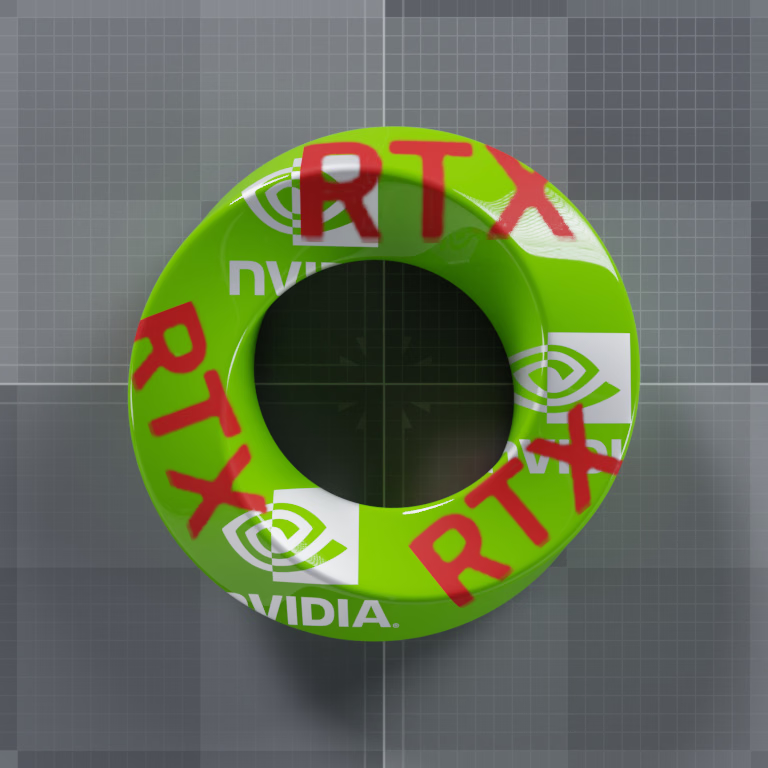
Use omni:decal:priority to choose which decal appears on top where their
projected masks overlap. Higher values cover lower values. A cutout in the
top decal reveals the next lower decal, or the receiver’s original material
if no lower decal applies. Assign distinct priorities when ordering matters;
do not rely on binding relationship order to break ties.
These Path Tracing renders use the same geometry, masks, and decal transforms. Only the red decals’ priority changes. Silver covers red at priority 10 versus 0; red covers silver when raised to 20. The masks’ black areas remain cut out in either order.
Limitations#
A maximum of six decals can be active at any surface point. If more than six overlap, only the six with the highest priority values are rendered.
Real-Time Path-Tracing and Path Tracing support decals. The Minimal renderer does not.
Cutout opacity is supported. Transmissive decal materials are not supported.
In path-traced modes, decal cutouts contribute to shadow visibility.
For complete runnable workflows, see Python: Decals and C: Decals. For material assignment, see Material Binding.