

Multi-rate Sensor Simulation#
Multi-rate sensor simulation lets cameras and lidars capture data at different
rates within the same simulation, without requiring you to schedule each sensor
yourself. Configure the capture rate on each sensor, then step the simulation
at a cadence that suits your workflow. Keep all enabled sensors in every
step() call; the renderer schedules their captures
and returns available outputs automatically. This lets you combine sensors
with different rates without tracking which sensors are due on each step or
changing your simulation loop when their rates change.
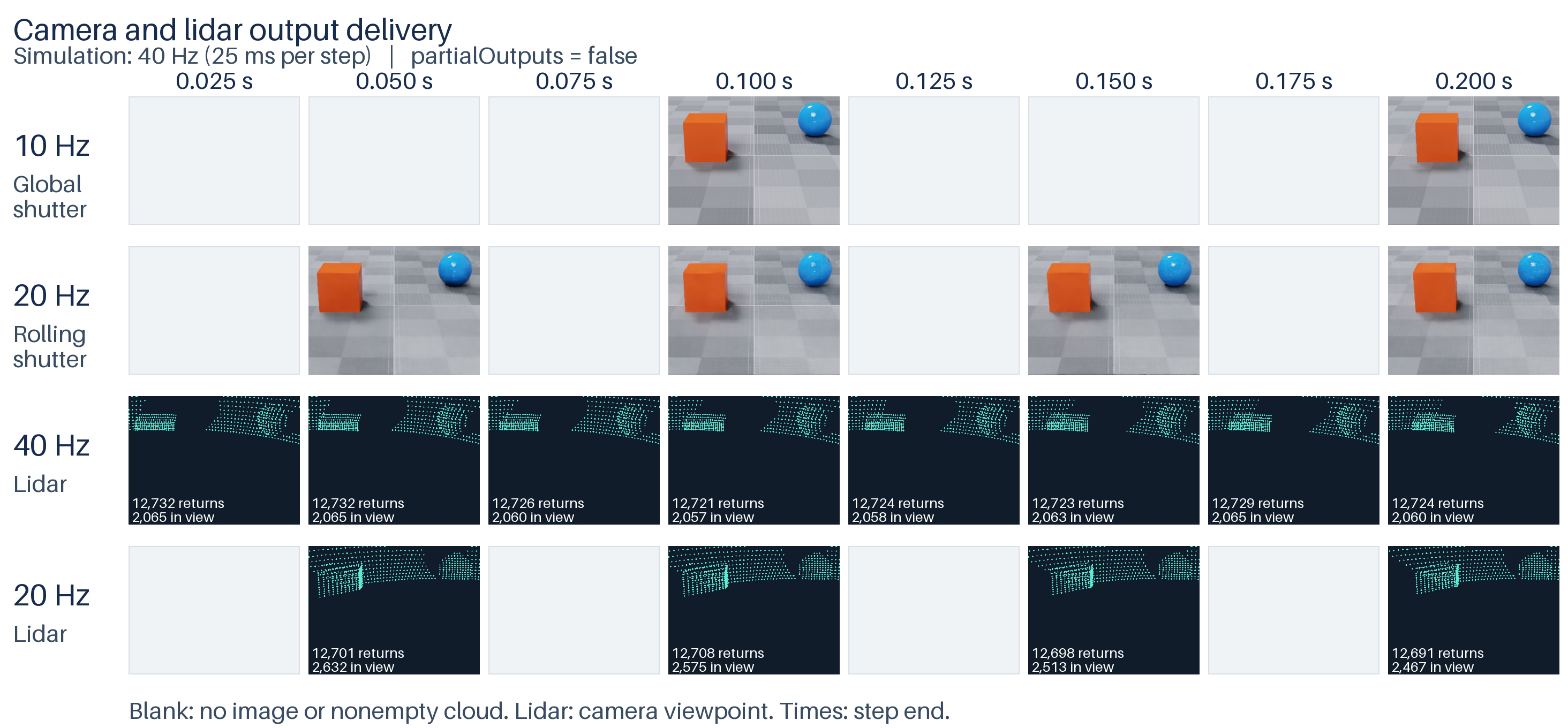
Two cameras and two lidars running at different capture rates in the Python example. The simulation advances in 25 ms steps and requests all four sensors on every step. With partial outputs disabled, each sensor returns only completed captures; blank cells mark steps with no output. Lidar points are projected from the rolling-shutter camera’s viewpoint.#
The simulation step, a sensor’s capture period, and output delivery are separate:
delta_timeadvances the common sensor simulation clock, in seconds.omni:sensor:frameRateschedules each sensor independently, in rational Hz.omni:sensor:Core:partialOutputscontrols whether an unfinished capture can produce intermediate outputs.
For example, a 20 Hz scanning lidar needs two 1/40-second steps to complete one scan. Keep it selected during both steps, including the first step with no completed output. A 40 Hz lidar completes a scan on every step.
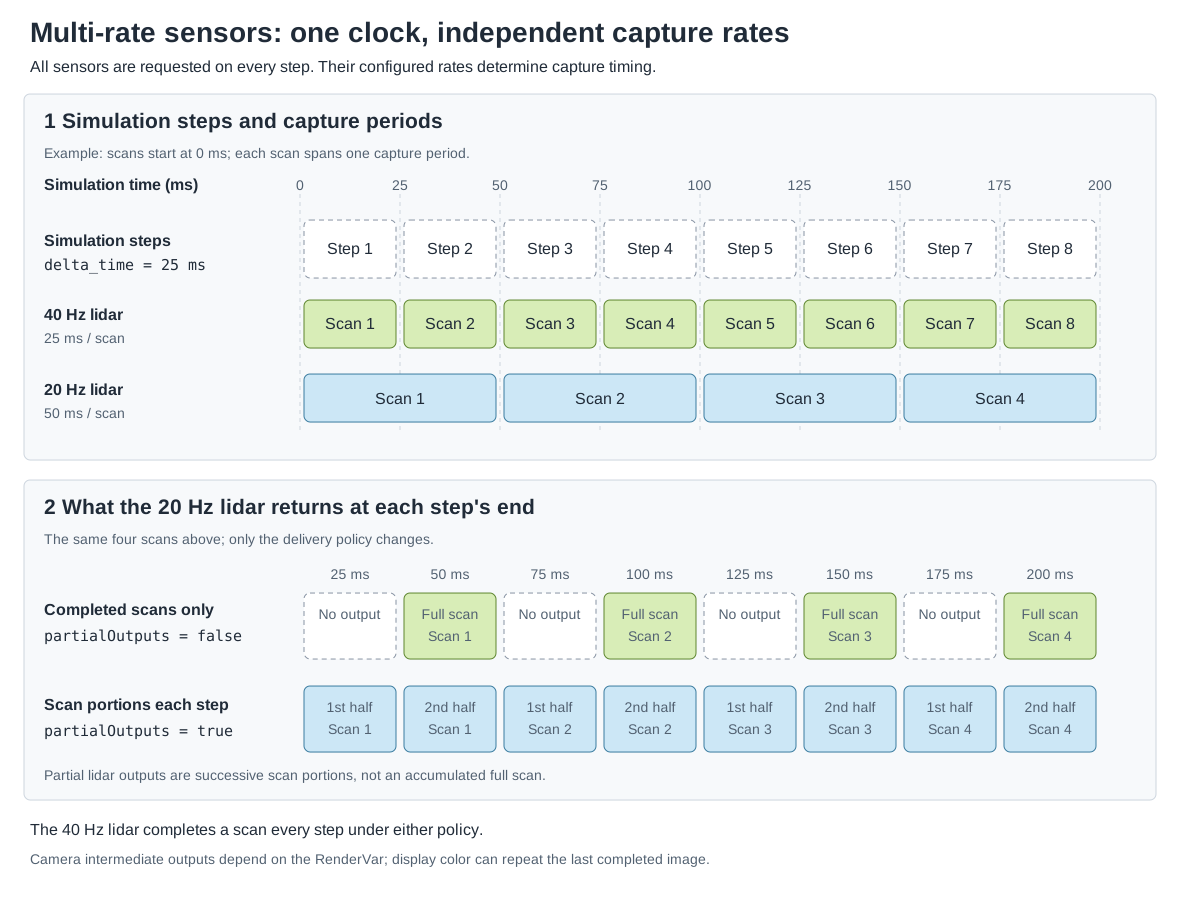
Simulation steps advance a shared clock. Each lidar captures at its own configured rate; partialOutputs changes when data is returned without changing those capture periods.#
Configure Each Sensor#
Author the rate and output policy on the sensor prim, rather than on its RenderProduct. Give each sensor its own RenderProduct as described in Sensor Configuration.
The shared timing API and generic lidar schema provide these controls:
USD declaration |
Behavior |
|---|---|
|
In OmniSensorAPI, a positive numerator/denominator sets capture frequency in Hz. The generic lidar schema defaults to (10, 1). |
|
In OmniSensorGenericLidarCoreAPI, permits intermediate scan delivery. Set false for completed scans. For cameras, set this policy through the runtime-stage API below. |
The following lidar captures forty scans per simulated second and delivers only completed scans. The Python tab authors the same attributes with OpenUSD:
def OmniLidar "Lidar40" (
    prepend apiSchemas = ["OmniSensorGenericLidarCoreAPI"]
)
{
    # A full scan completes in each 1/40-second simulation step.
    double2 omni:sensor:frameRate = (40, 1)
    bool omni:sensor:Core:partialOutputs = false
    bool omni:sensor:Core:includeInvalidPoints = false
    token omni:sensor:Core:elementsCoordsType = "CARTESIAN"
    # World-space points let both scans share the camera's viewpoint.
    token omni:sensor:Core:outputFrameOfReference = "WORLD"
    # Keep the emitter firing sequence shorter than each angular tick.
    float omni:sensor:Core:rotPatternFiringResDeg = 1
    double3 xformOp:translate = (-150, 150, 300)
    uniform token[] xformOpOrder = ["xformOp:translate"]
}
lidar = stage.DefinePrim("/World/Lidar40", "OmniLidar")
lidar.SetMetadata("apiSchemas", Sdf.TokenListOp.Create(prependedItems=["OmniSensorGenericLidarCoreAPI"]))
# Rational Hz: numerator / denominator. Each scan takes one 1/40-second step.
lidar.CreateAttribute("omni:sensor:frameRate", Sdf.ValueTypeNames.Double2).Set(Gf.Vec2d(40, 1))
lidar.CreateAttribute("omni:sensor:Core:partialOutputs", Sdf.ValueTypeNames.Bool).Set(False)
lidar.CreateAttribute("omni:sensor:Core:includeInvalidPoints", Sdf.ValueTypeNames.Bool).Set(False)
lidar.CreateAttribute("omni:sensor:Core:elementsCoordsType", Sdf.ValueTypeNames.Token).Set("CARTESIAN")
# World-space points let both scans share the camera's viewpoint.
lidar.CreateAttribute("omni:sensor:Core:outputFrameOfReference", Sdf.ValueTypeNames.Token).Set("WORLD")
lidar.CreateAttribute("omni:sensor:Core:rotPatternFiringResDeg", Sdf.ValueTypeNames.Float).Set(1)
UsdGeom.Xformable(lidar).AddTranslateOp().Set(Gf.Vec3d(-150, 150, 300))
Apply OmniSensorAPI and use the same frameRate attribute for a scheduled
camera. Without a positive
authored rate, an ordinary camera is automatically triggered by renderer steps;
it does not acquire a fixed capture rate from delta_time alone.
For a rolling-shutter camera, also configure the exposure timing. This 20 Hz
camera has a 50 ms exposure span at 240 rows: 239 / 9560 + 1 / 40 = 1 / 20
second. Each exposure spans exactly two 25 ms simulation steps:
def Camera "Camera20" (
    prepend apiSchemas = ["OmniSensorAPI", "OmniRtxRollingShutterAPI"]
)
{
    double2 omni:sensor:frameRate = (20, 1)
    float focalLength = 50
    float horizontalAperture = 20.955
    # At 240 rows, 239 / 9560 + 1 / 40 = 1 / 20 second.
    # Each exposure spans exactly two 25 ms simulation steps.
    double2 omni:rtx:rollingShutter:lineExposure = (1, 40)
    double2 omni:rtx:rollingShutter:lineOffset = (1, 9560)
    token omni:rtx:rollingShutter:scanOrder = "topToBottom"
    float3 xformOp:rotateXYZ = (-20, 0, 0)
    double3 xformOp:translate = (0, 350, 1000)
    uniform token[] xformOpOrder = ["xformOp:translate", "xformOp:rotateXYZ"]
}
camera = UsdGeom.Camera.Define(stage, "/World/Camera20")
sensor = camera.GetPrim()
sensor.SetMetadata(
    "apiSchemas", Sdf.TokenListOp.Create(prependedItems=["OmniSensorAPI", "OmniRtxRollingShutterAPI"])
)
sensor.CreateAttribute("omni:sensor:frameRate", Sdf.ValueTypeNames.Double2).Set(Gf.Vec2d(20, 1))
# At 240 rows, 239 / 9560 + 1 / 40 = 1 / 20 second: two 25 ms steps.
sensor.CreateAttribute("omni:rtx:rollingShutter:lineExposure", Sdf.ValueTypeNames.Double2).Set(Gf.Vec2d(1, 40))
sensor.CreateAttribute("omni:rtx:rollingShutter:lineOffset", Sdf.ValueTypeNames.Double2).Set(Gf.Vec2d(1, 9560))
sensor.CreateAttribute("omni:rtx:rollingShutter:scanOrder", Sdf.ValueTypeNames.Token).Set("topToBottom")
camera.AddTranslateOp().Set(Gf.Vec3d(0, 350, 1000))
camera.AddRotateXYZOp().Set(Gf.Vec3f(-20, 0, 0))
See Rolling Shutter for exposure-span and motion-BVH requirements.
The current scheduler reads omni:sensor:frameRate; do not substitute the
legacy omni:sensor:tickRate spelling.
Stepping Multiple RenderProducts#
The RenderProduct input set identifies the sensors to simulate. You should always request every sensor in every step, and ovrtx will deliver back the results that are ready each step. Removing a product discards its accumulated rendering history. Repeatedly omitting and re-adding a slow sensor can incur teardown, initialization, and warm-up work. Do not construct the input set from a list of outputs due this step.
# Update scene animation to the next 25 ms simulation time.
ordinal += 1
simulation_time = (step_index + 1) / 40
ovstage.population.update_from_usd_time(stage, ordinal, simulation_time)
# Make the scene updates available to the renderer.
stage.advance_write_floor(ordinal, ovstage.Scope.ALL).wait()
# Advance every sensor by 25 ms, including those with no output this step.
# Capture rates and partialOutputs determine when outputs are returned.
# Keep all four sensors requested to avoid teardown and reinitialization.
products = renderer.step(
    render_products={
        "/Render/Lidar40",
        "/Render/Lidar20",
        "/Render/Camera10",
        "/Render/Camera20",
    },
    delta_time=1 / 40,
    ordinal=ordinal,
)
// Publish animated scene state before advancing the sensor clock.
++ordinal;
const double simulation_time = (step_index + 1) / 40.0;
const auto population = ovstage_population_apply_usd_time(stage_, ordinal, simulation_time);
ASSERT_EQ(population.status, OVSTAGE_OK);
docs_wait_ovstage_population_no_errors(stage_, population.op_index);
docs_ovstage_advance_write_floor(stage_, ordinal);

// Keep slow sensors selected even on steps with no completed output.
ovx_string_t paths[] = {
    ovx_str("/Render/Lidar40"), ovx_str("/Render/Lidar20"),
    ovx_str("/Render/Camera10"), ovx_str("/Render/Camera20"),
};
ovrtx_render_product_set_t products{};
products.render_products = paths;
products.num_render_products = 4;
ovrtx_step_result_handle_t step_handle = OVRTX_INVALID_HANDLE;
const auto operation = ovrtx_step_with_stage(
    renderer_, products, 1.0 / 40.0, ordinal, &step_handle);
ASSERT_API_SUCCESS(operation.status);
For attached-stage ordering and ordinals, see ovstage Integration. For C result fetching and lifetime, see Sensor Outputs.
Choose When To Deliver Outputs#
Set omni:sensor:Core:partialOutputs through ovstage after loading the scene
and before the first render step. For cameras, adding this attribute only to the
USD scene does not set the runtime output policy. The following snippets apply
the same policy to all four sensors and publish the write before stepping:
# Set the delivery policy on all four sensors before the first step.
# False returns completed captures only; True also allows intermediate outputs.
ordinal += 1
with ovstage.PathDictionary(stage) as paths:
    path_list = paths.create_path_list_from_strings(
        [
            "/World/Lidar40",
            "/World/Lidar20",
            "/World/Camera10",
            "/World/Camera20",
        ]
    )
    with stage.query_from_path_list(path_list) as query:
        stage.write_attribute(
            query,
            "omni:sensor:Core:partialOutputs",
            ordinal=ordinal,
            tensors=np.full(4, args.partial_outputs, dtype=np.bool_),
            is_array=False,
        ).wait()
    paths.destroy_path_list(path_list)
stage.advance_write_floor(ordinal, ovstage.Scope.ALL).wait()
// The pinned ovrtx 0.5 camera schemas lack this attribute. Set it through
// ovstage before the first step, then publish the write ordinal.
++ordinal;
auto* dictionary = ovstage_get_path_dictionary(stage_);
const ovx_string_t sensor_paths[] = {
    ovx_str("/World/Lidar40"), ovx_str("/World/Lidar20"),
    ovx_str("/World/Camera10"), ovx_str("/World/Camera20"),
};
ovx_primpath_list_t path_list = OVX_INVALID_PRIMPATH_LIST;
const auto path_result = path_dictionary_create_path_list_from_strings(
    dictionary, sensor_paths, 4, &path_list);
ASSERT_EQ(path_result.status, OVX_API_SUCCESS);
ovstage_query_handle_t query = OVSTAGE_INVALID_QUERY_HANDLE;
ASSERT_EQ(ovstage_query_from_path_list(stage_, path_list, &query), OVSTAGE_OK);

// Deliver only completed captures here. Use true to also deliver partial outputs.
bool partial_outputs[] = {false, false, false, false};
int64_t shape[] = {4};
DLTensor tensor{};
tensor.data = partial_outputs;
tensor.device = {kDLCPU, 0};
tensor.ndim = 1;
tensor.dtype = {kDLBool, 8, 1};
tensor.shape = shape;
ovstage_write_data_t data{};
data.tensors = &tensor;
data.tensor_count = 1;
data.is_array = false;
const ovx_string_or_token_t attribute{
    0, ovx_str("omni:sensor:Core:partialOutputs")
};
const auto write = ovstage_write_attribute(
    stage_, query, attribute, ordinal, data, OVSTAGE_PRIM_MODE_UPSERT);
ASSERT_EQ(write.status, OVSTAGE_OK);
docs_wait_ovstage_no_errors(stage_, write.op_index);
const auto release = ovstage_release_query(stage_, query);
ASSERT_EQ(release.status, OVSTAGE_OK);
docs_wait_ovstage_no_errors(stage_, release.op_index);
path_dictionary_release_path_list_reference(dictionary, path_list);
docs_ovstage_advance_write_floor(stage_, ordinal);
With partialOutputs = false, a capture spanning several steps accumulates
until it is complete. This is the appropriate policy when a consumer needs a
whole lidar scan or completed camera exposure. It suppresses intermediate
delivery; it does not pause the sensor’s simulation or eliminate the work
needed to accumulate the capture.
With partialOutputs = true, a step can also deliver partial captures.
The output rate can therefore exceed the authored capture rate. For lidar,
consume the delivered portion of the scan. Camera AOVs have different
intermediate-output semantics. In particular, LdrColor
returns the last completed display image during an unfinished exposure.
Its public output has no isFullFrame parameter. Use partialOutputs = false
when the consumer requires only newly completed images. See
Rolling Shutter for the per-AOV behavior.
Process only available output:
Iterate the returned products and all of their frames. A product can be absent or have an empty frame list; a sufficiently large step can complete multiple frames.
For lidar, use
Counts[0]to bound delivered point data. A zero count means there are no delivered points in that output. It is not a reason to remove the lidar from the next step.A zero point count alone does not identify an incomplete scan: a completed scan can also contain no valid returns. Use sensor timing and output metadata when that distinction matters.
Use frame capture timestamps and point-cloud metadata to associate data with simulation time. The time when a result becomes available need not equal the capture start time.
For the generic lidar in this example, frameId advances on intermediate
render calls too; it is not a count of delivered full scans.
The point-cloud motion timestamps frameStartTimeStampNs and
frameEndTimeStampNs describe the final render slice in an accumulated scan.
Use FrameOutput.start_time / end_time for the full capture interval.
In ovrtx 0.6 and later, timestampNs anchors the delivered point offsets at
the accumulated scan start. The pinned 0.5 package predates this fix: do not
use its timestampNs as the accumulated scan’s start time. The example’s
JSON report includes the runtime version and the FrameOutput capture times.
Observe a Paused Simulation#
A normal camera with no positive omni:sensor:frameRate and no long exposure
can act as an interactive observer of the same scene. After publishing an
observer transform at a new ordinal, step with delta_time=0. This refreshes
the view without advancing the common sensor clock. Do not advance object
animation on these view-only updates.
Keep both the observer and the scheduled sensor products in the input set.
Use partialOutputs=false on the simulated camera and hold its last completed
image between captures. Stage ordinals order scene writes and renderer reads;
they are independent of elapsed simulation time.
Start this pattern with a positive simulation step. For an instantaneous
scheduled sensor, a zero-time step exactly at its initial startTime can
trigger a capture. Repeated zero-time warmup at that boundary is not a neutral
observer-only operation.
The C: Simulated Camera and Observer example combines a 30 Hz top-down sensor with a Vulkan observer, pause/resume controls, and a retained sensor inset.
Further Reading#
Python: Multi-rate Sensors — runnable comparison with two lidars, two cameras, a timing report, and headless image output.
Sensor Outputs — result iteration, mapping, and output metadata.
Reading Sensor PointClouds — point-cloud tensor layouts and validity.