

Your First Node#
We are going to take the image the renderer produces, convert it to grayscale on the GPU, and publish the result as a new AOV of our own. This is what we will have at the end:
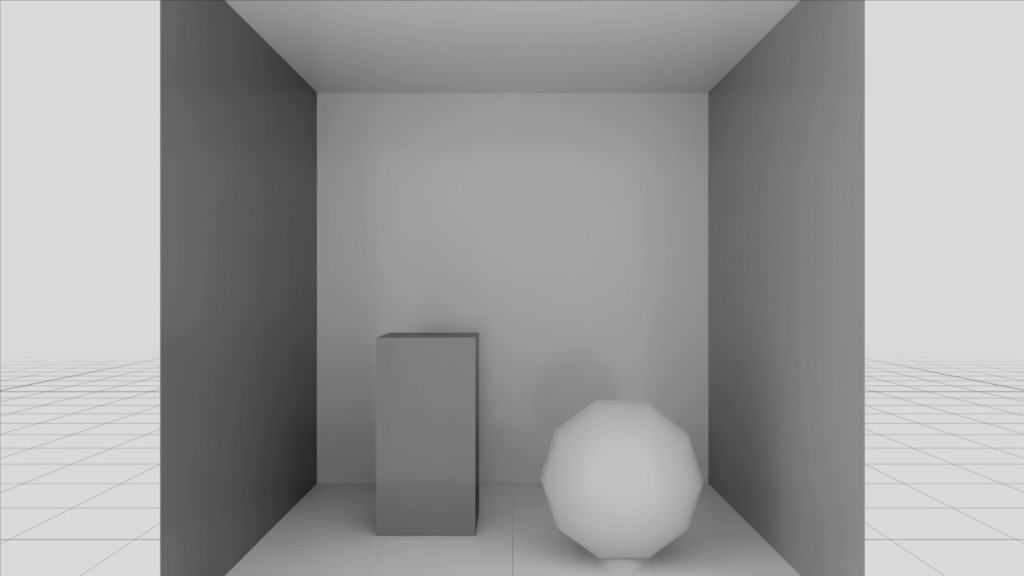
That takes three files and a scene to wire them into, written in that order, in CUDA. Being able to write a CUDA kernel and read USD is assumed; neither is taught here.
Note
The complete runnable project, with main.py and uv run main.py, is
Python: SPG Grayscale.
Note
This first node uses CUDA to keep the workflow focused. You can also build the same example with Slang by changing the GPU source and Lua launch script.
Step 1: The Kernel#
File: GrayscaleKernel.cu
SPG compiles this at runtime with NVRTC.
// SPG kernel: convert the LdrColor AOV to grayscale.
// The entry point is declared extern "C" so NVRTC can resolve it by the
// subIdentifier name ("grayscale") authored in GrayscaleKernel.usda.
extern "C" __global__ void grayscale(
    int width,
    int height,
    cudaTextureObject_t inputLdrColor,
    cudaSurfaceObject_t outputLdrGrayscale)
{
    int x = blockIdx.x * blockDim.x + threadIdx.x;
    int y = blockIdx.y * blockDim.y + threadIdx.y;

    if (x < width && y < height)
    {
        // Read the input AOV through a read-only, hardware-cached texture.
        uchar4 pixel = tex2D<uchar4>(inputLdrColor, x, y);

        // ITU-R BT.601 luminance weights.
        float luminance = 0.299f * pixel.x + 0.587f * pixel.y + 0.114f * pixel.z;
        unsigned char gray = (unsigned char)min(255.0f, max(0.0f, luminance));

        // Write the output AOV through a read/write surface.
        uchar4 out = { gray, gray, gray, pixel.w };
        surf2Dwrite<uchar4>(out, outputLdrGrayscale, x * sizeof(uchar4), y);
    }
}
Three things in there are not free choices:
The entry point is
extern "C". Without C linkage SPG cannot find it by name.uchar4matches theLdrColorAOV, which is RGBA uint8.The name
grayscaleis the first of three places it has to appear. We will write the other two in the next two steps.
Step 2: The Lua Launch Script#
File: GrayscaleKernel.cu.lua
The script says how the kernel is launched. It receives an inputs table holding a
descriptor for each resource bound to the node, fills an outputs table with what the
node’s outputs have to be, and returns the launch configuration. Its full surface is
The Lua Launch Script.
The function name is the second of the three places that name has to appear.
-- Launch script for GrayscaleKernel.cu. SPG calls this once per frame.
-- The function name must equal the subIdentifier ("grayscale").
function grayscale(inputs, outputs)
    assert(#inputs["LdrColor"].shape == 2, "Input must be a 2D image")
    assert(inputs["LdrColor"].dtype == cuda.uchar4, "Input must be uchar4")

    -- shape is 1-indexed: [1] = height (rows), [2] = width (columns).
    local height = inputs["LdrColor"].shape[1]
    local width  = inputs["LdrColor"].shape[2]

    -- Allocate the output AOV before launching.
    outputs["LdrGrayscale"] = cuda.image(width, height, cuda.uchar4)

    return cuda.kernel({
        -- args order/types must match the C signature exactly.
        args = {
            cuda.int(width),                             -- -> int width
            cuda.int(height),                            -- -> int height
            cuda.TextureObject(inputs["LdrColor"]),      -- -> cudaTextureObject_t inputLdrColor
            cuda.SurfaceObject(outputs["LdrGrayscale"]), -- -> cudaSurfaceObject_t outputLdrGrayscale
        },
        block = { 32, 32 },
        grid  = { math.ceil(width / 32), math.ceil(height / 32) },
    })
end
Again, what is not a free choice:
The keys
"LdrColor"and"LdrGrayscale"are the USD attribute names, which we author in the next step. They have to match exactly.The
argslist has to match the kernel’s parameter list, in order and in type. The inline comments name the C parameter each entry feeds.shape[1]is height andshape[2]is width, whilecuda.imagetakes width first. Swap that pair and the picture comes out transposed.cuda.uchar4is a dtype: it says what one element of the resource is, here four unsigned 8-bit numbers, so one RGBA pixel. Dtypes are values taken from thecudatable and handed to the functions that create resources. The input’s own dtype is readable asinputs["LdrColor"].dtype, which is how a script checks what it was given. Refer to Shapes and Types.
Step 3: The USD Shader Definition#
File: GrayscaleKernel.usda
This declares the node’s interface and points SPG at the source file.
# Reusable SPG shader definition. A scene references this prim and connects
# its ports. SPG finds the launch script by appending ".lua" to the source
# asset path (GrayscaleKernel.cu -> GrayscaleKernel.cu.lua), so keep them
# co-located.
def Shader "GrayscaleKernel"
{
    uniform token info:implementationSource = "sourceAsset"
    uniform asset info:spg:sourceAsset = @GrayscaleKernel.cu@
    uniform token info:spg:sourceAsset:subIdentifier = "grayscale"

    # opaque resource ports: the concrete dtype/shape is resolved at runtime
    # by the launch script.
    opaque inputs:LdrColor
    opaque outputs:LdrGrayscale
}
Four things to get right here:
info:spg:sourceAssetis the path to the.cufile, relative to this.usda. Its extension is what tells SPG how to treat it.info:spg:sourceAsset:subIdentifieris the third and last place the namegrayscaleappears.opaque inputs:LdrColorandopaque outputs:LdrGrayscaleare the names the launch script keyed on in the previous step.SPG finds the launch script by appending
.luato the source asset path, which is why the two files are named as they are. Refer to The Lua Launch Script.
Nothing here names a scene. This file is a definition, and the scene we write next references it.
Step 4: The Scene File#
File: grayscale_scene.usda
This is where the node joins the render. The rendering section of the scene follows; the rest of the file is Cornell Box-inspired geometry, walls, a box and a sphere, which the renderer draws and our node then transforms.
def Scope "Render"
{
    def RenderProduct "GrayscaleDemo"
    {
        uniform int2 resolution = (1280, 720)
        rel camera = </World/Camera>
        rel orderedVars = [ <LdrColor>, <LdrGrayscale> ]

        def RenderVar "LdrColor"
        {
            uniform string sourceName = "LdrColor"
            opaque omni:rtx:aov
        }

        def RenderVar "LdrGrayscale"
        {
            uniform string sourceName = "LdrGrayscale"
            opaque omni:rtx:aov.connect = <../GrayscaleKernel.outputs:LdrGrayscale>
        }

        def Shader "GrayscaleKernel" (
            references = @GrayscaleKernel.usda@
        )
        {
            opaque inputs:LdrColor.connect = <../LdrColor.omni:rtx:aov>
        }
    }
}
Follow the wiring in one direction and it reads as a chain:
LdrColor.omni:rtx:aov  ->  GrayscaleKernel.inputs:LdrColor
GrayscaleKernel.outputs:LdrGrayscale  ->  LdrGrayscale.omni:rtx:aov.connect
Both RenderVars carry a sourceName, which is the name the AOV is registered under, and both
are listed in orderedVars. Leave either out and the node has nothing to read or nowhere to
publish.
Step 5: Run It#
Loaded, the scene renders as LdrColor through its camera. This is what our node is about to
be handed:
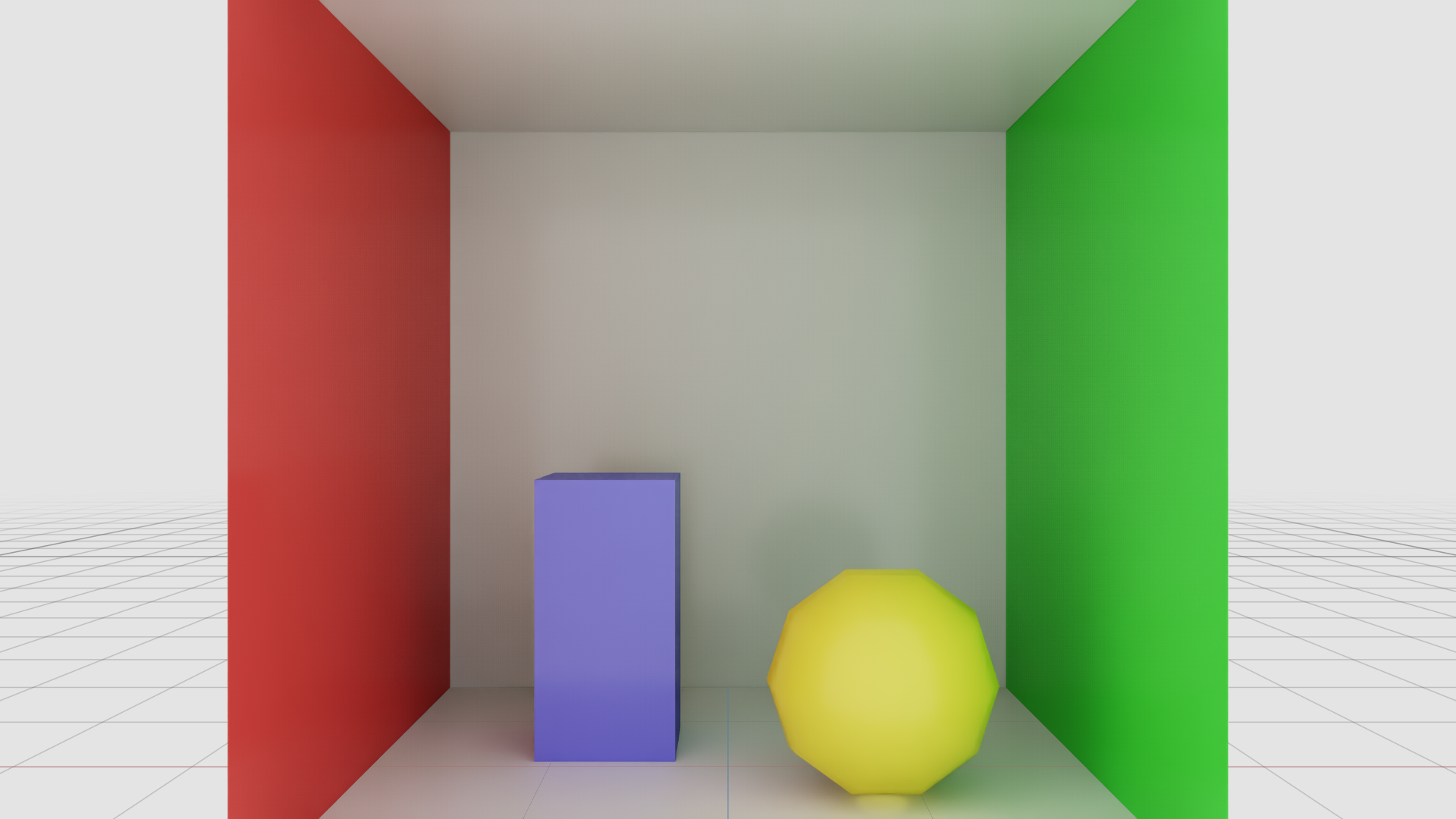
The first step compiles the node and can take up to a minute on a cold shader cache, so warm up before reading anything back. Attach a stage, load the scene, and step the product:
# SPG is enabled by default. The first step compiles the CUDA kernel with
# NVRTC, which can take up to a minute on a fresh shader cache.
print("Creating renderer...", file=sys.stderr)
renderer = ovrtx.Renderer()
stage = ovstage.Stage("ovrtx.example.spg-grayscale")
renderer.attach_ovstage(stage)
print(f"Loading {args.scene}...", file=sys.stderr)
ordinal = 1
ovstage.population.open_usd(stage, str(args.scene), ordinal=ordinal)
stage.advance_write_floor(ordinal, ovstage.Scope.ALL).wait()
# Warm up so the kernel is compiled and the image has converged, then render.
for _ in range(WARMUP_STEPS):
    renderer.step(render_products={RENDER_PRODUCT}, delta_time=STEP_DT, ordinal=ordinal)
products = renderer.step(render_products={RENDER_PRODUCT}, delta_time=STEP_DT, ordinal=ordinal)
The graph runs on every step. Read LdrGrayscale back the same way as any built-in render
var, then release in the reverse order of setup:
# An SPG output AOV is read exactly like any built-in render var.
OUTPUT_DIR.mkdir(exist_ok=True)
frame = products[RENDER_PRODUCT].frames[0]
save_render_var(frame, LDR_COLOR_PATH, OUTPUT_DIR / "input.png")
save_render_var(frame, OUTPUT_VAR_PATH, OUTPUT_DIR / "grayscale.png")


del frame, products
renderer.detach_ovstage()
stage.destroy()
renderer.destroy()
Read back, LdrGrayscale is the same image with the colour taken out of it:
An output AOV is read back the same way whatever it holds: map it to the CPU, or to CUDA with
ovrtx.Device.CUDA, and copy it out.
That is a working SPG node. It runs inside the renderer’s own frame, reads an AOV the renderer produced, and publishes one of its own that anything downstream reads without knowing SPG was involved. Nothing was compiled into the renderer to make that happen.
What Next#
The pages under How-To cover common SPG tasks.