

Python: Decals#
Projects three red RTX wordmarks and three silver metallic NVIDIA logos onto the curved green logo from the shared test scene. Loads the scene through an attached runtime stage and renders its camera.
“Create a minimal Python example that loads USD-authored decals through a runtime stage, renders them, and saves the color output.”
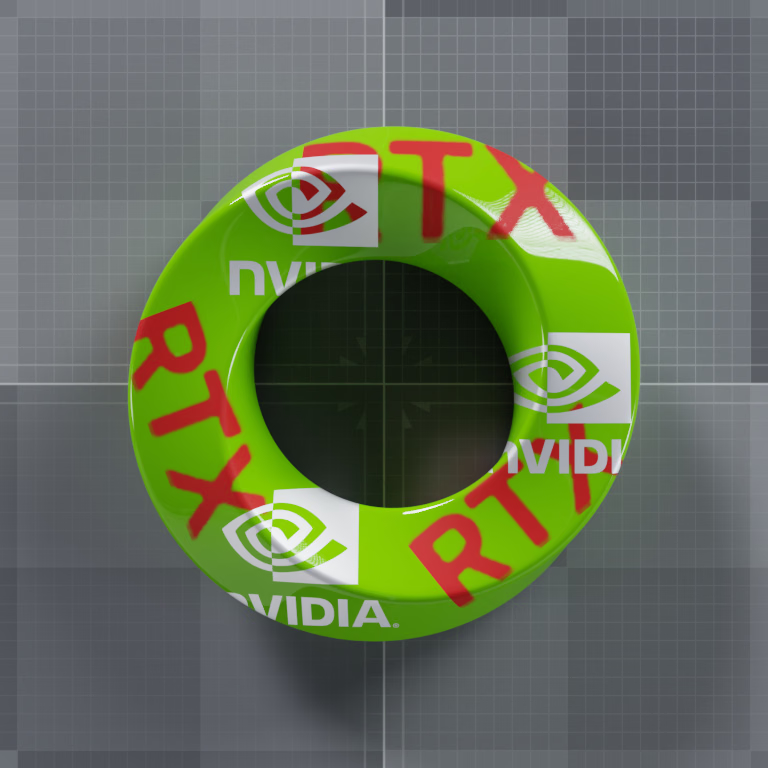
Silver NVIDIA logos (priority 10) overlap red RTX lettering (priority 0). Cutouts reveal the lower decal or the green receiver.#
The example loads the shared scene and renders enough frames for image quality:
# ovstage owns the scene; ovrtx renders the attached runtime stage.
renderer = ovrtx.Renderer()
stage = ovstage.Stage("ovrtx.example.decals")
renderer.attach_ovstage(stage)

ordinal = 1
ovstage.population.open_usd(stage, SCENE_PATH, ordinal=ordinal)
stage.advance_write_floor(ordinal, ovstage.Scope.ALL).wait()

# Warm up material loading and temporal accumulation before saving.
for _ in range(40):
    renderer.step({"/Render/Camera"}, 1.0 / 60.0, ordinal=ordinal)

products = renderer.step({"/Render/Camera"}, 1.0 / 60.0, ordinal=ordinal)
It then maps LdrColor to the CPU and writes a PNG:
product = products["/Render/Camera"]
frame = product.frames[-1]
mapped = frame.render_vars["/Render/Camera/LdrColor"].map(device=ovrtx.Device.CPU)
view = np.from_dlpack(mapped)
pixels = view.copy()  # Keep pixels valid after the mapped output is released.
del view
mapped.unmap()
del mapped
if args.png:
    args.png.parent.mkdir(parents=True, exist_ok=True)
    Image.fromarray(pixels).save(args.png)
    print(f"Saved {args.png}", file=sys.stderr)
Prerequisites#
Python 3.10-3.13
An NVIDIA RTX-capable GPU and a supported driver
Running#
cd examples/python/decals
uv run main.py --png
A successful run writes _output/decals.png. Run without --png to open
Rerun, or use --rrd _output/decals.rrd to save a recording. An optional
path after --png selects a different PNG location. Both output options
can be combined.
Scene and Masks#
The scene reuses the base logo geometry, green plastic material, grid, and
studio environment. Six OmniDecal prims are bound only to the logo mesh:
three red RTX wordmarks and three silver NVIDIA logos. Silver has
priority 10 and red has priority 0. The upper silver logo intentionally
overlaps the upper RTX wordmark. A third RTX wordmark follows the lower-right
curve and overlaps the right-hand NVIDIA logo. The example uses
frontAndBack so both surface sides receive the decals.
To enlarge a planar decal, increase the local X and Y components of
xformOp:scale. This scene doubles both components: the upper RTX decal
uses (16, 16, 12), the left and lower-right RTX decals use
(13, 13, 12), and the silver decals use (10.6, 10.6, 12). The local Z scale remains 12
to preserve the projection depth. The local extent remains
[(-0.5, -0.5, -0.5), (0.5, 0.5, 0.5)]. Larger decals still appear
only on bound receiver surfaces; they do not bridge the hole or extend
past the mesh boundary.
The grayscale masks define cutout opacity: white applies the decal and black exposes the next lower decal, or the receiver where no lower decal applies. Both masks preserve the original logo artwork. Colors and metallic reflections are supplied by the materials, not painted into the masks.
The following equivalent snippets set parameters on the silver decal’s
OmniSurface shader. Alpha mode 1 reads the mask’s red channel explicitly;
metalness = 1 gives the decal a metallic response.
color3f inputs:diffuse_reflection_color = (0.95, 0.95, 0.95)
float inputs:metalness = 1
float inputs:specular_reflection_roughness = 0.55
bool inputs:enable_opacity = true
asset inputs:geometry_opacity_image = @./decal-nvidia-mask.png@
# Read the mask's red channel, not a missing alpha channel.
int inputs:geometry_opacity_image_alpha_mode = 1
shader.CreateInput("diffuse_reflection_color", Sdf.ValueTypeNames.Color3f).Set(Gf.Vec3f(0.95))
shader.CreateInput("metalness", Sdf.ValueTypeNames.Float).Set(1.0)
shader.CreateInput("specular_reflection_roughness", Sdf.ValueTypeNames.Float).Set(0.55)
shader.CreateInput("enable_opacity", Sdf.ValueTypeNames.Bool).Set(True)
shader.CreateInput("geometry_opacity_image", Sdf.ValueTypeNames.Asset).Set("./decal-nvidia-mask.png")
# Read the mask's red channel, not a missing alpha channel.
shader.CreateInput("geometry_opacity_image_alpha_mode", Sdf.ValueTypeNames.Int).Set(1)
The committed masks are ready to use. To regenerate them from the source
images in the example’s artwork/ directory, run:
uv run --no-project --with pillow generate_masks.py
Overlapping Decals#
Set omni:decal:priority on each OmniDecal to control overlap.
Higher values are on top. Use distinct priorities when the order matters;
changing the order of the receiver’s binding relationships is not a
replacement for setting priority.
These Path Tracing renders use the same geometry, masks, and decal transforms. Only the
red decals’ priority changes. Look at the upper NVIDIA eye crossing the
red R: silver covers red at priority 10 versus 0; red covers silver
when raised to 20. The lower-right RTX wordmark also crosses the right-hand
NVIDIA logo, demonstrating the same reversal. The masks’ black areas remain
cut out in either order.
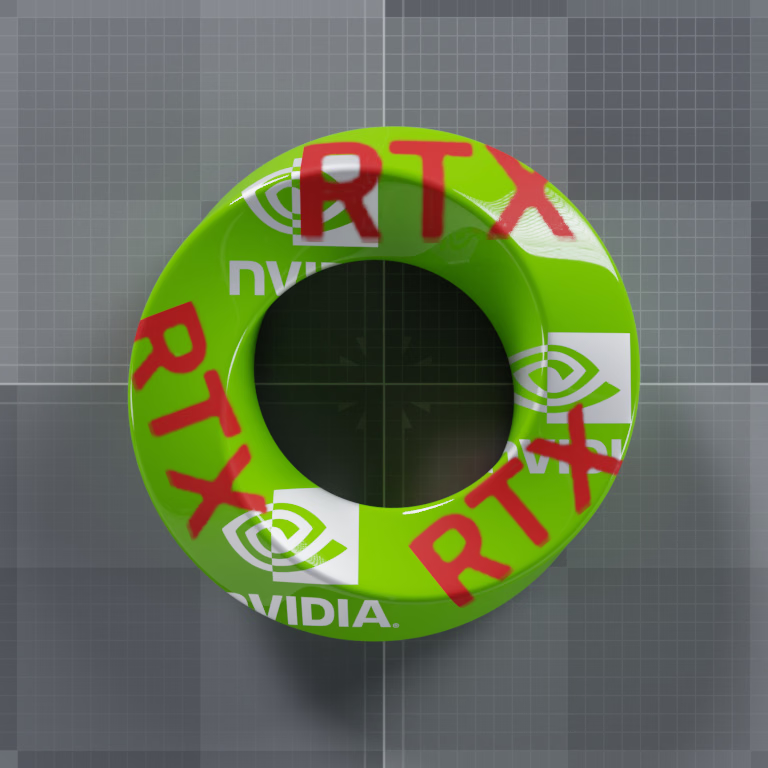
The following equivalent snippets author the priority override in a stronger
layer above ovrtx-test-decals.usda. In the Python tab, stage is a
USD stage whose root layer sublayers that scene. The complete USDA layer is
tests/docs/data/ovrtx-test-decals-red-on-top.usda. RedRTXB and
RedRTXC inherit from RedRTXA, so this override raises all three red
decals. Load the resulting composed stage to render the new order.
over "World"
{
    over "RedRTXA"
    {
        # Silver stays at 10. Raising red from 0 to 20 puts red on top.
        # RedRTXB and RedRTXC inherit this value from RedRTXA.
        int omni:decal:priority = 20
    }
}
decal = stage.OverridePrim("/World/RedRTXA")
# Silver stays at 10. Raising red from 0 to 20 puts red on top.
# RedRTXB and RedRTXC inherit this value from RedRTXA.
decal.CreateAttribute("omni:decal:priority", Sdf.ValueTypeNames.Int, custom=False).Set(20)