

Python: Semantic Segmentation#
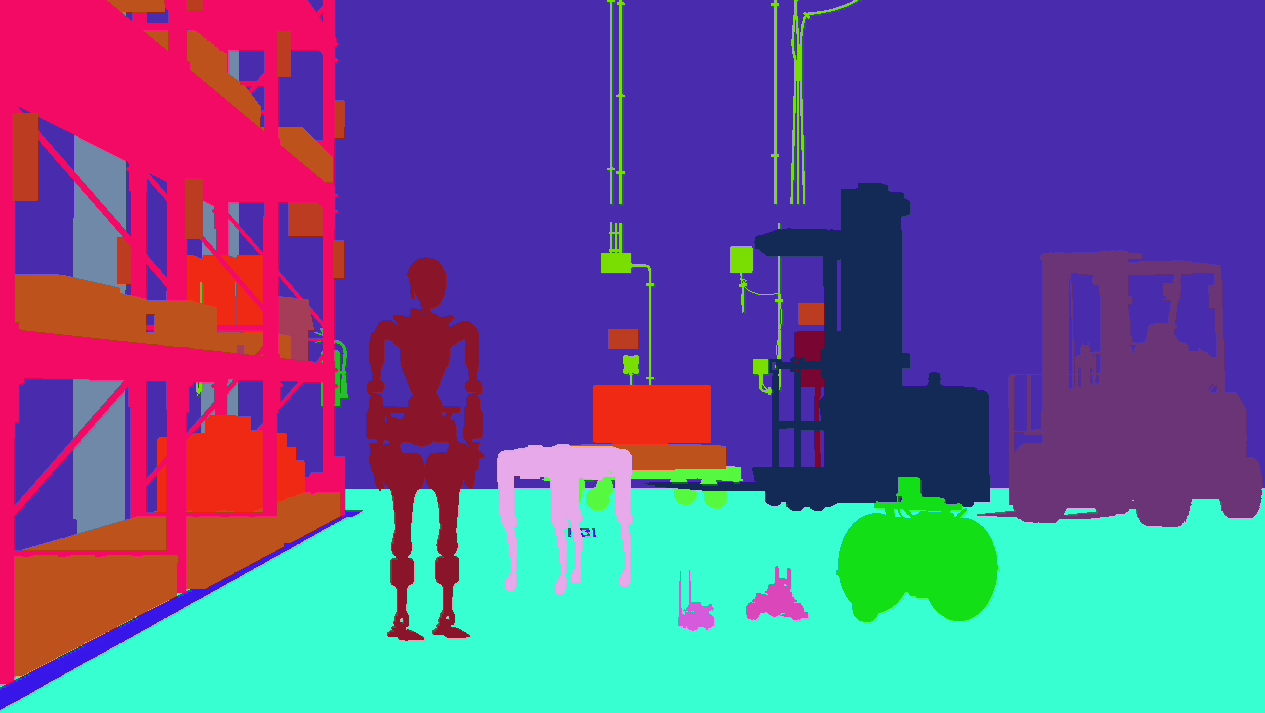
Renders semantic segmentation from the bundled ovrtx-robot-lineup.usda scene through /World/Camera and streams labeled results to rerun.io.
The example uses an inline USDA root layer with a relative subLayers arc to the source scene. The inline layer authors semantic-label overrides for each top-level robot payload, a RenderProduct targeting /World/Camera, and one RenderVar for each requested AOV, so the original USD file is left untouched.
“Create a Python example that composes an existing scene with semantic label overrides and camera annotation outputs, renders several camera AOVs including semantic segmentation and its ID map, decodes metadata into human-readable labels, logs a useful visual layout to a viewer, and supports headless image export.”
Prerequisites#
Python 3.10-3.13
NVIDIA RTX-capable GPU
Supported NVIDIA driver
Internet access to download the remote payloads referenced by
ovrtx-robot-lineup.usdaUnsandboxed runtime execution
Running#
cd examples/python/semantic-segmentation
uv run main.py
Options#
Flag |
Description |
|---|---|
|
Set the render resolution |
|
Render warmup frames before logging |
|
Set the renderer step delta and Rerun simulation timestamp interval |
|
Set the number of columns in the Rerun AOV grid blueprint |
|
Render a different USD file |
|
Do not spawn Rerun; write display PNGs for image AOVs to |
The example decodes SemanticIdMap before logging SemanticSegmentation. It remaps renderer semantic IDs into compact 16-bit Rerun class IDs, logs an AnnotationContext with the semantic labels, and displays the segmentation image in the Rerun blueprint grid.
The first step from a newly built application will block for 1-2 minutes while shaders are compiled and cached.
The example captures the static AOVs after 50 warmup frames by default. It then moves all seven robots between their rest pose and small offsets for ten frames with the camera and warehouse fixed, and captures only TargetMotionSD. Motion direction is shown as hue and displacement as brightness, with 20 pixels at full brightness. In headless mode, static PNGs are saved before animation and are not overwritten. The raw motion output is also saved as _output/TargetMotionSD.npy.
The example also captures instance segmentation, bounding boxes,
visibility, ID maps and camera parameters. Raw additional outputs are saved as
_output/<sourceName>.npy with shape and content diagnostics in
_output/capture.json. First-frame ID-map deltas are saved in _output/initial/;
after warmup the unchanged scene has no new IDs, so a zero-entry delta is expected.
Empty outputs and mapping failures are recorded without preventing the other
outputs from being captured. See Decoding camera outputs for
Python and C API decoding examples.
Visualizing Buffer Outputs#
The example decodes bounding-box and visibility records into typed arrays and
joins runtime IDs through InstanceMap and StableIdSemanticIdMap to prim
paths. The overlays show robot geometry only. Raw box outputs show individual
parts; semantic box outputs show the seven top-level robot bounds.
For a 3D box, the eight local corners are transformed by its world matrix,
then the view and projection matrices decoded from CameraParams. Matrices
use row vectors. Divide clip XY by W, map NDC X to image width, and invert NDC Y
for image coordinates. Each edge is clipped against the camera near plane.
The projection illustration supports pinhole cameras. Camera and box coordinates already share scene units; do not apply
metersPerSceneUnit again.
The code below projects one decoded box onto the camera image:
def draw_projected_box(draw, row, color) -> int:
    """Transform eight local corners and clip each edge against the camera near plane before projection."""
    corners = np.array([[row["max"][axis] if index & (1 << axis) else row["min"][axis]
                         for axis in range(3)] + [1] for index in range(8)], dtype=np.float64)
    clip = corners @ row["transform"] @ view @ projection
    edges_drawn = 0
    for first in range(8):
        for axis in range(3):
            second = first ^ (1 << axis)
            if second < first:
                continue
            a, b = clip[first].copy(), clip[second].copy()
            if not np.all(np.isfinite([a, b])) or max(a[3], b[3]) < near:
                continue
            if a[3] < near:
                a += (b - a) * (near - a[3]) / (b[3] - a[3])
            if b[3] < near:
                b += (a - b) * (near - b[3]) / (a[3] - b[3])
            ndc = np.array([a[:2] / a[3], b[:2] / b[3]])
            pixels = (ndc * [0.5, -0.5] + 0.5) * [width, height]
            draw.line([tuple(point) for point in pixels], fill=color, width=max(1, width // 750))
            edges_drawn += 1
    return edges_drawn
OcclusionSD is shown by coloring loose robot-part boxes from green to red.
It reports one ratio per instance, so this visualization is not a per-pixel
occlusion mask. Records with ratio -1 are omitted.
ID-map outputs pair an annotated scene with decoded IDs, paths and semantic
labels. CameraParams shows the camera matrices and the 3D boxes projected
with them. Delta-map illustrations use the first frame, when IDs are introduced;
the static frame after warmup correctly has no new entries.
Decoded records, including complete identifiers and strings, are saved in
_output/decoded.json. Box selection and drawing counts are saved in
_output/visualization.json.
Minimal capture#
Run the example with --render-mode MinimalRendering --resolution 960 540 --no-spawn
to save Minimal previews under _output/minimal/. It captures static outputs after
50 warmup frames, then moves the robots for a separate motion image. Minimal requests
LdrColor and the supported Synthetic Data outputs; it omits HdrColor.
A small ambient fill keeps every robot visible; Minimal ignores dome lights.
Path Tracing capture#
Use --render-mode PathTracing --resolution 960 540 --samples-per-pixel 128 --no-spawn
to save PT tensors, PNG previews, and capture.json under _output/pt/.
Path Tracing captures one static frame at 128 samples per pixel, without warmup frames.
The robots then move for one separate motion frame; static outputs are already saved.
The report retains empty outputs for diagnosis. LPE RenderVars use expression source names.
The example authors the PT render product and its output requests as follows:
def build_pt_render_layer_usda(scene_path: Path, resolution: tuple[int, int], samples_per_pixel: int = 128) -> str:
    """Request PT outputs on the same labeled lineup without changing its source scene."""
    base = build_render_layer_usda(scene_path, resolution)
    # Tag existing objects and bound materials; mask IDs do not change their appearance.
    robot_names = ["GR1T2_fourier_hand_6dof", "spot", "forklift_c", "forklift_b",
                   "carter_v1", "jetbot", "kaya"]
    material_overrides = {
        "forklift_c": '''over "Looks" {
            over "M_Forklift_C01" {
                int multimatte_id = 101
            }
            over "M_Forklift_C01_Blue" {
                int multimatte_id = 102
            }
        }''',
        "forklift_b": '''over "Looks" {
            over "M_Forklift_B1_Body" {
                int multimatte_id = 103
            }
            over "M_Forklift_B1_Glass" {
                int multimatte_id = 104
            }
        }''',
    }
    for identifier, name in enumerate(robot_names, 1):
        base = re.sub(r'(over "' + name + r'"\s*\([^)]*\)\s*\{)',
                      lambda match: match[0] + f'\n        int primvars:multimatte_id = {identifier}\n'
                      + material_overrides.get(name, "") + "\n", base)
    # The source scene assigns IDs 8/9/10 to warehouse walls, shelves and pallets.
    # The source scene also tags warehouse floors with ID 11 for an independent alpha mask.
    # Request only the four configured Multi-Matte RenderVars; each carries its own selectors.
    names = list(dict.fromkeys(PT_AOV_NAMES + re.findall(r'string sourceName = "(\w+)"', base)))
    names = [name for name in names if not name.startswith("PtMultiMatte") or int(name[-1]) < 4]
    definitions = []
    for name in names:
        expression = PT_LPE_EXPRESSIONS[int(name[-1])] if name.startswith("PtLpe") else name
        source_type = 'token sourceType = "lpe"' if name.startswith("PtLpe") else ''
        matte_selectors = ""
        if name.startswith("PtMultiMatte"):
            index = int(name[-1])
            selectors = PT_MULTIMATTE_CHANNELS[index * 4:index * 4 + 4]
            for component, (identifier, is_material) in zip("rgba", selectors):
                matte_selectors += f"int omni:rtx:pt:multimatte:{component}Id = {identifier}\n"
                matte_selectors += f"bool omni:rtx:pt:multimatte:{component}IsMat = {str(is_material).lower()}\n"
        definitions.append(f'def RenderVar "{name}" {{\nstring sourceName = "{expression}"\n{source_type}\n{matte_selectors}}}')
    variables = "\n".join(definitions)
    ordered = ", ".join(f"<{name}>" for name in names)
    width, height = resolution
    # Allow two setup passes after scene edits; samplesPerPixel still caps the render at the requested SPP.
    return base.split('def "Render"', 1)[0] + f'''def "Render" {{
    def RenderProduct "Camera" {{
        rel camera = </World/Camera>
        int2 resolution = ({width}, {height})
        token omni:rtx:rendermode = "PathTracing"
        uint omni:rtx:pt:samplesPerPixel = {samples_per_pixel}
        int omni:rtx:pt:samplesPerIteration = {min(samples_per_pixel, 32)}
        int omni:rtx:quality = 100
        int omni:rtx:quality:minSpp = {samples_per_pixel + 2 * min(samples_per_pixel, 32)}
        bool omni:rtx:pt:adaptiveSampling:enabled = false
        bool omni:rtx:pt:radianceCache:enabled = false
        uint omni:rtx:rt:groundTruth:resolution:width = {width}
        uint omni:rtx:rt:groundTruth:resolution:height = {height}
        rel orderedVars = [{ordered}]
        {variables}
    }}
}}
'''
Multi-Matte masks use geometry IDs 1–7 for the robots. The source scene assigns IDs 8, 9 and 10 to warehouse walls, shelves and pallets, respectively. Material IDs 101 and 102 select the C forklift’s body and painted panels; 103 and 104 select the B forklift’s body and glass. Warehouse floors use geometry ID 11. Each requested Multi-Matte RenderVar selects four independent coverage masks with these attributes:
Attributes on the RenderVar |
Meaning |
|---|---|
|
ID selected by that RGBA component. Omitted IDs and -1 produce zero coverage. |
|
False selects geometry |
Request the configured RenderVars in the RenderProduct’s orderedVars.
Their requests determine allocation; no channelCount attribute is needed.
Up to eight Multi-Matte RenderVars provide 32 masks. A sparse request such as
PtMultiMatte7 allocates only its four masks. Separate RenderVars may use the
same Multi-Matte source name with different selectors.
When legacy product/global selectors are enabled, unconfigured RenderVars retain
their RGB selectors and opaque alpha.
The first output selects walls, shelves and pallets in RGB, and floors in alpha.
MultiMatte.png combines corresponding RGB slices from outputs 0–3.
The grey strip underneath shows each output’s full-frame alpha mask.
Its labels use G for geometry IDs and M for material IDs, in RGBA order;
G-1 is the disabled alpha component of the fourth output.