

Python: Multi-rate Sensors#
This example demonstrates best practices for running sensors with different
capture rates in one simulation. The example runs two cameras and two lidars
at different rates, and demonstrates the different returns expected with
different values for omni:sensor:core:partialOutputs, which controls whether
a sensor waits for a complete frame before returning an output.
Regardless of the configuration, for optimum performance, it is important to
always request all enabled sensors during a simulation. Sensors are
initialized on their first step() call, and torn down when they are no
longer requested. If you try to only step sensors when you are expecting an
output, you will pay this teardown and initialization cost every time the
requested sensor set changes.
Run The Example#
From the ovrtx repository root, run the example with an RTX GPU and the driver listed in Hardware & Driver Requirements. Rerun displays the two camera images and the two lidar point clouds in separate views:
cd examples/python/multi-rate-sensors
# Run one simulated second with completed captures only and open the Rerun viewer.
uv run main.py
# Run the same simulation and save a Rerun recording instead of opening the viewer.
uv run main.py --rrd _output/multi-rate-sensors.rrd
Each run records 40 steps (one simulated second), starting from simulation time
zero with no warmup steps. The first result is reported as
step=01 t=0.025s: the timestamp is the end of that first 25 ms step.
--steps N changes the number of recorded steps.
The animated asset covers the first two seconds and holds its final pose afterward.
The lidars use a one-degree angular firing interval, which accommodates the default emitter sequence at both scan rates and limits the point-cloud size.
Compare the two output policies below. Both runs use the same scene, capture rates, and 25 ms simulation steps. Only the delivery policy changes.
Completed Captures Only (partialOutputs = false)#
The default policy delivers a sensor output only when its capture is complete. Run without a viewer to save the camera timeline and delivery report:
# Deliver completed captures only; save camera/lidar timelines and a JSON report.
uv run main.py --no-rr \
    --filmstrip _output/full-timeline.png --report _output/full.json
RenderProduct |
Capture rate |
Completed outputs (partialOutputs = false) |
|---|---|---|
|
40 Hz |
Every step: 1, 2, 3, 4, … |
|
20 Hz |
Even steps: 2, 4, 6, 8, … |
|
10 Hz |
Every fourth step: 4, 8, 12, 16, … |
|
20 Hz |
Even steps: 2, 4, 6, 8, …; each rolling-shutter exposure spans two steps. |
All four sensors deliver completed outputs together at steps 4, 8, 12, … (0.100 s, 0.200 s, 0.300 s, …).
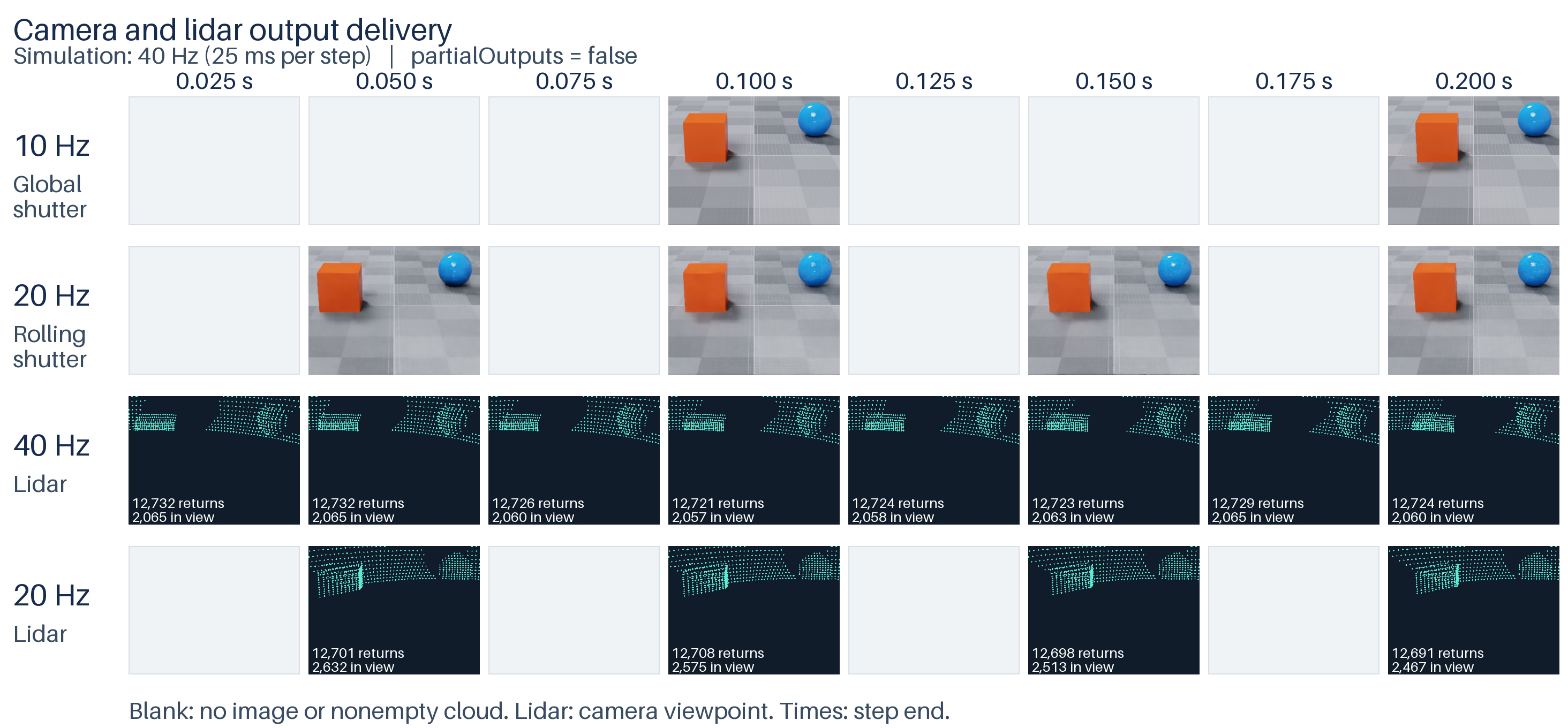
Default run (partialOutputs = false), first eight steps: the 10 Hz camera (first row) delivers every 100 ms, and the 20 Hz camera (second row) delivers every 50 ms. The lower two rows show the 40 Hz and 20 Hz lidar point clouds projected from the rolling-shutter camera’s viewpoint. The 20 Hz lidar delivers a complete scan every other step. Blank cells mark steps with no output.#
The first eight steps of the default run print:
step=01 t=0.025s: Lidar40
step=02 t=0.050s: Camera20, Lidar20, Lidar40
step=03 t=0.075s: Lidar40
step=04 t=0.100s: Camera10, Camera20, Lidar20, Lidar40
step=05 t=0.125s: Lidar40
step=06 t=0.150s: Camera20, Lidar20, Lidar40
step=07 t=0.175s: Lidar40
step=08 t=0.200s: Camera10, Camera20, Lidar20, Lidar40
Intermediate Outputs Enabled (partialOutputs = true)#
Enable intermediate delivery to receive outputs while a scan or exposure is
still in progress. This run sets partialOutputs = true on both cameras
and both lidars. Capture rates and completion times stay the same:
# Also deliver intermediate outputs; save camera/lidar timelines and a JSON report.
uv run main.py --no-rr --partial-outputs \
    --filmstrip _output/partial-timeline.png --report _output/partial.json
RenderProduct |
Capture rate |
Delivered outputs (partialOutputs = true) |
|---|---|---|
|
40 Hz |
Every step: 1, 2, 3, 4, …; each scan is complete. |
|
20 Hz |
Every step: one 25 ms scan slice; each 50 ms scan spans two deliveries. |
|
10 Hz |
Every fourth step: 4, 8, 12, 16, …; each image is complete. |
|
20 Hz |
Every step: intermediate outputs on odd steps; newly completed images on even steps. |
The 20 Hz lidar and rolling-shutter camera now deliver outputs on odd steps as well as even steps. The lidar delivers successive scan slices rather than accumulating a full scan for the even-step output. After the first exposure completes, the camera’s intermediate LdrColor outputs repeat its last completed image. They do not show an image being progressively rendered. Do not use image delivery alone to count completed exposures.
The 10 Hz camera also has partialOutputs = true, but its global-shutter
capture is instantaneous. It has no exposure spanning multiple steps, so
there are no intermediate camera outputs to deliver between its captures.
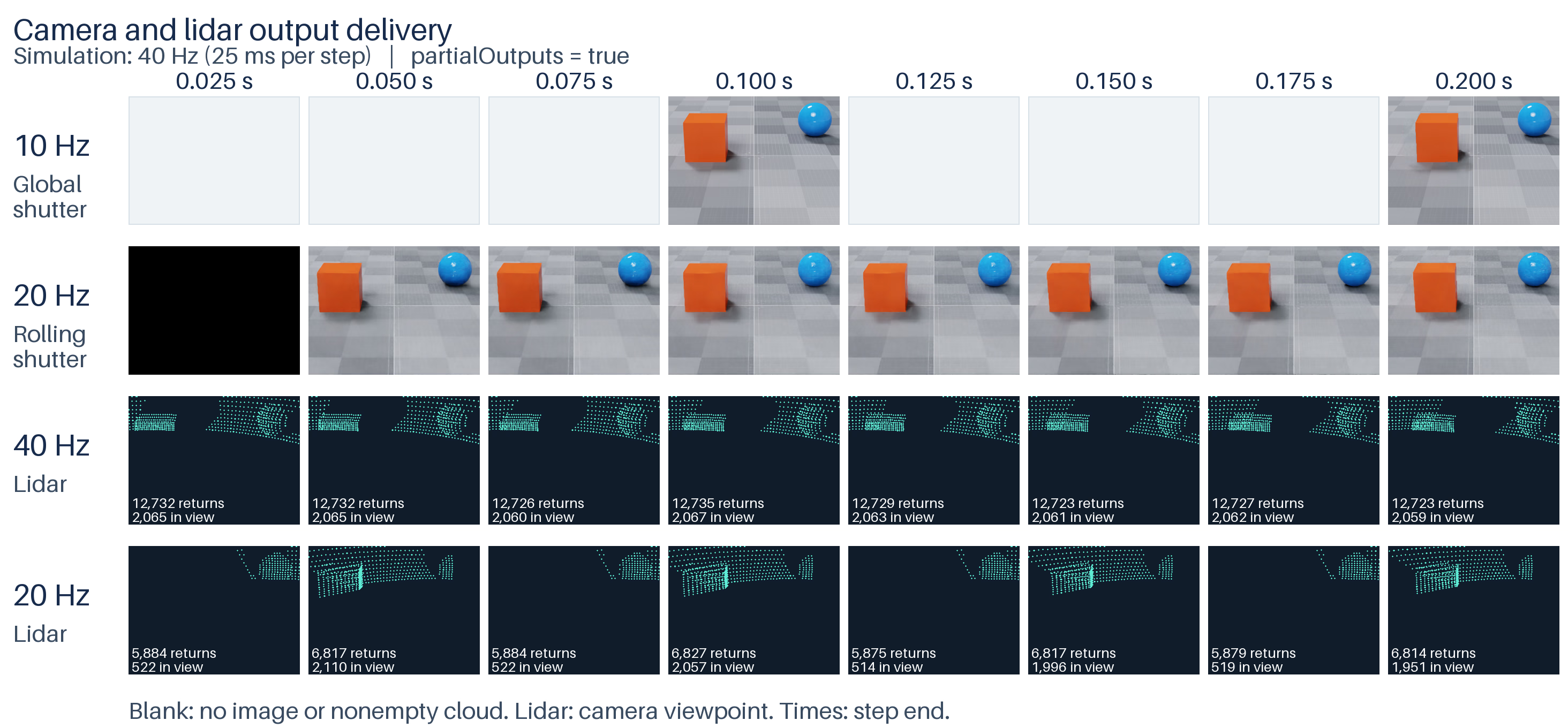
Partial-output run (partialOutputs = true), first eight steps: the 10 Hz camera (first row) still delivers every 100 ms. The 20 Hz camera (second row) returns an output every 25 ms, with a newly completed image every 50 ms and repeats between completions. The black output at 0.025 s arrives before the first completed exposure; gray blank cells mark steps with no output. The lower two rows show lidar returns from the rolling-shutter camera’s viewpoint. The 20 Hz lidar delivers alternating portions of its scan on successive steps.#
The lidar views draw only the points delivered at that step, with no history accumulation. Each cell lists the total number of delivered returns and how many fall inside the camera’s view. Both lidars output world-space coordinates in metres; the projection uses the rolling-shutter camera’s pose and lens. The lidars have their own positions and fields of view, so their returns cover only part of the scene visible to the camera. These are point-cloud visualizations, not additional camera captures. Zero-return lidar deliveries are skipped and also appear as blank cells.
The first eight steps with partial outputs enabled print:
step=01 t=0.025s: Camera20, Lidar20, Lidar40
step=02 t=0.050s: Camera20, Lidar20, Lidar40
step=03 t=0.075s: Camera20, Lidar20, Lidar40
step=04 t=0.100s: Camera10, Camera20, Lidar20, Lidar40
step=05 t=0.125s: Camera20, Lidar20, Lidar40
step=06 t=0.150s: Camera20, Lidar20, Lidar40
step=07 t=0.175s: Camera20, Lidar20, Lidar40
step=08 t=0.200s: Camera10, Camera20, Lidar20, Lidar40
The JSON report contains delivery-step times, capture times, lidar point counts and scan metadata. Empty lidar payloads are skipped; the report counts delivered nonempty point clouds, rather than inferring complete scans from the existence of a frame entry.
Select The Output Policy#
After loading the scene, set partialOutputs on all four sensors through
ovstage before the first render step. Set it to false to receive only
completed captures, or true to also receive intermediate outputs.
This changes output delivery without changing the sensors’ capture rates.
With partialOutputs = true, the 20 Hz lidar also delivers intermediate
point clouds on odd steps. The 20 Hz rolling-shutter camera also returns
outputs on odd steps, but an intermediate color output does not establish
that the exposure is complete. The two timelines above show how the policy
changes delivery.
Set the policy before stepping:
# Set the delivery policy on all four sensors before the first step.
# False returns completed captures only; True also allows intermediate outputs.
ordinal += 1
with ovstage.PathDictionary(stage) as paths:
    path_list = paths.create_path_list_from_strings(
        [
            "/World/Lidar40",
            "/World/Lidar20",
            "/World/Camera10",
            "/World/Camera20",
        ]
    )
    with stage.query_from_path_list(path_list) as query:
        stage.write_attribute(
            query,
            "omni:sensor:Core:partialOutputs",
            ordinal=ordinal,
            tensors=np.full(4, args.partial_outputs, dtype=np.bool_),
            is_array=False,
        ).wait()
    paths.destroy_path_list(path_list)
stage.advance_write_floor(ordinal, ovstage.Scope.ALL).wait()
Step All Sensors#
# Update scene animation to the next 25 ms simulation time.
ordinal += 1
simulation_time = (step_index + 1) / 40
ovstage.population.update_from_usd_time(stage, ordinal, simulation_time)
# Make the scene updates available to the renderer.
stage.advance_write_floor(ordinal, ovstage.Scope.ALL).wait()
# Advance every sensor by 25 ms, including those with no output this step.
# Capture rates and partialOutputs determine when outputs are returned.
# Keep all four sensors requested to avoid teardown and reinitialization.
products = renderer.step(
    render_products={
        "/Render/Lidar40",
        "/Render/Lidar20",
        "/Render/Camera10",
        "/Render/Camera20",
    },
    delta_time=1 / 40,
    ordinal=ordinal,
)
Read Available Outputs#
Iterate all returned frames and map their render variables. For lidar,
Counts[0] is the number of delivered points: read only that many entries
from the point-data arrays. This scene sets includeInvalidPoints=false,
so invalid returns have already been removed:
# Iterate what was returned. A product can be absent or have no frames.
for product_path, product in products.items():
    for frame in product.frames:
        for render_var in frame.render_vars.values():
            with render_var.map(device=ovrtx.Device.CPU) as mapped:
                if render_var.source_name == "PointCloud":
                    count = int(np.from_dlpack(mapped["Counts"])[0])
                    if count == 0:
                        # No points this step; keep the lidar active.
                        continue
                    points = np.from_dlpack(mapped["Coordinates"])[:, :count].T
                    if rr is not None:
                        rr.log(product_path, rr.Points3D(points, radii=0.02))
                    del points
                else:
                    pixels = np.from_dlpack(mapped)
                    if rr is not None:
                        rr.log(product_path, rr.Image(pixels))
Camera color outputs such as LdrColor do not
provide a reliable indication of exposure progress. With partialOutputs=true,
intermediate outputs can return the last completed display image.
Use partialOutputs=false to receive only newly completed images.
--filmstrip saves camera and lidar deliveries from the first eight steps on a
shared time axis. --png saves the last delivered image from each camera
side by side.
See Multi-rate Sensor Simulation for scheduling, output policy, and history preservation, and Rolling Shutter for partial camera AOVs.