

Mesh Lights#
Overview#
A mesh light is renderable geometry with a bound emissive material. Mesh lights can represent sources whose shape would be difficult to approximate with an intrinsic light, such as neon signs, coiled bulbs, and emissive displays.
An emissive material makes the geometry visibly glow. Mesh-light sampling is a separate RenderProduct setting that lets ovrtx explicitly sample that geometry as a direct-light source. Without sampling, the geometry remains emissive but direct illumination from it converges much more slowly and can remain noisy at practical sample counts.
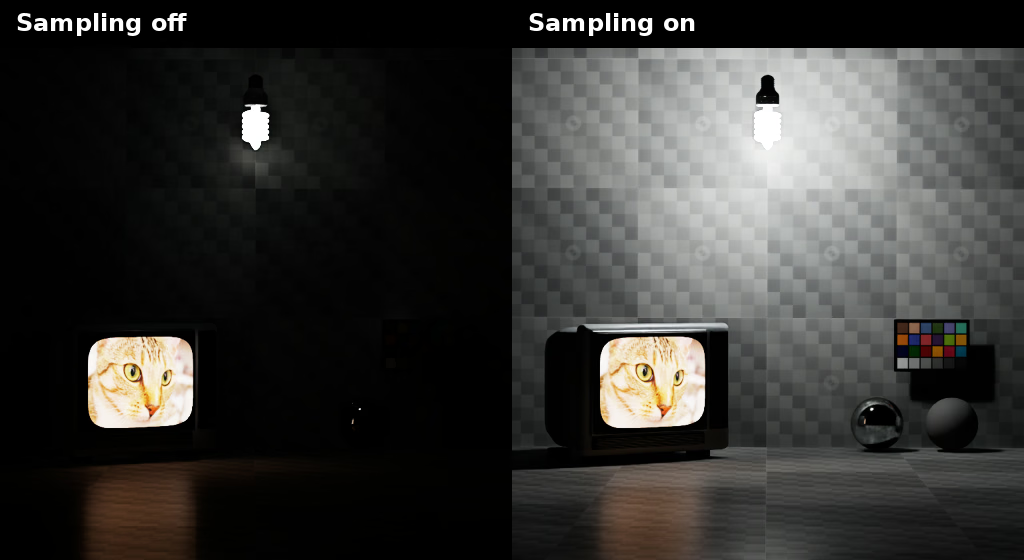
The fluorescent bulb and TV screen remain emissive in both panels. The screen is a textured mesh light whose emission color comes from an image. At this real-time frame budget, enabling mesh-light sampling improves illumination of the room. Screen image: Chelsea the cat, photographed by Stefan van der Walt and dedicated to the public domain under CC0 1.0 Universal.#
Enabling Mesh-Light Sampling#
Mesh-light sampling is disabled by default. Enable the setting that belongs to the active render mode on each RenderProduct that should sample emissive geometry:
USD declaration |
Description |
|---|---|
|
Enables mesh-light sampling in Path Tracing mode. |
|
Enables mesh-light sampling in Real-Time Path-Tracing mode. |
Minimal mode does not support mesh-light sampling. Authoring both settings is safe when a RenderProduct may switch between Path Tracing and Real-Time Path-Tracing; only the setting for the active mode is consumed.
The following examples enable mesh-light sampling for both supported modes:
def "Render"
{
    def RenderProduct "Camera" (
        prepend apiSchemas = ["OmniRtxSettingsPtAdvancedAPI_1"]
    )
    {
        # Author the setting for each render mode that may use this product.
        bool omni:rtx:pt:ris:meshLights = true
        bool omni:rtx:rtpt:ris:meshLights = true
    }
}
product = UsdRender.Product.Define(stage, "/Render/Camera")
product.GetPrim().ApplyAPI("OmniRtxSettingsPtAdvancedAPI_1")
product.GetPrim().CreateAttribute(
    "omni:rtx:pt:ris:meshLights", Sdf.ValueTypeNames.Bool
).Set(True)
product.GetPrim().CreateAttribute(
    "omni:rtx:rtpt:ris:meshLights", Sdf.ValueTypeNames.Bool
).Set(True)
Limitations#
The physical-lighting schemas do not support mesh lights.
PhysicalLightIlluminantAPI and PhotometricAreaLightAPI cannot be
applied to mesh geometry, so mesh lights cannot use their illuminant spectra,
lumens, or lux-at-distance controls. Mesh-light color and brightness come from
the bound material’s emission values instead. A material may provide its own
physically meaningful emission controls, but those controls are
material-specific and are not part of the physical-lighting schemas.
ovrtx supports at most 16,777,216 (2^24) mesh-light geometries in a scene. Additional eligible geometries are not added to the mesh-light sampling buffer. Large numbers of emissive meshes or triangles also increase sampling and scene-update costs.
Further Reading#
Refer to Material Binding for material binding and to Render Modes for render-mode configuration.