

Ghost Lights#
Overview#
A ghost light illuminates the scene while reducing or removing the visible light source from camera, reflection, and refraction paths. This is a non-physical artistic control. Use it to remove distracting highlights or hide a source that should affect lighting without appearing in the image.
Ghost-light controls operate at three levels. More specific values take precedence:
A RenderProduct supplies global behavior for invisible lights.
ghostFactoroverrides those values for one light.primvars:omni:rtx:ghostFactoroverrides both for one receiving object.
Primary-Ray Visibility#
visibleInPrimaryRay controls whether the light source itself is visible to
the camera. It does not disable the light’s illumination.
USD declaration |
Description |
|---|---|
|
Shows or hides light geometry from camera rays. Dome and distant lights default to true; other supported lights default to false. |
The following comparison changes only primary-ray visibility. The wall and subjects remain illuminated in both panels:
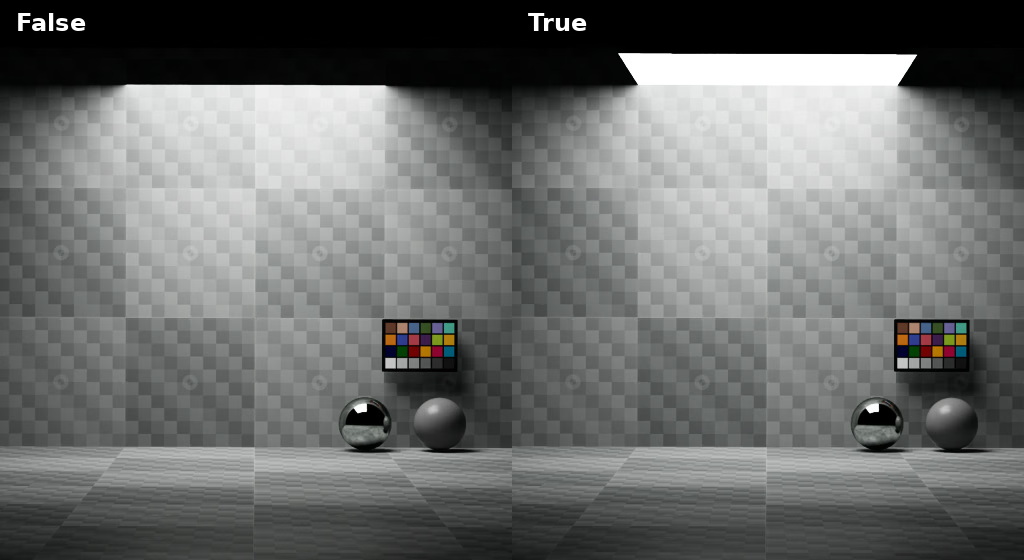
Primary-ray visibility hides the source without turning off its illumination.#
Per-Light Ghost Factor#
ghostFactor controls how a light source appears in specular and glossy
interactions. It applies even when the source is visible to primary rays.
USD declaration |
Description |
|---|---|
|
A negative value disables the per-light override. Zero leaves reflections and refractions unchanged. Any positive value removes perfect-specular appearances; increasing toward 1 suppresses progressively rougher glossy appearances. One hides the source from all but diffuse interactions. |
The following comparison keeps the rect light visible to the camera while changing its ghost factor. Look at the light reflected in the two material spheres. Notice that the sharper reflection on the chrome sphere disappears much more quickly than the rougher reflection on the grey sphere.
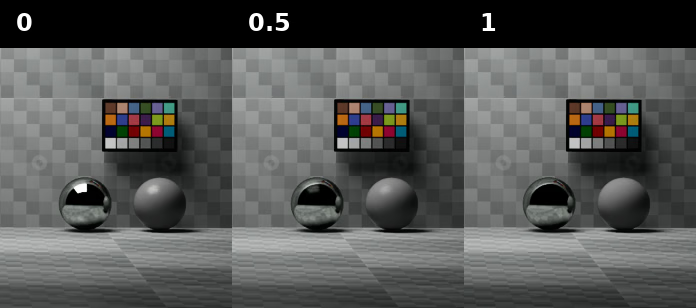
A positive ghost factor removes the perfect-specular reflection and increasingly attenuates glossy reflections.#
Global Controls#
Apply OmniRtxSettingsCommonAPI_1 to a RenderProduct to configure the
fallback behavior for lights hidden from primary rays:
USD declaration |
Description |
|---|---|
|
Uses each light’s primary-ray visibility. |
|
For an invisible light without a per-light ghost factor, hide it from reflection paths whose material roughness is below this threshold. The supported range is 0 through 1. |
|
For an invisible light without a per-light ghost factor, hide it from refraction paths whose material roughness is below this threshold. The supported range is 0 through 1. |
A threshold of zero leaves the source visible in glossy interactions. Raising
the threshold hides it from progressively rougher paths. These RenderProduct
values do not affect a visible light unless the light has its own non-negative
ghostFactor.
Per-Object Override#
Author float primvars:omni:rtx:ghostFactor = -1 on geometry to override
ghosting for interactions on that object. The value follows the same scale as
the per-light factor. A negative value disables the object override.
The object value takes precedence over the per-light and RenderProduct values.
For a visible light, it applies only when that light also has a non-negative
per-light ghostFactor. This prevents an object override from unexpectedly
ghosting every visible light in the scene.
Further Reading#
Refer to Common Attributes for the controls that change the light’s actual diffuse and specular contribution.