

C: Gaussian Splats#
This example demonstrates two ParticleField rendering features using the same cactus scene:
Smoother Gaussians: non-stochastic rendering reduces transparency noise in RTPT, making fine details smoother from the first frame.
Relighting:
ParticleFieldSHDiffuse.mdllets scene lights illuminate the Gaussians using their captured color as diffuse albedo.
Smoother Gaussians with Non-Stochastic Rendering#
The close-up compares stochastic.usda and non_stochastic.usda through
Camera_close. Both use the default emissive material and identical settings
apart from omni:rtx:rtpt:gaussian:nonStochastic:enabled.
Enabling it reduces the grain around the cactus spines without waiting for
multiple frames to accumulate, at a performance cost. Lighting and shadows can
still contain noise.
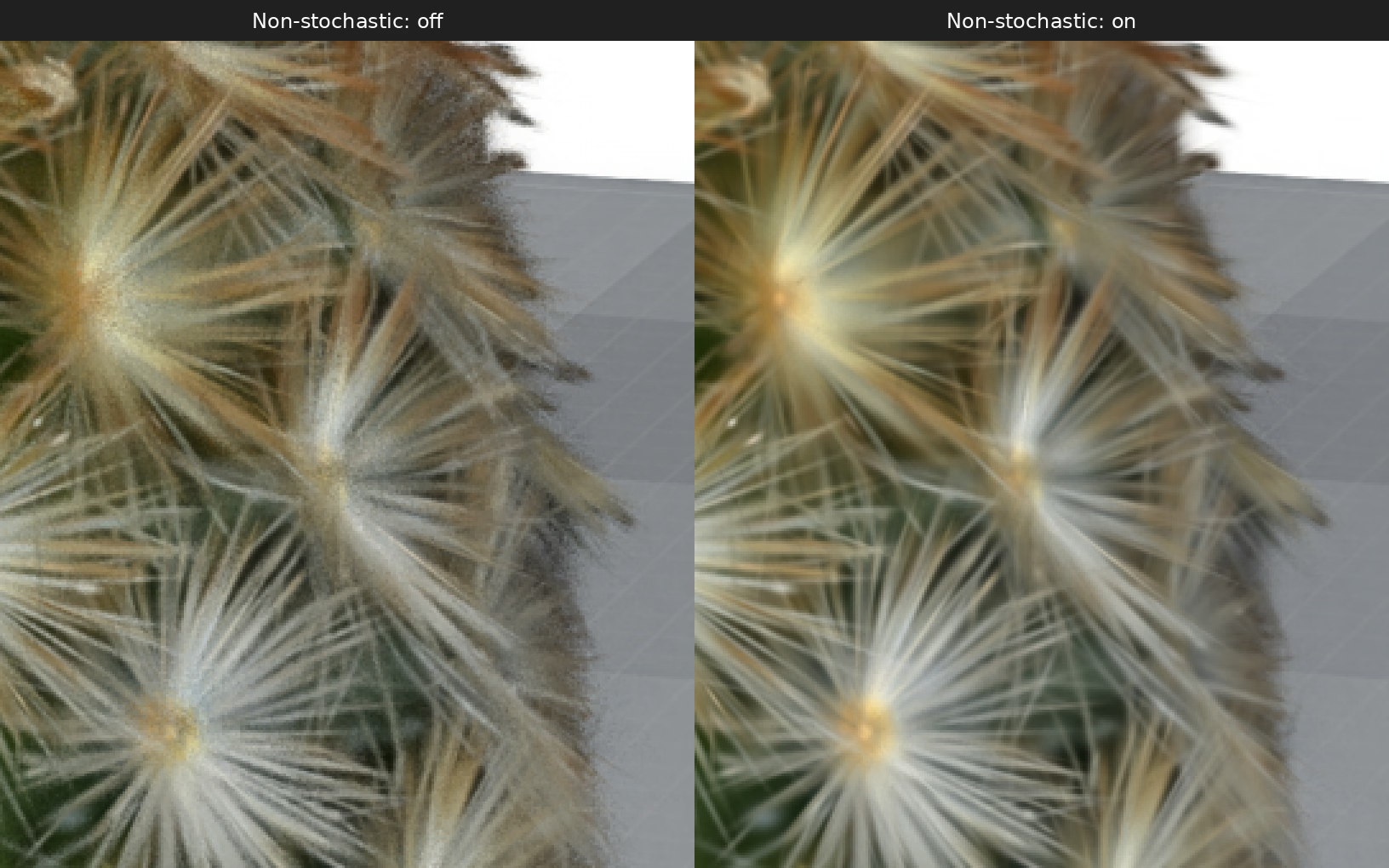
Camera_close, RTPT first frame: non-stochastic compositing off (left) and on (right). Matching crops enlarged 3× without smoothing. Only the non-stochastic attribute differs.#
Enable non-stochastic compositing on the RenderProduct. This feature requires RTPT; disable adaptive disocclusion sampling, which would force stochastic rendering:
over "Render" {
    over "Camera" {
        rel camera = </World/Camera_close>
        token omni:rtx:rendermode = "RealTimePathTracing"
        bool omni:rtx:rtpt:gaussian:nonStochastic:enabled = true
        # Adaptive disocclusion sampling would force stochastic rendering.
        bool omni:rtx:rtpt:adaptiveSampling:disocclusion:enabled = false
    }
}
product = UsdRender.Product.Get(stage, "/Render/Camera")
product.GetCameraRel().SetTargets(["/World/Camera_close"])
prim = product.GetPrim()
prim.CreateAttribute("omni:rtx:rendermode", Sdf.ValueTypeNames.Token).Set("RealTimePathTracing")
prim.CreateAttribute("omni:rtx:rtpt:gaussian:nonStochastic:enabled", Sdf.ValueTypeNames.Bool).Set(True)
# Adaptive disocclusion sampling would force stochastic rendering.
prim.CreateAttribute(
    "omni:rtx:rtpt:adaptiveSampling:disocclusion:enabled", Sdf.ValueTypeNames.Bool
).Set(False)
Relighting with the Diffuse MDL#
The wider view through Camera compares the default emissive appearance with
sh_diffuse.usda under the same studio lighting. The default material displays
the captured appearance; ParticleFieldSHDiffuse uses the SH0 color as diffuse
albedo so scene lights can shade the cactus and pot.
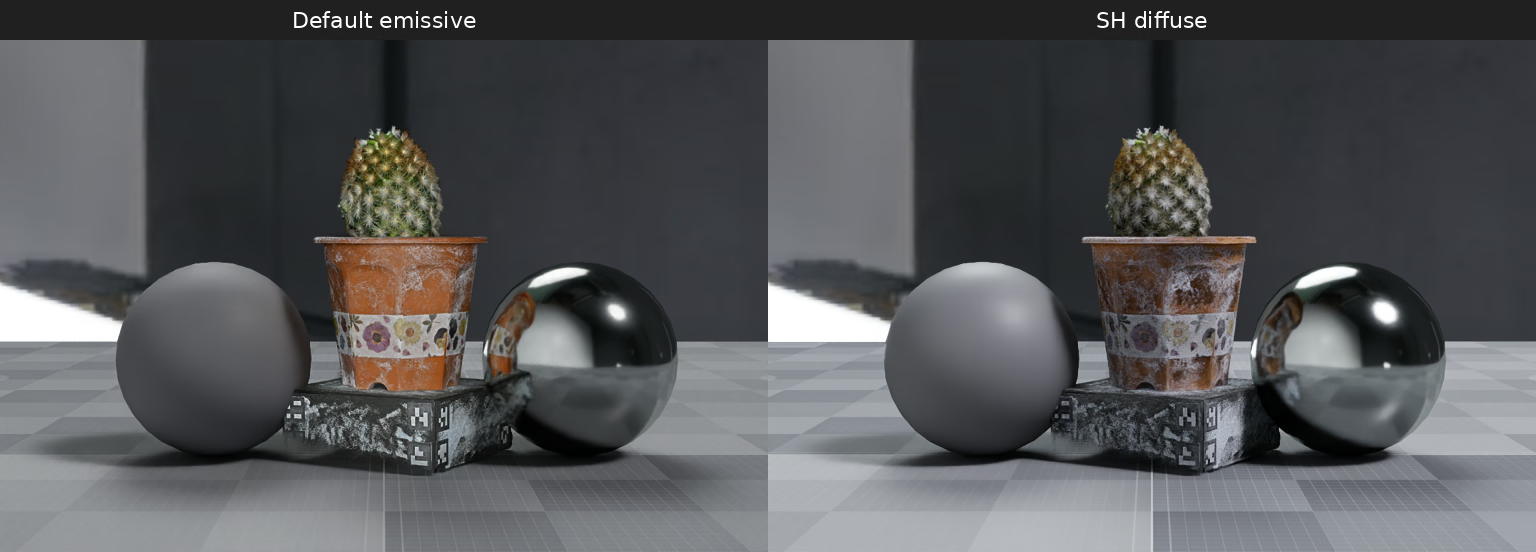
Camera, RTPT after 32 frames: default emissive material (left) and ParticleFieldSHDiffuse with normal tone mapping (right).#
ovrtx supplies ParticleFieldSHDiffuse.mdl with its runtime materials, at
bin/mdl/ParticleFieldSHDiffuse.mdl in the extracted SDK package. You do not
need to write an MDL material; see Supplied Material Source. The snippet below references and binds the
supplied material to the ParticleField and enables normal tone mapping.
Diffuse relighting works in PT and RTPT and uses stochastic transparency.
Captured lighting remains in SH0, so this does not recover unlit surface color.
over "World" {
    def Material "SHDiffuse" {
        token outputs:mdl:surface.connect = </World/SHDiffuse/Shader.outputs:out>
        def Shader "Shader" {
            uniform token info:implementationSource = "sourceAsset"
            uniform asset info:mdl:sourceAsset = @ParticleFieldSHDiffuse.mdl@
            uniform token info:mdl:sourceAsset:subIdentifier = "ParticleFieldSHDiffuse"
            token outputs:out (renderType = "material")
        }
    }
    over "Splats" (
        prepend apiSchemas = ["MaterialBindingAPI"]
    ) {
        rel material:binding = </World/SHDiffuse>
    }
}
over "Render" {
    over "Camera" {
        # Render scene-lit color through the normal color pipeline.
        bool omni:rtx:gaussian:skipTonemapping:enabled = false
        bool omni:rtx:rtpt:gaussian:nonStochastic:enabled = false
    }
}
material = UsdShade.Material.Define(stage, "/World/SHDiffuse")
shader = UsdShade.Shader.Define(stage, "/World/SHDiffuse/Shader")
shader.SetSourceAsset(Sdf.AssetPath("ParticleFieldSHDiffuse.mdl"), "mdl")
shader.SetSourceAssetSubIdentifier("ParticleFieldSHDiffuse", "mdl")
output = shader.CreateOutput("out", Sdf.ValueTypeNames.Token)
output.SetRenderType("material")
material.CreateSurfaceOutput("mdl").ConnectToSource(output)
# Bind to the existing ParticleField; its SH0 data becomes diffuse albedo.
splats = stage.GetPrimAtPath("/World/Splats")
UsdShade.MaterialBindingAPI.Apply(splats).Bind(material)
product = stage.GetPrimAtPath("/Render/Camera")
# Render scene-lit color through the normal color pipeline.
product.CreateAttribute("omni:rtx:gaussian:skipTonemapping:enabled", Sdf.ValueTypeNames.Bool).Set(False)
product.CreateAttribute("omni:rtx:rtpt:gaussian:nonStochastic:enabled", Sdf.ValueTypeNames.Bool).Set(False)
Run the Scenes#
Follow the C API setup and GPU requirements. From the ovrtx repository root, build and run the example for your platform:
cd examples/c/gaussian-splats
cmake -B build
cmake --build build --config Release
.\build\static\Release\gaussian-splats.exe `
  ../../python/gaussian-splats/non_stochastic.usda non-stochastic.png
.\build\shared\Release\gaussian-splats-dynamic.exe `
  ../../python/gaussian-splats/sh_diffuse.usda sh-diffuse.png
cd examples/c/gaussian-splats
cmake -B build -DCMAKE_BUILD_TYPE=Release
cmake --build build
./build/static/gaussian-splats \
  ../../python/gaussian-splats/non_stochastic.usda non-stochastic.png
./build/shared/gaussian-splats-dynamic \
  ../../python/gaussian-splats/sh_diffuse.usda sh-diffuse.png
Both loaders accept the same scene layers. Use stochastic.usda for the
close-up with non-stochastic rendering disabled, or gaussian_splats.usda for
the wider view with the default emissive material.
The C example saves one frame. The diffuse comparison above was rendered with 32 frames using the Python example.
Scene and Source#
The scene references cactus-100.usdc and requires internet access on first load. The capture is by Steam Studio, released under CC0-1.0; see the original dataset.
See Gaussian Splats for the Gaussian attribute layout, render-mode support, and feature limitations.