

Sensor Scheduling#
Sensors can capture at different rates within one simulation. You configure each sensor’s capture rate, then step the simulation at a cadence that suits your workflow. The renderer schedules captures and returns the outputs that are ready. Your loop does not need to track which sensor is due.
Cameras are unscheduled by default: they render on each renderer step rather
than at an independent capture rate. To schedule a camera, apply
OmniSensorAPI to its USD Camera prim and set omni:sensor:frameRate to a
positive rate. Applying the API alone leaves the rate unset. Camera sensor-model
schemas already include this API; non-visual sensor model schemas include it
and supply a positive default rate.
The Radar generic wpmDmat model and the Acoustic generic wpm model declare no
delivery policy of their own. They take their scan rate from the same
omni:sensor:frameRate attribute. What a radar step that fires no scan
delivers is on the Outputs page of the Radar generic wpmDmat model; the Outputs page of the
Acoustic generic wpm model
describes its frames, each one complete firing cycle.
The Generic wpm model publishes a
complete selected pattern per capture and exposes no partial-output policy.
Its firing offsets affect motion sampling within that capture; they do not
split a scan over later frames.
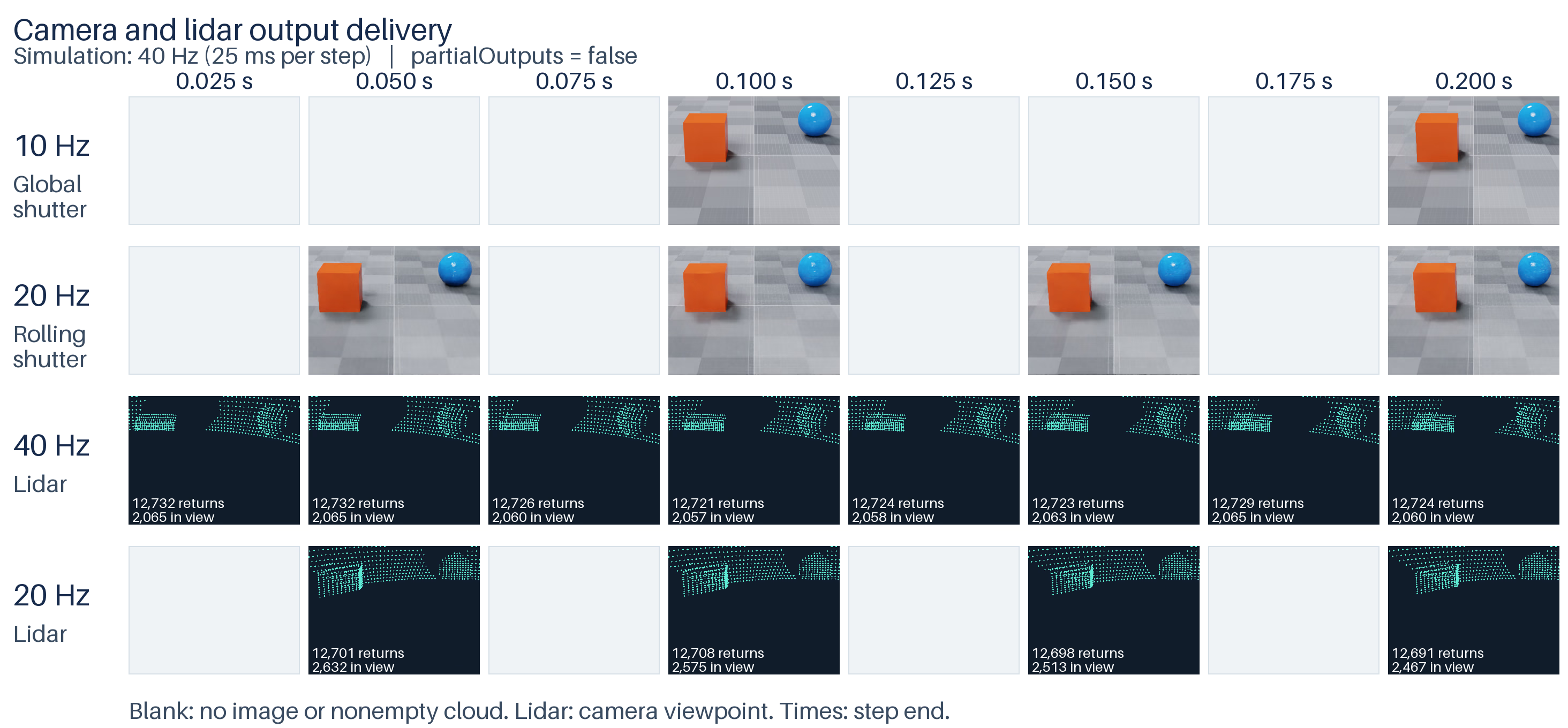
Two cameras and two lidars running at different capture rates in the Python example. The simulation advances in 25 ms steps and requests all four sensors on every step. With partial outputs disabled, each sensor returns only completed captures; blank cells mark steps with no output. Lidar points are projected from the rolling-shutter camera’s viewpoint.#
Frame rate, step and delivery#
The simulation step, a sensor’s capture period and output delivery are three separate things:
delta_timeadvances the common sensor simulation clock, in seconds.omni:sensor:frameRateschedules each sensor independently, in rational Hz.omni:sensor:Core:partialOutputscontrols whether an unfinished capture can produce intermediate outputs.
A positive omni:sensor:frameRate schedules captures at that rate,
independently of how often you step. omni:sensor:startTime sets the start
offset. See Shared attributes for defaults.
Without a positive rate:
A camera is unscheduled and renders one frame per step.
delta_timealone does not establish a fixed capture rate.Non-visual sensors retain a default 30 Hz capture schedule. Each capture spans 1/30 s; a step that advances time delivers the captures within it. Every non-visual schema supplies a positive rate, so this fallback requires you to author
(0, 1)explicitly.
The non-visual models handle those captures differently:
Lidar generic core flashes a whole scan per capture.
Lidar generic wpm requires a positive rate and publishes nothing without one.
Radar generic wpmDmat scans once per capture.
Acoustic generic wpm produces one frame per capture regardless of the rate.
Generic wpm traces its complete selected pattern per capture.
For example, a 20 Hz scanning lidar needs two 1/40 s steps to complete one scan. Keep it selected during both steps, including the first step, which delivers no completed output. A 40 Hz lidar completes a scan on every step.
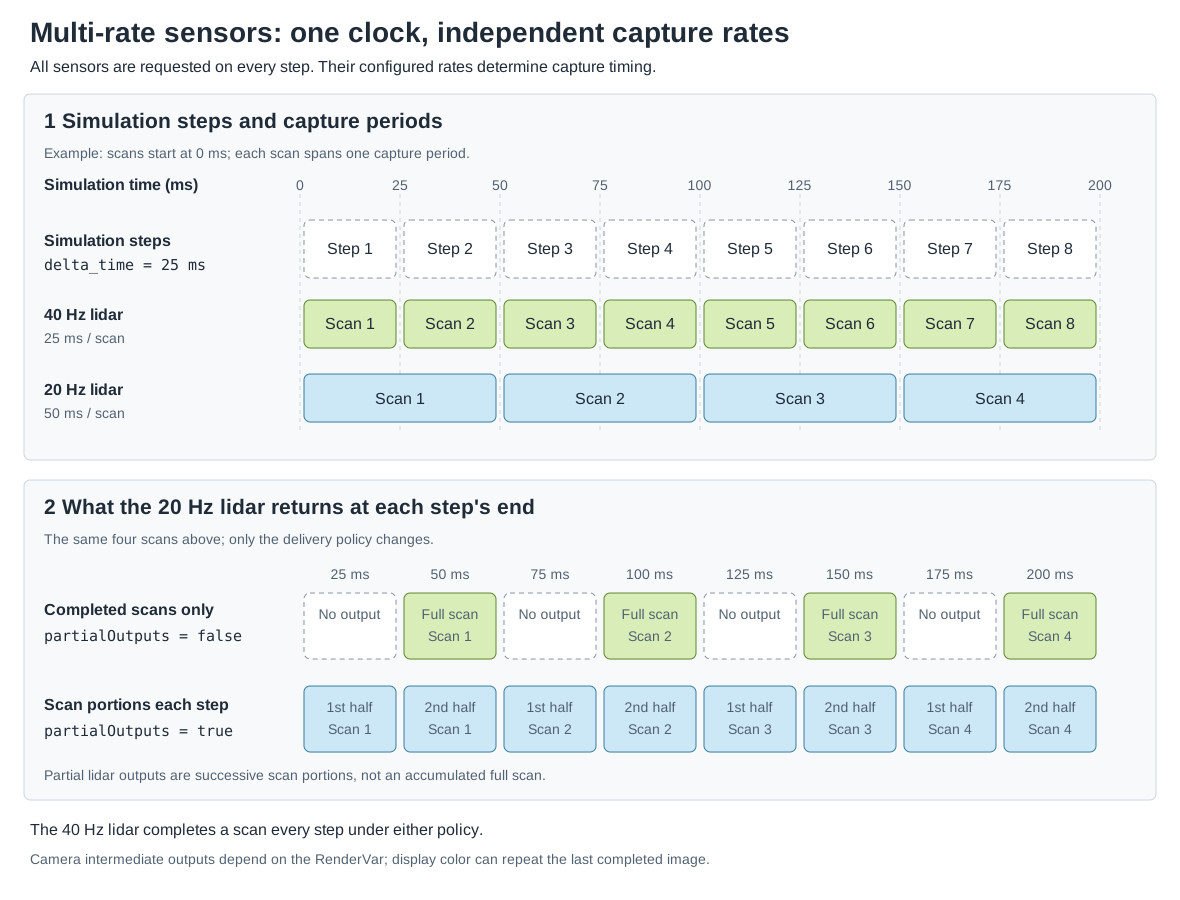
Simulation steps advance a shared clock. Each lidar captures at its own
configured rate; partialOutputs changes when data is returned without
changing those capture periods.#
Capture rate and output delivery#
Author the rate and the output policy on the sensor prim, not on its RenderProduct. Give each sensor its own RenderProduct, as Output Configuration describes under “Independent RenderProducts”. No single default of the delivery policy holds for every model, so the table lists, per model, where the controls are declared and what they default to:
Sensor |
USD declaration |
Behavior |
|---|---|---|
Every sensor |
|
A positive numerator/denominator sets the capture frequency in Hz; each model’s default is under “Shared attributes” on Sensor Configuration. |
Lidar generic core model |
|
What |
Lidar generic wpm model |
|
The model declares the policy in its own namespace; its USD attributes page describes it. |
Generic wpm model |
No partial-output attribute. |
Delivers the complete selected pattern in each capture. Firing offsets select motion samples within it; see Outputs. |
Cameras |
No schema declares the attribute on a |
ovrtx looks for |
The following lidar captures forty scans per simulated second and delivers only completed scans; the Python tab authors the same attributes with OpenUSD:
#usda 1.0
def OmniLidar "Lidar40" (
    prepend apiSchemas = ["OmniSensorGenericLidarCoreAPI"]
)
{
    # A full scan completes in each 1/40-second simulation step.
    double2 omni:sensor:frameRate = (40, 1)
    bool omni:sensor:Core:partialOutputs = false
    bool omni:sensor:Core:includeInvalidPoints = false
    token omni:sensor:Core:elementsCoordsType = "CARTESIAN"
    # World-space points let both scans share the camera's viewpoint.
    token omni:sensor:Core:outputFrameOfReference = "WORLD"
    # Keep the emitter firing sequence shorter than each angular tick.
    float omni:sensor:Core:rotPatternFiringResDeg = 1
    double3 xformOp:translate = (-150, 150, 300)
    uniform token[] xformOpOrder = ["xformOp:translate"]
}
from pxr import Gf, Sdf, UsdGeom

lidar = stage.DefinePrim("/World/Lidar40", "OmniLidar")
lidar.SetMetadata("apiSchemas", Sdf.TokenListOp.Create(prependedItems=["OmniSensorGenericLidarCoreAPI"]))
# Rational Hz: numerator / denominator. Each scan takes one 1/40-second step.
lidar.CreateAttribute("omni:sensor:frameRate", Sdf.ValueTypeNames.Double2).Set(Gf.Vec2d(40, 1))
lidar.CreateAttribute("omni:sensor:Core:partialOutputs", Sdf.ValueTypeNames.Bool).Set(False)
lidar.CreateAttribute("omni:sensor:Core:includeInvalidPoints", Sdf.ValueTypeNames.Bool).Set(False)
lidar.CreateAttribute("omni:sensor:Core:elementsCoordsType", Sdf.ValueTypeNames.Token).Set("CARTESIAN")
# World-space points let both scans share the camera's viewpoint.
lidar.CreateAttribute("omni:sensor:Core:outputFrameOfReference", Sdf.ValueTypeNames.Token).Set("WORLD")
lidar.CreateAttribute("omni:sensor:Core:rotPatternFiringResDeg", Sdf.ValueTypeNames.Float).Set(1)
UsdGeom.Xformable(lidar).AddTranslateOp().Set(Gf.Vec3d(-150, 150, 300))
Apply OmniSensorAPI and the same frameRate attribute for a scheduled
camera. For a rolling-shutter camera, also configure the exposure timing. This
20 Hz camera has a 50 ms exposure span at 240 rows:
239 / 9560 + 1 / 40 = 1 / 20 second, so each exposure spans exactly two
25 ms simulation steps:
#usda 1.0
def Camera "Camera20" (
    prepend apiSchemas = ["OmniSensorAPI", "OmniRtxRollingShutterAPI"]
)
{
    double2 omni:sensor:frameRate = (20, 1)
    float focalLength = 50
    float horizontalAperture = 20.955
    # At 240 rows, 239 / 9560 + 1 / 40 = 1 / 20 second.
    # Each exposure spans exactly two 25 ms simulation steps.
    double2 omni:rtx:rollingShutter:lineExposure = (1, 40)
    double2 omni:rtx:rollingShutter:lineOffset = (1, 9560)
    token omni:rtx:rollingShutter:scanOrder = "topToBottom"
    float3 xformOp:rotateXYZ = (-20, 0, 0)
    double3 xformOp:translate = (0, 350, 1000)
    uniform token[] xformOpOrder = ["xformOp:translate", "xformOp:rotateXYZ"]
}
from pxr import Gf, Sdf, UsdGeom

camera = UsdGeom.Camera.Define(stage, "/World/Camera20")
sensor = camera.GetPrim()
sensor.SetMetadata(
    "apiSchemas", Sdf.TokenListOp.Create(prependedItems=["OmniSensorAPI", "OmniRtxRollingShutterAPI"])
)
sensor.CreateAttribute("omni:sensor:frameRate", Sdf.ValueTypeNames.Double2).Set(Gf.Vec2d(20, 1))
# At 240 rows, 239 / 9560 + 1 / 40 = 1 / 20 second: two 25 ms steps.
sensor.CreateAttribute("omni:rtx:rollingShutter:lineExposure", Sdf.ValueTypeNames.Double2).Set(Gf.Vec2d(1, 40))
sensor.CreateAttribute("omni:rtx:rollingShutter:lineOffset", Sdf.ValueTypeNames.Double2).Set(Gf.Vec2d(1, 9560))
sensor.CreateAttribute("omni:rtx:rollingShutter:scanOrder", Sdf.ValueTypeNames.Token).Set("topToBottom")
camera.AddTranslateOp().Set(Gf.Vec3d(0, 350, 1000))
camera.AddRotateXYZOp().Set(Gf.Vec3f(-20, 0, 0))
The exposure span a scheduled camera may use and the timing attributes behind it are on Rolling Shutter. A rolling-shutter camera also needs the motion BVH; Motion BVH on Output Configuration gives the modes and which sensors need which.
Step every RenderProduct on every step#
The RenderProduct input set identifies the sensors to simulate. Request every sensor in every step, and ovrtx returns the results that are ready on that step. Omitting a sensor discards its accumulated capture and invokes tear-down and reinitialization costs when it is requested again.
The snippets show one step of the example’s loop. The Python tab advances the
scene’s USD animation to the step’s simulation time with
ovstage.population.update_from_usd_time, publishes that state at a new
ordinal, then steps all four products by 25 ms. The USD animation clock and the
sensor clock advance together here, but they are separate things. The C tab
does the same with ovstage_population_apply_usd_time and
ovrtx_step_with_stage.
import ovstage

# Update scene animation to the next 25 ms simulation time.
ordinal += 1
simulation_time = (step_index + 1) / 40
ovstage.population.update_from_usd_time(stage, ordinal, simulation_time)
# Make the scene updates available to the renderer.
stage.advance_write_floor(ordinal, ovstage.Scope.ALL).wait()
# Advance every sensor by 25 ms, including those with no output this step.
# Capture rates and partialOutputs determine when outputs are returned.
# Keep all four sensors requested to avoid teardown and reinitialization.
products = renderer.step(
    render_products={
        "/Render/Lidar40",
        "/Render/Lidar20",
        "/Render/Camera10",
        "/Render/Camera20",
    },
    delta_time=1 / 40,
    ordinal=ordinal,
)
// Publish animated scene state before advancing the sensor clock.
++ordinal;
const double simulation_time = (step_index + 1) / 40.0;
const auto population = ovstage_population_apply_usd_time(stage_, ordinal, simulation_time);
ASSERT_EQ(population.status, OVSTAGE_OK);
docs_wait_ovstage_population_no_errors(stage_, population.op_index);
docs_ovstage_advance_write_floor(stage_, ordinal);

// Keep slow sensors selected even on steps with no completed output.
ovx_string_t paths[] = {
    ovx_str("/Render/Lidar40"), ovx_str("/Render/Lidar20"),
    ovx_str("/Render/Camera10"), ovx_str("/Render/Camera20"),
};
ovrtx_render_product_set_t products{};
products.render_products = paths;
products.num_render_products = 4;
ovrtx_step_result_handle_t step_handle{};
const auto operation = ovrtx_step_with_stage(
    renderer_, products, 1.0 / 40.0, ordinal, &step_handle);
ASSERT_API_SUCCESS(operation.status);
For attached-stage ordering and ordinals, see ovstage Integration under “Ordinals and Write-Floor Gates”. For fetching results and their lifetime, in C in particular, see Sensor Outputs under “Frames in a step result” and “Lifetime and ownership”.
Partial outputs#
When an exposure or scan spans several simulation steps, you can choose to
receive only completed captures or also receive intermediate outputs while the
capture is in progress. Cameras, the Lidar generic core model and the Lidar
generic wpm model support this choice through partialOutputs. Radar and
acoustic models do not expose this control.
With partialOutputs = false, a capture spanning several steps accumulates
until it is complete. This is the right policy when a consumer needs a whole
lidar scan or a completed camera exposure. It suppresses intermediate delivery;
it does not pause the sensor’s simulation or remove the work of
accumulating the capture.
With partialOutputs = true, a step can also deliver partial captures, so
the output rate can exceed the authored capture rate. For a lidar, consume the
delivered portion of the scan. Camera RenderVars differ in what an intermediate
frame carries: the color outputs LdrColor and HdrColor of the
camera output tables repeat the last completed
image while an exposure is unfinished, and the frame that completes the
exposure carries the newly completed image. Rolling Shutter tabulates the intermediate behavior of
the RenderVars it lists. Nothing in a delivered image marks it as a repeat or
as newly completed; the frame’s capture window does. Use
partialOutputs = false when the consumer needs only newly completed images.
Cameras and lidar core use omni:sensor:Core:partialOutputs; lidar wpm uses
omni:sensor:LidarWpm:partialOutputs. Both lidar models default to false;
cameras default to true. The lidar schemas declare their attributes, so you
can author them in USD.
For cameras, set omni:sensor:Core:partialOutputs through ovstage after loading
the scene, preferably before the first render step.
On a Camera, authoring this attribute in USD alone has no effect by default:
no supported camera schema declares it, so population omits it from the runtime
stage and the policy remains true. Either write it through ovstage, as below,
or set customLayerData.populateAllAuthoredAttributes = true on the root layer.
See Loading USD, “Authored Attribute Population”.
The renderer reads the camera policy on every step. A later write therefore
takes effect on the next step; writing before rendering is a recommendation,
not a restriction. The Lidar generic core model also accepts live edits to
partialOutputs. See Runtime Parameter Updates and
its attributes.
The snippets apply one policy to all four sensors of the example. Both write one boolean to the four sensor prims through an ovstage query at a new ordinal, then advance the write floor so that the renderer sees the write:
import numpy as np
import ovstage

# Set the delivery policy on all four sensors before the first step.
# False returns completed captures only; True also allows intermediate outputs.
ordinal += 1
with ovstage.PathDictionary(stage) as paths:
    path_list = paths.create_path_list_from_strings(
        [
            "/World/Lidar40",
            "/World/Lidar20",
            "/World/Camera10",
            "/World/Camera20",
        ]
    )
    with stage.query_from_path_list(path_list) as query:
        stage.write_attribute(
            query,
            "omni:sensor:Core:partialOutputs",
            ordinal=ordinal,
            tensors=np.full(4, args.partial_outputs, dtype=np.bool_),
            is_array=False,
        ).wait()
    paths.destroy_path_list(path_list)
stage.advance_write_floor(ordinal, ovstage.Scope.ALL).wait()
++ordinal;
auto* dictionary = ovstage_get_path_dictionary(stage_);
const ovx_string_t sensor_paths[] = {
    ovx_str("/World/Lidar40"), ovx_str("/World/Lidar20"),
    ovx_str("/World/Camera10"), ovx_str("/World/Camera20"),
};
ovx_primpath_list_t path_list = OVX_INVALID_PRIMPATH_LIST;
const auto path_result = path_dictionary_create_path_list_from_strings(
    dictionary, sensor_paths, 4, &path_list);
ASSERT_EQ(path_result.status, OVX_API_SUCCESS);
ovstage_query_handle_t query = OVSTAGE_INVALID_QUERY_HANDLE;
ASSERT_EQ(ovstage_query_from_path_list(stage_, path_list, &query), OVSTAGE_OK);

// Deliver only completed captures here. Use true to also deliver partial outputs.
bool partial_outputs[] = {false, false, false, false};
int64_t shape[] = {4};
DLTensor tensor{};
tensor.data = partial_outputs;
tensor.device = {kDLCPU, 0};
tensor.ndim = 1;
tensor.dtype = {kDLBool, 8, 1};
tensor.shape = shape;
ovstage_write_data_t data{};
data.tensors = &tensor;
data.tensor_count = 1;
data.is_array = false;
const ovx_token_or_string_t attribute{
    0, ovx_str("omni:sensor:Core:partialOutputs")
};
const auto write = ovstage_write_attribute(
    stage_, query, attribute, ordinal, data, OVSTAGE_PRIM_MODE_UPSERT);
ASSERT_EQ(write.status, OVSTAGE_OK);
docs_wait_ovstage_no_errors(stage_, write.op_index);
const auto release = ovstage_release_query(stage_, query);
ASSERT_EQ(release.status, OVSTAGE_OK);
docs_wait_ovstage_no_errors(stage_, release.op_index);
path_dictionary_release_path_list_reference(dictionary, path_list);
docs_ovstage_advance_write_floor(stage_, ordinal);
Process only the output that arrived: iterate every returned product and all
of its frames, and place data in time with the frame’s capture window and the
model’s params, as Sensor Outputs describes under
“Frames in a step result”. For a lidar, bound every read by Counts[0]
(Delivered entry count); a zero count is not a
reason to drop the lidar from the next step
(Step every RenderProduct on every step). The frame counters and timestamps
a model publishes among its output params follow that model’s rules; for a
point cloud they are on the Outputs pages of the
Lidar generic core model and the
Radar generic wpmDmat model.
Observe a paused simulation#
A camera with no positive omni:sensor:frameRate and no long exposure can
act as an interactive observer of the same scene. After publishing the
observer’s transform at a new ordinal, step with delta_time = 0; zero is a
valid step length. This refreshes the view without advancing the common sensor
clock. Do not advance object animation on these view-only updates.
Keep both the observer and the scheduled sensor products in the input set. Use
partialOutputs = false on the simulated camera and hold its last completed
image between captures. Stage ordinals order scene writes and renderer reads;
they are independent of elapsed simulation time, as ovstage Integration explains under “Ordinals and Write-Floor
Gates”.
Start this pattern with a positive simulation step. A zero-length step whose
end falls exactly on a scheduled sensor’s initial omni:sensor:startTime
reaches that capture time, and a sensor whose capture is instantaneous captures
there; a zero-length step is therefore not a sensor-free warm-up at that
boundary.
The C: Simulated Camera and Observer example combines a 30 Hz top-down sensor with a Vulkan observer, pause and resume controls, and a retained sensor inset.