

Python: Camera calibration#
Fit a camera model from checkerboard photographs and save the calibration as a USD Camera. The script estimates a 3×3 camera matrix K (focal lengths and principal point) and a distortion vector D, then writes them to the matching OpenCV lens-distortion schema.
Calibration measures projection differences that can affect reprojection, stereo depth and synthetic images: unequal focal lengths, an off-center principal point, and barrel or pincushion distortion.
What Calibration Controls#
Intrinsics control projection: where scene points appear and how straight lines curve in the image. They do not change the render mode or available outputs.
The Camera generic core model simulates sensor response and image processing after rendering. It can share the Camera prim with a lens model; each uses its own attributes.
Set Up the Example#
The example project is in examples/python/camera-calibration. It includes
main.py, pyproject.toml, uv.lock and the eight photographs in
input_images/. No renderer or GPU is required.
From the SDK root, enter the example directory:
cd examples/python/camera-calibration
uv run creates the project environment and installs the locked dependencies:
OpenCV, NumPy and USD. Python 3.10–3.14 is supported.
The project requires opencv-python>=4.8,<5. The fisheye workflow was validated
with the locked OpenCV 4.14.0.94 and the supplied photographs.
The Example Photographs#
The eight supplied fisheye photographs are 1920×1536 and show a board with a
20×14 inner-corner grid. They are already in input_images/:
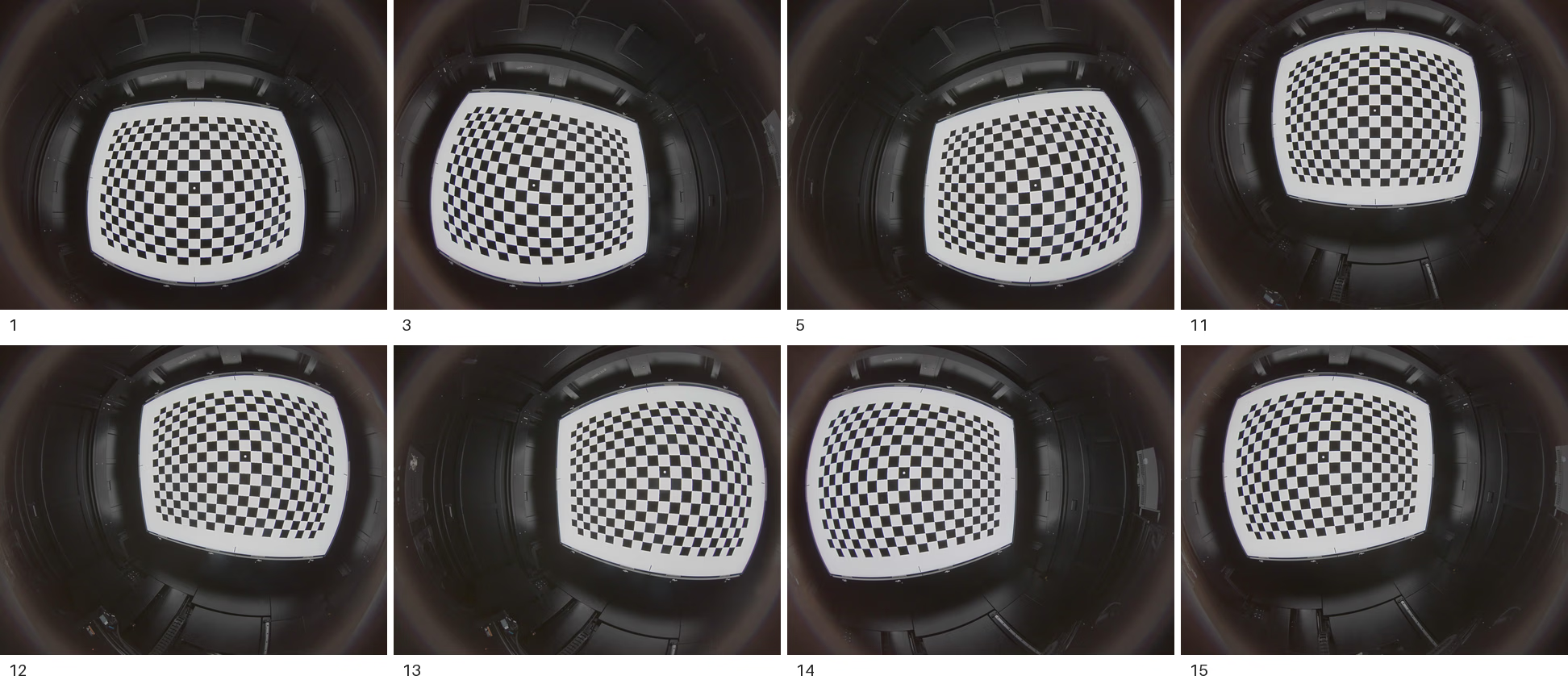
The input photographs, labeled by filename suffix.#
For your own photographs, use one image resolution and vary the board’s angle,
distance and position across the frame. Pass the folder with --images and
set --pattern to your board’s inner-corner grid. Use --fisheye only for a
fisheye lens.
The commands below use --fisheye --pattern 20x14 for the example photographs.
Choosing a lens model#
ovrtx provides schemas matching both OpenCV’s pinhole and fisheye models:
OmniLensDistortionOpenCvPinholeAPI and
OmniLensDistortionOpenCvFisheyeAPI. Use the pinhole model for conventional
lenses and the fisheye model for fisheye lenses.
See OpenCV pinhole and OpenCV fisheye for schema attributes, and calibration resolution for rendering at a different resolution. The script does not produce lookup-table or omni-directional stereo calibrations.
Run It#
uv run main.py --fisheye --pattern 20x14 --output-usd ./_out/calibrated_camera.usda
Flag |
Default |
What it does |
|---|---|---|
|
|
The folder of checkerboard photographs. Files ending |
|
|
The inner-corner grid of the board. |
|
off, so pinhole |
Solve the four-coefficient fisheye model instead of the pinhole one, and write the fisheye schema. |
|
off |
Pinhole only: solve the eight-coefficient rational model instead of the
five-coefficient model. Cannot be combined with |
|
|
Where to write the camera. Missing parent directories are created. |
Count inner corners, not squares: a board of N × M squares has
(N - 1) × (M - 1) inner corners. A 21×15-square board needs
--pattern 20x14. A mismatched pattern prevents detection; the script reports
skipped photographs and stops if too few boards are detected.
What the Script Does#
Detect corners#
Find the checkerboard grid in each grayscale photograph and refine its corner positions to sub-pixel accuracy. Skip images where the grid is not detected; collect the remaining image points and corresponding board coordinates for fitting.
# pattern is (columns, rows) of inner corners, not checkerboard squares.
found, corners = cv2.findChessboardCorners(gray, pattern, corner_flags)
if not found:
    failed.append(name)
    print(f"  [skip] no {pattern[0]}x{pattern[1]} board: {name}")
    continue
# Refine pixel positions using a 5-pixel search radius in each direction.
# (-1, -1) disables the excluded central region; subpix sets the stopping criteria.
corners = cv2.cornerSubPix(gray, corners, (5, 5), (-1, -1), subpix)
# OpenCV expects one float32 array per image: N x 1 x 2 image coordinates.
imgpoints.append(corners.reshape(-1, 1, 2).astype(np.float32))
# Pair these with N x 1 x 3 board coordinates in the same corner order.
objpoints.append(objp.reshape(-1, 1, 3).astype(np.float32))
used.append(name)
print(f"  [ok]   corners found: {name}")
Fit the model#
Fit the selected OpenCV model to the collected points. The solver returns the
camera matrix K, distortion vector D and reprojection RMS. The pinhole
path optionally enables the rational model; the fisheye helper tries several
initial focal lengths.
if is_fisheye:
    # Try several initial focal lengths and keep the fit with the lowest RMS.
    rms, K, D = _fisheye_calibrate(objpoints, imgpoints, size)
    model = "fisheye (k1..k4)"
else:
    # Enable three extra radial coefficients for the eight-coefficient model.
    flags = cv2.CALIB_RATIONAL_MODEL if rational else 0
    # Stop after 100 iterations or when the parameter change meets the 1e-6 tolerance.
    crit = (cv2.TERM_CRITERIA_EPS | cv2.TERM_CRITERIA_MAX_ITER, 100, 1e-6)
    # None lets OpenCV initialize K and D; discard the per-photo rotation/translation vectors.
    # Returns reprojection RMS in pixels, camera matrix K and distortion coefficients D.
    rms, K, D, _, _ = cv2.calibrateCamera(objpoints, imgpoints, size, None, None, flags=flags, criteria=crit)
    model = "pinhole rational (k1..k6)" if rational else "pinhole (k1,k2,p1,p2,k3)"
Write the camera attributes#
Apply the selected lens-distortion schema to the USD Camera and write the solved parameters as attributes in its namespace. Store the calibration image size so ovrtx can scale the intrinsics to the RenderProduct resolution.
#usda 1.0
def Camera "CalibratedCamera" (
    prepend apiSchemas = ["OmniLensDistortionOpenCvFisheyeAPI"]
)
{
    float omni:lensdistortion:opencvFisheye:cx = 965.48444
    float omni:lensdistortion:opencvFisheye:cy = 767.19696
    float omni:lensdistortion:opencvFisheye:fx = 489.91925
    float omni:lensdistortion:opencvFisheye:fy = 489.53534
    int2 omni:lensdistortion:opencvFisheye:imageSize = (1920, 1536)
    float omni:lensdistortion:opencvFisheye:k1 = 0.07464232
    float omni:lensdistortion:opencvFisheye:k2 = -0.026043002
    float omni:lensdistortion:opencvFisheye:k3 = 0.009413581
    float omni:lensdistortion:opencvFisheye:k4 = -0.0014346525
}
# Record an applied API schema as a USD list edit on this layer.
schemas = Sdf.TokenListOp()
# schema is the selected OpenCV pinhole or fisheye API schema name.
schemas.prependedItems = [schema]
prim.SetMetadata("apiSchemas", schemas)
# lens maps attribute names to solved values; ns is the selected model's namespace.
# custom=False marks these as schema attributes, not application-defined metadata.
for name, value in lens.items():
    prim.CreateAttribute(f"{ns}:{name}", Sdf.ValueTypeNames.Float, custom=False).Set(float(value))
# Preserve the calibration resolution as a USD int2 (width, height).
prim.CreateAttribute(f"{ns}:imageSize", Sdf.ValueTypeNames.Int2, custom=False).Set(
    Gf.Vec2i(int(cal["width"]), int(cal["height"]))
)
The script requires at least three photographs with detected boards. Use more, with varied angles, distances and positions, to cover the image rather than concentrating corners near its center.
The fisheye solver tries initial focal lengths of 0.3, 0.4, 0.5, 0.6, 0.8 and 1.0 times the longer image dimension. It discards attempts that raise an error or return a non-finite RMS, then keeps the lowest RMS. If all six fail, it stops.
Reprojection RMS measures the residual between detected and projected corners, in pixels. Below about 0.5 pixels is a useful rule of thumb, not a guarantee of accuracy. The script reports and stores the RMS but does not enforce a threshold; a poor fit still produces a file.
The script maps OpenCV’s distortion vector to named attributes. For pinhole, the tangential terms precede the third radial term; preserve this ordering if copying a vector by hand.
Solve |
OpenCV D |
Attributes written |
|---|---|---|
Pinhole, five coefficients |
|
|
Pinhole, rational |
|
|
Fisheye |
|
|
The Camera It Writes#
The output contains a Camera prim with the selected OpenCV schema, solved intrinsics and calibration image size. Attribute definitions, types and defaults are listed under OpenCV pinhole and OpenCV fisheye in Lens Calibration.
The script also writes two custom attributes: calibration:model records the
model and calibration:reprojectionRmsPixels records the fit error. These are
metadata for tracing the calibration; they do not affect rendering.
The script relies on the applied schema’s omni:lensdistortion:model fallback
rather than authoring the selector. The lens-distortion schemas must be registered
when the stage is read for that fallback to resolve. Lens Calibration’s examples
author the selector explicitly.
The script also writes standard camera attributes for plain USD viewers:
For pinhole, it derives focal length, apertures and offsets from the solve.
focalLengthis set to fx and the horizontal aperture to the image width to reproduce the field of view.For fisheye, these are nominal placeholders; the calibrated projection is carried by the lens-distortion schema.
These focal-length values are not physical lens measurements. The script leaves
fStop unauthored, so depth of field is off. Before enabling it, set physical
focal length and aperture values; see Lens Calibration for the
attributes depth of field uses. The output layer is Y-up.
Check the Result#
The run reports per photograph as it goes, then prints a summary:
  [ok]   corners found: Internal_reference_calibration_1.png
  [skip] no 20x14 board: some_other_photo.png

Calibrating from <n> images at 1920x1536 ...

============================================================
Camera intrinsic calibration
============================================================
Model:              fisheye (k1..k4)
Resolution:         1920 x 1536
Focal length (px):  fx=...  fy=...
Principal point:    cx=...  cy=...
Distortion coeffs:  [...]
Reprojection RMS:   ... px
Images used:        ...  (failed: ...)
============================================================

USD camera written: ./_out/calibrated_camera.usda
Check the following:
Images used: compare with the number supplied. If many were skipped, check the pattern, focus and board visibility before changing solver settings.
Reprojection RMS: assess the fit using the guidance above.
Principal point: usually near the image center (about 960, 768 for the example images). A large offset warrants checking the solve.
Written USD: check that
prepend apiSchemasnames the expected schema andimageSizematches the calibration photographs.
Results can vary with OpenCV version and, for fisheye, the selected starting point. Compare with a tolerance rather than expecting identical final digits.
Potential issues#
When using your own images with this script, check for the following:
no images found in <dir>— the folder is empty or holds files the script does not glob. Only.png,.jpgand.jpegare read.need >=3 images with a detected board, got <n>— the boards were not detected, and the count is how many were. Check--patternfirst; see inner corners. Blur, glare, a partially visible board, or a board too small in the frame do the same thing to individual photographs. The script names each skipped photograph.image size mismatch: <name> is WxH, expected WxH— the folder mixes resolutions. Intrinsics are in pixels, so photographs from two resolutions cannot be solved together. Split them and calibrate each set separately.fisheye calibration failed to converge for any focal seed— every one of the six starting guesses diverged. Check that the photographs really are fisheye and that the pattern is right; if they are and it still fails, check the OpenCV version against the pin.--rational is only valid for pinhole calibration— the rational model is a pinhole-only refinement and was passed together with--fisheye. Drop one of the two flags.The calibration succeeds but the rendered image is not distorted — the camera prim is not carrying a resolvable model selector, or the attributes were copied under the wrong namespace.
opencvFisheyeandopencvPinholeattribute names are not interchangeable, and a value authored under the namespace the camera is not using is an attribute nothing reads.
Use the Calibrated Camera in a Scene#
Reference the generated Camera prim into your scene. The calibration script sets
it as the asset’s defaultPrim, so the reference needs only the file path.
This creates _out/scene.usda with the camera at /World/Camera:
#usda 1.0
def Xform "World"
{
    def Camera "Camera" (
        prepend references = @calibrated_camera.usda@
    )
    {
    }
}
from pxr import Usd, UsdGeom

stage = Usd.Stage.CreateNew("_out/scene.usda")
UsdGeom.Xform.Define(stage, "/World")
camera = UsdGeom.Camera.Define(stage, "/World/Camera")
# The asset path is relative to scene.usda; defaultPrim selects the Camera.
camera.GetPrim().GetReferences().AddReference("calibrated_camera.usda")
stage.GetRootLayer().Save()
Set the referenced camera’s pose in your scene and point the RenderProduct’s
camera relationship at it. The lens parameters remain in the referenced
asset. See Output Configuration for connecting the
camera to a RenderProduct.
For each calibration photograph, reproduce the camera and checkerboard poses in the scene and compare a render with the photograph. Check the corner positions and line curvature across the frame.
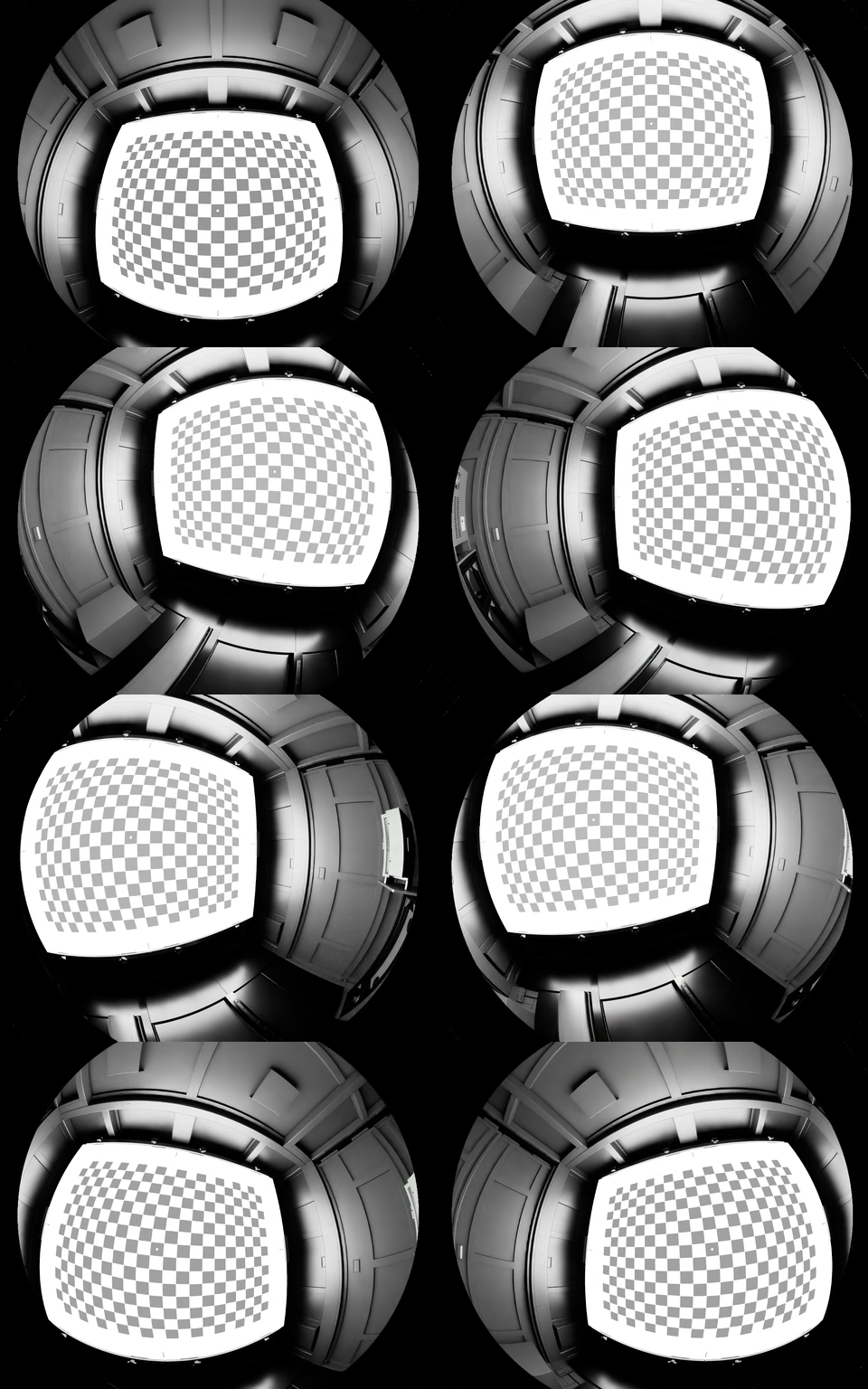
The grid uses the calibration solved from the example photographs, with one tile per calibration pose, to compare simulated and photographed distortion.