

Sensor Definition Validation#
Validate a sensor definition before rendering to find parameter errors. The sensor introspection utility runs the model’s own validation rules and returns either success or a diagnostic. After a successful check, you can inspect the accepted parameters and the capture schedule derived from them.
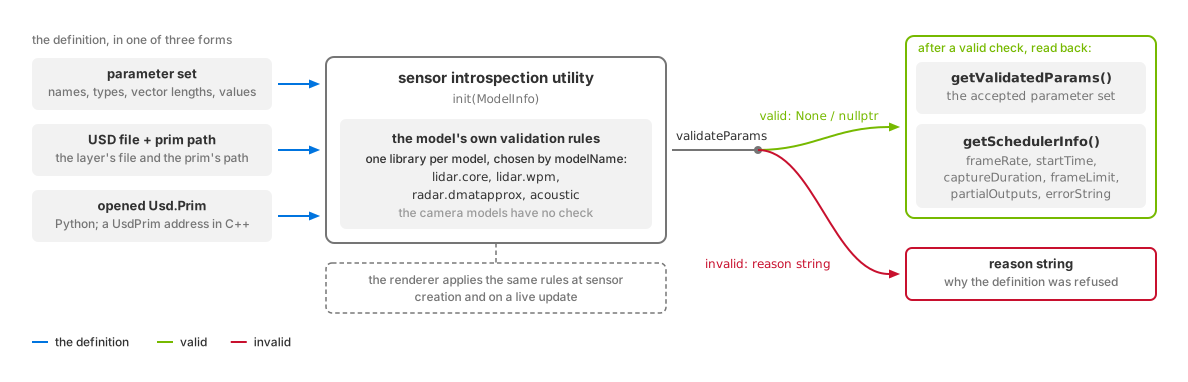
The model validates the definition before rendering. A successful check makes its accepted parameters and scheduling information available.#
Supported models#
Validation is available for these five non-visual models. Camera models do not
provide a validation implementation. Initialize ModelInfo with the model and
vendor identifiers below:
Model |
|
|
|---|---|---|
|
|
|
|
|
|
|
|
|
|
|
|
|
|
For Generic wpm, this utility checks model controls and the shared capture schedule. It does not validate flattened pattern arrays or active mapping compatibility. Rendering validates those together; verify the accepted selectors in output params. See Generic wpm configuration acceptance.
These lowercase identifiers select the validation library. They differ from
omni:sensor:modelName and omni:sensor:modelVendor on the sensor prim;
for lidar core those are "LidarCore" and "NVIDIA". See
model identity and the
library naming convention.
marketName is free text and is not read by the utility.
Set schemaVersion and modelVersion explicitly. The examples request
schema 1, model 0 (modelInfo.version = { 1u, 0u } in C++).
init() rejects unset versions and unsupported requests. Leave
allowDeprecated at its default. See
error handling.
Validation inputs#
validateParams() accepts a parameter set or a USD sensor definition:
Input |
Requirements |
|---|---|
|
Supply parameter names, data types, vector lengths and values using the structure documented below. |
USD file and prim path |
Pass the file path and the path of the sensor prim within it. |
Python |
Pass the prim to |
C++ |
Pass its address to |
For USD inputs, the utility reads every omni:sensor attribute, including
unauthored attributes supplied by applied API schemas. Those attributes use their
schema defaults. The utility registers the packaged schemas during initialization.
Validation results#
validateParams() returns None in Python or nullptr in C++ on success.
A failure returns a string explaining the rejected definition.
After success, getValidatedParams() returns the accepted parameter set.
getSchedulerInfo() returns:
Fields |
Contents |
|---|---|
|
Capture rate and timing as rational numbers. |
|
Capture limit and intermediate-output policy. |
|
A diagnostic if no parameters have been validated, the last validation failed, or required scheduling attributes are missing. |
Without a prim argument, getSchedulerInfo() uses the last validated parameters
without validating again. With a prim, it validates that prim first.
The renderer uses the same rules when creating a sensor or updating its parameters and logs rejection reasons as errors. Runtime Parameter Updates describes what a rejected creation or update does to the sensor. Lidar core’s parameter validation rules list its checks; the lidar tutorials run validation before their rendering checks.
Package and imports#
The ovrtx package includes the utility at bin/libs/sensors-introspection/.
It is also distributed as the standalone sensor-introspection package, with
the Python module available as the sensor_introspection wheel.
bin/libs/sensors-introspection/
├── bin/                                # utility, model libraries and schemas
├── include/                            # C++ headers
├── omni/sensors/sensor_introspection/   # Python module and its native libraries
├── docs/                               # utility reference
└── PACKAGE-LICENSES/
The headers include ISensorIntrospectionImpl.h, SensorIntrospectionTypes.h
and SensorIntrospectionUtil.h. The Python wrapper uses ctypes and requires
no compilation; it looks for the native utility library in its own directory
first.
For the bundled package, add omni/sensors to the Python path and import the
module:
import sys

sys.path.append("/path/to/ovrtx/bin/libs/sensors-introspection/omni/sensors")
import sensor_introspection as sc
If you instead add the package root to the path, import through
omni.sensors.sensor_introspection. The wheel contains the same
omni/sensors tree. init() discovers the model library as described under
library loading, or accepts an explicit
library path as its second argument.
Utility reference#
The following reference comes from the packaged utility documentation. It covers API structures, examples, library loading and errors. The output-buffer validation example and its structure are omitted here.
The utility loads a validation library for the selected sensor model. Each model implements the same interface with its own parameter checks.
Architecture overview#
The utility has these components:
Core Interface (
ISensorIntrospectionImpl.h) - Defines the common interface that all sensor introspection implementations must followType Definitions (
SensorIntrospectionTypes.h) - Defines the data structures used by the APIUtility Class (
SensorIntrospectionUtil.h/cpp) - Main class that handles dynamic loading and parameter cachingImplementation Libraries - Separate shared object files for each sensor type
Factory Functions - C-style functions exported by each implementation library
Python Bindings - Python bindings over the native utility
Library loading#
Library discovery#
When SensorIntrospectionUtil::init() is called, it:
Constructs the library path based on the model name and vendor
Or uses a custom path if provided
Loads the shared library using platform-specific APIs (
dlopenon Linux,LoadLibraryon Windows)
Symbol resolution#
The utility resolves the createSensorIntrospectionImpl() factory from the loaded library:
extern "C" SENSOR_INTROSPECTION_API omni::sensors::ISensorIntrospectionImpl* createSensorIntrospectionImpl();
Implementation creation#
The utility calls the factory to create the model validation instance.
SensorIntrospectionUtil::init() returns library-loading, missing-factory, or implementation-creation errors before
version resolution. After successful creation, it calls the implementation’s init() to resolve
modelInfo.version in place; that call returns nullptr when accepted or a version-rejection reason.
Parameter validation#
The implementation’s validateParams() method is called with the provided parameters. It returns nullptr if valid, or an error string if validation fails.
Data structures#
ModelInfo#
ModelInfo selects the model library and requests a schema/model version:
struct ModelInfo
{
    const char* modelName;      // Name of the sensor model (e.g., "lidar.core")
    const char* modelVendor;    // Vendor of the model (e.g., "nv")
    const char* marketName;     // Market name of the model; not read by the utility
    SensorVersion version;      // Schema/model request, resolved in place on acceptance
    bool allowDeprecated;
};
Parameters#
Parameters supplies parallel arrays of names, types, vector lengths and values:
struct Parameters
{
    uint32_t numParams;                    // Number of parameters
    const char** paramNames;               // Array of parameter names
    SensorIntrospectionParamType* dataTypes;     // Array of parameter data types
    uint32_t* paramVectorLengths;          // Array of vector lengths
    const void** paramValues;              // Array of parameter values
};
Usage examples#
These examples initialize the lidar core validator and inspect the validation result. Python validates a USD file; C++ shows both a manually supplied parameter set and USD-file validation.
import sensor_introspection as sc

# Create a sensor introspection
introspection = sc.SensorIntrospectionUtil()

# Initialize with lidar.core model
# Note: Use lowercase names for introspection implementation library discovery
model_info = sc.ModelInfo()
model_info.modelName = "lidar.core"
model_info.modelVendor = "nv"
model_info.schemaVersion = 1
model_info.modelVersion = 0  # Schema 1, model 0
model_info.allowDeprecated = False
introspection.init(model_info)  # Raises RuntimeError on loading or version-resolution failure.

# USDA path and to be checked prim
usda_path = "path/to/usda.usda"
prim_path = "/prim_path"
# Validate the parameters
error = introspection.validateParams(usda_path, prim_path)
if error is None:
    print("LidarCore parameters valid")
    validated_params = introspection.getValidatedParams()
    print("Validated parameters:", validated_params)
else:
    print(f"Validation failed: {error}")
#include "SensorIntrospectionUtil.h"

omni::sensors::SensorIntrospectionUtil introspection;

// Initialize with model information
// Note: Use lowercase names for introspection implementation library discovery
omni::sensors::ModelInfo modelInfo{};
modelInfo.modelName = "lidar.core"; // Lowercase for library discovery
modelInfo.modelVendor = "nv";
modelInfo.version = { 1u, 0u };     // Schema 1, model 0
modelInfo.allowDeprecated = false;
if (const char* error = introspection.init(modelInfo)) {
    std::cout << "Initialization failed: " << error << std::endl;
    return;
}

// Prepare parameters -- this is an incomplete set just for demonstration
const char* paramNames[] = {"omni:sensor:Core:numberOfEmitters", "omni:sensor:Core:nearRangeM"};
omni::sensors::SensorIntrospectionParamType dataTypes[] = {
    omni::sensors::SensorIntrospectionParamType::INT,
    omni::sensors::SensorIntrospectionParamType::FLOAT
};
uint32_t paramVectorLengths[] = {1, 1};
uint32_t numEmitters = 100U;
float nearRangeM = 0.5f;
const void* paramValues[] = {&numEmitters, &nearRangeM};

omni::sensors::Parameters params = {
    2,              // numParams
    paramNames,     // paramNames
    dataTypes,      // dataTypes
    paramVectorLengths, // paramVectorLengths
    paramValues     // paramValues
};

// Validate parameters
const char* error = introspection.validateParams(params);

if (error == nullptr) {
    auto validatedParams = introspection.getValidatedParams();
    // Use validated parameters...
} else {
    std::cout << "Validation failed: " << error << std::endl;
}
After initialization, validate a USD file by passing its path and the sensor prim path:
// Validate parameters from a USD file
const char* error = introspection.validateParams("/path/to/sensor.usda", "/sensor_prim");
if (error == nullptr) {
    std::cout << "USD validation successful" << std::endl;
} else {
    std::cout << "USD validation failed: " << error << std::endl;
}
Library naming convention#
The default path is derived from ModelInfo::modelName and ModelInfo::modelVendor:
Linux:
librtx.sensors.{modelName}.{modelVendor}.ispect.impl.soWindows:
rtx.sensors.{modelName}.{modelVendor}.ispect.impl.dll
Examples:
librtx.sensors.lidar.core.nv.ispect.impl.so(Lidar generic core model)librtx.sensors.radar.dmatapprox.nv.ispect.impl.so(Radar generic wpmDmat model)librtx.sensors.acoustic.nv.ispect.impl.so(Acoustic generic wpm model)librtx.sensors.generic.wpm.nv.ispect.impl.so(Generic wpm model)
Error handling#
Initialization and validation report these errors and warnings:
Missing libraries (returns an initialization error)
A missing
createSensorIntrospectionImplsymbol (unloads the loaded library and returns an initialization error)Failed implementation creation (returns an initialization error)
Parameter and AOV validation failures (returns descriptive error strings)
Platform loader paths#
Linux: Uses
dlopen,dlsym,dlcloseWindows: Uses
LoadLibrary,GetProcAddress,FreeLibrarymacOS and other non-Windows platforms: Use the
dlopen,dlsym, anddlclosebranch and.sofilename convention; this describes the source path, not an official support guarantee
Current implementations#
rtx.sensors.lidar.core.nv.ispect.impl: Lidar generic core model validation
rtx.sensors.lidar.wpm.nv.ispect.impl: Lidar generic wpm model validation
rtx.sensors.radar.dmatapprox.nv.ispect.impl: Radar generic wpmDmat model validation
rtx.sensors.acoustic.nv.ispect.impl: Acoustic generic wpm model validation
rtx.sensors.generic.wpm.nv.ispect.impl: Generic wpm model controls and capture schedule validation; flattened pattern arrays and mapping compatibility are checked when rendering accepts the complete configuration