

Python: Generic WPM Configurations#
Run the small configurations from Generic wpm model and inspect their raw Contributions. The example saves the channels to an NPZ file and optionally visualizes derived hit samples with Rerun. It does not turn contributions into detector outputs.
The shared scene reuses the documentation cube mesh to form a steel enclosure. The sensor is at its center. The X/Z walls are 11 m from the origin; the Y walls are 12 m away. No visual lights are needed for this nonvisual capture.
Prerequisites and Running#
Use Python 3.10–3.14, an RTX GPU and a supported driver.
Run from examples/python/generic-wpm:
uv run main.py --recipe depth --no-rr --png _output/depth.png
uv run main.py --recipe lidar --rrd _output/lidar.rrd
uv run main.py --recipe acoustic --no-rr --output _output/acoustic.npz
uv run main.py --recipe mixed --live-edits --no-rr
The first capture may take several minutes while shaders compile. Without
--no-rr or --rrd, the example opens the Rerun viewer.
Option |
Meaning |
|---|---|
|
|
|
Raw channel and CPU-parameter NPZ; defaults to |
|
Run without the viewer. |
|
Save a headless recording; cannot be combined with |
|
Save labeled range cells for |
|
For |
Configuration#
Each recipe is a sensor/RenderProduct layer under tests/docs/usd/data.
The runner composes it with scene.usda. Keep the public tree’s relative layout
when copying the example so its recipe layers and cube reference resolve.
For example, the following override layer adds a one-cell receiver neighborhood to the Gaussian recipe. Its sublayer supplies the sensor, patterns and output. This increases capacity from 135 to 1,215 slots without increasing the ray count; the guide contains the full recipes and common setup.
The USD Python tab assumes the Gaussian pattern has been authored on stage.
#usda 1.0
(
    defaultPrim = "World"
    metersPerUnit = 1
    upAxis = "Z"
    timeCodesPerSecond = 10
    subLayers = [@generic_wpm_gaussian.usda@]
)

over "World"
{
    over "Sensor"
    {
        # Radius one allocates nine receiver slots per ray; edge slots can be invalid.
        uint[] omni:sensor:GenericWpm:tx:mappingBloomFactors = [1]
    }
}
sensor = stage.GetPrimAtPath("/World/Sensor")
# Radius one allocates nine receiver slots per ray; edge slots can be invalid.
sensor.GetAttribute("omni:sensor:GenericWpm:tx:mappingBloomFactors").Set([1])
Example Output#
One recorded run of the depth recipe printed shape=(1, 15, 1, 1, 1), valid=15/15. Its center
cell is 11 m away; oblique samples have longer paths to the same wall. The image
shows sampled range cells, not pinhole-camera pixels.
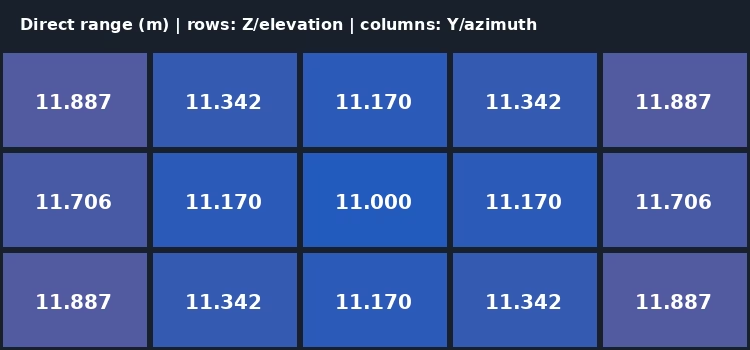
Range derived from the depth recipe’s valid direct-return contributions.#
The NPZ uses channel names as keys and prefixes CPU parameter names with
param_. Reshape records in [tile, tx, rayInTx, bounce, receiverSlot]
order and filter every payload by Valid != 0. The Rerun view plots valid
HitPosWorld samples; multiple contributions can occupy the same position.
Capture and Read Contributions#
The following Python/C snippets use an attached ovstage and the recipe’s
/Render/GenericWpm RenderProduct. The C API example
provides the complete C++ application. For stage attachment and cleanup order,
see ovstage Integration.
Step a Sealed Configuration#
Finish stage writes and advance the write floor before rendering their ordinal. The snippets below step the 10 Hz example and obtain its frame. Initial repeated steps allow pipeline warmup:
main.py, from the runnable Python example.#for _ in range(steps):
products = renderer.step(render_products={"/Render/GenericWpm"}, delta_time=0.1, ordinal=ordinal)
frame = products["/Render/GenericWpm"].frames[0]
const ovx_string_t product =
    literal_to_ovx_string("/Render/GenericWpm");
ovrtx_render_product_set_t products{};
products.render_products = &product;
products.num_render_products = 1;
const auto enqueue = ovrtx_step_with_stage(
    renderer, products, 0.1, ordinal, &result_handle);
check(enqueue);
ovrtx_op_wait_result_t done{};
check(ovrtx_wait_op(
    renderer, enqueue.op_index, ovrtx_timeout_infinite, &done));
require(done.num_error_ops == 0,
        "Rendering failed; inspect the renderer log");
ovrtx_render_product_set_outputs_t results{};
check(ovrtx_fetch_results(
    renderer, result_handle, ovrtx_timeout_infinite, &results));
Copy the CPU Output#
Find Contributions by its full RenderVar prim
path, /Render/GenericWpm/Contributions, not just its sourceName. CPU
mapping waits for the producing GPU work and copies tensors to host memory.
The following snippets find channels and CPU parameters by name, then take
independent copies before releasing the mapping:
import numpy as np
import ovrtx

with frame.render_vars["/Render/GenericWpm/Contributions"].map(device=ovrtx.Device.CPU) as output:
    # Copy inside the mapping: the returned arrays own their memory.
    tensors = {name: np.from_dlpack(output[name]).copy() for name in output}
    params = {name: np.from_dlpack(output.params[name]).copy() for name in output.params}
The application has found the RenderVar’s handle in the fetched
results. Its copy_tensor() helper validates tensor type and layout,
then copies the data into an owning vector:
ovrtx_map_output_description_t map{};
map.device_type = OVRTX_MAP_DEVICE_TYPE_CPU;
check(ovrtx_map_render_var_output(
    renderer, handle, &map, ovrtx_timeout_infinite, &output));

// Channel and parameter order is not part of the contract; find
// each by name.
auto channel = [&](std::string_view name) -> const DLTensor& {
    for (size_t i = 0; i < output.num_tensors; ++i) {
        if (view(*output.tensors[i].name) == name) {
            return *output.tensors[i].dl;
        }
    }
    throw std::runtime_error("Missing channel: " +
                             std::string(name));
};
auto parameter = [&](std::string_view name) {
    for (size_t i = 0; i < output.num_params; ++i) {
        if (view(output.params[i].name) != name) {
            continue;
        }
        const auto copy =
            copy_tensor<uint32_t>(output.params[i].dl, kDLUInt);
        require(copy.size() == 1,
                "Expected a scalar CPU parameter");
        return copy[0];
    }
    throw std::runtime_error("Missing parameter: " +
                             std::string(name));
};
captured.shape = {parameter("numTiles"),
                  parameter("numTx"),
                  parameter("raysPerTx"),
                  parameter("maxBounces"),
                  parameter("groupSize")};
captured.selectors = {parameter("activeTxPatternIndex"),
                      parameter("activeRxPatternIndex"),
                      parameter("activeMappingPageIndex")};
// These vectors and metadata copies remain valid after
// unmapping.
captured.valid =
    copy_tensor<uint32_t>(channel("Valid"), kDLUInt);
captured.distance =
    copy_tensor<float>(channel("RoundTripDistanceM"), kDLFloat);
captured.hit_world =
    copy_tensor<float>(channel("HitPosWorld"), kDLFloat, 3);
const size_t slots = std::accumulate(captured.shape.begin(),
                                     captured.shape.end(),
                                     size_t{1},
                                     std::multiplies<size_t>());
require(slots == captured.valid.size() &&
            slots == parameter("maxContributions") &&
            slots == captured.distance.size() &&
            3 * slots == captured.hit_world.size(),
        "Contribution dimensions do not match their channels");
check(ovrtx_unmap_render_var_output(
    renderer, output.map_handle, {}));
output.map_handle = OVRTX_INVALID_RENDER_VAR_OUTPUT_MAP_HANDLE;
In C, mapped pointers expire when you unmap. After processing a step, release
its results with ovrtx_destroy_results(). Python DLPack views retain
their mapping while referenced, even beyond a with block. Independent copies
make ownership explicit and allow prompt release of renderer buffers. Dropping
step results does not invalidate a live mapping.
For GPU consumers, use linear CUDA mapping with producer and completion synchronization; see Mapping API. This output is not a CUDA image array.
Filter Valid Slots#
The snippet below reconstructs logical slot coordinates from copied CPU parameters and filters copied payloads. The data remains usable after the renderer is destroyed. Keeping coordinates before compacting the records preserves which transmitter, ray, bounce and receiver slot produced each sample:
import numpy as np

# These are owned copies from capture(), not borrowed GPU or mapped CPU data.
shape = tuple(int(params[name].item()) for name in ("numTiles", "numTx", "raysPerTx", "maxBounces", "groupSize"))
valid = tensors["Valid"].reshape(shape) != 0
# Keep logical slot coordinates before compacting the valid payloads.
slot_indices = np.argwhere(valid)
hit_samples = tensors["HitPosWorld"].reshape(*shape, 3)[valid]
path_lengths = tensors["RoundTripDistanceM"].reshape(shape)[valid]
for (size_t slot = 0; slot < captured.valid.size(); ++slot) {
    if (!captured.valid[slot]) {
        continue; // Dense holes are not returns.
    }
    size_t index = slot;
    std::array<size_t, 5> coordinates{};
    for (int axis = 4; axis >= 0; --axis) {
        coordinates[axis] = index % captured.shape[axis];
        index /= captured.shape[axis];
    }
    // Coordinates are tile, transmitter, ray, bounce, receiver slot
    // (fastest).
    csv << ordinal << ',' << slot;
    for (auto coordinate : coordinates) {
        csv << ',' << coordinate;
    }
    csv << ',' << captured.distance[slot];
    for (int axis = 0; axis < 3; ++axis) {
        csv << ',' << captured.hit_world[3 * slot + axis];
    }
    csv << ',';
    // Only the colocated, one-bounce depth recipe has range = round-trip
    // / 2.
    if (depth) {
        csv << captured.distance[slot] / 2;
    }
    csv << '\n';
}
Before reshaping, distinguish a completed capture from EMPTY output: an EMPTY
capture still has named channels, but their leading dimensions are zero.
Warmup may report accepted capacity parameters while the channel tensors are
still empty. Wait for a completed capture rather than reshaping empty tensors
to that capacity. Allocated slots with all Valid = 0 instead mean the capture
completed without positive-power contributions.
Change Active Patterns#
Without --live-edits, mixed renders its initial authored selection.
With it, the requested Tx/Rx/page triplets are (0,0,0), (1,1,1),
(2,1,1), (0,1,0) and (0,0,0). The fourth is invalid: the accepted
triplet stays (2,1,1) with 18 slots. The final valid request restores two
slots. The console reports both requested and accepted selectors.
The snippets below publish all three scalar writes at one new ordinal and
advance the write floor once, after the writes complete. Do not step between
the writes. Python receives the requested tx, rx and page values;
C receives the requested triplet and a single-prim sensor query for
/World/Sensor:
import numpy as np
import ovstage

with ovstage.PathDictionary(stage) as paths:
    prims = paths.create_path_list_from_strings(["/World/Sensor"])
    try:
        with stage.query_from_path_list(prims) as query:
            for name, value in (
                ("activeTxPatternIndex", tx),
                ("activeRxPatternIndex", rx),
                ("activeMappingPageIndex", page),
            ):
                stage.write_attribute(
                    query,
                    paths.intern_token("omni:sensor:GenericWpm:" + name),
                    ordinal=ordinal,
                    tensors=np.array([value], dtype=np.uint32),
                    is_array=False,
                ).wait()
    finally:
        paths.destroy_path_list(prims)
# Seal only after all three writes; do not step the renderer between them.
stage.advance_write_floor(ordinal, ovstage.Scope.ALL).wait()
const ovx_string_t names[] = {
    literal_to_ovx_string("omni:sensor:GenericWpm:activeTxPatternIndex"),
    literal_to_ovx_string("omni:sensor:GenericWpm:activeRxPatternIndex"),
    literal_to_ovx_string("omni:sensor:GenericWpm:activeMappingPageIndex"),
};
int64_t shape[] = {1};
for (size_t i = 0; i < requested.size(); ++i) {
    DLTensor tensor{};
    tensor.data = &requested[i];
    tensor.device = {kDLCPU, 0};
    tensor.ndim = 1;
    tensor.dtype = {kDLUInt, 32, 1};
    tensor.shape = shape;
    ovstage_write_data_t write{};
    write.tensors = &tensor;
    write.tensor_count = 1;
    write.is_array = false;
    // All three selectors belong to the same application-owned ordinal.
    wait_stage(stage,
               ovstage_write_attribute(stage,
                                       sensor,
                                       {0, names[i]},
                                       ordinal,
                                       write,
                                       OVSTAGE_PRIM_MODE_UPSERT));
}
ovstage_write_floor_desc_t floor{};
floor.ordinal = ordinal;
floor.scope = OVSTAGE_SCOPE_ALL;
wait_stage(stage, ovstage_advance_write_floor(stage, &floor));
// Step the attached renderer with this same ordinal after publishing all
// writes.
Render the sealed ordinal and compare the accepted selector CPU parameters with the requested values. A rejected edit retains the complete accepted configuration, not the previous frame: tracing continues against the current scene. See Runtime updates for the model’s acceptance rules.
The guide covers modality limits.