

Outputs#
The Camera generic core model delivers its results as AOVs on the RenderProduct
that renders the camera, requested like any other camera output: through a
RenderVar whose sourceName names them
(Output Configuration covers the
RenderProduct and the RenderVar). Seven names are reserved for the model. Two
are primary outputs, the images the pipeline is built to deliver, and one of
them must be requested; the other five are optional taps that publish the
image as it leaves one stage. Every product that requests any of the seven must also
request HdrColor, the linear high-dynamic-range render that is the model’s
only input: one input AOV and one primary output AOV are required, everything
else is optional. The camera output tables
describe HdrColor itself, per render mode, and Configure the Input
Image covers its precision and the render mode that must
produce it.
What arrives is a picture, not a point cloud. Unlike the non-visual models,
there is no Counts channel bounding a variable number of returns and no
per-point time offset: every output is a full image surface sized to the
product’s display dimensions. The element type changes along the pipeline,
though. The color filter array collapses the three color components into one
component of sensor codes, and the image signal processor (ISP) works in a YUV
representation before the final decode back to RGBA, so a consumer that
assumes every output is an RGB image misreads the middle of the pipeline. The
table below gives each stage’s format, element type and shape in the notation
of the camera output tables.
The pipeline and its outputs#
The operations run in a fixed order, the same every frame and for every camera. Nothing about the order is authored: what you author on the camera prim decides how each stage behaves, not which stages exist. Each stage hands its result to the next, and each can also publish that result as an AOV, so the seven names are also a map of where you are in the sequence.
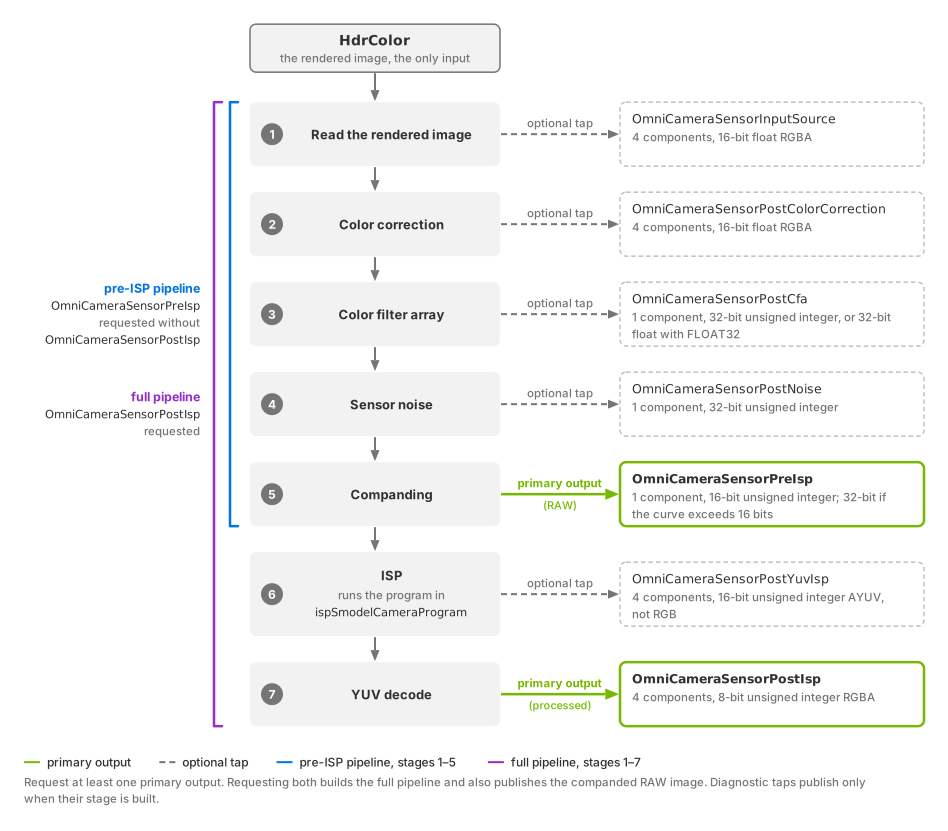
The pipeline from HdrColor to its two primary outputs.
Requesting OmniCameraSensorPreIsp alone builds the five-stage pipeline
through companding; requesting OmniCameraSensorPostIsp builds the full
pipeline through YUV decode. The five other names are optional taps on the
stage they follow.#
Stage |
What it does to the image |
Published as ( |
Format |
Type |
Shape |
Publishes on |
|---|---|---|---|---|---|---|
Read the rendered image |
Reads |
|
RGBA |
float16 |
|
Both pipelines |
Color correction |
Optional black-level and full-well normalization, the sensor response scale, a 3×3 color matrix, then a per-component white balance. Still a color image, always in this format. |
|
RGBA |
float16 |
|
Both pipelines |
Color filter array |
Collapses the three color components into one sensor code per pixel, according to the 2×2 mosaic you author, and scales it into sensor-code range. |
|
Sensor code |
uint32; float32 when |
|
Both pipelines |
Sensor noise |
Adds photon shot noise and dark shot noise to each sensor code. A
|
|
Sensor code |
uint32, always |
|
Both pipelines |
Companding |
Compresses the wide internal code range onto the narrower range a sensor
transmits, through the piecewise-linear curve in
|
|
Sensor code |
uint16; uint32 when the curve’s largest output value needs more than 16 bits |
|
Both pipelines with uint16; pre-ISP pipeline only with uint32 |
ISP |
Runs the program in |
|
AYUV (alpha, luma and two chroma components per pixel) |
uint16 |
|
Full pipeline only |
YUV decode |
Converts the ISP’s YUV result back to RGBA. |
|
RGBA |
uint8 |
|
Full pipeline only; its primary output |
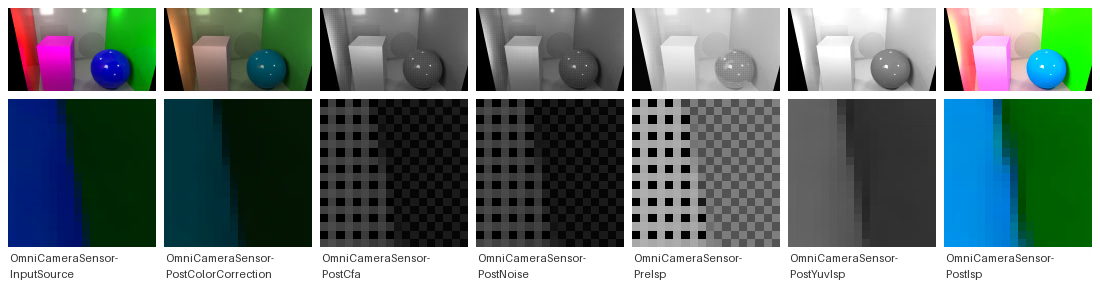
The seven AOVs of one Cornell box frame in pipeline order, each above a
magnified crop of the same image region: OmniCameraSensorInputSource
and OmniCameraSensorPostColorCorrection are color images;
OmniCameraSensorPostCfa, OmniCameraSensorPostNoise and
OmniCameraSensorPreIsp are single-component surfaces of sensor codes,
shown gray, whose 2x2 mosaic appears in the crops;
OmniCameraSensorPostYuvIsp is the ISP’s AYUV result, pictured as its
luma; OmniCameraSensorPostIsp is the decoded RGBA image. The
floating-point and sensor-code images are scaled for display.#
Attributes that shape the output#
Three attributes, all in the omni:sensor:core: namespace of the camera
prim, reshape what the outputs carry rather than what the pixels hold.
colorFilterArrayOutputDataTypeFormat (color filter array group) chooses the element type of the
color-filter-array tap, and of nothing after it.
compandingLinearCompandCoeff (companding group) decides, through its
largest output value, whether the companded codes are 16-bit or 32-bit unsigned
integers. Companding supports both formats, but the ISP requires
16-bit unsigned input. The 32-bit form is supported when requesting
OmniCameraSensorPreIsp without OmniCameraSensorPostIsp. Requesting the
full pipeline with a curve that requires 32-bit output is rejected
(the ISP’s 16-bit input requirement).
ispSmodelCameraProgram (ISP group) decides whether the ISP stage
has a program to run, which the next section covers; the same group holds the
raw-format and padding attributes that describe the companded codes to the
ISP.
Primary outputs#
Two of the seven names are primary outputs, and one of them must be present on the product. The primary output you request also decides how much of the pipeline is built.
Primary output AOV |
What it is, and what it builds |
|---|---|
|
The processed image. Requesting it builds the complete pipeline, all
seven stages, including the ISP stage that runs the program in
|
|
The sensor output just before ISP processing, typically the RAW image:
the single-component mosaic of companded sensor codes, as a camera
transmits it before any processing. Requesting it without
|
If both are requested, the complete pipeline is built.
OmniCameraSensorPreIsp publishes the companded RAW image while processing
continues through the ISP and YUV decode to OmniCameraSensorPostIsp. Both
remain primary outputs. If neither is requested while some other model AOV is,
the product is skipped and the reason is logged as an error; a tap on its own
does not build a pipeline for it to sit on.
The ISP stage is not configured by attributes: it runs the program authored in
ispSmodelCameraProgram, whose schema default is the empty string. Until
you author one, OmniCameraSensorPostYuvIsp and OmniCameraSensorPostIsp
are published without a processed image, while the five stages before them run
as usual. Supply the ISP program covers
obtaining a program and describing the companded codes to it; the
ISP group on the attributes
page gives the attribute semantics.
Diagnostic taps#
The other five names are optional taps on intermediate stages:
OmniCameraSensorInputSource (the read-back input),
OmniCameraSensorPostColorCorrection, OmniCameraSensorPostCfa,
OmniCameraSensorPostNoise and OmniCameraSensorPostYuvIsp. Each one
publishes the image as it leaves one stage, so a parameterization can be
inspected where it went wrong rather than only at the end. A tap publishes
only when the stage behind it is part of the pipeline that was built: on the
pre-ISP pipeline OmniCameraSensorPostYuvIsp produces nothing.
The noise stage draws its grain from a fixed seed, so the same scene and the
same sensor codes give the same grain in every run. Comparing one run against
another therefore does not show whether noise was added; comparing
OmniCameraSensorPostCfa against OmniCameraSensorPostNoise in the same
frame does. Shape an Image Like a Camera Sensor
uses the taps this way to verify a configuration.
Note
The taps are the model’s diagnostic mechanism. They are not part of the imaging contract and none of them is required to obtain sensor output; a consumer should rely on the two primary outputs.
What enables the pipeline#
Two things together run the pipeline on a RenderProduct: the product’s camera
carries OmniSensorGenericCameraCoreAPI and no other sensor schema, and the
product names one of the seven outputs. A camera carries exactly one
OmniSensorGeneric* schema; a camera with none of them, or with two, is
rejected, and its product delivers none of this model’s outputs. The schema
supplies the parameters, so an attribute you leave unauthored runs on the
schema default; the output name switches the pipeline on.
One consequence follows. If you build an image graph of your own and happen to
name one of its outputs OmniCameraSensorPostCfa on a product whose camera
carries the schema, you have enabled this model on that product. The product then also needs HdrColor (requested on the
same product) and one
of the two primary outputs, or it is skipped. Pick names outside the reserved seven.
One pipeline per product#
Because the attributes live on the camera prim, each camera in a stage carries
its own configuration, and the RenderProduct bound to that camera delivers that
camera’s outputs. Each RenderProduct also gets a pipeline of its own, so
products rendered in the same frame can request different primary outputs and carry
different settings: one product can stop at OmniCameraSensorPreIsp while
another runs the full pipeline on a differently configured camera. A product
that renders several cameras into one frame takes every setting from the first
of its cameras.
Request example#
The example below authors the smallest complete request, in USDA and with the
USD Python API: a camera carrying the schema, a product bound to it with the
input and the full-pipeline primary output in its orderedVars, and the two
RenderVars.
#usda 1.0
def Camera "SensorCamera" (
    prepend apiSchemas = ["OmniSensorGenericCameraCoreAPI"]
)
{
}

def Scope "Render"
{
    def RenderProduct "SensorCamera"
    {
        int2 resolution = (1920, 1080)
        rel camera = </SensorCamera>
        rel orderedVars = [<HdrColor>, <OmniCameraSensorPostIsp>]

        def RenderVar "HdrColor"
        {
            string sourceName = "HdrColor"
        }

        def RenderVar "OmniCameraSensorPostIsp"
        {
            string sourceName = "OmniCameraSensorPostIsp"
        }
    }
}
from pxr import Gf, UsdGeom, UsdRender

camera = UsdGeom.Camera.Define(stage, "/SensorCamera")
camera.GetPrim().AddAppliedSchema("OmniSensorGenericCameraCoreAPI")

stage.DefinePrim("/Render", "Scope")
product = UsdRender.Product.Define(stage, "/Render/SensorCamera")
product.GetResolutionAttr().Set(Gf.Vec2i(1920, 1080))
product.GetCameraRel().SetTargets(["/SensorCamera"])

# The input AOV and the full-pipeline terminal: both are required.
hdr_var = UsdRender.Var.Define(stage, "/Render/SensorCamera/HdrColor")
hdr_var.GetSourceNameAttr().Set("HdrColor")
post_isp_var = UsdRender.Var.Define(stage, "/Render/SensorCamera/OmniCameraSensorPostIsp")
post_isp_var.GetSourceNameAttr().Set("OmniCameraSensorPostIsp")

product.GetOrderedVarsRel().SetTargets([
    "/Render/SensorCamera/HdrColor",
    "/Render/SensorCamera/OmniCameraSensorPostIsp",
])
Swap the primary output for OmniCameraSensorPreIsp to stop before the ISP, and
add any of the five taps to watch a stage in the middle.
The outputs are mapped and read back like any other output. Each one
is an image tensor whose format, element type and shape follow the table
above; a reader that maps the taps expecting four components everywhere must
switch to one component between OmniCameraSensorPostCfa and
OmniCameraSensorPreIsp. Mapping an output covers the mechanics, and
Decoding camera outputs shows image
outputs being read in Python and C.
If nothing arrives#
When nothing arrives, or the product is skipped and the reason is logged as an error, the Symptom Index lists the misconfigurations of this model and links back to the rule each one breaks.