

Non-Visual Sensor Materials#
Non-visual materials describe what a surface is made of so lidar, radar and
acoustic sensor models can calculate its response. Author SimReady material
labels on the UsdShade.Material prim bound to the geometry. These labels are
separate from the shader that controls its appearance in camera images.
A UsdShade material can carry both a visual shader network and non-visual labels. Changing a
visual texture or tint does not normally change the non-visual response.
The Lidar generic wpm model can also use visual material inputs through
omni:sensor:LidarWpm:useVisualMaterialInputs (false by default); see
its attributes.
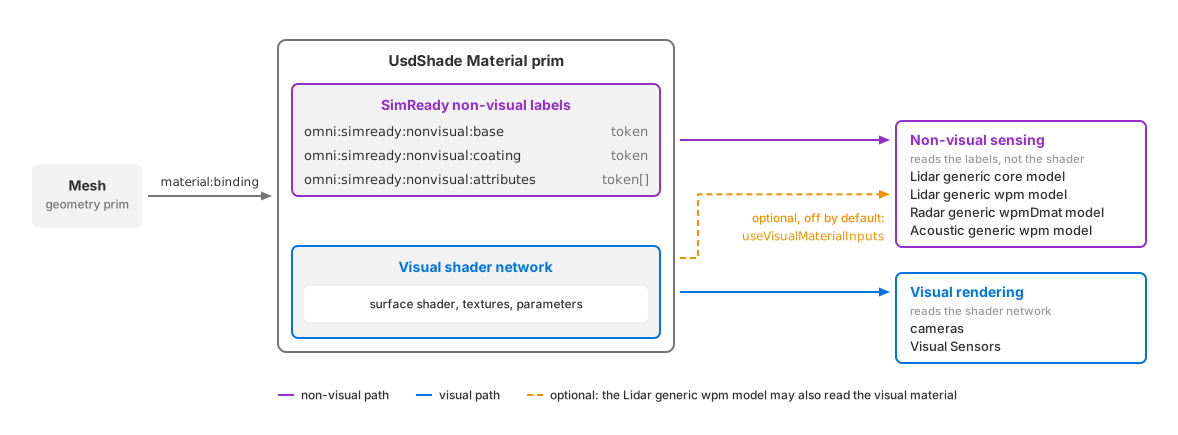
One bound UsdShade material supplies visual shading and non-visual surface labels.#
Cameras and camera-based sensor models use visual shading. See Material Binding for binding and shader setup, Decals for layered surface detail, and UV Projectors for projected imagery.
Semantic labels used for segmentation are separate from non-visual material labels.
Material attributes#
Author these attributes on the bound Material prim, not on the geometry.
The base identifies the substrate, the coating adds a surface layer, and the
attribute array adds surface flags.
USD declaration |
Description |
|---|---|
|
Base material, such as asphalt, steel or concrete. |
|
Layer over the base material. Use |
|
Surface flags. Multiple flags can be supplied; use an array containing |
These custom attributes have no schema-declared defaults. Use the exact token spellings in the SimReady Non-Visual Sensor Attributes Table, including case. The SimReady material requirements require all three attributes on every visual material of an asset, consistent with its visual appearance and without time samples.
A sensing-only material needs no surface shader: ovrtx recognizes a bound Material with at least one non-visual attribute, including when the attribute is added after loading. Author all three for a complete material description. If the material also renders visually, keep its visual shader network connected to the UsdShade material and author the labels on the same Material prim.
Creating non-visual materials#
These snippets create the asphalt, steel and concrete materials used by the Python and C radar examples. The ground uses asphalt, the moving cube uses steel, and the fixed cube uses concrete. Both example scenes contain the same labels and bindings.
The Python snippet uses an existing USD stage. Bind the materials to
geometry as described in Material Binding.
#usda 1.0
def Xform "Materials"
{
    # These materials intentionally omit visual shaders. The sensor return
    # behavior comes from the nonvisual attributes on the bound Material.
    def Material "Asphalt"
    {
        token omni:simready:nonvisual:base = "asphalt"
        token omni:simready:nonvisual:coating = "none"
        token[] omni:simready:nonvisual:attributes = ["none"]
    }

    def Material "Steel"
    {
        token omni:simready:nonvisual:base = "steel"
        token omni:simready:nonvisual:coating = "none"
        token[] omni:simready:nonvisual:attributes = ["none"]
    }

    def Material "Concrete"
    {
        token omni:simready:nonvisual:base = "concrete"
        token omni:simready:nonvisual:coating = "none"
        token[] omni:simready:nonvisual:attributes = ["none"]
    }
}
from pxr import Sdf, UsdGeom, UsdShade

UsdGeom.Xform.Define(stage, "/World/Materials")
for name, base in (("Asphalt", "asphalt"), ("Steel", "steel"), ("Concrete", "concrete")):
    material = UsdShade.Material.Define(stage, f"/World/Materials/{name}")
    prim = material.GetPrim()
    # Labels describe the surface for sensing; no visual shader is needed.
    prim.CreateAttribute("omni:simready:nonvisual:base", Sdf.ValueTypeNames.Token).Set(base)
    prim.CreateAttribute("omni:simready:nonvisual:coating", Sdf.ValueTypeNames.Token).Set("none")
    # Use a token array even when there are no additional surface flags.
    prim.CreateAttribute("omni:simready:nonvisual:attributes", Sdf.ValueTypeNames.TokenArray).Set(["none"])
Runtime changes#
Adding, changing or removing labels on the runtime stage updates the material without reinitializing the renderer or saving and reopening the scene. Publish edits through ovstage using the sequence in ovstage Integration. This runtime editing support is separate from SimReady’s requirement that an asset’s authored material labels have no time samples.
Checking material assignments#
Lidar point clouds can report the packed base, coating and surface flags in
MaterialId. See Lidar generic core outputs for decoding. Radar and acoustic
outputs do not report material IDs.
For a visual check, use the camera’s nonVisualMaterialId
debug view, which colors surfaces
by their resolved material ID.
If surfaces that should differ report the same ID, check their material
bindings, attribute types and token spellings. ID 0 can represent an
intentionally unspecified material; it does not by itself prove that labels
failed to load. Unrecognized base or coating tokens contribute zero to their
respective fields, so a nonzero ID does not prove that every label is valid.
See the Symptom Index for further
checks.