

Sensor Configuration#
Configure a sensor by creating its USD prim, applying the model’s API schema, and setting its attributes. The schema supplies defaults for attributes you leave unauthored. You can author the sensor in a scene file or add it at run time through stage population.
Use a RenderProduct to request its outputs, then map the returned data.
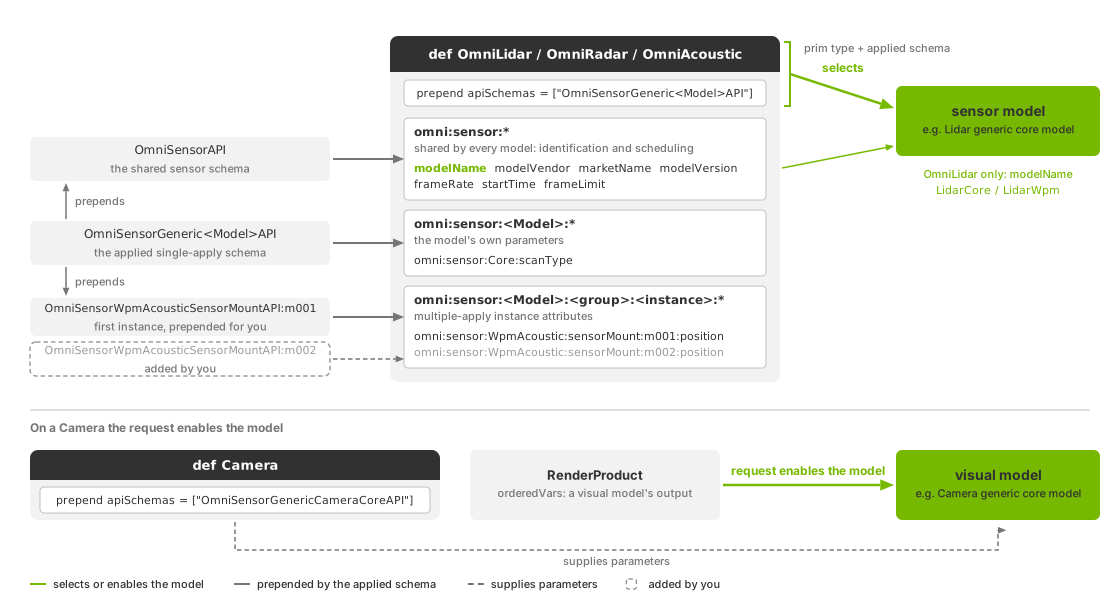
Sensor attributes include shared settings, model parameters and named instances such as scan patterns or emitter states.#
Creating a sensor#
Choose the prim type and model schema from the table below. Each model defines its own parameters and outputs; an attribute name used by two models does not necessarily have the same meaning. Follow the model’s attributes link for its units and constraints.
Each model uses a single-apply API schema. Models with repeated groups, such as scan configurations, include an initial instance of a multiple-apply schema.
Model |
Prim |
Applied API schema |
Model attributes |
|---|---|---|---|
|
|
|
|
|
|
|
|
|
|
|
|
|
|
|
|
|
|
|
|
|
|
|
|
|
|
|
This minimal lidar applies the core model schema and sets a 10 Hz capture rate.
The schema supplies the remaining defaults, including modelName = "LidarCore".
Python snippets on this page assume an existing USD stage.
#usda 1.0
def OmniLidar "Lidar" (
    prepend apiSchemas = ["OmniSensorGenericLidarCoreAPI"]
)
{
    # Capture at 10 Hz; other parameters use schema defaults.
    double2 omni:sensor:frameRate = (10, 1)
}
from pxr import Gf, Sdf

lidar = stage.DefinePrim("/Lidar", "OmniLidar")
# Author the API schema name without requiring its generated Python bindings.
lidar.SetMetadata("apiSchemas", Sdf.TokenListOp.Create(
    prependedItems=["OmniSensorGenericLidarCoreAPI"]
))
# Capture at 10 Hz; other parameters use schema defaults.
lidar.CreateAttribute(
    "omni:sensor:frameRate", Sdf.ValueTypeNames.Double2, custom=False
).Set(Gf.Vec2d(10, 1))
For a visual sensor, apply exactly one of the two model schemas to the Camera and request that model’s outputs on its RenderProduct. Requesting sensor outputs from a camera with neither schema, or with both, fails validation and produces no outputs from that model. See Camera core outputs and Depth camera outputs for the output requirements.
If the RenderProduct requests only rendered images, no sensor model runs, even if the Camera carries a sensor schema. See Cameras.
Model identity#
Model selection depends on the prim:
OmniRadaralways runs the Radar generic wpmDmat model, regardless ofomni:sensor:modelName.OmniAcousticalways runs the Acoustic generic wpm model, regardless ofomni:sensor:modelName.OmniLidarusesomni:sensor:modelName:"LidarWpm"selects the Lidar generic wpm model."LidarCore", an absent name or any other value selects the Lidar generic core model. An unrecognized name logs one warning.OmniGeneralSensorrequiresomni:sensor:modelName = "GenericWpm"to select the Generic wpm model. Its schema supplies that value. An absent or unrecognized name selects no model and logs a warning once. KeepmodelVendor = "NVIDIA"too: a different vendor refuses the configuration.On a
Camera, the requested outputs activate the pipeline. The Camera generic core pipeline then checks all three identity strings against the values its schema supplies. Keep those values unchanged; see camera model identification.
The schema supplies these identity strings. Apart from the model-selection and validation rules above, they are descriptive labels. Their meanings and defaults are listed under Shared attributes. The validation utility uses separate model identifiers, listed in Sensor Definition Validation.
Instances of multiple-apply schemas#
The model schema includes the first instance of each required group. For
example, the acoustic schema includes mount m001, receiver group g001
and firing sequence seq001 with usable defaults. You can override their
attributes without applying another schema; see acoustic default topology for the values.
Lidar emitter state s001, firing pattern p001 and radar scan s001
work the same way.
The Generic wpm model uses fixed roles tx, rx and ray. Alternatives
are flattened arrays within each role, not newly named schema instances. Those
arrays are empty by default; author a complete pattern before rendering. See
Generic wpm USD Attributes.
To add an instance, add SchemaName:instanceName to apiSchemas and include
the instance name in its attribute namespace. Names must be valid USD
identifiers and cannot start with a digit. Names such as s002 and m002
follow the existing convention; each model defines its ordering rules.
This example keeps the default radar scan s001 and adds s002, with
different ranges and angular sampling densities:
#usda 1.0
def Xform "World"
{
    def OmniRadar "generic_radar" (
        # The model schema includes s001; the second entry adds s002.
        prepend apiSchemas = [
            "OmniSensorGenericRadarWpmDmatAPI",
            "OmniSensorGenericRadarWpmDmatScanCfgAPI:s002",
        ]
    )
    {
        float omni:sensor:WpmDmat:scan:s001:maxRangeM = 50
        float omni:sensor:WpmDmat:scan:s001:raysPerDeg = 10.0

        float omni:sensor:WpmDmat:scan:s002:maxRangeM = 300
        float omni:sensor:WpmDmat:scan:s002:raysPerDeg = 8.0
    }
}
from pxr import Sdf

radar = stage.DefinePrim("/World/generic_radar", "OmniRadar")
# The model schema includes scan s001; add s002 explicitly.
radar.AddAppliedSchema("OmniSensorGenericRadarWpmDmatAPI")
radar.AddAppliedSchema("OmniSensorGenericRadarWpmDmatScanCfgAPI:s002")

radar.CreateAttribute("omni:sensor:WpmDmat:scan:s001:maxRangeM", Sdf.ValueTypeNames.Float, custom=False).Set(50)
radar.CreateAttribute("omni:sensor:WpmDmat:scan:s001:raysPerDeg", Sdf.ValueTypeNames.Float, custom=False).Set(10.0)

radar.CreateAttribute("omni:sensor:WpmDmat:scan:s002:maxRangeM", Sdf.ValueTypeNames.Float, custom=False).Set(300)
radar.CreateAttribute("omni:sensor:WpmDmat:scan:s002:raysPerDeg", Sdf.ValueTypeNames.Float, custom=False).Set(8.0)
Run More Than One Scan Pattern
explains how the radar uses and orders scans. Additional lidar emitter states
(OmniSensorGenericLidarCoreEmitterStateAPI:s002) and acoustic mounts
(OmniSensorWpmAcousticSensorMountAPI:m002) use the same authoring pattern.
Their model attributes pages describe each instance’s parameters and effects.
Three namespace shapes#
Sensor attributes use three namespace forms:
omni:sensor:*— shared identification and scheduling attributes.omni:sensor:<Model>:*— model parameters, such asomni:sensor:Core:*for lidar core oromni:sensor:WpmAcoustic:*for acoustic sensors.omni:sensor:<Model>:<Group>:<Instance>:*— instance parameters, such asomni:sensor:WpmAcoustic:sensorMount:m001:position.
Use the exact namespace. An attribute such as omni:sensor:Core:modelName,
or a mount attribute missing m001, can be authored in USD but has no effect.
Sensor API Schemas lists the complete declarations;
the model pages explain how to use them.
Overriding parameters#
Set a parameter by authoring its attribute on the sensor prim:
In a scene file: apply the schema and author the values you want to change. Unauthored attributes use schema defaults.
In a stronger layer: sublayer the existing scene and author overrides in the root layer. You can populate an inline root layer at run time; see Adding RenderProducts at run time, which also shows applying a camera sensor schema.
On the runtime stage: update supported attributes while the sensor runs. Runtime Parameter Updates lists the supported edits and what happens when an edit is rejected. Camera partial-output delivery is configured this way; see Sensor Scheduling.
These tabs author the same lidar: 40 Hz, complete scans, valid Cartesian points in world coordinates, one-degree firing resolution, and a translated pose.
#usda 1.0
    def OmniLidar "Lidar40" (
        prepend apiSchemas = ["OmniSensorGenericLidarCoreAPI"]
    )
    {
        # A full scan completes in each 1/40-second simulation step.
        double2 omni:sensor:frameRate = (40, 1)
        bool omni:sensor:Core:partialOutputs = false
        bool omni:sensor:Core:includeInvalidPoints = false
        token omni:sensor:Core:elementsCoordsType = "CARTESIAN"
        # World-space points let both scans share the camera's viewpoint.
        token omni:sensor:Core:outputFrameOfReference = "WORLD"
        # Keep the emitter firing sequence shorter than each angular tick.
        float omni:sensor:Core:rotPatternFiringResDeg = 1
        double3 xformOp:translate = (-150, 150, 300)
        uniform token[] xformOpOrder = ["xformOp:translate"]
    }
from pxr import Gf, Sdf, UsdGeom

lidar = stage.DefinePrim("/World/Lidar40", "OmniLidar")
lidar.SetMetadata("apiSchemas", Sdf.TokenListOp.Create(prependedItems=["OmniSensorGenericLidarCoreAPI"]))
# Rational Hz: numerator / denominator. Each scan takes one 1/40-second step.
lidar.CreateAttribute("omni:sensor:frameRate", Sdf.ValueTypeNames.Double2).Set(Gf.Vec2d(40, 1))
lidar.CreateAttribute("omni:sensor:Core:partialOutputs", Sdf.ValueTypeNames.Bool).Set(False)
lidar.CreateAttribute("omni:sensor:Core:includeInvalidPoints", Sdf.ValueTypeNames.Bool).Set(False)
lidar.CreateAttribute("omni:sensor:Core:elementsCoordsType", Sdf.ValueTypeNames.Token).Set("CARTESIAN")
# World-space points let both scans share the camera's viewpoint.
lidar.CreateAttribute("omni:sensor:Core:outputFrameOfReference", Sdf.ValueTypeNames.Token).Set("WORLD")
lidar.CreateAttribute("omni:sensor:Core:rotPatternFiringResDeg", Sdf.ValueTypeNames.Float).Set(1)
UsdGeom.Xformable(lidar).AddTranslateOp().Set(Gf.Vec3d(-150, 150, 300))
To override an existing sensor, save the minimal example above as
sensor_configuration_minimal.usda. Place this new root layer alongside it.
The root layer changes the capture rate to 20 Hz and records a device name;
the sensor type and applied schema come from the sublayer. For the Python tab,
use a file-backed stage with its root layer as the edit target.
#usda 1.0
(
    subLayers = [@sensor_configuration_minimal.usda@]
)

# Override the existing sensor without redefining it.
over "Lidar"
{
    double2 omni:sensor:frameRate = (20, 1)
    string omni:sensor:marketName = "Example device"
}
from pxr import Gf, Sdf

# Resolve the sublayer relative to this stage's root layer.
stage.GetRootLayer().subLayerPaths.append("sensor_configuration_minimal.usda")
lidar = stage.OverridePrim("/Lidar")
# These root-layer opinions take precedence over the sublayer.
lidar.CreateAttribute(
    "omni:sensor:frameRate", Sdf.ValueTypeNames.Double2, custom=False
).Set(Gf.Vec2d(20, 1))
lidar.CreateAttribute(
    "omni:sensor:marketName", Sdf.ValueTypeNames.String, custom=False
).Set("Example device")
See Python: Multi-rate sensors for the complete example, or Python: Lidar for a single lidar with Cartesian output and invalid points excluded.
Orienting the prim#
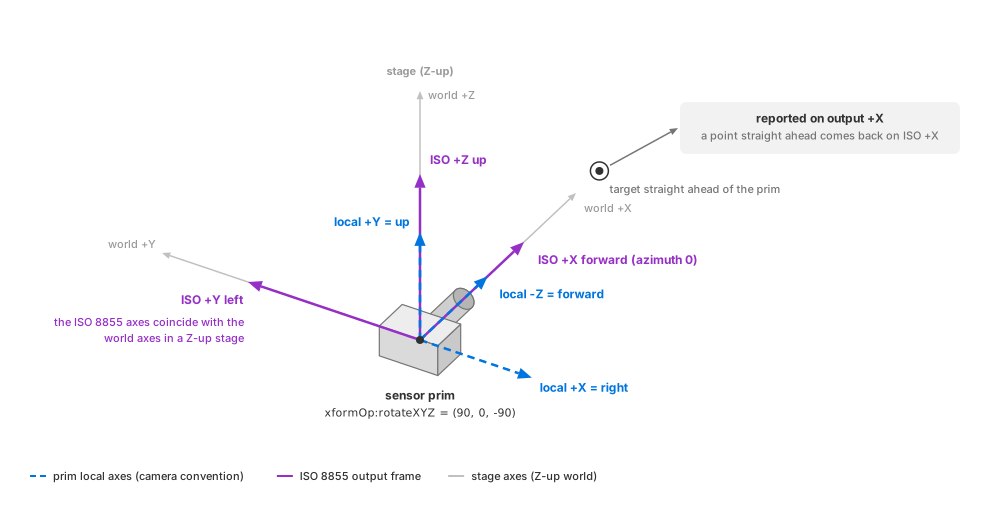
Camera-style prim axes and ISO 8855 output axes. With the rotation shown,
both forward directions point along world +X in a Z-up stage.#
Sensor prims use camera axes: local -Z points forward, +Y points up,
and +X points right. Lidar beams, radar fields of view and acoustic lobes
are aimed along -Z.
Outputs use the ISO 8855 sensor frame: +X forward, +Y left and +Z up.
A point directly ahead of the sensor therefore has positive output X and
azimuth zero. See The sensor frame
for output-frame details.
In a Z-up stage, xformOp:rotateXYZ = (90, 0, -90) points the sensor along
world +X with its up axis along world +Z. The lidar and radar examples
use this rotation; the acoustic example uses an equivalent matrix. Use a Z-up
stage when comparing world-frame outputs directly with stage coordinates.
In a Y-up stage, the model converts between stage axes and ISO 8855 axes.
This example authors the Z-up orientation described above. The rotation aims
the sensor along world +X and keeps its up direction along world +Z.
#usda 1.0
(
    upAxis = "Z"
)

def OmniLidar "Lidar" (
    prepend apiSchemas = ["OmniSensorGenericLidarCoreAPI"]
)
{
    # Aim local -Z along world +X, with local +Y along world +Z.
    float3 xformOp:rotateXYZ = (90, 0, -90)
    uniform token[] xformOpOrder = ["xformOp:rotateXYZ"]
}
from pxr import Gf, Sdf, UsdGeom

UsdGeom.SetStageUpAxis(stage, UsdGeom.Tokens.z)
lidar = stage.DefinePrim("/Lidar", "OmniLidar")
lidar.SetMetadata("apiSchemas", Sdf.TokenListOp.Create(
    prependedItems=["OmniSensorGenericLidarCoreAPI"]
))
# AddRotateXYZOp also authors xformOpOrder so the rotation is applied.
xform = UsdGeom.Xformable(lidar)
xform.AddRotateXYZOp().Set(Gf.Vec3f(90, 0, -90))