

Python: Runtime textures#
NVIDIA Carter drives in a circle through a warehouse. Its forward-facing camera
feeds a stationary monitor: Warp converts the previous frame to greyscale, then
ovstage publishes the pixels as an OmniRuntimeTexture. An existing
UsdUVTexture shader samples that texture through dynamic://carterMonitor
and feeds a UsdPreviewSurface material on the monitor screen.
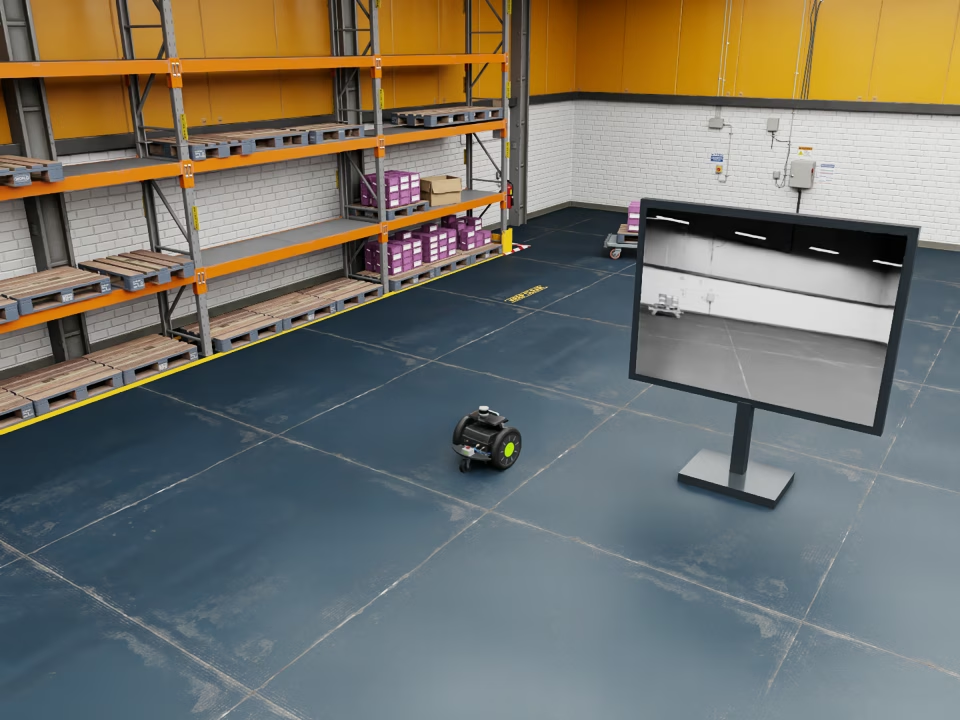
The external view shows Carter and the monitor. The monitor displays the previous robot-camera frame after the Warp luminance conversion.#
The scene is a copy of the robot-lineup scene, trimmed to Carter and the warehouse, with two added viewing cameras and the monitor. Motion is kinematic: the example writes Carter’s pose along a circle, and its child camera follows. The first frame displays black because no previous frame exists yet.
Running#
Run a complete circle and record the animation, or save a final overview:
cd examples/python/runtime-textures
uv run main.py --rrd _output/carter-monitor.rrd
uv run main.py --png _output/carter-monitor.png
Use matching ovrtx and ovstage packages containing OmniRuntimeTexture, an
RTX-capable GPU, and internet access for the warehouse and Carter payloads.
The renderer and Warp both use CUDA device 0. The example uses the Hydra path.
Without --png or --rrd, the example opens Rerun and streams the overview,
current robot camera, and a close-up of the monitor. --rrd saves those views
as an animated recording. --png saves the final overview and sibling
_first.png, _robot.png, and _monitor.png files.
The defaults render 180 frames at 30 simulation frames per second, completing a
circle in six seconds. --frames, --fps, and --period control those
values independently. --check additionally compares the GPU conversion with
an independent CPU reference and the rendered monitor with the previous frame.
These validation readbacks are separate from the GPU texture-feedback path.
Converting the camera image#
The kernel reads LdrColor. It decodes sRGB, computes
linear-light luminance with Rec. 709 weights, and encodes greyscale back to sRGB.
The runtime texture declares texture:colorSpace = "sRGB". The kernel preserves
the camera image’s row order:
@wp.func
def srgb_to_linear(value: float):
    if value <= 0.04045:
        return value / 12.92
    return wp.pow((value + 0.055) / 1.055, 2.4)


@wp.kernel
def camera_luminance(source: wp.array3d(dtype=wp.uint8), texels: wp.array(dtype=wp.uint8)):
    y, x = wp.tid()
    r = srgb_to_linear(float(source[y, x, 0]) / 255.0)
    g = srgb_to_linear(float(source[y, x, 1]) / 255.0)
    b = srgb_to_linear(float(source[y, x, 2]) / 255.0)
    luminance = 0.2126 * r + 0.7152 * g + 0.0722 * b
    encoded = 12.92 * luminance
    if luminance > 0.0031308:
        encoded = 1.055 * wp.pow(luminance, 1.0 / 2.4) - 0.055
    gray = wp.uint8(wp.clamp(encoded * 255.0 + 0.5, 0.0, 255.0))
    index = (y * source.shape[1] + x) * 4
    texels[index] = gray
    texels[index + 1] = gray
    texels[index + 2] = gray
    texels[index + 3] = wp.uint8(255)
Publishing the previous frame#
Before rendering frame N, the loop maps frame N-1 on the GPU and runs Warp. The result and mapping stay alive until the kernel completes. The packed CUDA bytes are then written to the texture:
if products is not None:
    # Consume frame N-1 before rendering N. Keep the result and mapping alive
    # until Warp finishes reading; the texture update never goes through the CPU.
    output = products["/Render/Robot"].frames[-1].render_vars["/Render/Robot/LdrColor"]
    with output.map(device=ovrtx.Device.CUDA, sync_stream=0) as mapped:
        mapped.wait()
        source = wp.from_dlpack(mapped)
        wp.launch(camera_luminance, dim=(height, width), inputs=[source, texels], device="cuda:0")
        wp.synchronize_device("cuda:0")
        del source
    del mapped, output
    stage.write_attribute(texture_query, "texture:data", ordinal=ordinal,
                          is_array=True, tensors=texels).wait()
The mapping uses linear CUDA memory. Mapping and texture publication can copy GPU data; this path avoids host texel readback but is not zero-copy sampling. The explicit waits make ownership and ordering visible in this small example. See CUDA and Vulkan Scheduling on Linux for the Linux scheduling considerations.
Moving Carter and rendering#
The monitor starts with black pixels published at ordinal 1. The first loop iteration, at ordinal 2, updates only Carter’s pose because there is no previous camera frame to display. Subsequent iterations update Carter’s pose and the monitor pixels together at the same ordinal, then seal it before rendering. Carter faces the circle’s tangent:
angle = math.tau * (frame / args.fps) / args.period
heading = angle + math.pi / 2  # Carter's +X axis follows the circle's tangent.
c, s = math.cos(heading), math.sin(heading)
pose = np.array([[
    [c, s, 0, 0], [-s, c, 0, 0], [0, 0, 1, 0],
    [-5 + 1.4 * math.cos(angle), 4 + 1.4 * math.sin(angle), 0.25, 1],
]], dtype=np.float64)
stage.write_attribute(robot_query, "omni:xform", ordinal=ordinal,
                      is_array=False, tensors=pose).wait()
# The child camera follows Carter. Seal texture and motion together.
stage.advance_write_floor(ordinal, ovstage.Scope.ALL).wait()
products = renderer.step(render_products, 1.0 / args.fps, ordinal=ordinal)
For texture authoring, supported formats, lifetime rules, and attachment behavior, see Runtime textures.