

Configure a Firing Pattern#
A Lidar generic wpm model firing pattern defines each emitter row’s direction, firing time and channel. Rotary scans repeat one pattern around the scan window; solid-state scans can cycle through several patterns. The examples below configure both and identify the active pattern from the output.
The Lidar generic core model firing pattern uses emitter states and a different scheduling scheme.
Before you start. Start with a sensor and PointCloud RenderProduct. See
Your First Lidar Sensor for the shared workflow and
Output Configuration for product setup.
Firing-pattern attributes defines array lengths,
instance names and ordering.
A tick is one application of a pattern, one step at the
nominal resolution omni:sensor:LidarWpm:rotPatternFiringResDeg for a rotary
sensor and the whole scan for a solid-state one, as the scan schedule defines it. A firing
pattern is the set of emitter rows that fire during one tick: each row is
offset in azimuth from the tick by its azimuthDeg, aimed at its own
elevationDeg, and fired at its own fireTimeNs after the tick starts.
Rotary example#
This sensor fires two rows at each rotary tick at a nominal one-degree resolution with maxReturns
2 and requests the default point cloud channels. The file is the model’s
example scene: a complete stage with the sensor, its RenderProduct and its
PointCloud RenderVar, which you load and step like any other scene. It
carries no geometry, so add the surfaces the sensor should see before you look
for returns.
#usda 1.0
(
    metersPerUnit = 1
    timeCodesPerSecond = 10
    upAxis = "Z"
)

def Xform "Sensor"
{
    def OmniLidar "Lidar" (
        prepend apiSchemas = ["OmniSensorGenericLidarWpmAPI"]
    )
    {
        token visibility = "invisible"
        double2 omni:sensor:frameRate = (10, 1)
        token omni:sensor:LidarWpm:scanType = "rotary"
        float omni:sensor:LidarWpm:rotPatternFiringResDeg = 1
        uint omni:sensor:LidarWpm:maxReturns = 2

        float[] omni:sensor:LidarWpm:firingPattern:p001:azimuthDeg = [0, 0]
        float[] omni:sensor:LidarWpm:firingPattern:p001:elevationDeg = [-1, 1]
        uint[] omni:sensor:LidarWpm:firingPattern:p001:fireTimeNs = [0, 1000]
        uint[] omni:sensor:LidarWpm:firingPattern:p001:channelId = [1, 2]
        uint[] omni:sensor:LidarWpm:firingPattern:p001:rangeId = []
    }

    def Scope "Outputs"
    {
        def RenderProduct "Product"
        {
            rel camera = </Sensor/Lidar>
            rel orderedVars = [</Sensor/Outputs/PointCloud>]
        }

        def RenderVar "PointCloud"
        {
            uniform string sourceName = "PointCloud"
            token[] channels = []
        }
    }
}
from pxr import Gf, Sdf, UsdGeom, UsdRender

UsdGeom.SetStageMetersPerUnit(stage, 1.0)
UsdGeom.SetStageUpAxis(stage, UsdGeom.Tokens.z)
stage.SetTimeCodesPerSecond(10)
UsdGeom.Xform.Define(stage, "/Sensor")
lidar = stage.DefinePrim("/Sensor/Lidar", "OmniLidar")
lidar.AddAppliedSchema("OmniSensorGenericLidarWpmAPI")
UsdGeom.Imageable(lidar).CreateVisibilityAttr(UsdGeom.Tokens.invisible)
lidar.CreateAttribute("omni:sensor:frameRate", Sdf.ValueTypeNames.Double2, custom=False).Set(Gf.Vec2d(10, 1))
lidar.CreateAttribute("omni:sensor:LidarWpm:scanType", Sdf.ValueTypeNames.Token, custom=False).Set("rotary")
lidar.CreateAttribute("omni:sensor:LidarWpm:rotPatternFiringResDeg", Sdf.ValueTypeNames.Float, custom=False).Set(1)
lidar.CreateAttribute("omni:sensor:LidarWpm:maxReturns", Sdf.ValueTypeNames.UInt, custom=False).Set(2)

# The main schema brings the first pattern instance, p001: author only its arrays.
pattern = "omni:sensor:LidarWpm:firingPattern:p001"
lidar.CreateAttribute(f"{pattern}:azimuthDeg", Sdf.ValueTypeNames.FloatArray, custom=False).Set([0, 0])
lidar.CreateAttribute(f"{pattern}:elevationDeg", Sdf.ValueTypeNames.FloatArray, custom=False).Set([-1, 1])
lidar.CreateAttribute(f"{pattern}:fireTimeNs", Sdf.ValueTypeNames.UIntArray, custom=False).Set([0, 1000])
lidar.CreateAttribute(f"{pattern}:channelId", Sdf.ValueTypeNames.UIntArray, custom=False).Set([1, 2])
lidar.CreateAttribute(f"{pattern}:rangeId", Sdf.ValueTypeNames.UIntArray, custom=False).Set([])

stage.DefinePrim("/Sensor/Outputs", "Scope")
product = UsdRender.Product.Define(stage, "/Sensor/Outputs/Product")
product.GetCameraRel().SetTargets(["/Sensor/Lidar"])
product.GetOrderedVarsRel().SetTargets(["/Sensor/Outputs/PointCloud"])
point_cloud = UsdRender.Var.Define(stage, "/Sensor/Outputs/PointCloud")
point_cloud.GetSourceNameAttr().Set("PointCloud")
# An empty channel list requests every channel the model produces.
point_cloud.GetPrim().CreateAttribute("channels", Sdf.ValueTypeNames.TokenArray, custom=False).Set([])
rotPatternFiringResDeg = 1 requests 360 ticks over the 360° window.
The ticks include both angular endpoints, so their actual spacing is 360/359°;
the requested resolution is nominal. Pattern p001 is applied at each tick,
and its fire times, 0 and 1000 ns, count from the tick’s start. The two
rows share the azimuth of the tick and sit one degree below and above the
horizon, on detector channels 1 and 2; the empty rangeId selects
the default range. The PointCloud RenderVar’s empty channels list asks
for all eight channels this model produces; Outputs lists
them and the rules for requesting a subset.
Solid-state example#
Solid-state sensors have one logical tick per scan. This example applies two patterns and holds each selected pattern for two scans. The file is a complete stage like the rotary one, and you run it the same way.
#usda 1.0
(
    metersPerUnit = 1
    timeCodesPerSecond = 10
    upAxis = "Z"
)

def Xform "Sensor"
{
    def OmniLidar "Lidar" (
        prepend apiSchemas = [
            "OmniSensorGenericLidarWpmAPI",
            "OmniSensorGenericLidarWpmFiringPatternAPI:p002"
        ]
    )
    {
        token visibility = "invisible"
        double2 omni:sensor:frameRate = (10, 1)
        token omni:sensor:LidarWpm:scanType = "solidState"
        uint omni:sensor:LidarWpm:firingPatternDwellTicks = 2
        uint omni:sensor:LidarWpm:maxReturns = 2

        float[] omni:sensor:LidarWpm:firingPattern:p001:azimuthDeg = [-1, 1]
        float[] omni:sensor:LidarWpm:firingPattern:p001:elevationDeg = [0, 0]
        uint[] omni:sensor:LidarWpm:firingPattern:p001:fireTimeNs = [0, 1000]
        uint[] omni:sensor:LidarWpm:firingPattern:p001:channelId = [1, 2]
        uint[] omni:sensor:LidarWpm:firingPattern:p001:rangeId = []

        float[] omni:sensor:LidarWpm:firingPattern:p002:azimuthDeg = [0]
        float[] omni:sensor:LidarWpm:firingPattern:p002:elevationDeg = [0]
        uint[] omni:sensor:LidarWpm:firingPattern:p002:fireTimeNs = [0]
        uint[] omni:sensor:LidarWpm:firingPattern:p002:channelId = [2]
        uint[] omni:sensor:LidarWpm:firingPattern:p002:rangeId = []
    }

    def Scope "Outputs"
    {
        def RenderProduct "Product"
        {
            rel camera = </Sensor/Lidar>
            rel orderedVars = [</Sensor/Outputs/PointCloud>]
        }

        def RenderVar "PointCloud"
        {
            uniform string sourceName = "PointCloud"
            token[] channels = [
                "Coordinates", "Intensity", "TimeOffsetNs", "Flags",
                "ChannelId", "FiringPatternIndex"
            ]
        }
    }
}
from pxr import Gf, Sdf, UsdGeom, UsdRender

UsdGeom.SetStageMetersPerUnit(stage, 1.0)
UsdGeom.SetStageUpAxis(stage, UsdGeom.Tokens.z)
stage.SetTimeCodesPerSecond(10)
UsdGeom.Xform.Define(stage, "/Sensor")
lidar = stage.DefinePrim("/Sensor/Lidar", "OmniLidar")
lidar.AddAppliedSchema("OmniSensorGenericLidarWpmAPI")
# The second pattern is a second instance of the multiple-apply schema.
lidar.AddAppliedSchema("OmniSensorGenericLidarWpmFiringPatternAPI:p002")
UsdGeom.Imageable(lidar).CreateVisibilityAttr(UsdGeom.Tokens.invisible)
lidar.CreateAttribute("omni:sensor:frameRate", Sdf.ValueTypeNames.Double2, custom=False).Set(Gf.Vec2d(10, 1))
lidar.CreateAttribute("omni:sensor:LidarWpm:scanType", Sdf.ValueTypeNames.Token, custom=False).Set("solidState")
lidar.CreateAttribute("omni:sensor:LidarWpm:firingPatternDwellTicks", Sdf.ValueTypeNames.UInt, custom=False).Set(2)
lidar.CreateAttribute("omni:sensor:LidarWpm:maxReturns", Sdf.ValueTypeNames.UInt, custom=False).Set(2)

first = "omni:sensor:LidarWpm:firingPattern:p001"
lidar.CreateAttribute(f"{first}:azimuthDeg", Sdf.ValueTypeNames.FloatArray, custom=False).Set([-1, 1])
lidar.CreateAttribute(f"{first}:elevationDeg", Sdf.ValueTypeNames.FloatArray, custom=False).Set([0, 0])
lidar.CreateAttribute(f"{first}:fireTimeNs", Sdf.ValueTypeNames.UIntArray, custom=False).Set([0, 1000])
lidar.CreateAttribute(f"{first}:channelId", Sdf.ValueTypeNames.UIntArray, custom=False).Set([1, 2])
lidar.CreateAttribute(f"{first}:rangeId", Sdf.ValueTypeNames.UIntArray, custom=False).Set([])

second = "omni:sensor:LidarWpm:firingPattern:p002"
lidar.CreateAttribute(f"{second}:azimuthDeg", Sdf.ValueTypeNames.FloatArray, custom=False).Set([0])
lidar.CreateAttribute(f"{second}:elevationDeg", Sdf.ValueTypeNames.FloatArray, custom=False).Set([0])
lidar.CreateAttribute(f"{second}:fireTimeNs", Sdf.ValueTypeNames.UIntArray, custom=False).Set([0])
lidar.CreateAttribute(f"{second}:channelId", Sdf.ValueTypeNames.UIntArray, custom=False).Set([2])
lidar.CreateAttribute(f"{second}:rangeId", Sdf.ValueTypeNames.UIntArray, custom=False).Set([])

stage.DefinePrim("/Sensor/Outputs", "Scope")
product = UsdRender.Product.Define(stage, "/Sensor/Outputs/Product")
product.GetCameraRel().SetTargets(["/Sensor/Lidar"])
product.GetOrderedVarsRel().SetTargets(["/Sensor/Outputs/PointCloud"])
point_cloud = UsdRender.Var.Define(stage, "/Sensor/Outputs/PointCloud")
point_cloud.GetSourceNameAttr().Set("PointCloud")
point_cloud.GetPrim().CreateAttribute("channels", Sdf.ValueTypeNames.TokenArray, custom=False).Set(
    ["Coordinates", "Intensity", "TimeOffsetNs", "Flags", "ChannelId", "FiringPatternIndex"]
)
The second pattern is a second instance of the multiple-apply schema,
OmniSensorGenericLidarWpmFiringPatternAPI:p002, with its own five arrays
under firingPattern:p002:; the two patterns need not have the same row
count. firingPatternDwellTicks = 2 keeps each pattern selected for two
consecutive ticks, which on a solid-state sensor means two scans. The RenderVar
names six channels explicitly and leaves out MaterialId and EchoId;
Requesting the output on
Outputs says which channels arrive whether or not they are
named.
Which pattern fires#
Which pattern fires at a tick follows from the tick’s position alone. For a
rotary scan, ticks are numbered from zero at the start of every scan, and the
pattern of tick tickIndex is
(tickIndex / firingPatternDwellTicks) % patternCount
with integer division: the first pattern holds for the first
firingPatternDwellTicks ticks, the second for the next, and the sequence
wraps after firingPatternDwellTicks * patternCount ticks. Because the
numbering restarts at each scan boundary, every rotary scan begins with the
first pattern, whatever tick the previous scan ended on.
For a solid-state scan one logical tick is one scan, and the tick index is the
absolute scan index: scans are counted in whole scan periods from time zero, so
the scan that starts at time t is scan number t / scanPeriod, where the
scan period is the inverse of omni:sensor:frameRate (0.1 s in the examples
above), and the same formula gives its pattern. A jump in simulation time
therefore advances the pattern deterministically: the pattern of a scan depends
only on when the scan happens, not on how many scans were rendered before it.
In the solid-state example above, two patterns and a dwell of two give scans 0
and 1 to p001, scans 2 and 3 to p002, scans 4 and 5 to p001 again,
and so on. With a dwell of 1 the patterns alternate on every scan; with a single
pattern the dwell changes nothing. firingPatternDwellTicks must be positive:
a value of zero fails validation, and a running sensor keeps the dwell it had.
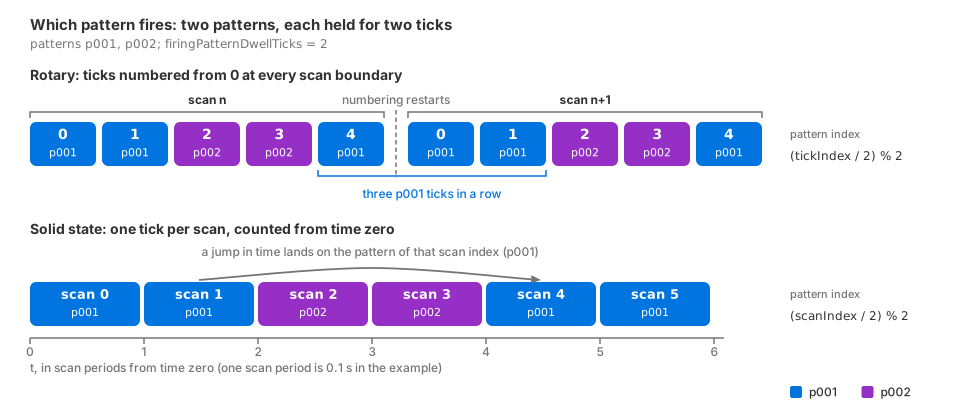
Pattern selection with two patterns and firingPatternDwellTicks = 2.
Top: a rotary sensor numbers its ticks from zero at every scan boundary, so
each scan starts with p001. Bottom: a solid-state sensor’s tick is the
scan itself, counted from time zero, so scans 2 and 3 fire p002 whatever
was rendered before them.#
Each point reports the pattern that fired it in FiringPatternIndex, its
zero-based position in the lexicographic order of the instance names rather
than a stable identifier;
FiringPatternIndex
on Outputs has the rule.
Add, rename or remove patterns#
To add a pattern, apply the next instance of
OmniSensorGenericLidarWpmFiringPatternAPI to the prim and author its four
required arrays, and rangeId if you need it, under the matching instance
name. Adding a pattern, or editing the arrays of one that exists, is a live edit
on this model: an accepted update becomes active as one complete profile and
drops a scan that was in progress, and an update that fails validation leaves
the last valid profile active. Retune the Sensor While It Runs describes update behavior. The following rules apply to firing patterns:
An array that is present but empty is an update, not an omission. Emptying a pattern’s arrays does not remove the pattern: it leaves the pattern with no rows, which fails validation, and the previous profile stays in force.
Deleting or renaming a pattern instance is not a live edit. Recreate the sensor after you delete or rename an instance.
Zero-padded names keep the order you intend:
p010sorts afterp002, whilep10would sort beforep2.On a product that tiles several sensors, only the first sensor’s patterns are read, so edit that one; refer to Tile Lidars.
Verification#
Request ChannelId and FiringPatternIndex on the PointCloud
RenderVar, or leave the list empty to receive both, run the sensor for several
scans and read each published point cloud as Sensor Outputs describes: bound every per-point read by
Counts[0] and keep only the points whose Flags carry the valid bit.
Select by Flags before you read ids, because in dense output every invalid
slot carries a ChannelId of 0; ChannelId on Outputs
has the rule. The first outputs after the sensor starts may be empty while the
model prepares itself; Outputs describes that empty output.
Check the following:
Every valid point’s
ChannelIdis one of the ids you wrote in the patterns’channelIdarrays, exactly as written: the ids are labels, not indices.On a solid-state sensor all valid points of one scan share one
FiringPatternIndex, and consecutive scans follow the dwell. For the example above the index holds for two scans and then switches, a sequence such as0, 0, 1, 1, 0, and after an edit tofiringPatternDwellTicks = 1it alternates on every scan. The valid points of a scan carry only the channel ids of the pattern that fired:1and2forp001,2alone forp002.On a rotary sensor a completed scan with at least
firingPatternDwellTicks * patternCountticks contains firings of every pattern, soFiringPatternIndextakes every value from0topatternCount - 1among the patterns whose rays returned something; the single-pattern example reports0everywhere.
The number of points is not the invariant: a row whose ray meets nothing within range contributes no valid point, so a pattern aimed at empty sky can be absent from a scan. The ids and indices of the points that are present are still exactly the ones you authored.
Potential issues#
These are the symptoms a firing-pattern configuration causes. The reason for a rejected parameter set is logged as an error, and the sensor definition validation utility names it for a layer before you render.
The sensor has never published anything. The initial parameter set failed validation, and this model publishes nothing until its parameters validate. In the patterns, look for arrays of unequal length, a required array that is missing or empty, an instance name that starts with a digit or holds a character other than letters, digits and underscores, more than 256 patterns, or a
firingPatternDwellTicksof zero.An edit to a pattern appears to do nothing. The whole parameter set was refused, or the edit was made on a sensor other than the first one of a tiled product; refer to Retune the Sensor While It Runs.
The patterns do not alternate. With one pattern there is nothing to alternate. With several, a dwell above one holds each pattern for that many ticks, and a rotary sensor begins every scan with the first pattern, so two consecutive scans start alike by design; refer to which pattern fires.
Points land on the neighboring detector. The consumer treats
ChannelIdas an index; it is the authored label. Refer to channel ids are labels.