

Simulate Moving Targets#
The Radar generic wpmDmat model measures Doppler from motion of the targets, the sensor or both. Enable the renderer’s motion BVH and advance scene animation with every step so the model can account for motion during a scan.
Before you start, you should know the model (Radar generic wpmDmat model), how its output is read (Outputs) and the renderer options a sensor scene depends on, the motion BVH among them (Output Configuration).
Motion setup#
Set the renderer’s motion BVH to ENABLE or AUTO when creating it.
Both examples use ENABLE. See motion BVH configuration for API settings and
supported modes.
Animate the target with time-sampled transforms. The scene both examples load,
radar_example.usda, is Z-up and authored in meters, and holds:
a radar at
(0, 0, 1), rotated to look along world +X, withomni:sensor:frameRateat(10, 1)andomni:sensor:WpmDmat:elementsCoordsTypeatCARTESIAN;an asphalt ground plane spanning -200 m to 200 m in X and in Y;
a steel cube with an edge of 1.5 m whose
xformOp:translateis time-sampled from(30, 4, 0.75)at time code 0 to(20, 4, 0.75)at time code 10, one meter closer to the radar at every time code, on a stage that runs 10 time codes per second;a concrete cube of the same size, fixed at
(30, -4, 0.75).
The three materials are non-visual labels alone, with no surface shader
(Non-Visual Sensor Materials). The RenderVar lists Coordinates, Counts
and RadialVelocityMs; the C example’s copy of the scene lists RCS as well,
and the model adds Counts and Flags whether or not they are listed
(Outputs).
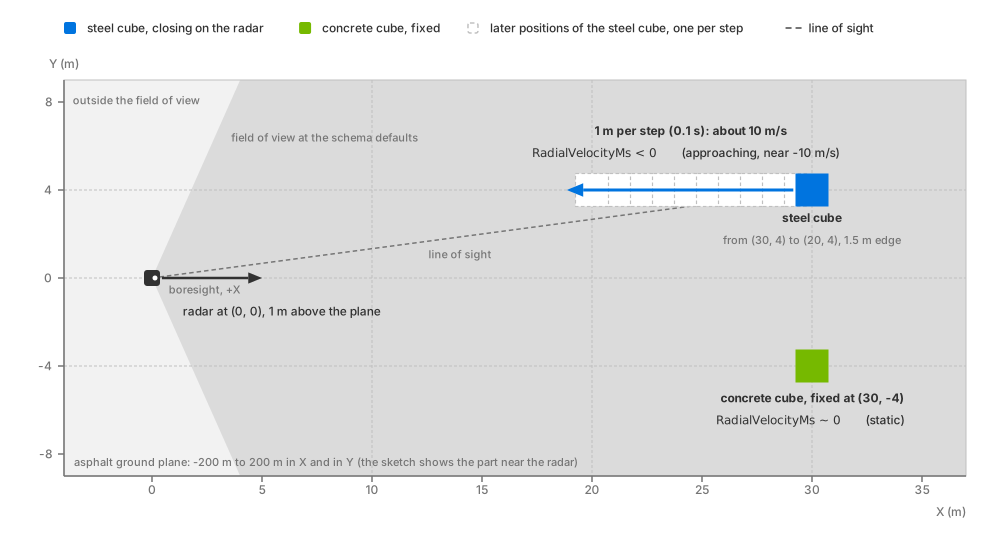
The example scene from above. The steel cube closes on the radar along the
line of sight and reports a negative RadialVelocityMs; the concrete cube
holds still and its detections report a radial velocity near zero.#
Motion BVH#
The motion BVH allows the trace to account for target motion within a frame.
Without it, the radar runs without an error, tracing from its pose at the acquisition time against a static scene for that frame. Animated targets can change position between steps, but contribute no target velocity; a stationary radar therefore measures radial velocities near zero. Sensor velocity is still computed from its movement since the previous step, so a moving radar can report Doppler even when motion BVH is disabled.
If scene updates are not reaching rendering, check the update sequence in ovstage Integration. When using time-sampled USD animation, that includes advancing its evaluation time.
The output does not report whether motion BVH was active. Compare enabled and disabled runs as described below. Unlike the Lidar generic core model, radar has no motion-compensation attribute; see Doppler measurements.
Doppler measurements#
RadialVelocityMs is signed, and a detection approaching the
radar reads negative (Outputs). For a direct-path return, it is the component of relative motion along the
radar’s line of sight, so purely transverse motion produces no Doppler.
Multipath returns also depend on motion along the other path segments. Moving or
articulated parts whose motion is in the scene produce velocity contributions of
their own, separable when the scan’s velocity resolution allows (Radar generic wpmDmat model).
Velocities beyond the unambiguous interval are folded into it. The interval
depends on the processing mode; see aliasing. The model has no
motion-compensation attribute or per-detection timing
(Timestamps).
The example scene’s
steel cube moves 1 m every 0.1 s, giving a speed of 10 m/s. Its radial speed
is slightly lower because it travels 4 m to the side of the radar. Expect
RadialVelocityMs near -10 m/s for the cube, within the default unambiguous
velocity interval, and near zero for the stationary concrete cube and ground.
The radar is stationary. Detection counts can vary.
Verification#
Run either example. Each prints one line per animated step: ten in the C example,
ten by default in the Python example (--steps). The Python example prints
step N: valid points=..., radial velocity min/max=[..., ...] m/s; the C example
prints the same line with an RCS min/max=[..., ...] interval before the
velocity interval, and closes with Observed ... detections with |radial
velocity| > 0.1 m/s; max |radial velocity| = ... m/s, counting across all steps
the detections whose velocity magnitude exceeds 0.1 m/s. Both count only the
entries within Counts[0] whose Flags carry the VALID bit
(Outputs).
On steps that detect the steel cube, expect a minimum radial velocity near
−10 m/s and a maximum near zero from stationary surfaces. The C summary’s
max |radial velocity| should be near 10 m/s. Exact detection counts vary.
Python prints valid points=0 for frames without a scan; C treats them as
an error and stops. Step at the scan period to
avoid these gaps. See Outputs for the distinction between a frame
without a scan and a fired scan without detections.
Repeat the run with the motion BVH configuration entry omitted. With the radar stationary, radial velocities should be near zero even though the cube changes position between steps. Compare velocities between the runs; both runs can produce nonzero detection counts.
The Python example also draws every detection in a rerun viewer, colored by signed radial velocity: blue approaching, green near zero, red receding. The steel cube’s detections come out blue while the concrete cube’s stay green.
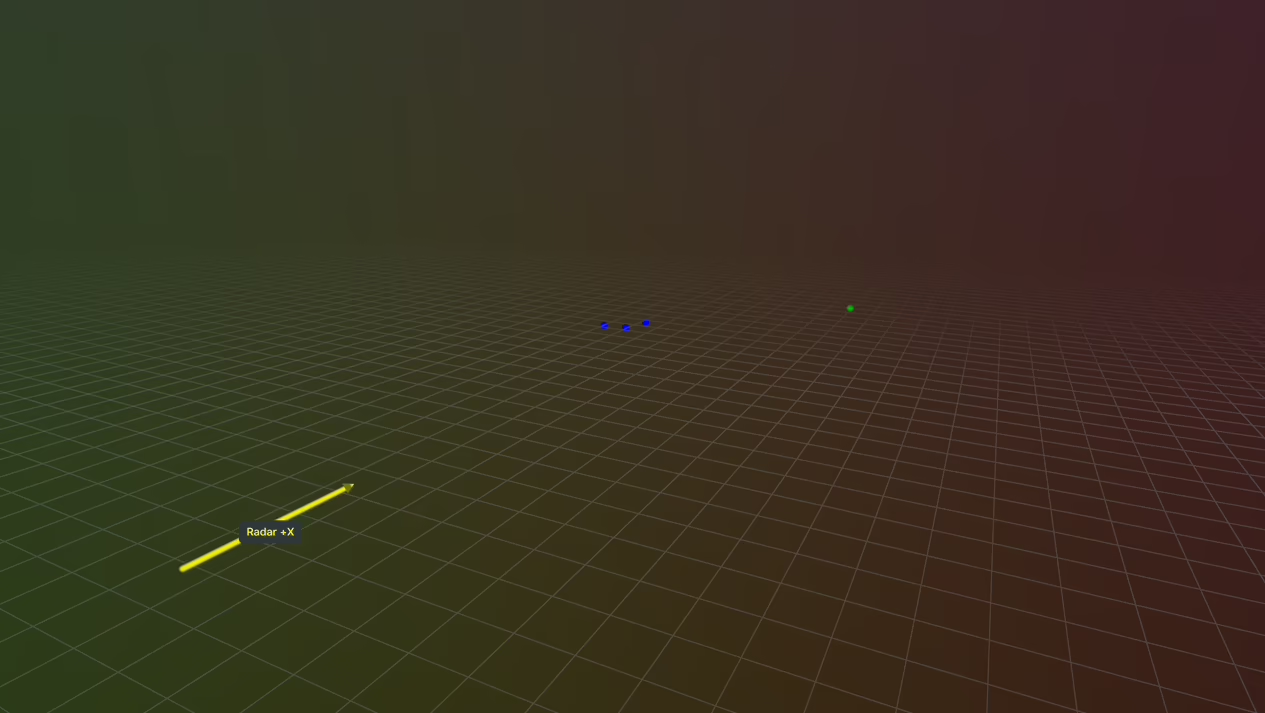
The Python radar example’s view, with each detection colored by its signed
RadialVelocityMs: blue for the approaching steel cube, green for the fixed
concrete cube.#
For the systematic version of this check, with known radial velocities below and beyond the unambiguous limit and an isolated, direct-path transverse run that should produce no Doppler, follow checks 3 and 7 of Validate a Parameterization.
Potential issues#
A target you animated shows no motion effects and the radar raised no error: the renderer was created without the motion BVH, or on a GPU that cannot trace against motion, so the radar ran without it as described under the motion BVH. Recreate the renderer with
ENABLEorAUTO(Motion BVH); the Motion BVH column of Hardware & Driver Requirements lists the GPU support.The sign is reversed from what you expected: approaching is negative by convention (Outputs).
A plausible velocity at the wrong value: the true radial velocity lies beyond the scan’s unambiguous interval and folded back into it. For a
FASTscan raise the activemaxVelMpsSequenceentry; for aWAVEFORMscan the interval followswaveLengthMm, its selectedchirpRepetitionTimeSequenceentry and its other chirp attributes; or author the scan to the device’s real ambiguity (aliasing).A moving radar reports radial velocity in a static scene: that is its own motion, by design, with the motion BVH or without it. A static scene seen from a moving radar is a Doppler scene.