

Runtime Parameter Updates#
Many sensor model attributes can change without reloading the scene. Others require recreating the sensor, or reject invalid edits while retaining the previous configuration. Whether an edit takes effect depends on the attribute and model. Plain cameras respect all attribute changes at runtime.
Check the model’s USD attributes page for its live-update rules: Lidar generic core, Lidar generic wpm, Radar generic wpmDmat, Acoustic generic wpm, Generic wpm or Camera generic core.
Applying an update#
Change the sensor’s attributes on the runtime stage through ovstage. For
example, an acoustic sensor’s omni:sensor:WpmAcoustic:azSpanDeg can change
from 90 to 120 degrees while the sensor runs.
Write the new values and wait for the writes to complete.
Advance the stage’s write floor and wait for publication.
Update the renderer from the stage, then step it. In C, enqueue
ovrtx_update_from_stage()beforeovrtx_step_with_stage(). Python’sstep()performs the update automatically.
ovstage Integration provides the Python and C update loops and explains write ordinals. The model receives the sensor’s full parameter set before the next step, including unchanged attributes. Moving the prim is not a sensor-parameter update.
Update timing#
Support for runtime changes depends on both the attribute and the model. Some attributes are read only when the model is created; others are read on every update. Check the model’s attributes page: the attribute’s type, namespace, or absence of a runtime-change note in its schema does not establish whether it can change live.
For sensor-model parameters, a frame already in progress finishes with its
starting values. Accepted changes apply to the next frame. Camera output
delivery policy is an exception: omni:sensor:Core:partialOutputs is read
on every step, so a change takes effect on the next step. See
Sensor Scheduling for the delivery options and examples.
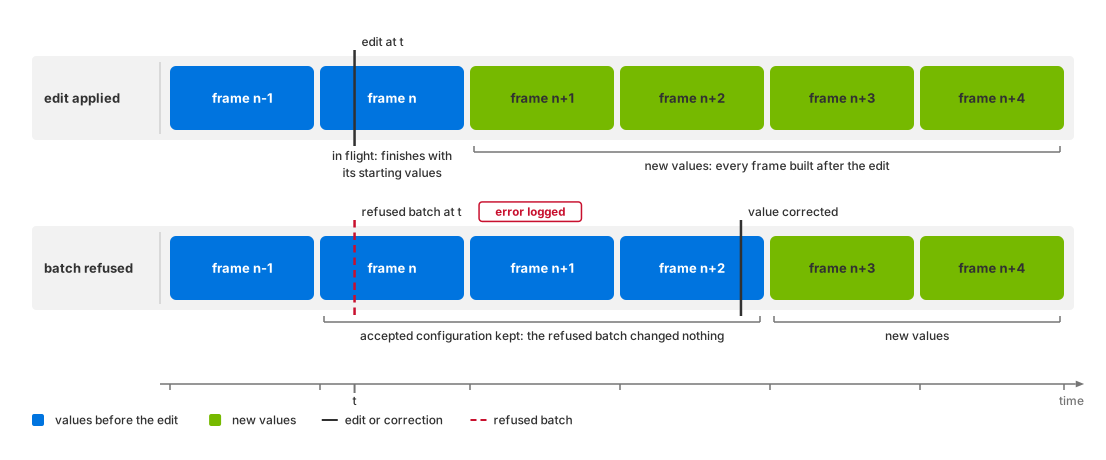
Accepted parameters apply to the next frame; rejected updates leave the previous configuration in use.#
Update outcomes#
An update can change the running configuration, require reallocation, or be refused. The distinction determines whether output changes and whether sensor history is retained. These are model behaviors, not status values returned by an ovstage write. A successful write confirms that the runtime stage accepted the value; it does not confirm that the sensor model uses it.
Check the renderer’s error log after the update, then inspect an output frame produced with the new configuration. Continued output, a successful stage readback, or the absence of an error alone does not establish acceptance.
Outcome |
Behavior |
How to check |
|---|---|---|
Applied |
The next frame uses the new value. |
Check the output parameter that reports the value, or verify a predictable output change. See Verifying an update. |
Applied, after a reallocation |
The change alters how much memory the sensor needs: a longer firing
sequence, an extra mount, a larger return capacity. The model resizes
its output for the new configuration; expect a brief delay on the step
where that happens. The sensor itself is not recreated, so its frame
counter carries on. On the Lidar generic core, Radar generic wpmDmat and
Acoustic generic wpm models the noise restarts from its built-in
starting point on that step. On the Acoustic generic wpm model even a
change to a scalar such as |
Verify acceptance as above. The model’s attribute documentation identifies changes that require reallocation; a changed output layout can confirm a resize, but a slower step alone cannot. There is no reallocation status in the output. |
Refused, value kept |
The model recognizes the attribute, will not change it on a running sensor, and carries on with the old value. The frame is still produced. |
Look for an error identifying the unsupported runtime change. Where the output reports the affected parameter, it still reports the old value. |
Update rejected |
The whole parameter update fails before the model applies any of it. Nothing in that batch is applied, including otherwise valid edits. |
Look for a parameter-validation error. Outputs continue to use the previously accepted configuration; they carry no rejection marker. |
Batch validation#
If validation fails, the entire parameter update is rejected, including valid edits in the same batch. The sensor retains its previous configuration and output layout, and logs the reason as an error. The invalid value remains on the runtime stage and is included in later updates until corrected. Change one attribute at a time when diagnosing a rejection.
Use the logged validation error to identify the invalid parameter, correct it on the runtime stage, and publish the update again. Then verify the intended values in a subsequent frame as described below. Reading the corrected value back from the stage does not show whether the model accepted the new batch.
A sensor created with invalid parameters has no previous configuration to retain. Creation behavior is model-specific; see, for example, Lidar generic core attributes.
Model-specific behavior#
The following examples illustrate which changes each model accepts. Follow the links for the full attribute restrictions.
The Acoustic generic wpm model supports live changes to nearly all its parameters, including
omni:sensor:WpmAcoustic:enableInterference, where a frame already in flight finishes in the mode it started in. Refer to its USD attributes.The Lidar generic core model applies edits to the output attributes (coordinate representation, frame of reference, custom transform, motion compensation state) and to its delivery policy
omni:sensor:Core:partialOutputsfrom the next frame on; Configure Lidar Output states what an edit made mid-scan does to a scan still being accumulated.A resizing edit on the Lidar generic core model, such as
maxReturnsor the emitter and channel counts, changes the output layout without recreating the sensor: the frame counter continues. Refer to its USD attributes.The Radar generic wpmDmat model re-reads its output group (coordinate system, frame of reference, custom transform) on every update; refer to its USD attributes.
On the Camera generic core model,
omni:sensor:frameRateis frozen: its schema declares that the attribute does not take runtime changes. Refer to its USD attributes.
Sensor recreation#
Output requests#
On the Lidar generic core, Radar generic wpmDmat and Acoustic generic wpm models, changing
which RenderVars the product requests, their order or their channels rebuilds
the model. Its frame counter restarts and a scan in progress is lost. A changed channel list
therefore takes effect through a rebuild, not as a live edit, and the rebuilt
model takes everything that is fixed at build time from what is authored then.
The Lidar generic wpm model is not rebuilt this way; refer to
Retune the Sensor While It Runs.
Removing a product from the step’s input set discards its accumulated
history as well, so keep every RenderProduct in every step, as
Sensor Scheduling explains.
Creation-only attributes#
Some attributes cannot change on a running sensor. The Lidar generic core model’s
omni:sensor:Core:scanType and omni:sensor:Core:rayType are the
examples; what the model holds fixed on its USD
attributes page states both. Recreate the sensor to change one.
Tiled products#
A model may read parameters only from the first sensor in a tiled product. The Lidar generic wpm model does; refer to tile zero. The visual models share one parameter set per tiled product as well: the Camera generic core model takes every setting from the first of its cameras (one pipeline per product), and the Camera single-view stereo depth model uses one parameter set for the whole tiled frame (several products, cameras and projections).
Rejected-update diagnostics#
A refused update leaves the accepted configuration and output layout in use. Output frames contain no rejection status or marker; continued output does not prove that an edit was accepted.
Validation failures and refused changes, such as edits to the Lidar generic core model’s scan type, are logged as errors. Configure the renderer’s log level to include errors and route them to your application. See Diagnostics and Renderer Configuration.
Verifying an update#
Read the output to check which configuration produced a frame. Reading the runtime stage confirms only the authored value, which may differ from the value the model accepted.
Output parameters#
Where an output reports the parameter you changed, compare it with the requested value. Each frame’s parameters identify the configuration used for that frame, including when an edit took effect.
Lidar point clouds report
coordsTypeandframeOfReference; see Lidar generic core outputs.Acoustic
SignalWaysreportscenterFrequencyascenterFrequencyHzandsampleDurationassampleDurationUs. The latter converts seconds to microseconds; see Acoustic generic wpm outputs.
Output comparisons#
If the output does not report the parameter, compare frames before and after an edit with a predictable structural effect. Prefer a reproducible integer, such as the acoustic model’s number of signal ways, over noisy amplitudes or point counts, which can vary between runs.
Adding an acoustic mount or channel id can increase numSignalWays.
Retune the Sensor While It Runs
provides the recipe and explains conditions that can hide the increase.
If the expected change is absent, check those conditions and the error log
before concluding that the update was rejected.
Capture a valid baseline before editing: a missing frame cannot serve as a comparison. Verify both the expected output change and the absence of update errors.
For the Generic wpm model, write coordinated pattern selectors and arrays in one batch. A rejected batch retains the complete last accepted configuration; its accepted selectors are reported in output params. See Switch Stored Patterns.