

Motion Artifacts#
Motion during a scan can distort a lidar point cloud. Motion BVH enables
tracing against changing sensor and scene transforms. The Lidar generic core
model can then compensate the output for sensor motion using
omni:sensor:Core:outputMotionCompensationState.
The Lidar generic wpm model carries the same control as a bool,
omni:sensor:LidarWpm:outputMotionCompensationState
(USD Attributes), and needs the motion BVH in the same way.
The Radar generic wpmDmat model has no compensation attribute
(Outputs).
Before you start, you should have a lidar rendering points (Your First Lidar Sensor), know the renderer options a sensor scene depends on (Output Configuration) and know the attributes that shape the lidar’s output (Configure Lidar Output).
Motion settings#
The following example retains motion distortion with the default
NONCOMPENSATED setting:
#usda 1.0

def OmniLidar "Lidar" (
    prepend apiSchemas = ["OmniSensorGenericLidarCoreAPI"]
)
{
    token omni:sensor:Core:outputMotionCompensationState = "NONCOMPENSATED"
}
from pxr import Gf, Sdf

lidar = stage.DefinePrim("/Lidar", "OmniLidar")
lidar.AddAppliedSchema("OmniSensorGenericLidarCoreAPI")
lidar.CreateAttribute(
    "omni:sensor:Core:outputMotionCompensationState", Sdf.ValueTypeNames.Token, custom=False
).Set("NONCOMPENSATED")
Motion BVH is selected when creating the renderer. It enables tracing at the sensor and scene poses corresponding to each firing time. Motion compensation transforms the resulting coordinates into the requested output frame. These are separate operations, illustrated below.
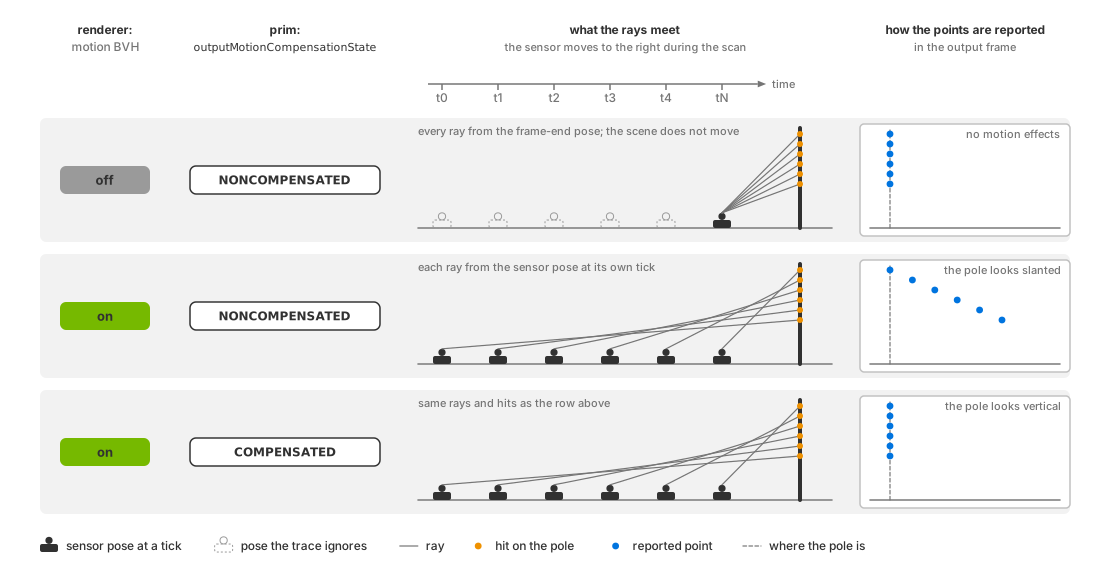
Effect of motion BVH and motion compensation on a scan. From top to bottom:
motion BVH disabled; enabled with NONCOMPENSATED output; enabled with
COMPENSATED output. Schematic, not to scale.#
Without motion BVH, rays use the sensor’s frame-end pose and a fixed scene. The model still produces points but omits motion during the scan and logs a warning once.
instantLidar fires the entire scan at one instant, leaving no within-scan
motion to compensate. Without motion BVH, it also uses the frame-end pose.
See Configure Lidar Output for instant-lidar timing.
Setting COMPENSATED does not enable motion BVH. With motion BVH off,
compensation still runs, but the trace contains no within-scan motion. Output
metadata does not identify this mismatch. Configure both settings when
validating a moving sensor.
Enable motion BVH when you create the renderer#
Select ENABLE when creating the renderer. See Motion BVH for Python and C examples,
GPU support, available modes and requirements for other sensors, including
rolling-shutter cameras.
Motion compensation#
NONCOMPENSATED (default) reports detections without correcting sensor
motion, retaining the distortion of a physical scanning sensor.
COMPENSATED uses each point’s timestamp and sensor motion to transform
detections into the requested output frame. This can improve alignment for
mapping and localization. For application-side deskewing, request firing
times through TimeOffsetNs.
See USD Attributes for the controls and Outputs for
motionCompensationState, which identifies the state used for each frame.
Two examples show what the states do to a scene:
A rotary lidar moving forward and scanning a circle on the ground. Non-compensated, the circle comes back as a complete closed circle, every point at the same range, the sensor-to-ground distance. Compensated, the circle has a tear in it, because the sensor has moved by the time the scan closes.
A moving solid-state line-scanning lidar seeing a vertical pole. Non-compensated, the pole looks slanted. Compensated, the pole looks vertical.
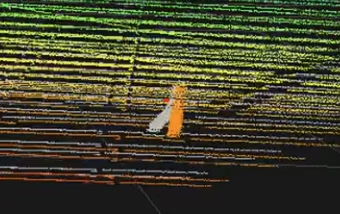
Lidar points from the circle and pole, with motion compensation (orange) and without (gray).#
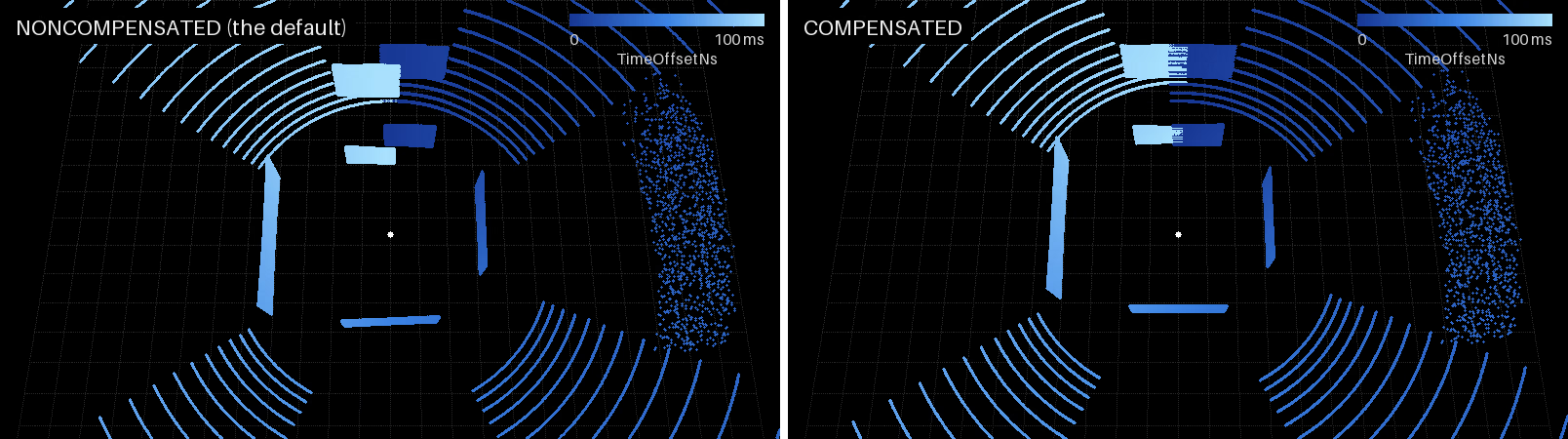
One sweep of the panel scene from a lidar moving forward at 8 m/s,
delivered NONCOMPENSATED (left) and COMPENSATED (right), seen from
above, points colored by TimeOffsetNs. With the motion kept in, the
ground rings close and the pane ahead, scanned at the start of the sweep
and again at its end, comes back twice, 0.8 m apart; with the motion taken
out, the rings tear where the scan wraps and the pane is whole.#
Compensation supports runtime updates. Frames already in flight retain
their previous state. With partialOutputs = false, conversion happens
on the completing step, so a mid-scan edit applies to the entire delivered
scan. See Runtime Parameter Updates for update handling,
Configure Lidar Output for output configuration and Outputs for
state metadata.
Verification#
Test motion BVH and compensation separately.
For motion BVH, animate the sensor or a target during a scan and compare runs with BVH enabled and disabled. Without it, within-step motion does not distort the trace. A nonzero point count alone cannot verify motion BVH: the model produces points in both cases; see behavior without motion BVH.
The runnable lidar scene is static. Add time-sampled sensor or target transforms and advance USD time each step, as the radar example does for its approaching target. See the attached update loop and clock descriptions in ovstage Integration.
For compensation, compare Coordinates with NONCOMPENSATED and
COMPENSATED in the same moving-sensor scene. Check each frame’s
motionCompensationState on Outputs to confirm the requested
state applied. If coordinates are identical, check whether the sensor moved
during the scan and whether the edit reached the model. Compensation removes
sensor motion only; moving targets retain their distortion. instantLidar
has no within-scan motion to compensate.
Potential issues#
See the Symptom Index for additional causes and checks.
A moving sensor or target leaves the points of each step undistorted: the motion BVH is off, because it was not requested or because the GPU cannot trace against motion. Refer to Motion BVH and to what the lidar does without it. Symptom Index: points in the wrong place.
The point cloud is smeared or sheared while the platform moves: that is
NONCOMPENSATEDbehaving as designed. AuthorCOMPENSATED, or deskew downstream fromTimeOffsetNs. Symptom Index: points in the wrong place.COMPENSATEDis authored and the smearing is unchanged: read themotionCompensationStateparam.0means the authored state is not the one in force: the attribute never reached the model.1means compensation ran: either the motion BVH is off and there was no sensor motion in the trace to compensate (refer to both settings), or the smear belongs to a moving target, which compensation leaves in place. Symptom Index: points in the wrong place.Scan-to-scan alignment degrades in a mapping or localization stage: the scans are motion-distorted. Compensate at the sensor, or deskew before the mapper. Symptom Index: points in the wrong place.
The attribute was changed while the sensor was running and nothing happened: read the
motionCompensationStateparam of a later frame. If it still reports the old state, the edit did not reach the model; Runtime Parameter Updates says how an edit reaches a running sensor and which outcomes it can have. Symptom Index: Runtime edits have no effect.