

C: Custom Selection with SPG#
Draw custom selection outlines and patterned fills by processing LdrColor
and SelectionState with a Slang Sensor Processing Graph (SPG) node.
The renderer supplies selection groups and visibility at output resolution;
SPG controls colors, outline widths and shapes, and visible and hidden fills.
The C++ example presents CustomSelection in its own Vulkan/CUDA viewer.
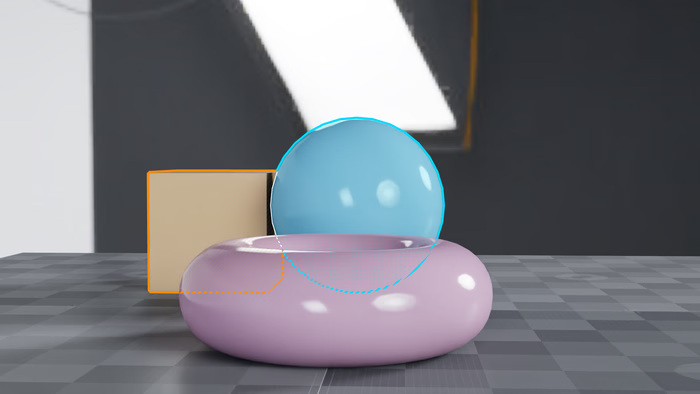
Three selection groups use cyan rounded outlines, purple square outlines, and orange diamond outlines on textured ground under a studio HDRI.#
Wiring the Render Outputs#
The scene requests the two input AOVs, connects them to the Slang node, and
publishes its result as CustomSelection. The following excerpt also defines
style inputs that can be edited without rebuilding the viewer:
#usda 1.0
over "Render"
{
    over "Camera"
    {
        int2 resolution = (1920, 1080)
        token omni:rtx:rendermode = "RealTimePathTracing"
        rel orderedVars = [<LdrColor>, <SelectionState>, <CustomSelection>]

        over "LdrColor"
        {
            opaque omni:rtx:aov
        }
        def RenderVar "SelectionState"
        {
            string sourceName = "SelectionState"
            opaque omni:rtx:aov
        }
        def RenderVar "CustomSelection"
        {
            string sourceName = "CustomSelection"
            opaque omni:rtx:aov.connect = <../SelectionOutline.outputs:Color>
        }
        def Shader "SelectionOutline"
        {
            uniform token info:implementationSource = "sourceAsset"
            uniform asset info:spg:sourceAsset = @SelectionOutline.slang@
            uniform token info:spg:sourceAsset:subIdentifier = "selectionOutline"

            # All morphology and styling is controlled by SPG, independently of native outline settings.
            int inputs:width = 6 # Maximum radius; group 2 uses half.
            int inputs:shape = 0 # Base shape: 0=circle, 1=square, 2=diamond; groups 2/3 rotate by 1/2.
            float inputs:fillAlpha = 0.18
            int inputs:dashPeriod = 16
            int inputs:hatchSpacing = 12
            int inputs:hatchLineWidth = 1
            float inputs:hiddenFillAlpha = 0.35

            opaque inputs:Color.connect = <../LdrColor.omni:rtx:aov>
            opaque inputs:SelectionState.connect = <../SelectionState.omni:rtx:aov>
            opaque outputs:Color
        }
    }
}
Assigning Selection Groups#
Use the selection API to assign geometry to groups. After the initial setup step completes, the example resolves the sphere, torus, and cube paths and assigns groups 1, 2, and 3 respectively:
// Assign selection only after the setup step completes, or the step discards the groups.
// Stable per-object groups demonstrate three SPG styles, including where selected objects overlap.
const ovx_string_t selected_paths[] = {{"/World/Sphere", 13}, {"/World/Torus", 12},
                                        {"/World/Cube", 11}};
const uint8_t selected_groups[] = {1, 2, 3};
selected_prim_path_ids.resize(3);
const ovx_api_result_t path_result = path_dictionary.vtable->create_paths_from_strings(
    path_dictionary.context, selected_paths, 3, selected_prim_path_ids.data());
if (path_result.status != OVX_API_SUCCESS) {
    std::cerr << "Failed to resolve the initial selection paths" << std::endl;
    return cleanup(1);
}
const ovrtx_enqueue_result_t selection_result = ovrtx_set_selection_outline_group(
    renderer, selected_prim_path_ids.data(), selected_prim_path_ids.size(), selected_groups);
if (check_and_print_error(selection_result, "set initial SPG selection")) {
    return cleanup(1);
}
Styling the Selection#
Each SelectionState pixel contains four coverage samples. In each sample,
bits 0–7 identify the selection group and bit 8 indicates visibility. Group zero
means no selected geometry. The following Slang shader expands the mask,
decodes and composites each coverage sample independently, and averages the
results:
struct Params
{
    int width;
    int shape; // Base shape; groups 2 and 3 rotate to the next shapes (circle, square, diamond).
    float fillAlpha;
    int dashPeriod;
    int hatchSpacing;
    int hatchLineWidth;
    float hiddenFillAlpha;
    int padding;
};
[[vk::binding(0, 1)]] ParameterBlock<Params> g_Params;
[[vk::binding(1, 1)]] Texture2D<float4> g_Color;
[[vk::binding(2, 1)]] Texture2D<uint4> g_SelectionState;
[[vk::binding(3, 1)]] RWTexture2D<float4> g_Result;

// All style choices live here or in the node's USD inputs.
float3 groupColor(uint group)
{
    return group == 3 ? float3(1.0, 0.55, 0.05) :
           group == 2 ? float3(0.85, 0.25, 1.0) : float3(0.0, 0.85, 1.0);
}

// Expand the mask with the requested shape and carry the nearest seed's group and visibility.
// Stable loop order breaks equal-distance ties.
uint4 nearestSelection(int2 pixel, int2 extent, uint4 center)
{
    const int radius = max(0, g_Params.width);
    int4 bestDistance = int4(0x7FFFFFFF);
    uint4 nearest = 0;
    // Interior samples do not need expansion; search only the background channels.
    const bool4 background = (center & 0xFF) == 0;
    for (int y = -radius; y <= radius; ++y)
    {
        for (int x = -radius; x <= radius; ++x)
        {
            const int2 offset = int2(x, y);
            const int2 p = pixel + offset;
            if (any(p < 0) || any(p >= extent))
                continue;
            // Rank eligible seeds in one metric, even when their stroke shapes differ.
            const int distance = x * x + y * y;
            if (!any(background & (distance < bestDistance)))
                continue;
            // One texture read and neighborhood walk serve all four coverage channels.
            const uint4 states = g_SelectionState.Load(int3(p, 0));
            for (uint sample = 0; sample < 4; ++sample)
            {
                const uint group = states[sample] & 0xFF;
                // Test each seed's style before choosing it: a farther, wider stroke can still reach us.
                const int strokeRadius = group == 2 ? max(1, radius / 2) : radius;
                const int shape = (g_Params.shape + (group == 2 ? 1 : group == 3 ? 2 : 0)) % 3;
                const int shapeDistance = shape == 1 ? max(abs(x), abs(y)) :
                                          shape == 2 ? abs(x) + abs(y) : distance;
                const int limit = shape == 0 ? strokeRadius * strokeRadius : strokeRadius;
                if (background[sample] && distance < bestDistance[sample] && group != 0 && shapeDistance <= limit)
                {
                    nearest[sample] = states[sample];
                    bestDistance[sample] = distance;
                }
            }
        }
    }
    return nearest;
}

// Different groups have a white separator; objects in the same group form one mask.
bool4 groupBoundary(int2 pixel, int2 extent, uint4 states)
{
    const uint4 groups = states & 0xFF;
    bool4 boundary = false;
    for (int y = -1; y <= 1; ++y)
    {
        for (int x = -1; x <= 1; ++x)
        {
            const int2 p = pixel + int2(x, y);
            if (any(p < 0) || any(p >= extent))
                continue;
            // All four coverage channels share the same neighborhood texture read.
            const uint4 other = g_SelectionState.Load(int3(p, 0)) & 0xFF;
            for (uint sample = 0; sample < 4; ++sample)
            {
                boundary[sample] = boundary[sample] ||
                    (groups[sample] != 0 && other[sample] != 0 && other[sample] != groups[sample]);
            }
        }
    }
    return boundary;
}

// Share a conservative tile occupancy test so empty image regions skip the expensive neighborhood search.
groupshared uint tileHasSelection;

// Composite each coverage sample independently. Stroke visibility follows its selected seed,
// so an unselected surface underneath an expanded stroke does not reclassify that stroke.
[shader("compute")]
[numthreads(16, 16, 1)]
void selectionOutline(uint3 tid : SV_DispatchThreadID, uint3 groupId : SV_GroupID, uint threadIndex : SV_GroupIndex)
{
    uint width, height;
    g_Color.GetDimensions(width, height);
    // Include the outline halo and the one-pixel separator neighborhood. Every thread participates
    // in both barriers, including threads outside the image in a partial edge workgroup.
    const int radius = max(1, g_Params.width);
    const int tileSize = 16 + 2 * radius;
    const int2 tileOrigin = int2(groupId.xy) * 16 - radius;
    if (threadIndex == 0)
        tileHasSelection = 0;
    GroupMemoryBarrierWithGroupSync();
    bool hasSelection = false;
    for (uint i = threadIndex; i < uint(tileSize * tileSize); i += 256)
    {
        const int2 p = tileOrigin + int2(int(i) % tileSize, int(i) / tileSize);
        if (all(p >= 0) && all(p < int2(width, height)))
            hasSelection = hasSelection || any((g_SelectionState.Load(int3(p, 0)) & 0xFF) != 0);
    }
    if (hasSelection)
        InterlockedOr(tileHasSelection, 1u);
    GroupMemoryBarrierWithGroupSync();
    if (tid.x >= width || tid.y >= height)
        return;
    if (tileHasSelection == 0)
    {
        g_Result[tid.xy] = g_Color.Load(int3(tid.xy, 0));
        return;
    }

    const int2 pixel = int2(tid.xy);
    const int2 extent = int2(width, height);
    const uint4 states = g_SelectionState.Load(int3(pixel, 0));
    uint4 seeds = 0;
    if (g_Params.width > 0 && any((states & 0xFF) == 0))
        seeds = nearestSelection(pixel, extent, states);
    bool4 boundaries = false;
    if (g_Params.width > 0 && any((states & 0xFF) != 0))
        boundaries = groupBoundary(pixel, extent, states);
    const uint period = uint(max(1, g_Params.dashPeriod));
    const bool dash = ((tid.x + tid.y) % period) < ((period + 1) / 2);
    // Cross two screen-space diagonal line families; use bounded residues to avoid unsigned subtraction wrap.
    const uint spacing = uint(clamp(g_Params.hatchSpacing, 1, 4096));
    const uint lineWidth = uint(clamp(g_Params.hatchLineWidth, 0, int(spacing)));
    const uint x = tid.x % spacing;
    const uint y = tid.y % spacing;
    const bool stripe = ((x + y) % spacing) < lineWidth;
    const bool hatch = stripe || ((x + spacing - y) % spacing) < lineWidth;
    // Group 1 uses a regular dot lattice instead of crossed lines in hidden interiors.
    // Reuse hatch spacing/line width as dot spacing/radius; zero width disables both patterns.
    const int2 dotOffset = int2(x, y) - int(spacing / 2);
    const bool stipple = lineWidth > 0 && dotOffset.x * dotOffset.x + dotOffset.y * dotOffset.y <= int(lineWidth * lineWidth);
    float4 overlay = 0; // Premultiplied RGB and alpha, accumulated over coverage samples.

    for (uint sample = 0; sample < 4; ++sample)
    {
        const uint state = states[sample];
        const uint group = state & 0xFF;
        if (group == 0)
        {
            const uint seed = seeds[sample];
            if ((seed & 0xFF) != 0 && ((seed & 0x100) != 0 || dash))
                overlay += float4(groupColor(seed & 0xFF), 1.0);
        }
        else if (boundaries[sample] &&
                 ((state & 0x100) != 0 || dash))
        {
            overlay += float4(1.0);
        }
        else
        {
            // Group 1 has solid fill, group 2 only an outline, and group 3 diagonal stripes.
            // Hidden group 1 uses dots, group 3 single hatching, and the other groups crossed hatching.
            const float visibleAlpha = group == 2 ? 0.0 :
                                       group == 3 ? (stripe ? saturate(g_Params.fillAlpha) : 0.0) :
                                       saturate(g_Params.fillAlpha);
            const bool hiddenPattern = group == 1 ? stipple : group == 3 ? stripe : hatch;
            const float alpha = (state & 0x100) != 0 ? visibleAlpha :
                                hiddenPattern ? saturate(g_Params.hiddenFillAlpha) : 0.0;
            overlay += float4(groupColor(group) * alpha, alpha);
        }
    }

    overlay *= 0.25;
    float4 color = g_Color.Load(int3(pixel, 0));
    color.rgb = color.rgb * (1.0 - overlay.a) + overlay.rgb;
    g_Result[tid.xy] = color;
}
The Lua launch script checks input shapes, allocates the output image, and binds the images and styling parameters in the shader’s binding order:
-- Both images use final output resolution. The renderer exports four unsigned 16-bit coverage states.
function selectionOutline(inputs, outputs)
    local color = inputs["Color"]
    local state = inputs["SelectionState"]
    assert(color.rank == 2 and color.dtype == slang.uchar4, "Color must be LdrColor")
    assert(state.rank == 2 and state.dtype == slang.ushort4, "SelectionState must be four uint16 samples")
    assert(state.shape[1] == color.shape[1] and state.shape[2] == color.shape[2],
           "SelectionState must match output resolution")
    -- USD value inputs are wrappers; Lua comparisons need their numeric value.
    assert(inputs["width"].value >= 0 and inputs["width"].value <= 32, "Example outline width must be 0..32")
    assert(inputs["shape"].value >= 0 and inputs["shape"].value <= 2, "Example shape must be circle, square, or diamond")

    outputs["Color"] = slang.image(color.shape, color.dtype)
    return slang.compute({
        bind = {
            slang.ParameterBlock(slang.int(inputs["width"]), slang.int(inputs["shape"]),
                                 slang.float(inputs["fillAlpha"]), slang.int(inputs["dashPeriod"]),
                                 slang.int(inputs["hatchSpacing"]), slang.int(inputs["hatchLineWidth"]),
                                 slang.float(inputs["hiddenFillAlpha"]), slang.int(0)),
            slang.Texture2D(color),
            slang.Texture2D(state),
            slang.RWTexture2D(outputs["Color"]),
        },
    })
end
Edit the inline shader inputs to change outline width and shape, fill opacity, dash period, and hidden-fill patterns. The initial styles are:
Object |
Group |
Visible style |
Hidden fill |
|---|---|---|---|
Sphere |
1 |
Cyan, rounded outline, translucent solid fill |
Stippling |
Torus |
2 |
Purple, thin square outline, no fill |
Cross-hatching |
Cube |
3 |
Orange, diamond outline, striped fill |
Single-direction hatching |
Edit the Slang shader to change the drawing algorithm. See
Overview for the SPG authoring reference and
Outputs for the full SelectionState output format.
Prerequisites#
CMake 3.18 or newer and a C++17 compiler
An NVIDIA RTX-capable GPU and a supported driver
CUDA Toolkit 12.0 or newer
Vulkan SDK 1.3.250 or newer, including
glslcOn Linux, the GLFW development dependencies for your window system
Building and Running#
The CMake helpers find installed ovrtx and ovstage SDK packages through
CMAKE_PREFIX_PATH, or fetch them when absent. Dependency downloads require
internet access. Build and run from the example directory:
cd examples/c/selection-spg
cmake -S . -B _build -DCMAKE_BUILD_TYPE=Release
cmake --build _build --config Release
./_build/ovrtx-selection-spg
On Windows, run _build/Release/ovrtx-selection-spg.exe.
For headless output, run either the default RTPT scene or its PT variant:
./_build/ovrtx-selection-spg --headless --num-frames 100
./_build/ovrtx-selection-spg --usd selection_pt.usda --headless --num-frames 100
On Windows, use the same arguments with the executable path above.
Headless mode writes out.png with all three group styles. The viewer reads
editable USD, Lua, and Slang assets directly from the source directory; changes
take effect on the next launch. The scene renders at 1920 × 1080 independently
of window size.
Viewer Controls#
Left-click or drag to replace the selection, preserving each object’s group.
Shift-click to toggle an object. Shift-clicking empty background preserves the selection; Shift-drag replaces it.
Right-drag to orbit; use the wheel to dolly.
Select only the sphere to see dashed hidden outlines and stippling behind the cube.
Limitations#
SelectionState represents the nearest selected surface only. Objects in the
same group form a combined mask. Expanded outlines inherit visibility from their
selected source samples; they do not query scene depth beneath the expanded
stroke. Adaptive coverage can miss features thinner than the center sampling
pattern.
XR foveation unwarp is unsupported for this AOV. When unwarp is authored, the
renderer clears SelectionState and logs a warning; beauty output continues.