

Acoustic generic wpm model#
The Acoustic generic wpm model simulates ultrasonic pulses and the echoes received by a transducer array. A mount locates each transducer; a receiver group selects the receiving mounts. A repeating firing sequence selects the transmitting mount, receiver group and channel id for each pulse. Each receiving membrane records an echo envelope: amplitude sampled over time.
A signal way is the envelope recorded by one receiving mount on one channel
id. Request SignalWays to receive these envelopes. Define the
sensor with an OmniAcoustic prim and OmniSensorGenericAcousticWpmAPI.
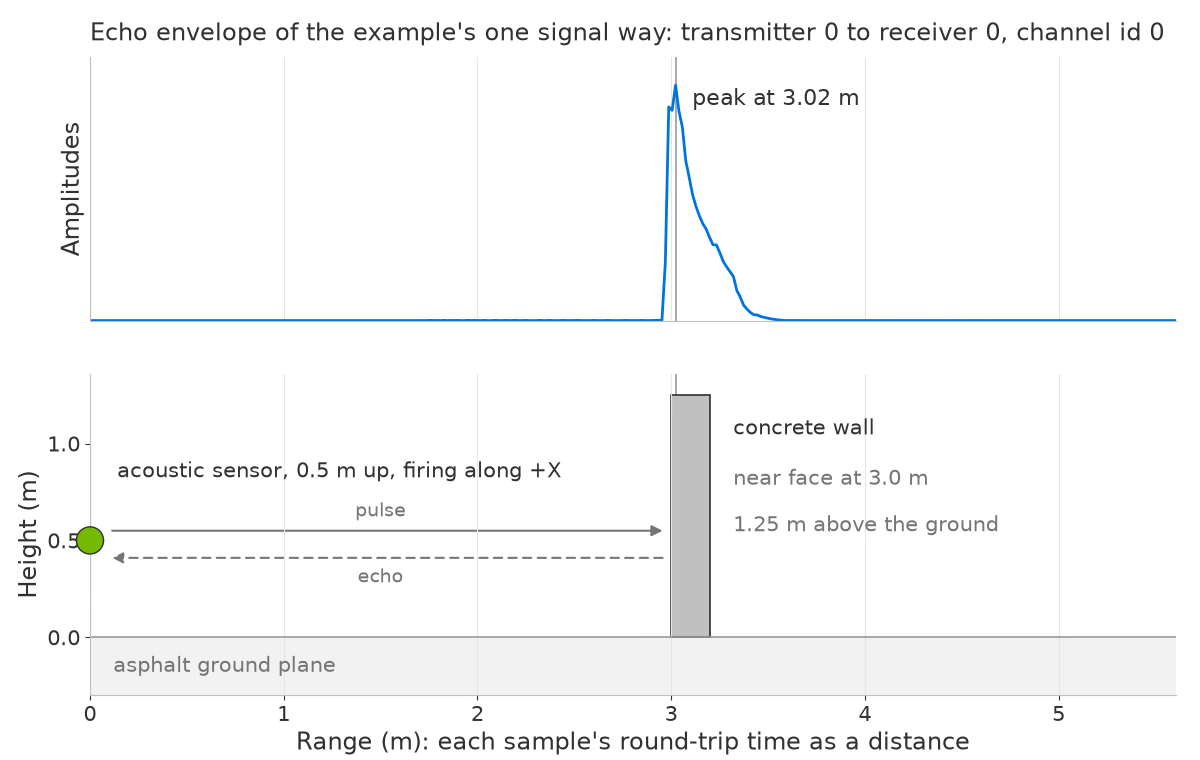
Echo amplitude plotted against range, aligned with the scene below. The sensor is 0.5 m above asphalt; the concrete wall is 3 m ahead, at the echo peak.#
Simulation#
Each firing event traces a pulse from the transmitting mount using the configured azimuth span, elevation span and ray density. The default trace depth allows two surface interactions. Indirect paths arrive later than direct paths and can produce ghost echoes, so one pulse can produce several echoes in an envelope. See ray tracing for these controls.
Surface response uses non-visual material labels. A visual shader is not required.
Outputs#
The SignalWays output contains one amplitude envelope per receiving-mount/channel-id pair. Request it with a single RenderVar; all six channels and the frame metadata are delivered together. The output contains signal samples, with dimensions specified by its params.
Capabilities#
Transducer arrays use sensor mounts, receiver groups and firing sequences on one
OmniAcousticprim. The main schema includes one of each, defining a single transducer that transmits and receives once per cycle. Add schema instances to expand the array; see Lay Out a Transducer Array and topology attributes.Basic mode (default) has a lower processing cost. Interference mode also models interference between concurrent transmissions from multiple mounts. See operating modes for their controls.
Membrane and pulse parameters describe the transducer and emitted signal. Signal mode, range-dependent gain, polynomial directivity, close-range boost and bounded noise control the envelope; see USD Attributes.
Most attributes, including operating mode, can change at runtime. See runtime updates for exceptions and Retune the Sensor While It Runs for examples and verification.
Applications#
Use this model for short-range ultrasonic sensing, including parking, proximity sensing and obstacle detection around vehicles and robots. One sensor prim can represent an array whose transducers transmit and receive in sequence. The scene’s non-visual material labels can also be used by lidar and radar sensors.
This model produces sampled echo envelopes. For point detections, use a lidar or radar model.
Sensor definition#
Apply OmniSensorGenericAcousticWpmAPI to an OmniAcoustic prim.
See Sensor Configuration for sensor authoring,
Output Configuration for RenderProducts and RenderVars,
and USD Attributes for acoustic controls. Your First Lidar Sensor
introduces the shared stepping and mapping workflow.
The Python: Acoustic Sensor example places a sensor 0.5 m above asphalt ground, facing a concrete wall 3 m away along world +X. Both surfaces have non-visual material labels and no visual shader. It plots echo envelopes in Rerun or prints a summary. Set Up an Acoustic Sensor explains the setup.
The following sensor definition applies the schema and sets a 10 Hz frame rate, tracing angles, trace depth and transform:
#usda 1.0
    # The sensor fires along its local -Z. This transform maps that onto world
    # +X, where the wall stands, and puts the sensor 0.5 m up, level with the
    # wall's center. It is authored as a matrix rather than as translate/rotate
    # ops so it matches the layout the runtime "omni:xform" attribute expects.
    def OmniAcoustic "Acoustic" (
        prepend apiSchemas = ["OmniSensorGenericAcousticWpmAPI"]
    )
    {
        double2 omni:sensor:frameRate = (10, 1)

        # Ray tracing: a wide ultrasonic lobe pointing along sensor -Z.
        float omni:sensor:WpmAcoustic:azSpanDeg = 90
        float omni:sensor:WpmAcoustic:elSpanDeg = 60
        uint omni:sensor:WpmAcoustic:raysPerDeg = 3
        uint omni:sensor:WpmAcoustic:traceTreeDepth = 2

        matrix4d xformOp:transform = ( (0, -1, 0, 0), (0, 0, 1, 0), (-1, 0, 0, 0), (0, 0, 0.5, 1) )
        uniform token[] xformOpOrder = ["xformOp:transform"]
    }
from pxr import Gf, Sdf

world = stage.DefinePrim("/World", "Xform")

acoustic = stage.DefinePrim("/World/Acoustic", "OmniAcoustic")
acoustic.AddAppliedSchema("OmniSensorGenericAcousticWpmAPI")
acoustic.CreateAttribute("omni:sensor:frameRate", Sdf.ValueTypeNames.Double2, custom=False).Set(
    Gf.Vec2d(10.0, 1.0)
)
acoustic.CreateAttribute(
    "omni:sensor:WpmAcoustic:azSpanDeg", Sdf.ValueTypeNames.Float, custom=False
).Set(90.0)
acoustic.CreateAttribute(
    "omni:sensor:WpmAcoustic:elSpanDeg", Sdf.ValueTypeNames.Float, custom=False
).Set(60.0)
acoustic.CreateAttribute(
    "omni:sensor:WpmAcoustic:raysPerDeg", Sdf.ValueTypeNames.UInt, custom=False
).Set(3)
acoustic.CreateAttribute(
    "omni:sensor:WpmAcoustic:traceTreeDepth", Sdf.ValueTypeNames.UInt, custom=False
).Set(2)
# Map sensor-local -Z to world +X and place the sensor 0.5 m above ground.
acoustic.CreateAttribute("xformOp:transform", Sdf.ValueTypeNames.Matrix4d, custom=False).Set(
    Gf.Matrix4d(
        (0.0, -1.0, 0.0, 0.0), (0.0, 0.0, 1.0, 0.0), (-1.0, 0.0, 0.0, 0.0), (0.0, 0.0, 0.5, 1.0)
    )
)
acoustic.CreateAttribute(
    "xformOpOrder",
    Sdf.ValueTypeNames.TokenArray,
    custom=False,
    variability=Sdf.VariabilityUniform,
).Set(["xformOp:transform"])
The model requires an active motion BVH. Select AUTO or ENABLE at
renderer creation; see motion BVH configuration. Initial frames contain no
echo data. See startup frames and Set Up an Acoustic Sensor
for warm-up and output handling.
Configuration and outputs#
Use USD Attributes to tune the sensor and Outputs before reading
SignalWays: it defines slots, validity, startup frames and range conversion.
The how-tos build a sensor, expand its array and retune it;
follow them in that order initially.