

Run More Than One Scan Pattern#
Configure multiple scans when the device alternates between operating modes,
such as near-range and far-range scans. Each scan has its own parameters.
The model cycles through them, and each output identifies the scan with
scanIdx. Scan instances explains instance naming
and ordering.
Before you start, you should know how a sensor prim gets its applied schemas
and attribute overrides (Sensor Configuration), what the model simulates (Radar
generic wpmDmat model) and how its PointCloud output is read
(Outputs).
Explicit default scan#
You may also list OmniSensorGenericRadarWpmDmatScanCfgAPI:s001 in
apiSchemas, or call
radar.AddAppliedSchema("OmniSensorGenericRadarWpmDmatScanCfgAPI:s001")
in Python. Explicitly listing the default instance makes both scans visible
in the schema list but produces the same two instances as the example above.
Attribute namespaces#
Per-scan attributes use the pattern
<parameterType> omni:sensor:WpmDmat:scan:<instanceName>:<parameterName> = <value>.
Include the instance name for every per-scan attribute. Names such as
omni:sensor:WpmDmat:scan:maxRangeM and omni:sensor:WpmDmat:maxRangeM
are ignored. Only the shared omni:sensor:* and sensor-level
omni:sensor:WpmDmat:* controls omit the instance segment; see
attribute namespaces.
The model discovers scans from these names rather than a separate scan count. See scan instances.
Scan ordering#
The scans run in lexicographic order of the instance name, so s001 is scan
index 0 and s002 is scan index 1; the rules for the names, how they are
compared and why to zero-pad them, are under Scan instances on the attributes page.
Scan cycle#
The sensor cycles through its scan configurations in instance order, using one configuration per firing. The next configuration is the pending scan.
All configurations share the sensor’s frame rate. Each firing occupies one frame; the next configuration waits for the next scheduled scan time. Different
timeOffsetUsecdelays do not allow multiple configurations to fire from the same scheduled scan time.A step with no radar firing returns no radar
PointCloudframe and does not advance the pending scan or its entry in the velocity sequence. A scan that fires but detects no targets is still published with a zero count and advances the sequence.The cycle starts at scan index
0. Events that restart the velocity sequence also reset the scan cycle to0.
Read the scan index from each output containing a scan, as described below.
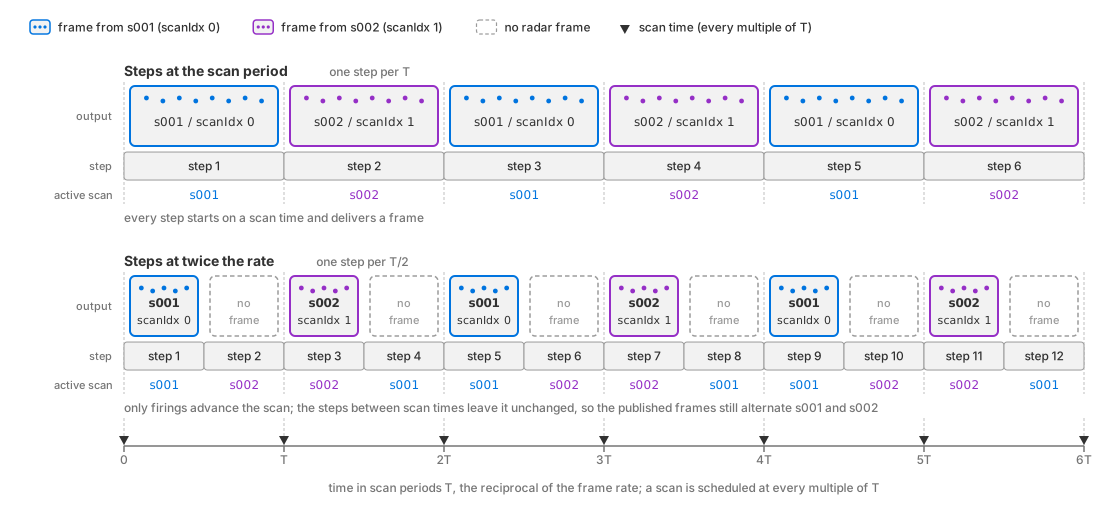
The scan cycle against the stepping cadence. Top: steps at the scan period
deliver a scan on every step, alternating s001 (scanIdx 0) and
s002 (scanIdx 1). Bottom: at twice the rate only every other step
starts on a scan time; the steps in between deliver no radar frame and
leave the pending scan unchanged, so the delivered scans still alternate
s001 and s002.#
Only the scan that fires advances its maxVelMpsSequence (FAST) or
chirpRepetitionTimeSequence (WAVEFORM);
Velocity sequence on
the attributes page explains what that does to the interval each frame
reports.
Step at the scan period#
Stepping faster than the frame rate produces steps without a radar firing; they return no radar frame and do not consume a scan configuration. A frame carries at most one scan, and a step longer than the scan period returns several frames, so inspect every returned frame (Frame delivery).
Stepping the RenderProduct at the
scan period, the reciprocal of omni:sensor:frameRate, lands every step on
one scan time once omni:sensor:startTime has passed.
With a nonzero
timeOffsetUsec the acquisition falls that much later than the scan time,
inside whichever step spans it, and the frame’s timestampNs reports it.
Read the scan index from the
output rather than inferring it from a step counter.
The shipped radar
examples author a frame rate of (10, 1) and step by 0.1 s, which lands on
every scan.
The frame rate
on the attributes page defines omni:sensor:frameRate itself, and
Frame rate, step and delivery
covers the scheduling that every sensor shares.
Verification#
Every radar PointCloud output carries the index of the scan that produced
it, scanIdx, a cycle count, cycleCnt, and that scan’s unambiguous
limits as params; Scan parameters on the Outputs page lists them
with their types and units. These params are present even when the scan detects
no targets. Read scanIdx from the output rather than counting frames.
To verify both scans, configure different ranges and compare the output
parameters. Author
maxRangeM = 50 on s001 and maxRangeM = 300 on s002, request a
radar PointCloud RenderVar, and step the RenderProduct at least four times
with a delta time equal to the scan period, so that every step contains one
scan time and produces a frame. Inspect the metadata of every returned frame,
including scans whose Counts[0] is 0. A timestamp of zero is valid for a
scan acquired at time zero (empty scans).
The scan index must alternate between 0 and 1 from one frame to the next, and
the maximum range must alternate in step with it, 50 with index 0 and 300 with
index 1. The first firing after the sensor starts, after a renderer reset or
after an accepted attribute update uses index 0 (the cycle); firings before
your check change which scan you first observe. A single-scan radar always
reports index 0. Verify cycleCnt independently per scan: the first four
frames that carry a scan report
(scanIdx, cycleCnt) as (0, 0), (1, 0), (0, 1), (1, 1).
If observed indices skip values, check that every returned frame is inspected;
refer to stepping.
Check range rejection as well as the reported parameters.
With enableRangeAliasing = false on both, place a strong target at 200 m,
beyond the near scan’s maxRangeM and within the far scan’s. Detections of
that target must appear only on the frames whose scan index is 1, and never
on the frames whose index is 0. How many detections it produces is not
reproducible, because sampling and noise change the count between frames, but
which frames it is absent from is.
Potential issues#
Every frame reports scan index 0: only one scan configuration was found, because the extra
OmniSensorGenericRadarWpmDmatScanCfgAPI:<name>was not applied. Refer to Scan instances on the attributes page.The second instance is applied, but every frame still reports scan index 0: check that every returned frame is inspected, including outputs with
Counts[0] == 0, as stepping describes. An applied instance counts as a scan even when the attributes meant for it lack the instance segment; that mistake shows up as the next symptom instead.Two scans exist but behave identically: the parameters were authored on one instance only. The other instance remains active with schema defaults. Refer to the per-scan attributes and their defaults.
The scans run in an order you did not intend: the order is lexicographic on the instance name, not authoring order. Refer to Scan instances on the attributes page.
Some steps return no radar frame: your application may be stepping faster than
omni:sensor:frameRate, so some steps hold no acquisition time. Such steps leave the pending scan and its ambiguity entry unchanged. Refer to stepping.A target beyond a scan’s
maxRangeMshows up at a plausible but wrong range:enableRangeAliasingis true for that scan, so over-range contributions fold into the configured unambiguous range instead of being discarded. Refer to aliasing and the unambiguous intervals on the attributes page.A delivered scan has no detections:
Counts[0]is 0, but its scan metadata still participates in the sequence check. See empty scans. For nonempty scans, bound reads byCounts[0]and test theVALIDbit ofFlagsas Counts, Flags and the detection cap describes.