

Sensor Outputs#
After a renderer step, find each output by its RenderVar’s full prim path and map it before reading. See Output Configuration for requesting outputs.
In Python, frame.render_vars accepts either an exact key or a prim name
unique among the outputs returned in that RenderProduct’s frame. The name is
the final prim path component, not source_name. Exact keys take precedence.
Multiple returned paths with the same name make that name ambiguous, even if
they share a source name. Indexing an ambiguous name raises KeyError directing
the caller to use a full path. Configured targets that produced no output do
not count toward ambiguity. Missing outputs remain missing. get returns
its default for missing or ambiguous names; containment returns false.
Both spellings return the same output object. Its render_var_path remains
the full canonical path: use that path for application identity and maps.
Iteration, keys, counts and dictionary mutations use exact canonical keys.
Exact reserved output names such as ovrtx_pick_hit take precedence over
authored prim-name aliases. Lookup scans the current dictionary, so adding or
removing canonical entries changes name resolution. Later scene edits do not
change an earlier result’s returned keys, including when it is fetched later.
Name lookup uses the existing full-path results and requires no additional native capability. The C API continues to enumerate full paths and map handles.
Lidar and radar PointCloud outputs and acoustic SignalWays outputs contain
named tensors and parameters. Read them by name rather than casting the container
to a fixed struct. Tensors hold bulk data on the CPU or GPU; parameters are small,
host-resident metadata values available when the output is mapped.
Camera outputs such as LdrColor contain a single tensor. Each model’s Outputs page defines its channels and parameters; C API and Python API define the output containers. See also the C API’s sensor functions and handle types.
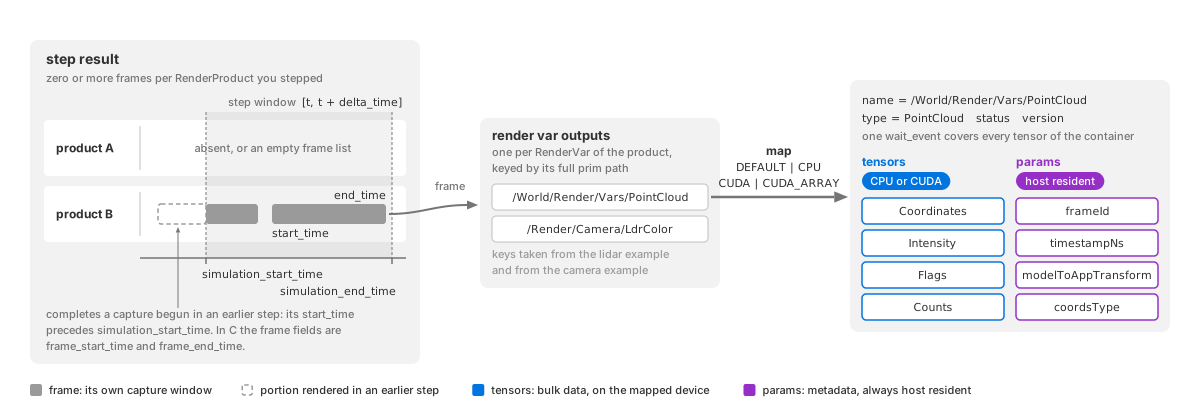
From a step to a mapped output: the step result holds zero or more frames per RenderProduct, each with its own capture window; a frame holds one output per RenderVar, keyed by prim path; mapping an output hands you a container of named tensors, host-resident params and one wait event.#
Mapping an output#
Frame delivery#
A renderer step advances simulation time by delta_time. Scheduled sensors
capture at their own rates, and an exposure or scan can span several steps.
The number of frames returned for a RenderProduct therefore depends on which
captures become ready during that step:
Zero: no capture is due, or a capture is still in progress and intermediate outputs are disabled.
One: one capture completes, or the sensor delivers one intermediate frame from an unfinished capture.
Several: the step spans several captures, or overlapping captures deliver frames during the same step. For example, it can complete an older exposure while also delivering an intermediate frame from a newer one.
For example, a 20 Hz lidar needs two 25 ms steps to complete a 50 ms scan. With intermediate outputs disabled, the first step returns no completed scan and the second returns one. See Sensor Scheduling for capture scheduling and delivery policies. An unscheduled camera without a long exposure normally returns one frame per step.
A requested product can be absent from the result or have an empty frame list. Iterate returned products and their frames instead of assuming one frame per step.
Within each frame, outputs are keyed by RenderVar prim path. Python uses
frame.render_vars["/World/Render/Vars/PointCloud"] for the lidar/radar examples
and frame.render_vars["/Render/Camera/LdrColor"] for the camera examples.
In C, inspect render_var_path in each output_render_vars entry.
When ovrtx cannot produce a RenderVar the RenderProduct lists, for example because
one of its settings has a value ovrtx does not accept, the frame still includes that
output in orderedVars order and reports the failure in the step result:
statusisEventStatus.FAILUREin Python andOVRTX_EVENT_FAILUREin C.error_messagenames the RenderVar and the reason.
Check status before mapping an output; mapping a failed output fails with the
same message. The RenderProduct’s other outputs are delivered as usual.
Each frame reports its capture window in sensor simulation seconds:
FrameOutput.start_time and end_time in Python, or frame_start_time
and frame_end_time in C. For an instantaneous capture, start and end are equal;
otherwise they bound the exposure or scan.
The step result separately reports simulation_start_time and
simulation_end_time: the window [t, t + delta_time] advanced by the step.
A frame’s capture window overlaps this window but need not fit inside it:
A capture that starts and finishes during the step lies within it.
A capture that began earlier reports its full window when it completes. Its
start_timeprecedessimulation_start_time.An intermediate frame from an unfinished capture reports only the slice rendered by this step.
Use the frame’s times and model params to timestamp data. The step that delivers it may occur after the capture began.
A capture longer than one step can deliver intermediate frames or wait until completion. Overlapping captures are retained: one step can return the older capture’s completed frame followed by an intermediate frame of the newer capture.
partialOutputs controls this policy: omni:sensor:Core:partialOutputs for
cameras and lidar core, and omni:sensor:LidarWpm:partialOutputs for lidar wpm.
See Partial outputs for defaults and configuration,
and Rolling Shutter for intermediate camera outputs. For lidar,
read only the delivered portion bounded by
Counts[0].
Mapping API#
In C, map with ovrtx_map_render_var_output() and release with
ovrtx_unmap_render_var_output(). In Python,
RenderVarOutput.map(device=...) returns a MappedRenderVar.
The requested device controls where tensor data is made available.
Check each returned tensor’s device before using its data. This is a DLPack
DLDevice with a device type and id, not the mapping-mode enum. In Python,
compare device.device_type.value with ovrtx.DLDeviceType.kDLCUDA or
ovrtx.DLDeviceType.kDLCPU, not with ovrtx.Device.
An explicit CPU map returns host tensors; an explicit CUDA map returns linear
CUDA tensors. Device.DEFAULT (OVRTX_MAP_DEVICE_TYPE_DEFAULT in C) chooses
the cheapest representation, so inspect the result rather than assuming one.
Mapping modes#
Choose a mapping mode for the tensors; parameters remain on the CPU.
Mode |
What you ask for |
|---|---|
|
The cheapest representation. Host data stays on the host, device data stays on the device, and an array-backed image resolves to the zero-copy array. |
|
A readable host buffer. Device data is copied down, and the call blocks until it has arrived. |
|
A raw device pointer usable from a kernel. |
|
An opaque CUDA array handle for texture and surface work. Zero-copy, and not readable through DLPack. |
Mapping costs depend on the output format as well as where the producer wrote the data. For image outputs and channels of non-visual composite outputs:
Producer’s memory |
Requested |
Result |
Cost |
|---|---|---|---|
Host |
|
Host pointer |
None; returned as is. |
Host |
|
Device pointer |
An allocation and a host-to-device copy. |
Linear device |
|
The producer’s own device pointer |
None. This is the point-cloud path. |
Linear device |
|
Host buffer |
Blocks on the producer’s event, then copies down. |
CUDA array |
|
Opaque handle, reported with an opaque-handle element type |
None. |
CUDA array |
|
Device pointer |
An allocation and a device-to-device copy. |
CUDA array |
|
Host buffer |
Blocks on the producer’s event, then copies down. |
Structured camera outputs have additional mapping costs:
Identifier maps and host-produced record outputs allocate an owned CPU snapshot or normalized backing allocation. An explicit CUDA map uploads that backing once and exposes named tensor views into it.
GPU-produced bounding boxes and occlusion outputs copy their backing once for
DEFAULTorCUDAmapping;CPUmapping reads it back. Their named fields share the mapped allocation rather than copying each field.CameraParamssnapshots its 23 CPU parameters and exposes no tensors, regardless of the requested mapping device.
See Decoding camera outputs for the fields and supported mapping devices of each structured camera output.
The point-cloud tensors of the lidar and radar models are written on the device whatever the sensor’s configuration; where you read them is decided by the mapping alone.
CUDA_ARRAY is the zero-copy path for image outputs. The tensor reports an
opaque-handle dtype instead of readable memory, so no DLPack consumer can read
it. Read the handle from tensor.cuda_array and consume it with a CUDA
library of your choice: Warp 1.15 or later (wp.Texture2D(cuda_array=handle)),
CuPy’s cupy.cuda.texture, or your own CUDA wrapper. The array belongs to
one CUDA device, which is not necessarily device 0: read device.device_id
and make that device current before issuing copies against the handle.
Warning
Asking for a CUDA array from a tensor that is not one is an error, not a
fallback. Point-cloud channels are linear device memory, so requesting
CUDA_ARRAY for a PointCloud output fails the whole map and reports
that only DEFAULT, CPU and CUDA are valid for that tensor. Use
CUDA for GPU point-cloud pipelines; CUDA_ARRAY is for array-backed
image outputs.
CPU mapping#
Use CPU mapping for logging, validation and CPU processing. These snippets read
LdrColor: Python creates a NumPy view with
np.from_dlpack(); C checks for one [H, W, 4] tensor and reads tensors[0].
The Python excerpt uses products returned by renderer.step() and the
minimal example’s parsed args to select saving and display options. See the
complete example for those prerequisites.
The C example unmaps after the displayed block.
# Get the Camera output for the step as a numpy array and display it
print("Fetching results...", file=sys.stderr)
for _product_name, product in products.items():
    for frame in product.frames:
        var = frame.render_vars["/Render/Camera/LdrColor"].map(device=ovrtx.Device.CPU)
        view = np.from_dlpack(var)
        pixels = view.copy()
        del view
        var.unmap()
        del var
        img = Image.fromarray(pixels)
        if args.png:
            output_dir = Path("_output")
            output_dir.mkdir(exist_ok=True)
            img.save(output_dir / "render.png")
            print(f"Saved to {output_dir / 'render.png'}", file=sys.stderr)
        else:
            img.show()
print("Fetched results.", file=sys.stderr)
// Map rendered output so that it can be accessed on the CPU
ovrtx_map_output_description_t map_desc = {};
map_desc.device_type = OVRTX_MAP_DEVICE_TYPE_CPU;
ovrtx_render_var_output_t rendered_output = {};
result = ovrtx_map_render_var_output(renderer,
                                   ldrcolor_output_handle,
                                   &map_desc,
                                   ovrtx_timeout_infinite,
                                   &rendered_output);
if (check_and_print_error(result, "map_render_var_output")) {
    ovrtx_destroy_results(renderer, step_result_handle);
    return cleanup(1);
}

// LdrColor is a single-tensor render variable; read tensors[0].
// Image outputs follow shape [H, W, C] with dtype.lanes == 1.
if (rendered_output.num_tensors != 1) {
    std::cerr << "Unexpected LdrColor render variable: expected 1 tensor, got " << rendered_output.num_tensors << "." << std::endl;
    ovrtx_cuda_sync_t no_sync = {};
    ovrtx_unmap_render_var_output(renderer, rendered_output.map_handle, no_sync);
    ovrtx_destroy_results(renderer, step_result_handle);
    return cleanup(1);
}
DLTensor const& tensor = *rendered_output.tensors[0].dl;
if (tensor.ndim != 3 || !tensor.shape || tensor.shape[2] != 4 || tensor.dtype.lanes != 1) {
    std::cerr << "Unexpected LdrColor tensor layout. Expected [H, W, 4] and dtype.lanes == 1." << std::endl;
    ovrtx_cuda_sync_t no_sync = {};
    ovrtx_unmap_render_var_output(renderer, rendered_output.map_handle, no_sync);
    ovrtx_destroy_results(renderer, step_result_handle);
    return cleanup(1);
}
int width = static_cast<int>(tensor.shape[1]);
int height = static_cast<int>(tensor.shape[0]);
stbi_write_png("out.png",
               width,
               height,
               /* components = */ 4,
               tensor.data,
               /* row stride in bytes = */ 4 * width);
CUDA mapping#
Map to CUDA when GPU code downstream should consume the output without a CPU
readback. The snippets map a camera RenderProduct’s LdrColor RenderVar at
/Render/Camera/LdrColor and check that the tensor landed on a CUDA device.
The C snippet names the stream to synchronize with through sync_stream,
which Synchronization explains.
import ovrtx

mapping = products["/Render/Camera"].frames[0].render_vars["/Render/Camera/LdrColor"].map(
    device=ovrtx.Device.CUDA
)
try:
    assert mapping.wait_event is not None
    mapping.wait()
    assert mapping.__dlpack_device__()[0] == 2  # DLPack kDLCUDA
finally:
    mapping.unmap()
Linear CUDA memory is selected with OVRTX_MAP_DEVICE_TYPE_CUDA:
map_desc.device_type = OVRTX_MAP_DEVICE_TYPE_CUDA;
map_desc.sync_stream = 1; // CUDA default stream
ovrtx_render_var_output_t cuda_output = {};
result = ovrtx_map_render_var_output(renderer_, ldr_handle, &map_desc,
                                     ovrtx_timeout_infinite, &cuda_output);
ASSERT_API_SUCCESS(result.status);
ASSERT_EQ(cuda_output.tensors[0].dl->device.device_type, kDLCUDA);
ovrtx_unmap_render_var_output(renderer_, cuda_output.map_handle, no_sync);
CUDA arrays#
Both bindings can map an image output as a CUDA array: Device.CUDA_ARRAY
in Python, OVRTX_MAP_DEVICE_TYPE_CUDA_ARRAY in C. Use it when a CUDA
texture or surface, or a graphics interop path, can consume a CUarray
directly and you want to avoid a copy into linear device memory.
LDR_COLOR_PATH is the prim path of the LdrColor RenderVar,
/Render/Camera/LdrColor in the example scene. The snippet maps it as
a CUDA array, reads the handle and the device it belongs to, and unmaps:
import ovrtx

# Device.CUDA_ARRAY hands back the render target's CUDA array instead of copying
# it into linear memory. The tensor therefore carries an opaque cudaArray_t handle
# that no DLPack consumer can read. ovrtx exposes it as a plain int and leaves the
# reading to you: wrap it with Warp 1.15+ (wp.Texture2D(cuda_array=...) then
# copy_to() or wp.texture_sample()), with CuPy, or with your own CUDA wrapper.
mapping = products["/Render/Camera"].frames[0].render_vars[LDR_COLOR_PATH].map(
    device=ovrtx.Device.CUDA_ARRAY
)
try:
    mapping.wait()  # Or mapping.wait_on(stream) to order a stream without blocking.
    tensor = mapping["LdrColor"]
    cuda_array = tensor.cuda_array  # cudaArray_t / CUarray -- an image handle, not a pointer.
    height, width, channels = tensor.shape

    # .device reports the resolved DLDevice, not the Device you asked for.
    assert mapping.device.device_type.value == ovrtx.DLDeviceType.kDLCUDA
    assert cuda_array != 0
    assert (height, width, channels) == (1080, 1920, 4)
    # The array belongs to one CUDA device, which is not necessarily device 0.
    # Make that device current before issuing copies against the handle.
    assert tensor.device.device_id >= 0
finally:
    mapping.unmap()
map_desc.device_type = OVRTX_MAP_DEVICE_TYPE_CUDA_ARRAY;
map_desc.sync_stream = 1; // CUDA default stream
ovrtx_render_var_output_t cuda_array_output = {};
result = ovrtx_map_render_var_output(renderer_, ldr_handle, &map_desc,
                                     ovrtx_timeout_infinite, &cuda_array_output);
ASSERT_API_SUCCESS(result.status);
ASSERT_EQ(cuda_array_output.tensors[0].dl->device.device_type, kDLCUDA);
ASSERT_EQ(cuda_array_output.tensors[0].dl->dtype.code, kDLOpaqueHandle);
ASSERT_NE(cuda_array_output.tensors[0].dl->data, nullptr);
ovrtx_unmap_render_var_output(renderer_, cuda_array_output.map_handle, no_sync);
Output container#
The mapped container is ovrtx_render_var_output_t in C and
MappedRenderVar in Python. Alongside tensors and parameters, it carries:
C field |
Meaning |
|---|---|
|
Map success or failure and its error text. Success does not mean a complete
sensor frame; |
|
Handle used to release the mapping. |
|
One |
|
Output identity and description; see Output identification. |
|
Output schema version; camera outputs and non-visual composite outputs use 0. |
C strings use ovx_string_t: a pointer and byte length. Non-empty library
strings are also null-terminated; { NULL, 0 } means no value. For exact name
matching, compare both length and bytes. A prefix comparison with strncmp()
can accept a different, longer name. See C API and Python API
for the full field definitions.
Metadata availability#
Tensor names, types, devices, shapes and strides, and all parameter values are populated when the output is produced. Tensor data may still be in flight.
You can use descriptors to allocate buffers, choose kernel launch dimensions, and read frame identity and pose before waiting for tensor data. Synchronize before reading the tensor bytes.
Values known only after rendering are tensors, not parameters. For example,
Counts is a tensor because its value depends on the completed trace.
Tensors#
A tensor is a named multidimensional array described using DLPack: data pointer, shape, dtype, device, strides and byte offset. NumPy, PyTorch, Warp, JAX and CuPy can consume compatible DLPack tensors as views without copying.
Two examples (a CUDA mapping places them on the device, a CPU mapping returns the same tensors on the host):
A Lidar generic core model
PointCloudoutput carriesCoordinates([3, maxPoints]float32),Intensity([maxPoints]float32),Flags([maxPoints]uint8) andCounts([1]int32, the number of delivered entries this frame), plus whatever other channels the RenderVar requested. The full catalog is on Outputs.A camera
HdrColoroutput is one image tensor,[H, W, 4]float16, read as the mapping itself. The camera tables are on Outputs.
The output’s semantic type and doc strings describe its contents. Each
model’s Outputs page lists supported and always-included channels;
Output Configuration explains how to request them.
Reading DLPack tensors#
For every tensor:
Take the dtype and shape from the descriptor; never hard-code them.
Add
byte_offsetto the data pointer before reading.Treat
stridesas element counts, not bytes, and check them against the layout you expect before assuming the data is contiguous.Keep the mapping alive for as long as you use pointers taken from it.
Composite outputs report explicit strides and a zero byte offset. Still read
these fields so your code handles other layouts. Scalar params and count tensors
use shape [1], including scalar params in CameraParams and
InstanceIdTokenMapSD (ndim == 1, shape (1,) in Python).
Params#
Params are named, typed metadata values, always CPU resident and available as soon as the output is mapped.
Each param uses a DLTensor descriptor: dtype gives the value type and shape
gives its dimensions. Scalars use shape [1], vectors use [N] and matrices
can use [4, 4]. Inspect ndim and shape to determine each param’s layout.
The same DLPack consumer can read tensors and params.
Capacity is already available in tensor shapes; a count determined during
rendering arrives in a tensor.
Parameter sets vary by model. Look up names you need and ignore unfamiliar ones.
Output identification#
Use the RenderVar’s full prim path to distinguish outputs. Several RenderVars in
one product can request the same source, such as PointCloud, with different
channel lists.
Field |
Location |
Example / purpose |
|---|---|---|
|
Step result, both bindings; Python mapping |
|
|
C mapped container |
The same full prim path, not |
|
Step result, both bindings |
Authored source name; absent from the mapped container. |
|
Step result, both bindings |
|
|
Step result, both bindings |
Why the output failed; empty when |
|
Composite mapped container |
Model output name, such as |
The Python wrapper#
RenderVarOutput.map(...) returns a MappedRenderVar whose tensors and
params you reach by name:
np.from_dlpack(rv): for a single-tensor output, the mapping itself is the DLPack view of that tensor (HdrColorandLdrColor, for example).rv["Coordinates"]: for a multi-tensor output, index by tensor name to get aRenderVarTensor. It exposesname,doc,shape,dtype,ndim,dataanddevice, implements the DLPack protocol, and addscuda_arrayfor an array-backed mapping.rv.params["frameId"]: look up aRenderVarParamby name. It has the same accessors minuscuda_arrayand is DLPack-compatible as well.rv.render_var_path,rv.type,rv.docandrv.version: the output’s identity and schema metadata, matching the C fields of the same meaning.rv.wait_event: the producer event, orNonefor a CPU mapping and for any mapping whose tensors all landed on the CPU.
Iterating a MappedRenderVar yields its tensor names in declaration order,
and values() / items() yield the tensors; in C walk num_tensors /
tensors and num_params / params. Both tensors and params implement
the DLPack protocol, so the same consumer code works for either. The accessors
are generic: they read any output that follows this format, so a new output
type needs no new reader code.
Reading a variable-size output#
For lidar and radar point clouds, use Counts to bound the delivered range
and Flags to identify valid returns within it. The allocated capacity can
be larger than the delivered range. Acoustic SignalWays uses different
bounds; see Outputs.
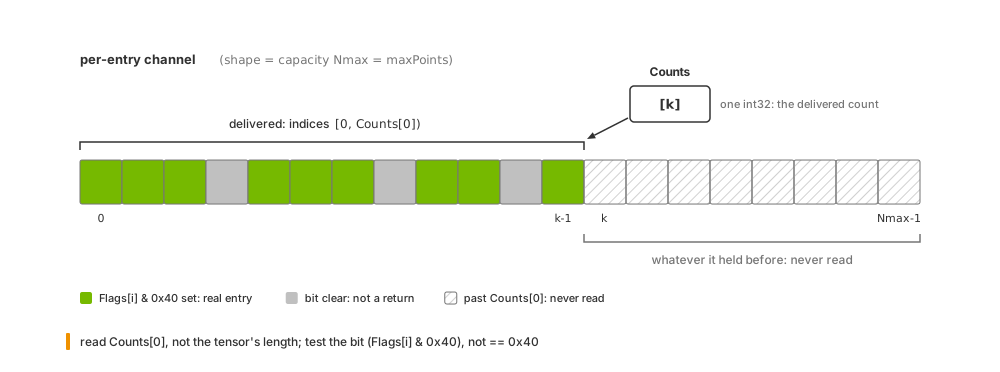
Capacity versus count: a per-entry channel is allocated for Nmax
entries, the delivered entries [0, Counts[0]) sit at the front, the
VALID bit of Flags marks the real ones inside that range, and
everything past Counts[0] holds whatever it held before.#
Allocated capacity#
For variable-size outputs, descriptor shapes report capacity, not the number of
entries produced. This lets the renderer publish descriptors before data is
ready. Lidar and radar also expose capacity through maxPoints. Read it from
the descriptor rather than hard-coding it; sensor configuration changes capacity.
The delivered count arrives in Counts, a one-element int32 tensor. Read
Counts[0], not the tensor’s length.
Lidar wpm has one exception: an empty output has zero-length per-entry tensors
while maxPoints still reports capacity. See
Startup outputs.
Delivered entry count#
Only indices [0, Counts[0]) contain this frame’s delivered entries. Data
beyond that range is stale, even when a Flags value there happens to be zero.
A zero count means no entries were delivered. It does not distinguish an unfinished capture from a completed capture with no returns. Use capture times and model parameters for that distinction. Keep stepping a sensor even when its output is empty; see Sensor Scheduling.
Sampling and configured noise can change counts between runs, even in a static scene. A non-zero count only shows that entries were produced. Compare structural properties and invariants, such as which frames contain a target or the direction of a change, rather than requiring equal counts.
Warning
Bound per-entry reads by Counts[0], not by tensor capacity or Flags.
Unwritten entries can contain plausible but stale values.
Checking validity#
Within the delivered range, a return is valid when Flags[i] & 0x40 is nonzero.
Test the bit rather than comparing Flags[i] == 0x40: other bits can be set
on a valid return.
Lidar core can also set the new-scan bit, 0x20. It marks returns from the scan
after the one in which the frame started. This occurs only for rotary sensors
with omni:sensor:Core:partialOutputs enabled when a frame crosses a scan
boundary: returns from the older scan have 0x40; valid returns from the new
scan have both bits.
With partialOutputs disabled (the default), each frame contains one full scan
and no new-scan bit. Solid-state windows never cross a scan boundary. Lidar wpm,
radar wpmDmat and acoustic wpm set only the validity bit.
Delivered and valid entries#
Counts bounds the delivered entries; Flags identifies which are valid.
All delivered entries are valid only when the model excludes invalid returns.
Lidar core controls this with omni:sensor:Core:includeInvalidPoints;
lidar wpm uses omni:sensor:LidarWpm:includeInvalidPoints. The
compactionType param reports the output’s compaction state. See each model’s
Outputs page for defaults and interpretation:
lidar core and
lidar wpm.
Radar wpmDmat has no include-invalid switch; its delivered entries are valid. See Outputs.
Use Counts and Flags for validity; lidar and radar include both even when
not requested. Identifiers, normals, RCS and velocities outside the delivered
range or in invalid entries do not describe the scene.
Reading a lidar point cloud#
These readers use the lidar core example’s Cartesian output with
includeInvalidPoints = false, so every delivered entry is valid. Both bound
reads by Counts[0]. Python extracts coordinates, intensity and time offsets;
C prints intensity and time-offset statistics. These are readers for that known
layout, not general decoders for every sensor model.
The reader maps the frame’s point cloud to the CPU, then returns arrays containing only the delivered entries:
def read_lidar_pointcloud(frame) -> tuple[np.ndarray, np.ndarray, np.ndarray]:
    """Map the PointCloud composite tensor to CPU and return valid point channels."""
    with frame.render_vars[POINTCLOUD_RENDER_VAR].map(device=ovrtx.Device.CPU) as pointcloud:
        coordinates = np.from_dlpack(pointcloud["Coordinates"])
        counts = np.from_dlpack(pointcloud["Counts"])
        intensity = np.from_dlpack(pointcloud["Intensity"])
        time_offset_ns = np.from_dlpack(pointcloud["TimeOffsetNs"])

        # Counts bounds the delivered entries. This scene sets
        # includeInvalidPoints=false, so the delivered entries are all valid.
        valid_count = int(counts[0])
        points = np.asarray(coordinates[:, :valid_count].T)
        return (
            points.copy(),
            np.asarray(intensity[:valid_count]).copy(),
            np.asarray(time_offset_ns[:valid_count]).copy(),
        )
This reader accepts an already CPU-mapped output. The example’s
cpu_tensor_data() helper finds a channel by name and checks that its
data is CPU resident before returning the pointer:
// Read one mapped lidar PointCloud. Counts bounds the delivered entries. The
// scene sets includeInvalidPoints=false, so the delivered entries are valid.
bool print_pointcloud_summary(ovrtx_render_var_output_t const& output)
{
    // The USD also requests Coordinates; this example only needs scalar and
    // time channels for the printed statistics.
    int32_t const* counts_data = cpu_tensor_data<int32_t>(output, "Counts");
    float const* intensity_data = cpu_tensor_data<float>(output, "Intensity");
    int32_t const* time_offset_data =
        cpu_tensor_data<int32_t>(output, "TimeOffsetNs");

    if (!counts_data || !intensity_data || !time_offset_data) {
        return false;
    }

    // With invalid returns dropped by the scene, Counts is also the valid-point
    // count.
    int32_t const valid_point_count = counts_data[0];
    if (valid_point_count <= 0) {
        std::cerr << "Expected at least one valid lidar point, got "
                  << valid_point_count << "\n";
        return false;
    }

    double intensity_sum = 0.0;
    int32_t max_time_offset_ns = time_offset_data[0];

    // Only the first Counts entries are delivered in each per-point channel.
    for (int32_t i = 0; i < valid_point_count; ++i) {
        const float intensity = intensity_data[i];
        if (!std::isfinite(intensity)) {
            std::cerr << "Intensity tensor contained a non-finite value\n";
            return false;
        }
        intensity_sum += intensity;
        max_time_offset_ns = std::max(max_time_offset_ns, time_offset_data[i]);
    }

    const double mean_intensity =
        intensity_sum / static_cast<double>(valid_point_count);
    std::cout << "valid points=" << valid_point_count
              << ", mean intensity=" << mean_intensity
              << ", max point time offset to point cloud frame start=" << max_time_offset_ns << " ns\n";
    return true;
}
The complete Python and
C examples include scene setup, mapping
and helper functions. For outputs that retain invalid entries, also test the
VALID bit within the delivered range.
Tensor layouts#
Read shape and strides instead of inferring layout from a channel name. Component-first arrays store all x values, then y, then z; their component stride is capacity, not delivered count. Point-first arrays store each point’s components together. Different models can use different layouts for the same channel name. Each model’s Outputs page specifies its layout.
Model-specific channel semantics#
The same channel name can have different meanings across models. For example,
TimeOffsetNs uses different reference instants. Consult each model’s Outputs
page before sharing conversion or motion-correction code between models.
Mapping status and capture completion#
status reports map success, including successful mapping of empty outputs.
It does not indicate whether a capture is partial or complete. Bound point-cloud
reads by Counts[0]; partial frames retain capacity-sized shapes with only a
portion populated. See Partial outputs for
which models deliver partial frames and how to configure them.
The sensor frame#
Every non-visual composite output measured in the SENSOR frame of
reference uses the ISO 8855 sensor frame: +X forward, +Y left, +Z up,
right-handed. Spherical coordinates use the same frame: the three components
of a spherical Coordinates entry are azimuth in degrees in [-180, 180],
elevation in degrees in [-90, 90] and distance in meters, in that order. The
coordsType param, tabulated under
Shared point-cloud params, reports which
representation an output used, and modelToAppTransform is the transform
that takes these axes to the application’s. How the sensor frame relates to the
prim’s own axes when you place a sensor is on Sensor Configuration.
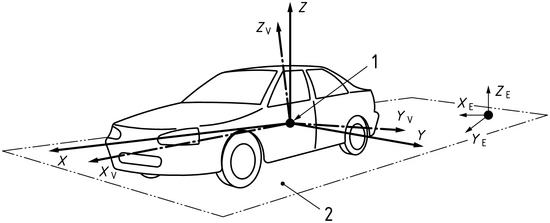
The ISO 8855 sensor frame that every SENSOR-frame composite output
uses.#
Synchronization#
Tensor data may still be in flight when mapping returns.
Warning
Reading device data before synchronizing can return stale or uninitialized values without reporting an error.
One event covers all tensors: cuda_sync.wait_event in C or wait_event
in Python. CPU mapping blocks until data is ready and needs no further wait.
For a device mapping, choose one synchronization method:
Method |
Effect |
|---|---|
Supply |
Inserts a barrier on that stream. Consume the data on that stream.
Python uses the default stream when |
Wait on the event from a consumer stream |
In Python, call |
Wait on the calling thread |
In Python, call |
Combining these methods is redundant. A device mapping always provides a usable event. If mapping copied data, the event covers completion of both production and the copy.
The C CUDA snippet above sets sync_stream = 1, the default stream, before
mapping. The Vulkan interop example shows a full double-buffered C path using
CUDA arrays, timeline semaphores and explicit synchronization:
C: Vulkan Interop.
Lifetime and ownership#
The mapping owns its strings, descriptors, parameter bytes and tensor data. Destroying the step result does not invalidate an existing mapping.
C: data stays valid until
ovrtx_unmap_render_var_output()releases the mapping. Copy anything that must outlive it; synchronize before copying GPU data. Unmapping remains valid after the step result is destroyed.Python: existing tensor/param objects, DLPack capsules and derived NumPy or Warp views keep the buffer alive. You do not need a copy just to extend its lifetime. After
unmap()or leaving awithblock, new lookups such asrv["X"],rv.paramsornp.from_dlpack(rv)raise. Previously acquired entries and arrays remain readable, as dorender_var_path,type,docandversion. Acquire what you need before unmapping.Pending GPU work: release with a synchronization hint (stream or event) so the buffer is not freed until your work finishes.
Step results have a lifetime of their own in C: every step result, including
one with no frames and every warm-up result, must be destroyed with
ovrtx_destroy_results, and destroying it leaves live mappings intact. The
C API’s usage patterns are on C API Practical Patterns; warming
up the renderer is on Output Configuration.
Single-tensor outputs#
Camera color, depth and synthetic-data image outputs do not go through the
composite path. Each is mapped as one tensor named after the RenderVar’s
sourceName, with no params, no semantic type and no description. Shapes
are channel-last DLPack shapes, [H, W, C], and the tensor already carries
its scalar type, so Python preserves the dtype and C readers inspect
dtype.code, dtype.bits and shape before reading pixels. In Python
the mapping is itself the DLPack tensor (np.from_dlpack(rv) on an
HdrColor or LdrColor mapping). Which output has which dtype, channels
and units is the catalog on Outputs; tested decoders for
images, identifiers and packed records are on
Decoding camera outputs.
Tiling adds no tile axis to any output, composite or single-tensor. The Lidar generic core model renders one sensor per RenderProduct (Outputs); how the Lidar generic wpm model lays out several sensors that share one product is on Outputs.