

Runtime textures#
Runtime textures allow you to create and fill textures dynamically at runtime that can then be applied to any material in the scene. Updating the texels in the stage changes the applied texture on the next rendered frame.
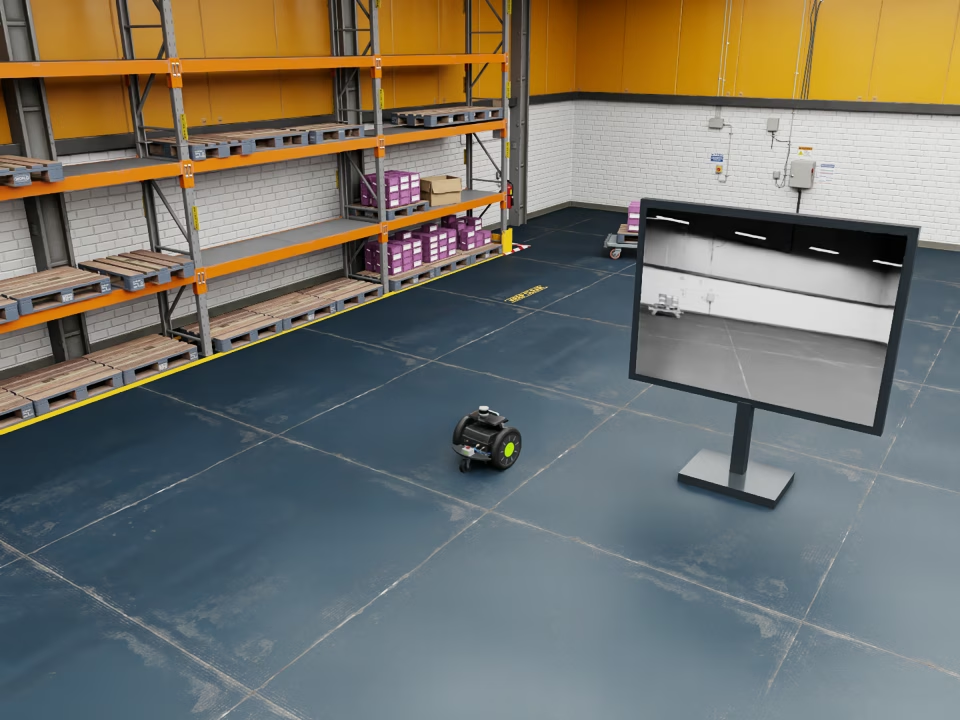
Carter drives in a circle while Warp converts its previous camera frame to greyscale and publishes it as the monitor texture. See the Python example.#
Creating a runtime texture#
Author an OmniRuntimeTexture prim and reference its texture:uri from a
material. The URI does not have to match the prim path.
The USDA and USD Python examples create a red texture and a UsdPreviewSurface
material that samples it. Bind /RuntimeMaterial to your mesh. The OVStage
Python example creates only the texture and points the existing UsdUVTexture
shader at its dynamic URI:
def OmniRuntimeTexture "Texture" {
    string texture:uri = "dynamic://runtimeTextureExample"
    token texture:dimension = "2d"
    int3 texture:extent = (1, 1, 1)
    token texture:format = "rgba8unorm"
    token texture:colorSpace = "linear"
    uchar[] texture:data = [255, 0, 0, 255]
}

def Material "RuntimeMaterial" {
    token outputs:surface.connect = </RuntimeMaterial/Surface.outputs:surface>
    def Shader "Surface" {
        uniform token info:id = "UsdPreviewSurface"
        color3f inputs:diffuseColor.connect = </RuntimeMaterial/Tex.outputs:rgb>
        float inputs:roughness = 1
        token outputs:surface
    }
    def Shader "Tex" {
        uniform token info:id = "UsdUVTexture"
        asset inputs:file = @dynamic://runtimeTextureExample@
        float2 inputs:st.connect = </RuntimeMaterial/UV.outputs:result>
        float3 outputs:rgb
    }
    def Shader "UV" {
        uniform token info:id = "UsdPrimvarReader_float2"
        token inputs:varname = "st"
        float2 outputs:result
    }
}
texture = stage.DefinePrim("/Texture", "OmniRuntimeTexture")
texture.CreateAttribute("texture:uri", Sdf.ValueTypeNames.String, custom=False).Set("dynamic://runtimeTextureExample")
texture.CreateAttribute("texture:dimension", Sdf.ValueTypeNames.Token, custom=False).Set("2d")
texture.CreateAttribute("texture:extent", Sdf.ValueTypeNames.Int3, custom=False).Set(Gf.Vec3i(1, 1, 1))
texture.CreateAttribute("texture:format", Sdf.ValueTypeNames.Token, custom=False).Set("rgba8unorm")
texture.CreateAttribute("texture:colorSpace", Sdf.ValueTypeNames.Token, custom=False).Set("linear")
texture.CreateAttribute("texture:data", Sdf.ValueTypeNames.UCharArray, custom=False).Set(Vt.UCharArray([255, 0, 0, 255]))

material = UsdShade.Material.Define(stage, "/RuntimeMaterial")
surface = UsdShade.Shader.Define(stage, "/RuntimeMaterial/Surface")
surface.CreateIdAttr("UsdPreviewSurface")
surface.CreateInput("roughness", Sdf.ValueTypeNames.Float).Set(1)
surface.CreateOutput("surface", Sdf.ValueTypeNames.Token)
material.CreateSurfaceOutput().ConnectToSource(surface.ConnectableAPI(), "surface")
tex = UsdShade.Shader.Define(stage, "/RuntimeMaterial/Tex")
tex.CreateIdAttr("UsdUVTexture")
tex.CreateInput("file", Sdf.ValueTypeNames.Asset).Set(Sdf.AssetPath("dynamic://runtimeTextureExample"))
tex.CreateOutput("rgb", Sdf.ValueTypeNames.Float3)
surface.CreateInput("diffuseColor", Sdf.ValueTypeNames.Color3f).ConnectToSource(tex.ConnectableAPI(), "rgb")
uv = UsdShade.Shader.Define(stage, "/RuntimeMaterial/UV")
uv.CreateIdAttr("UsdPrimvarReader_float2")
uv.CreateInput("varname", Sdf.ValueTypeNames.Token).Set("st")
uv.CreateOutput("result", Sdf.ValueTypeNames.Float2)
tex.CreateInput("st", Sdf.ValueTypeNames.Float2).ConnectToSource(uv.ConnectableAPI(), "result")
This example assumes the material and shader prims already exist in an
ovstage.Stage named stage, including the UsdUVTexture shader at
/RuntimeMaterial/Tex. The /Texture prim must be absent. Use an
application-owned ordinal above the stage’s write floor.
import numpy as np
import ovstage

with ovstage.PathDictionary(stage) as paths:
    texture_paths = paths.create_path_list_from_strings(["/Texture"])
    shader_paths = paths.create_path_list_from_strings(["/RuntimeMaterial/Tex"])
    try:
        with stage.query_from_path_list(texture_paths) as query:
            # INSERT creates the texture prim and rejects an existing prim at this path.
            stage.write_attribute(
                query, "usd-prim-type", ordinal=ordinal, is_array=False,
                tensors=np.array([paths.intern_token("OmniRuntimeTexture").raw_id], dtype=np.uint64),
                prim_mode=ovstage.PrimMode.INSERT,
            ).wait()
            stage.write_attribute(
                query, "texture:uri", ordinal=ordinal, is_array=True,
                tensors=np.frombuffer(b"dynamic://runtimeTextureExample", dtype=np.uint8),
                semantic=ovstage.AttributeSemantic.STRING,
            ).wait()
            for attribute, value in (("texture:dimension", "2d"),
                                     ("texture:format", "rgba8unorm"),
                                     ("texture:colorSpace", "linear")):
                stage.write_attribute(
                    query, attribute, ordinal=ordinal, is_array=False,
                    tensors=np.array([paths.intern_token(value).raw_id], dtype=np.uint64),
                    semantic=ovstage.AttributeSemantic.TOKEN_ID,
                ).wait()
            stage.write_attribute(
                query, "texture:extent", ordinal=ordinal, is_array=False,
                tensors=np.array([[1, 1, 1]], dtype=np.int32),
            ).wait()
            stage.write_attribute(
                query, "texture:data", ordinal=ordinal, is_array=True,
                tensors=np.array([255, 0, 0, 255], dtype=np.uint8),
            ).wait()

        # Assets carry authored/resolved token IDs. Dynamic URIs need no file resolution.
        pair_type = ovstage.DLDataType(ovstage.DLDataTypeCode.kDLUInt, 64, 2)
        asset = np.array([paths.intern_token("dynamic://runtimeTextureExample").raw_id, 0], dtype=np.uint64)
        with stage.query_from_path_list(shader_paths) as query:
            stage.write_attribute(
                query, "inputs:file", ordinal=ordinal, is_array=False,
                tensors=ovstage.make_dltensor(asset, dtype=pair_type, shape=[1]),
                semantic=ovstage.AttributeSemantic.ASSET_PATH_ID,
            ).wait()

        # Publish only after every write succeeds, then render this ordinal.
        stage.advance_write_floor(ordinal, ovstage.Scope.ALL).wait()
    finally:
        for path_list in (texture_paths, shader_paths):
            paths.destroy_path_list(path_list)
Declaration |
Meaning |
|---|---|
|
Nonempty dynamic:// identifier. Canonical identifiers must be unique in the attached stage. |
|
2d or 3d. A 2D texture requires depth one. |
|
Positive width, height, and depth in texels. |
|
Interleaved component layout and numeric interpretation; see the formats below. |
|
linear or sRGB. sRGB requires rgba8unorm; RGB is decoded and alpha remains linear. This value takes precedence over material color-space requests. |
|
Packed texel bytes. X varies fastest, followed by Y and Z. The byte count must exactly match extent and format. |
Supported formats are r8unorm, rg8unorm, rgba8unorm,
r16float, rg16float, rgba16float, r32float, rg32float,
and rgba32float. Their byte sizes per texel are 1, 2, 4, 2, 4, 8, 4, 8,
and 16 respectively. Float payloads must also be supplied as byte views.
Only whole-texture updates and one mip level are supported. Pitched or transposed input, compressed formats, region updates, mip chains, cube maps, and texture arrays are not supported.
Updating texels#
Keep dimensions in texture:extent; the tensor shape is not image metadata.
Use a compact uint8 byte tensor for texture:data. Write related metadata
and texels at the same ordinal, wait for every write to succeed, then advance
the write floor before rendering that ordinal.
The following examples publish a 256 × 256 RGBA8 texture, first red and then green. Both snippets produce texels on CUDA device 0. Its producer completes before ovstage reads the buffer; the buffer stays alive and unchanged until the write completes:
# Keep the dimensions explicit; the payload is a packed byte array.
extent = np.array([[256, 256, 1]], dtype=np.int32)
pixels = wp.empty(256 * 256 * 4, dtype=wp.uint8, device="cuda:0")
for channel, ordinal in ((0, 1), (1, 2)):
    wp.launch(fill_texture, dim=256 * 256 * 4,
              inputs=[pixels, channel], device="cuda:0")
    # Finish the producer before ovstage reads its storage.
    wp.synchronize_device("cuda:0")

    stage.write_attribute(query, "texture:extent", tensors=extent,
                          is_array=False, ordinal=ordinal).wait()
    stage.write_attribute(query, "texture:data", tensors=pixels,
                          is_array=True, ordinal=ordinal).wait()
    # Seal only after both writes succeed. The producer may now reuse pixels.
    stage.advance_write_floor(ordinal, ovstage.Scope.ALL).wait()
    products = renderer.step({"/Render/Camera"}, 1.0 / 60.0, ordinal=ordinal)
const ovstage_ordinal_t ordinal = channel + 1;
// RGBA8 on little-endian supported platforms: red, then green, opaque alpha.
const uint32_t color = channel == 0 ? 0xff0000ffu : 0xff00ff00u;
if (!cuda_ok(cuCtxSetCurrent(context)) ||
    !cuda_ok(cuMemsetD32(gpu_pixels, color, 256 * 256)) ||
    !cuda_ok(cuCtxSynchronize())) return cleanup(1);
int32_t extent[] = {256, 256, 1};
int64_t extent_shape[] = {1};
int64_t byte_shape[] = {256 * 256 * 4};
DLTensor extent_tensor {extent, {kDLCPU, 0}, 1, {kDLInt, 32, 3}, extent_shape, nullptr, 0};
DLTensor byte_tensor {reinterpret_cast<void*>(gpu_pixels), {kDLCUDA, 0}, 1,
                      {kDLUInt, 8, 1}, byte_shape, nullptr, 0};
ovstage_write_data_t extent_write {};
extent_write.tensors = &extent_tensor;
extent_write.tensor_count = 1;
ovstage_write_data_t data_write {};
data_write.tensors = &byte_tensor;
data_write.tensor_count = 1;
data_write.is_array = true;
// Keep all source storage alive until the writes complete successfully.
if (wait_stage(stage, ovstage_write_attribute(stage, query,
        {OVX_INVALID_TOKEN, {"texture:extent", strlen("texture:extent")}}, ordinal,
        extent_write, OVSTAGE_PRIM_MODE_UPSERT)) ||
    wait_stage(stage, ovstage_write_attribute(stage, query,
        {OVX_INVALID_TOKEN, {"texture:data", strlen("texture:data")}}, ordinal,
        data_write, OVSTAGE_PRIM_MODE_UPSERT))) return cleanup(1);
// Seal only after the related metadata and data writes both succeed.
ovstage_write_floor_desc_t floor {ordinal, OVSTAGE_SCOPE_ALL};
if (wait_stage(stage, ovstage_advance_write_floor(stage, &floor))) return cleanup(1);
The Python snippet uses this Warp kernel to fill the texture:
@wp.kernel
def fill_texture(pixels: wp.array(dtype=wp.uint8), channel: int):
    component = wp.tid() % 4
    # Interleaved RGBA8: one primary color and opaque alpha.
    pixels[wp.tid()] = wp.uint8(255 if component == channel or component == 3 else 0)
Render the updated texture by passing its ordinal to
step() in Python. In C, call
ovrtx_step_with_stage() with that ordinal and wait for the operation
to complete.
You can update the pixels without changing the material or reattaching the stage. The renderer uploads the texture again only when it changes.
Devices and buffer reuse#
Use one GPU for rendering, and create your CUDA texture buffers on that same GPU. For example, if the renderer uses CUDA device 0, your Warp kernel must also produce its pixels on device 0. Buffers from another GPU are rejected.
Wait for the kernel to finish before writing its pixels to ovstage. Then wait for the ovstage write to complete before changing or freeing the source buffer. You do not need to keep that buffer alive until rendering finishes: the renderer uses its own copy and manages its lifetime.
The renderer uses the latest published texture data. Rendering an earlier ordinal does not restore an older version of the texture. To display older content again, publish those pixels as a new update.
Texture updates copy data into ovstage and then into a texture the renderer can sample; the renderer does not sample your source buffer directly. With a borrowed stage attachment, CUDA pixels stay on the GPU during these copies. CPU buffers must be uploaded to the GPU, and replicated stage attachments may also copy data through CPU memory.
Memory Limits#
Each ovrtx renderer can use up to 1 GiB for runtime textures from its attached ovstage stage, including temporary replacement textures.
The limit counts the pixel data of existing textures, their replacements while an update is in progress, and temporary CPU upload buffers. It does not count your source buffers or ovstage’s storage.
For example, replacing 600 MiB of existing textures with another 600 MiB requires 1,200 MiB during the update. The renderer rejects that update under the default limit, even if the GPU has enough free memory. To stay within the limit, use smaller textures or replace fewer textures at once.
When an update exceeds the limit, the renderer reports the failure and keeps displaying the previous texture. If none exists, it displays a missing-texture placeholder.
Names and references#
Each runtime texture URI must be unique within its stage. On Windows, names that differ only by case are treated as the same name. Separate renderer attachments can use the same URI for different textures.
Deleting or renaming a texture leaves materials using its old URI with a missing-texture placeholder of the appropriate dimension (2D or 3D). Creating a texture with that URI reconnects those materials to it.
Detaching the stage or destroying the renderer releases the attachment’s texture resources once they are no longer in use.
Handling errors#
Invalid texture metadata or texels, duplicate URIs, and recoverable allocation or upload failures produce a diagnostic without stopping the render step. The renderer keeps the last published texture, or shows a missing-texture placeholder if no valid texture has been published. Correct the problem and update the texture to retry.
Examples#
See Python: Runtime textures and C: Runtime textures for complete runnable programs and output.
For the standard material nodes used above, see the UsdPreviewSurface specification.