

Path Tracing#
Path Tracing mode uses progressive sampling to reduce image noise as samples accumulate. Use it for offline or reference images when convergence time is acceptable.
Select PathTracing on the RenderProduct. See Render Modes
for equivalent USDA and Python authoring examples.
Warm-Up#
Path Tracing can accumulate multiple passes within a step. The number depends on the initial-frame quality and minimum-accumulation settings; a step does not unconditionally reach the sample limit. Texture availability can still matter when the first captured frame needs high-resolution mips. See Warming up the renderer.
The output’s progression and converged fields report accumulation
progress and whether a stopping criterion was reached. A zero
omni:rtx:pt:samplesPerPixel removes the sample-count limit.
reset() (ovrtx_reset() in C) discards
accumulated rendering history. See FrameOutput and
ovrtx_render_product_frame_output_t for the output fields.
See Outputs for this mode’s outputs, including SelectionState for
custom selection drawing with SPG.
Settings#
Author these settings on the RenderProduct, except for the global multi-GPU setting noted below. See Output Configuration for authoring and runtime updates.
Path Tracing#
USD declaration |
Description |
|---|---|
|
Maximum number of samples to accumulate per pixel. When this count is reached, rendering stops until a scene or setting change is detected. Set to 0 to remove this limit. |
|
Number of samples per pixel, per iteration. Multiple iterations can be run per launch to reduce iteration-batching overhead. Values above |
|
Upper bound on |
|
When enabled, noise values are computed for each pixel, and upon reaching the threshold level the pixel is no longer sampled. |
|
Target error for adaptive sampling. Lower values require more sampling. |
|
Maximum number of ray bounces for any ray type. Higher values give more accurate results, but worse performance. |
|
Additional specular and transmission bounces beyond |
|
Maximum number of bounces for subsurface scattering (SSS). Separate from |
|
Maximum number of bounces for volume scattering within a fog/sky volume. |
|
If disabled, material opacity is considered binary: values greater than or equal to 0.5 are considered opaque, while values less than 0.5 are considered transparent. |
Denoising#
USD declaration |
Description |
|---|---|
|
Runs the selected denoiser on the image. |
|
Uses motion information to reduce frame-to-frame flickering artifacts in the denoiser. |
|
Blend factor indicating how much to blend the denoised image with the original. 0 shows only the denoised image, 1.0 shows no denoising. |
|
If enabled, the OptiX Denoiser also denoises additional render variables alongside the color output. |
Sampling and Caching#
USD declaration |
Description |
|---|---|
|
Enables caching path-tracing results for improved performance at the cost of some accuracy. Cached contributions are omitted from light path expression outputs. |
|
Enables the many-light sampling algorithm, which can improve performance in scenes with many lights. |
|
Enables direct illumination sampling of geometry with emissive materials. |
Firefly Filter#
USD declaration |
Description |
|---|---|
|
Enables the firefly filter. |
|
Clamps the maximum ray intensity for glossy bounces. Can help prevent fireflies, but can result in energy loss. Automatically scaled with exposure. |
|
Clamps the maximum ray intensity for diffuse bounces. Can help prevent fireflies, but can result in energy loss. Automatically scaled with exposure. |
|
Clamps the maximum ray intensity for emissive contribution after primary bounce. Can help prevent fireflies, but can result in energy loss. Automatically scaled with exposure. |
Spectral Rendering#
See Spectral Rendering for startup configuration, physical illuminants, and RGB-versus-spectral comparisons.
USD declaration |
Description |
|---|---|
|
Enables spectral rendering. |
|
Minimum simulated wavelength in nanometers. |
|
Maximum simulated wavelength in nanometers. |
|
Response curve to convert spectral to CIE XYZ. |
Non-Uniform Volumes#
USD declaration |
Description |
|---|---|
|
Enables path-traced non-uniform volumes. |
|
Choose between |
|
Maximum delta tracking steps between bounces. Increase for highly scattering volumes like clouds. |
|
Maximum ratio tracking delta steps for shadow rays. Increase for highly scattering volumes like clouds. |
|
Maximum number of bounces in non-uniform volumes. |
Multi-GPU#
USD declaration |
Description |
|---|---|
|
Enables rendering across multiple GPUs when available. Author this global setting on the stage’s RenderSettings prim; see Settings on the RenderSettings prim. |
|
Automatically balance path-tracing work across GPUs in a multi-GPU configuration. |
|
Enables lossy compression of per-pixel output radiance values. |
|
Enables lossy compression of per-pixel output albedo values (needed by OptiX denoiser). |
|
Enables lossy compression of per-pixel output normal values (needed by OptiX denoiser). |
|
Prepares rendering commands concurrently across multiple GPUs. It has no effect with one GPU; disabling it serializes that work. |
Global Volumetric Effects#
USD declaration |
Description |
|---|---|
|
Enables an additional medium of Rayleigh-scattering particles to simulate a physically based sky. |
|
Scales the size of the Rayleigh sky. |
|
If a domelight is rendered for the sky color, the Rayleigh atmosphere is applied to the foreground while the background sky color is left unaffected. |
Anti-Aliasing#
USD declaration |
Description |
|---|---|
|
Sampling pattern used for anti-aliasing. Select from |
|
Sampling footprint radius, in pixels, when generating samples with the selected anti-aliasing pattern. |
Compositing and Back to Beauty#
Path Tracing can separate the final image, or beauty, into seven lighting contributions. You can adjust those contributions independently and add them back together. Work with their linear RGB values before applying tone mapping or a display transform.
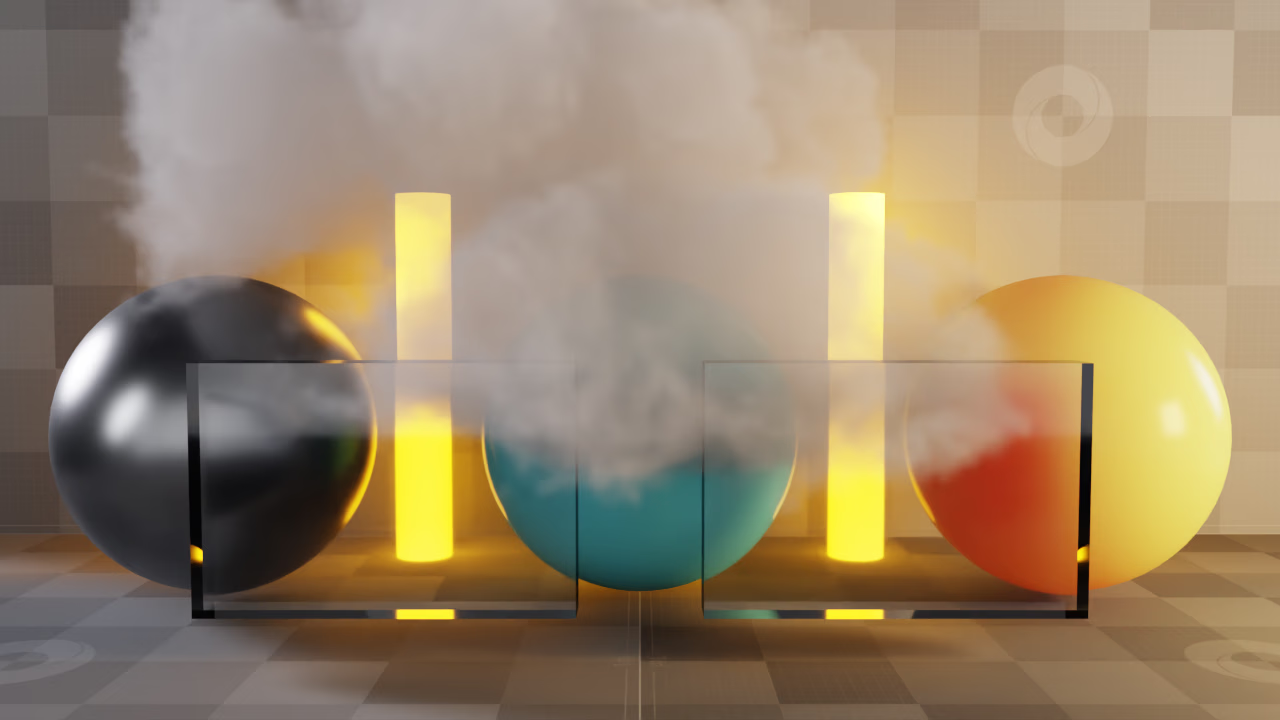
The seven lighting outputs reconstruct this scene, including its volume and visible background. The example compares the result with the rendered beauty.#
The following expression lists the complete additive set. Each name refers to the RGB channels of its RenderVar:
Request these seven RenderVars through orderedVars on the same
PathTracing RenderProduct. Capture them from the same completed frame.
Use an explicit list: adding every output whose name starts with Pt
would also add filters, geometry data, and duplicate contributions.
Convert float16 values to float32 before summing. Do not sum alpha; coverage
and foreground masks require their own compositing operation.
The passes separate paths by the initial scattering contribution. Subsequent lighting along a reflected or transmitted path remains in that pass. The table below explains which contributions are included.
Contribution |
|
|---|---|
|
Direct diffuse reflection. Direct glossy highlights belong to |
|
Indirect diffuse reflection. Reflected or transmitted views of other surfaces remain in the corresponding reflection or transmission pass. |
|
Direct and indirect glossy/specular reflection. It already includes direct specular highlights; there is no additional highlight term in this sum. |
|
Direct and indirect glossy/specular transmission, such as glass. |
|
Direct and indirect diffuse transmission, including subsurface scattering. It is separate from glossy/specular transmission. |
|
Emission, light hits, and environment misses seen directly by the camera. Emission seen through reflection or transmission remains in those passes. |
|
Direct and indirect paths whose initial scattering contribution is in a volume. |
PtBackground is useful for separate background and matte operations. Do not add it to this sum: the directly visible background is already in PtSelfIllumination. Normals, depth, motion, IDs, masks, and diagnostic buffers are also excluded.
Lighting and Material Filters#
The seven passes contain material-weighted radiance. Add them as they are. Do not multiply them again by PtDiffuseFilter, PtReflectionFilter, PtRefractionFilter, or PtSubsurfaceFilter. Those outputs describe material color filters; they are neither extra lighting terms nor a required multiplication step for this reconstruction.
The RenderVar setting sourceType = "raw" selects a named renderer
output. Here, raw does not mean lighting with its material filter divided
out. This distinction matters when adapting a compositor built for another
renderer.
Matching the Beauty#
Use HdrColor as the linear comparison target when its denoising and processing match the exported passes. Use PtPreDenoisedResult when checking the accumulated result before denoising. Finite sampling and independently stored float16 outputs can produce small differences; test a numerical tolerance instead of requiring identical bytes.
Keep exposure, denoising, tone mapping, color correction, and display encoding consistent with the reference:
For a comparison without denoising, disable denoising for both the beauty and its component passes.
For denoised reconstruction, enable
omni:rtx:pt:denoising:enabledandomni:rtx:pt:denoising:optix:denoiseAOVson the RenderProduct. Denoising only the beauty does not produce matching component passes.Add the linear values first, then apply the same exposure and display pipeline as the reference. Do not apply an exposure adjustment twice, and do not add tone-mapped or sRGB-encoded pass previews. The supplied PT example’s lighting outputs already include camera exposure; it applies no additional exposure multiplier to the sum.
To compare with LdrColor, also reproduce its tone-map operator, display transfer, clipping, and output quantization. Applying the sRGB transfer alone is insufficient when tone mapping is enabled.
The Python AOV compositing example provides a fixed scene, capture scripts, the seven-pass sum, and a numerical comparison. Its ACES Approximation and sRGB conversion matches that scene’s configuration; it is not a replacement for every possible renderer color pipeline.